DIY Chain Counter - Again!!!

My boat is 20m long and my router is about two thirds from the bow to the stern.
WiFi worked but was a bit flakey.
So I use a wired connection to my router - I had one near the bow anyway (for the Anchor Camera).
I understand that the RPi's WiFi isn't very strong so you might have problems with the connection.
That said, all the important detection and counting is done, locally, on the RPi so it shouldn't loose count but the web connection to it may get a bit flakey.

As with all projects like this (and fault finding) the key is to start with something that works and make changes accordingly.
I use that process all the time.
Re the WiFi strength, I think that makes a lot of sense, so I will run a cable when I install - its not that bad now I know most of the "wire runs". It'll be very similar to my AIS setup, which is hard wired onto the NMEA 2K network for my main nav system with Garmin, but also has a WiFi connection so I can connect with my iPad if I have to run Imray Navigator in any emergency.

Re the testing, I powered everything down last night, and on power up this morning I rebooted the Raspberry, restarted chain.js and "happy days" it values had been written away.

Today I'm going to try and put a break in the code so I can step through it and get a better understanding - I believe that the F9 key allows the stepping, so just got to google how to set some break points. Hopefully by the time I get back out to the boat I'll have covered everything, so it should be a case of a simple install, but as we all know, that wont happen, and Im sure your last comment will come into play.

PS I am still walking around the house with a smile on my face :)
 
Re the WiFi strength, I think that makes a lot of sense, so I will run a cable when I install - its not that bad now I know most of the "wire runs". It'll be very similar to my AIS setup, which is hard wired onto the NMEA 2K network for my main nav system with Garmin, but also has a WiFi connection so I can connect with my iPad if I have to run Imray Navigator in any emergency.

Re the testing, I powered everything down last night, and on power up this morning I rebooted the Raspberry, restarted chain.js and "happy days" it values had been written away.

Today I'm going to try and put a break in the code so I can step through it and get a better understanding - I believe that the F9 key allows the stepping, so just got to google how to set some break points. Hopefully by the time I get back out to the boat I'll have covered everything, so it should be a case of a simple install, but as we all know, that wont happen, and Im sure your last comment will come into play.

PS I am still walking around the house with a smile on my face :)
You might be interested to see that the code has lots of
console.log("Message");
lines left from when I was debugging.

If you run the code from a command line (not using systemd etc) - either from the RPi's console via the desktop GUI - or from an SSH connection to the RPi,
these messages will appear on the console as the program progresses.
These messages also display the counter as it is incremented/decremented.
Might be easier to debug using these messages.

I'm going to send you a PM on the Linux distros that I use.
 
You might be interested to see that the code has lots of
console.log("Message");
lines left from when I was debugging.

If you run the code from a command line (not using systemd etc) - either from the RPi's console via the desktop GUI - or from an SSH connection to the RPi,
these messages will appear on the console as the program progresses.
These messages also display the counter as it is incremented/decremented.
Might be easier to debug using these messages.

I'm going to send you a PM on the Linux distros that I use.
I did spot those, but hadnt really appreciated their functionality,

As I said earlier, I would like to gain a better and deeper understanding of coding, and this project offers me an ideal route to achieving this end. Any pointers or guidance would be warmly welcomed and greatly appreciated.Cheers Garry
 
Just tried your suggestion re creating programs using ChatGPT, with your chain counter as an example, and sure enough it responded in seconds, proposing a suitable hardware and software build - love it :).
FYI I am in the process of assembling the components on the breadboard for your "Opto Isolator Hat", that began this whole thread, then I guess its onto testing the full functionality.
One point to note, for others thinking of running with this project, is I purchased a Raspberry Pi 4 2Mb, and this uses a USB C connector for power, so ensure whatever Voltage Converter is selected supports a USB C connector, otherwise they will need an adaptor.
Just be a little careful with GPChat, you do need to be very specific, I had a problem a couple of months ago and received (following 3 attempts) what looked like the right code for what I required, but when I ran it, it did not function as I had required/requested. I had to resort to digging deeper into coding manuals before I managed to crack the problem. That said, it truly is an amazing resource, my only fear is that it will make us all lazy and instead of learning to code from first principles, we will just relay on this form in future, oh dear, I hope I am not falling into if we travel by trains at that speed we will all suffocate category ;-)

I live in MK, this subject seems rather topical, numerous police escorted motorcades running up and down the M1 yesterday to the AI talks held at Bletchley Park....
 
Regarding the supply of Raspberry Pis
The last couple of years has been very difficult.
Things are a lot better now though.
Thankfully I had lots of Model 3Bs from a previous project so that kept me going.
I also managed to buy a couple of CM4s for a router project that I worked on.
But apart from that, I searched on Ebay for any that I needed.

During the shortage, Raspberry Pi set up a website locator so that we could fine where in the world they were in stock.
This is a link to that website
Find Raspberry Pi computers in stock - rpilocator
Three and a half pages of availability now - during the shortage most of the time there were only half a dozen or so available - and then not the model I wanted.

No RPi 5s though although the prognosis is good.
A few months ago, I posted this video from Jeff Geerling on the South Wales plant that makes them
Amazing - I love watching this kind of thing.

 
I realize this is an old thread.... the source code is no longer posted on the website, I'd be interested in trying to see if it could be ported over to the Cerbo GX, either as a add-in or via Node-Red??
 
Sorry, I rebuilt my Internet server a year or so ago and didn't put the code for the Chain Counter back after the rebuild.
I've put the code for the chain counter back on the same URL
So you will find it at Index of /chaincounter/CodeVersion1.5
I'm going to rebuild that server again in a few weeks time but I will try and remember to put the code back then after that rebuild as well.
But tat server is working at the moment.
In the past, I've only used repurposed computers for my internet server - but I've bought some new kit for this next build!!

Anyway, back to the point.
Read all the notes in the above posts in this thread.
IIRC it uses a Raspberry Pi running Node.js
It also exposes a web server that you can connect to to read the chain counter.
Mostly designed for my own use but the code is there if anyone is interested.
I've not used Node-Red - it all seemed too graphical to me when I looked.

I'm not 100% happy with the software in this chain counter.
It might be worth uploading it to an AI LLM to see what it makes of it.
Last year, I built a garage door controller using a Raspberry Pi and I got ChatGPT to have a look at that code.
After making some enhancements with my input, ChatGPT suggested that it should rewrite my garage code so I let it.
And, yes, it made a very good job of it.
So, I think it might be a good idea to do the same with this chain counter code - let ChatGPT see if it can do better - and I'm sure it will.
These AI LLMs are VERY good at this kind of thing.
They weren't as good a couple/three years ago when I built this chain counter.
 
Fantastic ..... I'll report back if I'm successful porting it over. For simplicity, I'll probably just use Node-Red Dashboard 2.0, which will provide a simple HTML interface to display the value, reset the counter to 0 and provide for the input of user config variables. Then I'll see if I can push it out to NMEA 2000 via signalK.
 
Fantastic ..... I'll report back if I'm successful porting it over. For simplicity, I'll probably just use Node-Red Dashboard 2.0, which will provide a simple HTML interface to display the value, reset the counter to 0 and provide for the input of user config variables. Then I'll see if I can push it out to NMEA 2000 via signalK.

I was going to cobble something together as well but I don’t think there is actually a PGN for anchor chain is there?

I was thinking about abusing another PGN and getting that to show chain deployed instead. Perhaps depth.
 
I was going to cobble something together as well but I don’t think there is actually a PGN for anchor chain is there?

I was thinking about abusing another PGN and getting that to show chain deployed instead. Perhaps depth.
check PGN128777 has chain out, state and a few more
PGN128778 also has time windlass used

all working fine in Timo's libraries

V.
 
Can any chart plotters display it?
ah, that's a different Q altogether though :-)
not that I know off, but I've not checked latest plotters, for sure not supported by my 15yo+ GPSMAP4K series stuff.
Mind Garmin GMI10 and GMI20, can use NMEA0183 input of custom sentences to show chain out and chain speed. If you want that, I've sorted it out and works fine on mine, I can post the relevant info

V.
 
When I'm at the boat next I'll upload the json to the Cerbo GX. I'll have to see if SignalK properly sets the 128777 PGN. As for a chartplotter display, I know Raymarine can display html5 sourced data....
 
When I'm at the boat next I'll upload the json to the Cerbo GX. I'll have to see if SignalK properly sets the 128777 PGN. As for a chartplotter display, I know Raymarine can display html5 sourced data....
it works fine. I'm using it to pump data to an influxDB from signalk and then visualise all data using grafana.
 
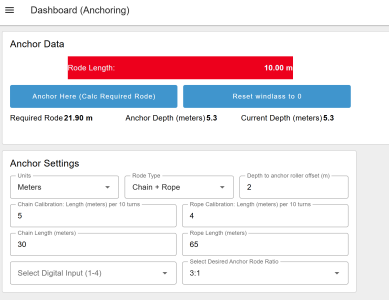
I have a prototype ready to upload to the boat.... not pretty, but I'll see how it behaves once the chain counter sensor is hooked up to the Cerbo GX... other than chatGPT getting confused about CSS use in a specific node, it converted over pretty well.... still a bit of work to do with units of measure to display all the calcs / windlass data in either feet/fathoms or meters.

When you're over the spot you want to anchor on, press "anchor here" and it calculates the required rode length. The rode legth display turns green once that's achieved. Seems to work equally well on a phone or tablet.

1752445970127.png
 
Top