Simple affordable chart-plotting app

VMH offer a full set of raster charts for use with an app called Marine Navigator, as a plotter. You can use the internal GPS, or connect wirelessly to the ship's system, if that is option is open to you. If you can, AIS could be available as an overlay.

The charts you buy from VMH are yours forever (or as long as the life of your devices!), so you can update as you feel you want to. Couple of options for coverage: NEW 2025 Android Charts : by VisitMyHarbour [Android: Marine Navigator Charts] - VisitMyHarbour articles
Agree. I have been using the Marine Navigator app and the Admiralty raster charts, both from VMH website for 10 years. Very low-cost for all UK, and near continent charts if required, and for use on two Android tablets, with AIS overlay if you have an AIS receiver. You get a free chart update in the second year. No subscription.
.
 
Yea I’ve used it on a desktop and I think you are right mouse over worked as you describe but the mobile app is obviously a desktop app ported to android without IMHO a touch interface design.

I’m not near the tablet, any idea how you create a group or tab?
I'm on Apple hardware, so will have to take an educated guess.

The creation process should be similar to on the laptop; start with: Options > Charts > Chart Groups

Click "New Group" and give your group a name, then you can select the desired chart folders in the upper pane and click "Add" to move them into the lower pane for whichever group tab is selected. If you want to add individual charts within a folder to your group, the steps here might work.

One other setting to be aware of is in Options > User Interface where there is an "Enable Touchscreen Interface" setting which works as described here.
 
I don't know of a comprehensive comparison, but there are plenty of resources for each individually. But for a brief primer...

The charts
Ideally charts are separate from the app, so you can used the best charts with the best app, but unfortunately that's rarely the case. Most charts are likely re-selling HO data. I suspect the number incorporating their own data are very few in number. Navionics does, and it sounds like Antares is largely privately-sourced as well. The UK seems an outlier in having specific leisure offerings (harbour details, etc), but it sounds like it may be reasonable to consider those offerings (VMH, etc) in a similar category?

What's in common
Nearly all function mainly as chart viewers; the interactivity is largely limited to adding routes, waypoints, zooming, and panning the display. People speak of objects appearing and disappearing as you zoom in and out; it's little different from if you were to swap in a more detailed paper chart: many items remain the same, some will be added or removed.

The general practice, if you want more information on an object (e.g. bridge information), is to select it and view the info in a popup. This differs from what you're used to with paper, though some offerings (esp. Navionics) do tend to include more text on the chart itself.

Waypoints are point positions, routes simply connect points, and the plotter can tell the autopilot to follow a route (which is really just steering to different waypoints in succession).

Most allow the setting of at least a safety depth, used to control the depth shading, so you can tell "safe" water at a glance.

If you want to "mark up" the chart, you are largely limited to adding a waypoint and giving it an appropriate name (e.g. "buoy missing"). Some apps allow you to select from a range of icons.

Other nice features are the ability to overlay a radar image on the chart, and also display AIS information. Here again you'd typically query an AIS object to bring up details (ship name, dimensions, heading, speed, closest point of approach, etc).

All of that is fairly standard, and the main differences would be in presentation and UI: the colours, the icons, the specific method of creating a route, the menu structure for adjusting settings, etc.

What's less common
Some offerings include 3D presentation of the bathymetric contours or the ability to add satellite imagery. Navionics offers "sonar charts" which are crowd-sourced data that is often more detailed than the standard charts. In popular areas this can be useful, in remote areas use caution (it may be interpolated and not real).

Many apps offer some form of measuring tool: you can select two points and it will show the bearing and distance to one from the other.

Very, very few offerings allow marking out areas (e.g. "safe" or "unsafe" areas) and setting entrance or exit alarms. Similarly, very few allow plotting LOPs or range circles.

Only a few have "good" AIS display, by which I mean displaying ticked course vectors, a visual CPA, and true-scale icons when zoomed in. Most display triangles, often coloured by vessel category (tanker, cargo, tug, leisure, etc).

That is a tremendously helpful post.

Thanks.
 
Orca android looks nice for uk and Europe, though I haven't subscribed yet. Disappointing the AIS CPA and warnings are a wad extra cash on orca though. VMH does everything perfectly for the uk.
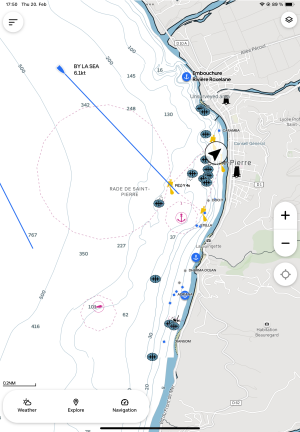
Orca works fine on both Android and iOS. We have a waterproof Samsung industrial tablet as our chartplotter. So far we've navigated Baltic Sea, Norwegian south west coast, Shetland, Orkneys, Scottish west coast, Irish Sea, and then all the way to the Caribbean with Orca CoPilot. The 120€/year subscription we're on gives all their features plus map updates to the whole world (well, the part they have charts for). I like the clarity of the charts a lot better than for instance Navionics.

Currently at anchor just outside the no-anchor zone at St. Pierre, Martinique.
IMG_1663.png

In addition to Orca CoPilot we used Antares Charts for Scottish anchorages, and the Swedish and Finnish harbour guides for anchorages in the Baltic. Nice to get drone shots showing which rocks you can tie up to etc.
 
I must be missing something but if I have say 8 chartlets all available (different scales area etc) is there some way to know which one is the one I probably want? Each is represented by a coloured rectangle, but I find I have to tap through them unsure if my finger has registered waiting for the page to load till eventually the option I want appears? MM users? do you have similar issues for Antares like this?
You can make chart ''groups'' and show whatever group you like in the rectangles. I have groups for satellite, o-charts, traffic maps, etc, one can show one single group, two or all of them.
 
Here on the west coast of Canada, Navionics "sonar charts" are usually a joke. Just interpolations from widely-spaced official soundings. Not real. Not useful. Navionics does update its standard charts as frequent as official CHS updates... I've seen newly-found rocks/shallows/wrecks take a year to show up on Navionics.
Sonar charts is like shooting an ambulance.
In France all Navionics charts have bene reverted to vector copies of SHOM charts with no additions whatsoever, the number of protests for false data was overwhelming. To be fair, user data was heavily unreliable as some depths are measured under the keel and others under water level, even with gps time stamps a lot of gps suffer from rollover effect so no sensible tidal height can be computed, etc etc. Let alone that sport fishermen and kayakers who sail over areas around high water while recording depths -which then appear as ''always covered'' in Sonar charts- whereas those same areas dry at low water.
Also, have a look at waters in North Korea, around Cape Horn, under ice covered waters where you are located: contours with a half a meter spacing, surely places with plenty of wandering people recording depths and sending them to Garmin :D
 
Something else to bear in mind that I spotted today. With Orca and B&G the flash sequence for buoys/beacons is always visible next to the buoy/beacon. With Savvy Navvy it is displayed if you tap on it. Navionics requires two taps.
 
I've been using Imray Navigator for years but as they won't give an answer to my question about support when they stop printing paper charts I'm looking at all the alternatives and so far I like C-Maps best.
 
Here on the west coast of Canada, Navionics "sonar charts" are usually a joke. Just interpolations from widely-spaced official soundings. Not real. Not useful. Navionics does update its standard charts as frequent as official CHS updates... I've seen newly-found rocks/shallows/wrecks take a year to show up on Navionics.
Correction:
Navionics does NOT update its standard charts as frequent as official CHS updates... I've seen newly-found rocks/shallows/wrecks take a year to show up on Navionics.
 
I'm following this with some enthusiasm as so far I've managed well enough with a paper chart and pencil and am overwhelmed by the apparent complexity and host of options that come with electronic navigation.

Clearly I'm very late to this particular party as I've never actually seen a chartplotter being used let alone had a chance for a play with one myself.

Are there any resources online that demonstrate the function and capabilities of all the various options?
I'm in the same position, except I've not used paper chart and pencil much either, and it may be too late to start now.

Its an increasingly tempting option though. Starting to look like a technological breakthrough.
 
Correction:
Navionics does NOT update its standard charts as frequent as official CHS updates... I've seen newly-found rocks/shallows/wrecks take a year to show up on Navionics.
Just to expand on this.

Third party chart suppliers, with very few exceptions such as Antares, do NOT do their own survey; they buy the basic chart data from Hydrographic Organizations such as the UKHO, and repackage it as appropriate for their target clients. Navionics also provide crowd-sourced data, which can be good in some areas but is dangerously bad in others (I have commented at length on this elsewhere). The bottom line is that the most up-to-date data (which might not be very up-to-date in unfrequented areas) is that provided by Hydrographic agencies. Unfortunately for us, they concentrate on formats for ships' ECDIS equipment, with prices to match!!

I will note that from having worked with UKHO on Antarctic charts, they also do quality assurance extremely carefully and meticulously. I estimate that at least as much effort goes into QA as into the compilation of data. I was part of the checking chain for some Antarctic charts.
 
How do you get the £45 approx Navionics now for Android? I am seeing £149.99 on Garmin website. Only need Thames Estuary.

You are probably looking at the SD card version and its downloadable update.

The Boating App (Androis / IOS) application is a separate system and does not use SD card ... you install the Boating App on the tablet / Phone you wish to use and then via the App - choose the chart region to download to that App. It is embedded into the app - unlike its 'sister' where it writes to the card.
As far as I see - the Boating App Navionics Charts cannot be separated or extracted out of the Boating App for use anywhere else. But they are the same as the SD charts. Biggest advantage I see - is they allow two installs ... so I have a good tablet for main use and my phone with same as in-pocket. The updates are easy to do etc etc.
 
Like most things in life ...

People will choose an application ... get used to using it ... and when they try out another application - will often not like it.

The 'trick' is to choose one that has desired coverage, frequent updates, more than one install allowed for its subscription- talking Charts not the app ... is clear on screen, easy to use menu / user options. Get used to using it ..

With all respect - this thread and its posts shows that throughout ...

And my personal bias as a Professional Trained Ships Navigator - I have on my various computers / Plotters - so many different Chart Plotting packages from the old raster Only early stuff through to latest full commercial .... when needed - I fire up the Full Commercial of course for my work which is world-wide. But for my 'yachting' the Navionics Boating App sorts all I need and in fact I probably only use about 25 - 30% of its capabilities ...

One comment I will make - as the packages approach the capability level of the Full Commercial - they get less intuitive to use. Not something you want on a boat bobbing about amongst others !! You want something that's easy and quick to sort.
 
So no-one has experienced navionics android log out and unable to log back in at sea out of mobile range, or loss of offline maps? It would be a no go for me if so.
Orca seems to keep the offline maps past the end of the subscription, unlike navionics, and I think CMap. On the plus side, navionics does have AIS warnings on the basic sub, unlike the other two?
 
So no-one has experienced navionics android log out and unable to log back in at sea out of mobile range, or loss of offline maps? It would be a no go for me if so.
[/QUOTE]
The posts that mention this - just odd ones ... the person must have done something to trigger failure. The aplication does not login via internet or mobile to use. You can 'Airplane' mode your phone / tablet to test and you will find you still have the App and its charts working (Airplane mode will of course stop any other data in - but you see what I mean). How does anyone, like myself as example, be able to use this Navionics
when out of mobile coverage ? It works.

Orca seems to keep the offline maps past the end of the subscription, unlike navionics, and I think CMap. On the plus side, navionics does have AIS warnings on the basic sub, unlike the other two?

The subscription for Navionics Boating App allows you to 1. Download the chart regions you want, 2. To Update charts when you have internet connection - at YOUR option, 3. once subsciption expires - the installation as long as it stays on the tablet or phone you used for the subscrption and its second back-up - the application and charts remain working - but no updates and no overlays such as AIS after sub expires. The charts are enbedded in the application on your tablet / phone.

I know plenty people who paid first year to download charts to the Boating app ... enjoyed updates etc until sub expired. They chose not to renew sub and they still have the App and Charts working today. In effect what you have is a digital version of the expired SD card version where that cannot be updated.

The factor is - If sub expires - you cannot move the installation to another phone / tablet .. ie if you replace your phone. BUT while sub is current - you CAN move to another tablet / phone - but you cannot have more than 2 installs at same time.
So if you have 2 installs and want to replace one tablet or phone. Make sure one install is secure. Unsinstall from the tablet or phone that will be replaced. Now install Boating App on the new tablet or phone ... login and you should be able to download / complete your installation and have all running on new tablet / phone. You other still as is as well.
 
I use OpenCPN (free version) on an old Windows laptop (because it's got a nice big screen). GPS feed is from a Garmin standalone unit using a serial connection. Charts from VisitMyHarbour and of course Antares (thanks Bob!). Everything works fine, only drawback is obviously not weatherproof so has to stay on the chart table.
 
One option if you have an ipad (with internal GPS, but connected to boat instruments via wifi works as well) is TZ iBoat. It works well as a stand alone plotter, but will integrate directly and seamlessly with Furuno hardware (though that's not too common with sailing yachts). The app is free but charts are paid - you can get the whole of the UK for about £40 for a year subscription, but once you have downloaded them they continue to work after that period, just without updates. That subscription includes both raster, vector and higher resolution bathymetric charts.

Another feature that is quite useful and doesn't actually need a chart subscription, as it works with the base outline map, is the tide and current display. You can use it like a tidal atlas and scroll forward and back to see how the tidal flow changes.

I've been using it for a few years now and found it quite nice for passage and route planning. It's possible to navigate with it as well. You can display AIS targets if you pay a one off fee for the plugin to do it. You can import and export routes in gpx format if you want to transfer them to other chart plotters.
 
Just a comment and its not aimed at knocking either type - just mentioning so those who did not know - do not make mistake when buying - check carefull the specs and actual capability !!

All Android Tablets on market now have GPS ... WiFi .... and most have SIM card - even Dual Sim (some the 2nd SIM slot can also be used as a SD card slot if there is no separate SD card slot).

Not all IOS (iPad) have GPS ... for some strange reason Apple still split their models up ... some with GPS - some without ... some with SIM - some without ....

So if you are looking at buying a tablet for above use ... make sure it has the capability ..... so many I know have made mistake on the iPad's and ended up without GPS and only WiFi capable ... Drone forums are full of such cries for help !!
 
I use OpenCPN (free version) on an old Windows laptop (because it's got a nice big screen). GPS feed is from a Garmin standalone unit using a serial connection. Charts from VisitMyHarbour and of course Antares (thanks Bob!). Everything works fine, only drawback is obviously not weatherproof so has to stay on the chart table.
Pay the one-time only $10 fee for the official OpenCPN version. It is so much better with ongoing development, updated plugins, etc. The "free" version, if you can find it, is years out-of-date.
 
Top