Simple affordable chart-plotting app

The posts that mention this - just odd ones ... the person must have done something to trigger failure. The aplication does not login via internet or mobile to use. You can 'Airplane' mode your phone / tablet to test and you will find you still have the App and its charts working (Airplane mode will of course stop any other data in - but you see what I mean).

I haven't renewed my subscription for quite some time, and the charts remain as they're supposed to. One person I know who was bit by the issue when crossing the Pacific reported the word from tech support was "that happens sometimes."

Pay the one-time only $10 fee for the official OpenCPN version. It is so much better with ongoing development, updated plugins, etc. The "free" version, if you can find it, is years out-of-date.
I wouldn't really call that an official version, it's just the most up-to-date version for Android on the Google Play store if you aren't compiling it yourself. For Windows and Mac you can download current binaries for free.
 
I haven't renewed my subscription for quite some time, and the charts remain as they're supposed to. One person I know who was bit by the issue when crossing the Pacific reported the word from tech support was "that happens sometimes."


I wouldn't really call that an official version, it's just the most up-to-date version for Android on the Google Play store if you aren't compiling it yourself. For Windows and Mac you can download current binaries for free.
It's the version that is maintained; the unpaid one is static and lacks things like the chart store and support for a wider range of chart formats.
 
It's the version that is maintained; the unpaid one is static and lacks things like the chart store and support for a wider range of chart formats.
For the longest time I thought Dave Register was some random person supplying a current version, since the other version (which I can't actually find anymore) was some ancient release like 4.x. I finally ran across the dedication in the OpenCPN manual and realised he was the original developer of it!
 
I've tried Navionics, Savvy Navvy, Orca, and B&G companion which is CMap. Orca is still a work in progress. Savvy is a lot better than it was. Navionics is good. It has the best routing (not that I'd trust any of them) but is the most expensive.
My favourite is the B&G/CMap. It is the easiest to read, it's easy to manually enter a route or adjust an automatic one. You can have multiple devices signed in. There is a free version (I'm not sure how much you get to access) but the premium version is £42.99 with world wide mapping. You don't need to have B&G electronics to use it.
I’m missing something here then, I downloaded and tried cmap but when i click on route, and the create route button, it only gives me an option for start and destination and creates a rubbish automatic route, including walking overland from my creek to far side of canvey island rather than sailing down the admittedly rather tidal creek :)
 
So no-one has experienced navionics android log out and unable to log back in at sea out of mobile range, or loss of offline maps? It would be a no go for me if so.
Orca seems to keep the offline maps past the end of the subscription, unlike navionics, and I think CMap. On the plus side, navionics does have AIS warnings on the basic sub, unlike the other two?
I have had this on ios, it was highly frustrating.
 
The posts that mention this - just odd ones ... the person must have done something to trigger failure. The aplication does not login via internet or mobile to use. You can 'Airplane' mode your phone / tablet to test and you will find you still have the App and its charts working (Airplane mode will of course stop any other data in - but you see what I mean). How does anyone, like myself as example, be able to use this Navionics
when out of mobile coverage ? It works.
[/QUOTE]
No, not quite. This particular issue has nothing to do with the charts, subscribed or otherwise.
It is an automated check from Garmin, basically saying we haven't seen you on our website for sometime, are you still one of our customers, if so then log in. Probably all tech companies do similar from time totime to keep their subscriber databases up to date. The issue is, that you cannot bypass it to open your charts in the app, until you have relooged into garmins website. And if you happen to be oit of signal, then your out of luck also, and possibly in a pickle. Because you now have no electronic charts.
 
No, not quite. This particular issue has nothing to do with the charts, subscribed or otherwise.
It is an automated check from Garmin, basically saying we haven't seen you on our website for sometime, are you still one of our customers, if so then log in. Probably all tech companies do similar from time totime to keep their subscriber databases up to date. The issue is, that you cannot bypass it to open your charts in the app, until you have relooged into garmins website. And if you happen to be oit of signal, then your out of luck also, and possibly in a pickle. Because you now have no electronic charts.
[/QUOTE]


Sorry but that does not tie in with how Boating App works. The only time it needs to login - is when you want to update or download different chart set. For all other use - it does not need or require login.
There are many out there happily sailing around with Boating App and charts opening that haven't logged in .. have expired subscriptions ...

There is nothing stated online or in Garmin literature that states you need to login other than to renew subscription ... download new chart areas ... update subscribed charts ... enable community info .... action overlays etc.

Because I have in another thread checked through Garmin online (it was a misunderstanding of overlays - whether can be used with expired subscription charts) - I would ask you to point / link to where Garmin state you need login as you say ... I can't find anything ... maybe someone else can ??

I better tell my pals with expired charts to take care then ??
 
Sorry, your not getting it. Its nowt to do with downloading charts or expired charts.
Nor to do with logging in to access your charts.
Its is probably just an administrative procedure, if you haven't logged in for some time ( and I don’t know the timescale ) an email is generated requesting you to log in now ( basically to confirm your account is still active and you want to stay on the database I presume) Now what triggers this exactly I have no clue, I jabe been using the app since 2015 and this happened probably 2023, and was totally unexpected.

That’s all well and good and it wouldn’t matter, except that the only way to clear the box and open navionics is to proceed to log in. And if you happen to have no signal, that’s not possible, so the box remains on screen and you can’t get past it to access your charts.

Doubt they are prohibiting access for any particular reason, its just an unintended consequence, or bug.

I cannot tell you where it says this will happen, I have no idea and I can’t be arsed trawling through terms and conditions. As its probably unintended, I doubt they even do. But I assure you it happens, I posted a thread about it a couple of years ago and it had happened to others.

So don’t tell your pal to take care with his unexpired charts, just tell him to log into his account occasionally and he’ll be fine.
 
Last edited:
"So don’t tell your pal to take care with his unexpired charts, just tell him to log into his account occasionally and he’ll be fine."

Please read MY text on that ... he's been using EXPIRED for ages .... at least 3yrs that I can recall ...... but its most likely much longer ..
 
"So don’t tell your pal to take care with his unexpired charts, just tell him to log into his account occasionally and he’ll be fine."

Please read MY text on that ... he's been using EXPIRED for ages .... at least 3yrs that I can recall ...... but its most likely much longer ..
Every time I open the IOS Navionics Boating app it comes up with a message that my subscription has expired. Need to be careful to click the Not Now button to access the (elderly, not used for navigation) charts.
Not sure what would happen if away from internet and accidentally hit the wrong button.
 
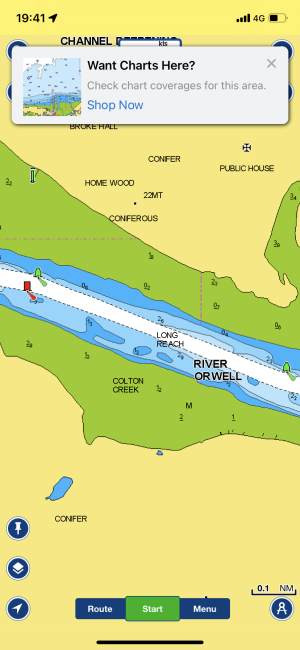
On my Navionics on my phone, when I open app it tells me (correctly) my subscription has expired and I select not to update. After that whenever I move cursor to a new area I get the following REALLY annoying banner that reappears instantly after declining the offer to update charts:
IMG_4423.png
 
mmmmm interesting ...

Fred - what happens when you turn off data internet ? Pals of mine who have EXPIRED charting - they appear to not have same..... but they are all using tablets where they don't need internet data as with a phone.
 
Hello everyone.

I am trying to decide what app to purchase for chart-plotting.

I had a handheld GPS but it was clunky and annoying, and felt outdated design-wise. A bit like using an old TomTom rather than google maps on a smartphone. And it broke so I need something new!

I don't like the sound of savvy navvy because apart from the negative reviews, automated passage planning does not appeal to me. I just want the simple ability to draw points and lines, and see myself as a small dot, on an on-screen chart. I will plan routes myself in advance according to tides and conditions.

I think the general go-to for most people is navionics... but you have to purchase charts separately and it all sounds a bit expensive... is there a cheaper option?

I feel like the most sensible approach is using a smartphone/tablet for ease of use, with a simple affordable app, and if necessary, a Garmin Glo 2 gps receiver for accuracy of data.

Does anyone have any advice for me?

Cheers!
Depends for a start on whether you are driving a small Mobo from a cockpit under cover or helming a small yacht from the cockpit. If the former, a tablet might give you what you need - a phone IMO is next to useless for anything more than seeing where you are - roughly. However , if you are in the open cockpit of a small yacht then a tablet with touch screen is not much use. Wet touch screens dont work right. Tablets arent that good vis wise in bright sun. And in case you are wondering I have both tablet and phone and am a raggie.

Without doubt, the best marine solution is a marine plotter with knobs not touch screen.

As for charts, its all the same data whether Navionics, Mapsource etc. Its all digitised data from UKHO when covering the UK.

I'm old and still prefer the paper charts as backup if nothing else. But then I did teach nav for YM courses and enjoy things like running fixes, course to steer etc. If passage making using the autopilot ( helming is boring) than paper nav occupies time
 
Not all IOS (iPad) have GPS ... for some strange reason Apple still split their models up ... some with GPS - some without ... some with SIM - some without ....

iPad models with cellular data have GPS. Wifi only models do not. This is because with apple hardware the gps receiver is part of the celluar modem chipset, which is obviously not present in wifi only models.

I find it odd that a £100 android tablet can have fully functional GPS, but an ipad costing many times more does not, but then apple have never been about good value for money.
 
iPad models with cellular data have GPS. Wifi only models do not. This is because with apple hardware the gps receiver is part of the celluar modem chipset, which is obviously not present in wifi only models.

I find it odd that a £100 android tablet can have fully functional GPS, but an ipad costing many times more does not, but then apple have never been about good value for money.

I too fail to understand why .....
 
I find it odd that a £100 android tablet can have fully functional GPS, but an ipad costing many times more does not, but then apple have never been about good value for money.
Nothing odd about Apples inflated prices. They are in business to extract as much cash for a little technology dressed in pretty design as they can.
 
Depends for a start on whether you are driving a small Mobo from a cockpit under cover or helming a small yacht from the cockpit. If the former, a tablet might give you what you need - a phone IMO is next to useless for anything more than seeing where you are - roughly. However , if you are in the open cockpit of a small yacht then a tablet with touch screen is not much use. Wet touch screens dont work right. Tablets arent that good vis wise in bright sun. And in case you are wondering I have both tablet and phone and am a raggie.

Without doubt, the best marine solution is a marine plotter with knobs not touch screen.

As for charts, its all the same data whether Navionics, Mapsource etc. Its all digitised data from UKHO when covering the UK.

I'm old and still prefer the paper charts as backup if nothing else. But then I did teach nav for YM courses and enjoy things like running fixes, course to steer etc. If passage making using the autopilot ( helming is boring) than paper nav occupies time

mmmmm I'm Old School Navigator. Sextants ... DR's / EP's all that .... double angle on the bow .... etc etc.

Today I sit on my boats and I really appreciate the evolution that has occurred ...... my Samsung A34 phone is in hand and giving me excellent info. It is NOT the poor unit as implied ...
I have a fast Android 8" Tablet also with same Boating App on - so I have back-up .... of course the larger screen is advantage ..

I also have the UHD 92sv Garmin set into cockpit fwd bulkhead ... also running Navionics.

All 3 are not only giving me the info I need on route - but also displaying AIS targets. Having 3 maybe overkill - but when I'm up on the foredeck enjoying a spell sitting out ... the phone is just the job. When in cockpit and not close to the Garmin .. the Tablet is just the job ...

Phone and Tablet both slip into jacket pockets ..

As to touch screen vs knobs - yes I agree most of the time ... but today quite often - the touch screen accesses more options .. and all you do is turn off TOUCH to stop it being affected by water running across it etc. The Phone / Tablet being in pocket - can be sorted.
 
I'm following this with some enthusiasm as so far I've managed well enough with a paper chart and pencil and am overwhelmed by the apparent complexity and host of options that come with electronic navigation.

Clearly I'm very late to this particular party as I've never actually seen a chartplotter being used let alone had a chance for a play with one myself.

Are there any resources online that demonstrate the function and capabilities of all the various options?

I have loaded a number of these apps but they mostly appear to do nowt unless you give them money.

Last night I tried Orca at random (In retrospect I see it was suggested in post 21). After a bit of thinking time it showed me a chart and my position on it. You appear to be able to zoom in and out of most of the known world. It cost nothing but there are further options.
Orca appears to do all I want in a free pocket plotter, ie a zoomable chart with a dot showing where I am. As for anything else, I know nothing.


I don't know if it will continue to work offshore.....but if I switch off WiFi at home the chart becomes vivid red but still appears to be usable. Can anyone expand on this?

.
 
I have loaded a number of these apps but they mostly appear to do nowt unless you give them money.

Last night I tried Orca at random (In retrospect I see it was suggested in post 21). After a bit of thinking time it showed me a chart and my position on it. You appear to be able to zoom in and out of most of the known world. It cost nothing but there are further options.
Orca appears to do all I want in a free pocket plotter, ie a zoomable chart with a dot showing where I am. As for anything else, I know nothing.


I don't know if it will continue to work offshore.....but if I switch off WiFi at home the chart becomes vivid red but still appears to be usable. Can anyone expand on this?

.

The Navionics Boating App allows you to download charts for the area you are interested in on a free trial basis for xx days ... they work fully ... until your trial period expires. Then you are left with World Low Detail map only.
You have option to subscribe while in trial or after ... then the charts are yours.
 
I have loaded a number of these apps but they mostly appear to do nowt unless you give them money.

Last night I tried Orca at random (In retrospect I see it was suggested in post 21). After a bit of thinking time it showed me a chart and my position on it. You appear to be able to zoom in and out of most of the known world. It cost nothing but there are further options.
Orca appears to do all I want in a free pocket plotter, ie a zoomable chart with a dot showing where I am. As for anything else, I know nothing.


I don't know if it will continue to work offshore.....but if I switch off WiFi at home the chart becomes vivid red but still appears to be usable. Can anyone expand on this?

.
A safe assumption is that if the chart comes “free” it is very superficial / lacks detail for navigation, very out of date, an illegal rip-off - or all three. There are a handful of exceptions, such as Norway and USA, but In most other countries a fee needs to be paid by the chart publishers to get access to the Hydrographic Office data.
Lots of options listed above for affordable charts and Apps. Not sure Orca would be the best starting point for a first time user, but each to their own preference.
 
Top