Remote Monitoring

This is rather "off topic" but I bumped into TwoHooter at LIBS last Jan and during a discussion with him and MJF, we decided to set up a small group to learn investigate Linux operating systems as a replacement to Windows 10.
For about a month, we ran a "kind of" virtual workshop - emailing each other.
I introduced a yachtie friend of mine to the group.
For me, these small workshops have been a great success.
I want to move away from Microsoft - especially for my boat systems - Over the last few years, I have stuck to W7 and not upgraded to W10.
Several friends have asked me to sort out their W10 systems so I have started to hate it.
I have now got a number of Linux based systems running where I would usually have used Windows.
My yachtie friend has now moved completely over to Linux and we are changing his boat system this winter.
Another yachtie friend has already changed his boat system to Linux.
Sorry about the thread drift - it might be worth starting a new thread but it is a bit technical - back to the main topic now.
 
In theory, DDNS should work but with a complex VPN like OpenVPN connecting two routers, I wouldn't want to introduce the complexity of DDNS - see above.

However if someone just wants to connect one of these cameras remotely, DDNS would be quite suitable.

ESCAM-G02-Dual-Antenna-720P-Pan-Tilt-WiFi-IP-IR-Camera--410986-.jpg


Having said that, I was fiddling around with mine the other day and it seems that there is are P2P and ONVIF options.
I've not looked into it but it may be possible to connect to this camera without using a static IP or DDNS.
I don't want to fiddle too much with mine as it is working well remotely at the moment!!!
I've just ordered another one of these cameras.
Mainly as a backup but I will also experiment with DDNS etc and see if I can find a useful solution for anyone to use.

BTW
Mine was triggered earlier this morning.
When I looked into it, it seems that a boat went past JW too close and too fast.
Her blinds must have rocked because the camera picked up this motion and sent me an alarm.

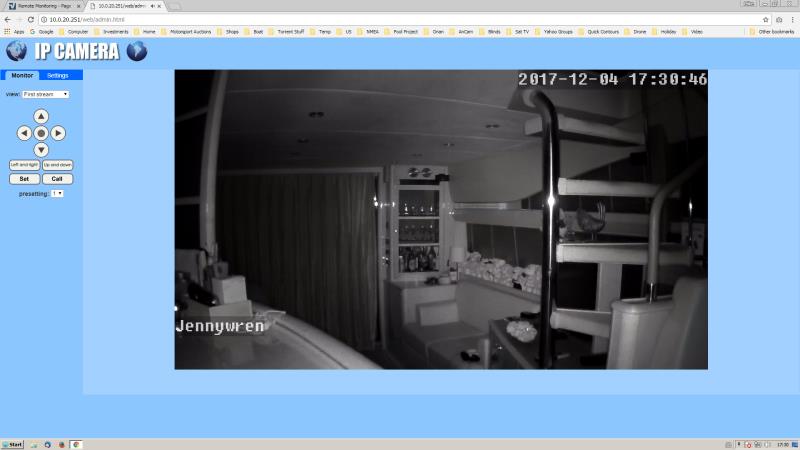
I've just realised that I haven't posted any pics of the output from this camera.
So, here is one that I've just taken using this cheap camera.

JWCamera_Small.jpg


Note that it is dark in SC at the moment so the IR lights are on and the camera has switched to black and white.
In the daylight, it is a normal colour image.

Some people may find this interesting.
Sorry if it is too geeky and boring for the others.
 
The Yacht Sentinel system looks good but it wouldn't suit our needs because it doesn't support sensors for Smoke or Carbon Monoxide, and I'm not clear how it deals with cameras or switching on devices remotely. I don't want to install someone's proprietary black box system and find I can't add what I want later, and I certainly don't want two systems running side-by-side. I'm probably making a rod for my own back but I want a system which I can configure to suit our needs as time goes on.

But there is one outstandingly good feature of the Yacht Sentinel system - you can add satellite connectivity (Iridium? they don't say which constellation they use). That is something we really do want because we often leave the boat at anchor in remote places with no cellphone connection while we go ashore. So full marks to yacht Sentinel for offering that.
 
No but I see that the download for the Pi image is working. Source code not the downloads for the server are still not there. The whole site and documentation is a complete mess though. How they can pretend that it's fit for consumer purchased is beyond me.

Pete, I think you have to take it in context, they are providing all information open source and even if you purchase from Skipper's Mate as I did it is very good value. If you want a fancy black box you plug in and go then it probably isn't the solution for you. If you're a bit handy and want to save some money then maybe you should give it a good look. I can say the support I've had by phone and email has been excellent, I did also try to contribute by sharing the work I did creating my mains power monitor unit.
 
Re: Remote Monitoring - on steroids

From the MVDirona.com blog:-
Dirona%20Remote%20Monitoring.jpg

11/25/2017: It's kind of amazing to be able to check the shore power from an airplane over Iceland when the boat is back in Dublin. N2kview on the Android works identically on any internet connection in the world as it does on the boat.

What's happening behind the scenes is pretty impressive: We're sitting on an aircraft at 36,000ft over Iceland running N2kview on an Android device communicating over the Aer Lingus WiFi system, then over a KU band satellite link to ground stations and out onto the open internet to KVH. Then out to one of the KVH ground stations, up to a satellite and back down to the KVH V7-IP systems running on board over a static IP address.

From our plane seats we can see all boat system status, start/stop the generator, turn on the heat, and even start the main engine. In this particular case we are watching the shore power closer than usual since we have been having show power breaker trips every few days to a week since arriving in Dublin. Something isn't right either on-board or on the shore pedestal.


And for the next trick: Start the main engine, retract the automatic dock lines, back the boat out, set up a dock-to-dock autoroute, and have the boat meet you at the other side of the pond.:)
 
Re: Remote Monitoring - on steroids

Wondered where Coracle was off to going up the river. Where you meeting her? :p

From the MVDirona.com blog:-
Dirona%20Remote%20Monitoring.jpg

11/25/2017: It's kind of amazing to be able to check the shore power from an airplane over Iceland when the boat is back in Dublin. N2kview on the Android works identically on any internet connection in the world as it does on the boat.

What's happening behind the scenes is pretty impressive: We're sitting on an aircraft at 36,000ft over Iceland running N2kview on an Android device communicating over the Aer Lingus WiFi system, then over a KU band satellite link to ground stations and out onto the open internet to KVH. Then out to one of the KVH ground stations, up to a satellite and back down to the KVH V7-IP systems running on board over a static IP address.

From our plane seats we can see all boat system status, start/stop the generator, turn on the heat, and even start the main engine. In this particular case we are watching the shore power closer than usual since we have been having show power breaker trips every few days to a week since arriving in Dublin. Something isn't right either on-board or on the shore pedestal.


And for the next trick: Start the main engine, retract the automatic dock lines, back the boat out, set up a dock-to-dock autoroute, and have the boat meet you at the other side of the pond.:)
 
Re: Remote Monitoring - on steroids

And for the next trick: Start the main engine, retract the automatic dock lines, back the boat out, set up a dock-to-dock autoroute, and have the boat meet you at the other side of the pond.:)
LOL, yeah, and the ultimate development is bound to be selling the boat, getting rid of all the ownership hassles, and just cruise with a playstation or similar from the comfort of your home armchair, in front of a huge TV screen... :rolleyes:
 
Re: Remote Monitoring - on steroids

Wondered where Coracle was off to going up the river. Where you meeting her? :p
Presumably Blythburgh. The trouble is that everything below the bulwarks will have been ripped off by the Bailey bridge like a double decker bus going under a railway bridge.:dread:
Dirona does make our shore power monitor look a bit pathetic. Have we got a shore power monitor at the moment?
 
Re: Remote Monitoring - on steroids

Yours is still plugged in and has seemed to be stable. I am at the yard tomorrow so will put one of ours onboard whilst we are away!


Presumably Blythburgh. The trouble is that everything below the bulwarks will have been ripped off by the Bailey bridge like a double decker bus going under a railway bridge.:dread:
Dirona does make our shore power monitor look a bit pathetic. Have we got a shore power monitor at the moment?
 
Re: Remote Monitoring - on steroids

Got given an Envirotxt for Christmas.
A really neat plug-in that sends SMS messages when power is off, restored, internal temperature settings and also a probe for external temperature sensing. Just needs a PAYG SIM.
BTW - check the PAYG provider, some need calls made every 3 months, but the EE one I got 'claims' that just a single text will keep the sim alive and registered withing a 6 month window.
Price was about £72 from https://www.uk-automation.co.uk/envirotxt-power-loss-alerts-temperature-monitoring-via-text-message/
 
In theory, DDNS should work but with a complex VPN like OpenVPN connecting two routers, I wouldn't want to introduce the complexity of DDNS - see above.

However if someone just wants to connect one of these cameras remotely, DDNS would be quite suitable.

ESCAM-G02-Dual-Antenna-720P-Pan-Tilt-WiFi-IP-IR-Camera--410986-.jpg


Having said that, I was fiddling around with mine the other day and it seems that there is are P2P and ONVIF options.
I've not looked into it but it may be possible to connect to this camera without using a static IP or DDNS.
I don't want to fiddle too much with mine as it is working well remotely at the moment!!!

Before Christmas, I bought a spare one of these.
Finally got round to playing with it yesterday.
I didn't want to fiddle with the other one which is working very well at the moment on the boat.
The one on the boat connects using my home VPN which is a bit too complicated for most uses.

I was expecting to set up a DDNS to get the spare one to work as a remote camera.
But I discovered that these Escam cameras use P2P camera technology.
Basically, this means that (at power up) the camera connects with the Escam servers and registers itself.
Then, using an Android app (there is probably an iOS equivalent) which also connects to Escam, you can connect with the camera.
The resultant connection is P2P - meaning that you then connect directly between the app and the camera.
Full control is available (i.e. pan and tilt) video and sound and you can also set up alarms (intruders etc)

This P2P connection is really simple to set up - either enter the UID (Unique ID) or scan a Qcode with the Android device.
The connection is then made - bypasses router firewalls - dead easy.
I'm not sure of the security implications so, for the moment, I have locked mine down by changing the default passwords but, after I've played a bit more, I might disable the P2P facility.
Security probably isn't a problem for most people though - as I said above, my boat one is on my internal LAN so, it could breach my firewall.
I'm probably being paranoid - it would need a significant hack to attack the camera firmware, especially as all the default users and passwords have been changed.

Anyway, I thought it would be interesting to report back.
Recapping - it is a doddle to set this device up.
 
Re: Remote Monitoring - on steroids

4 years ago I put a similar product, an Energenie, in my engine room. It also has a remote textable switched socket with programmable hysteresis, which can be used like a min max temp record even if you have nothing plugged in. Neat bit of kit for around a ton. EE SIMcard in my case but the important thing is to check mobile coverage inside your hull before choosing a network. Every icy dawn at home you will be texting your boat, so the single text per 6 months is irrelevant, lol.
 
Firstly thanks to Richard.C for the kind words - we do try. And, as you mention, are always keen to add features we may not have thought of. Sorry that we have only just become aware of this thread - maybe its because we're too scared to come over to the "dark side" of the Mobo Forum :)

I tried to download the Skippers Mate open source code but the link is broken. Emailed them a few days ago but no response.

Sorry Pete - I can find no email about this but thank you for pointing it out - the link has now been corrected. Did you contact us via the contact page ? We are also hoping to build a new sources download shortly.

Can it function as an anchor alert? In other words can you designate a guard zone radius around the boats current position and for the system to warn you on your mobile phone if the boat strays outside that zone?

Yes, Mike - you can set the radius on the GPS Settings page. This can be altered any time you like - so we have one setting for our mooring and than can change it when we anchor. You can also see the plots on Google Maps so you can see where she is.

If I install a monitoring system that relies on control "in the cloud" it actually means I am relying on the supplier's server. If I fall out with the supplier or they raise their prices or they go bust, I am stuck. The physical kit probably won't work with any other service.

Am I being paranoid?

If I'm not being paranoid the OP's choice of Skipper's Mate makes a lot of sense because they offer an open source version, or so it seems from their website.

TwoHooter - the Open Source software is available both for the boat and also for the central server so you can run your own server with VPN if you prefer. However, we have been trading for 35 years - we're not by any means a one product company - boating is our hobby which why we developed this. We're still supporting some legacy clients several decades on ! But paranoia is mainly useful - “In this world only the paranoid survive” as some say.

Penny
 
Last edited:
Before Christmas, I bought a spare one of these.
Finally got round to playing with it yesterday.
I didn't want to fiddle with the other one which is working very well at the moment on the boat.
The one on the boat connects using my home VPN which is a bit too complicated for most uses.

I was expecting to set up a DDNS to get the spare one to work as a remote camera.
But I discovered that these Escam cameras use P2P camera technology.
Basically, this means that (at power up) the camera connects with the Escam servers and registers itself.
Then, using an Android app (there is probably an iOS equivalent) which also connects to Escam, you can connect with the camera.
The resultant connection is P2P - meaning that you then connect directly between the app and the camera.
Full control is available (i.e. pan and tilt) video and sound and you can also set up alarms (intruders etc)

This P2P connection is really simple to set up - either enter the UID (Unique ID) or scan a Qcode with the Android device.
The connection is then made - bypasses router firewalls - dead easy.
I'm not sure of the security implications so, for the moment, I have locked mine down by changing the default passwords but, after I've played a bit more, I might disable the P2P facility.
Security probably isn't a problem for most people though - as I said above, my boat one is on my internal LAN so, it could breach my firewall.
I'm probably being paranoid - it would need a significant hack to attack the camera firmware, especially as all the default users and passwords have been changed.

Anyway, I thought it would be interesting to report back.
Recapping - it is a doddle to set this device up.

Hi Hurricane

Did you ever monitor what data usage these things (or your openvpn connection) actually use? I'm thinking of a PAYG 365 day sim for occasional netflix and running camera etc.. but no point doing it if it just chews the data up.. I can get 24gb over 365days for just under $100aud (50GBP) so not expensive - but rather not be topping up every month.

I was actually going to tether my nokia to the asus router as my phone plan is 15gb per month - but for some reason neither nokias work via usb tethering to the Router (my other phones did)..

Steve
 
Top
