Wifi booster

Rafflesover

Member
Joined
5 Apr 2018
Messages
23
Visit site
Hi,
I am considering buying a wifi booster to strengthen the weak signals in many marinas. Does anyone have any recommendations as to what would be the best thing to buy.
 
Hi,
I am considering buying a wifi booster to strengthen the weak signals in many marinas. Does anyone have any recommendations as to what would be the best thing to buy.
Are you often in marinas where the 4G/5G signal is poor? Or are you trying to save cost on data charges. I've never found any marina wifi to be fast even if I move to get decent signal. Frankly from the post lusty made the other day on the "standby" rate for Starlink running at a slow 500kbps its probably as good as most marinas even if you happen to be standing in the ideal spot! Most will just be taking a standard broadband connection (perhaps 50Mbs) and splitting it between all the things they do.
 
I am considering buying a wifi booster to strengthen the weak signals in many marinas.
I can't say for sure, but from my experiences I doubt the problem in marinas is weak signal.

I reckon it's packet collisions that cause problems.

With lots of access points, clients which are seen by multiple APs, other people running hotspots of their own on their boats (sharing some of the available wifi frequencies) I think it will take very few clients indeed to create a lot of network congestion.

That's how I explain my experiences, anyway. I've been to multiple marinas where the wifi works flawlessly at 2am (when no-one else is using it) and is rubbish during the day.

You're usually better off just tethering off your phone, or buying one of those little cellular routers.
 
Last edited:
As above - it is drummed into us at work to never use a public wifi so carry that over to personal life too. With unlimited 5g sim for £20 month or something it’s silly to use anything else really
 
We use a mobile router, works locally and overseas. It costs peanuts, as mentioned above. It services 4 devices and works, basically - anywhere.

Jonathan
Hi, so when abroad (our boat is in France) presumably you just buy a French sim for 1 month or whatever period suits?
 
As above - it is drummed into us at work to never use a public wifi so carry that over to personal life too. With unlimited 5g sim for £20 month or something it’s silly to use anything else really
Use a VPN and it's OK.

I primarily use Starlink or 5G, but there are cases where you want to use marina WiFi. For example, your Starlink is paused and there's bad reception for 5G (very common in the UK). So the OP's question is relevant.
 
  • Like
Reactions: Obi
I can't say for sure, but from my experiences I doubt the problem in marinas is weak signal.

I reckon it's packet collisions that cause problems.

With lots of access points, clients which are seen by multiple APs, other people running hotspots of their own on their boats (sharing some of the available wifi frequencies) I think it will take very few clients indeed to create a lot of network congestion.

That's how I explain my experiences, anyway. I've been to multiple marinas where the wifi works flawlessly at 2am (when no-one else is using it) and is rubbish during the day.

You're usually better off just tethering off your phone, or buying one of those little cellular routers.
I find that this problem is 100x less serious if you force a 5ghz wifi connection rather than 2.4.

To directly answer the OP's question: the killer app for this, and what we use, is a Ubiquiti Bullet Titanium mounted on the first spreader with an external diversity antenna. This is connected to the nav table with Ethernet pulled through the mast, and the Bullet is powered by PoE (power over Ethernet). At the nav table it's connected to a small WiFi router.

It's a bit of a faff to use but it's brilliant, getting really strong connections where a normal WiFi card in a computer can't even see the AP.

For intermediate cases, we have a Netgear Nighthawk external wifi with a long USB cable, which can be tied to a dorade guard abovedecks. This is a big boost, although not like the Bullet.
 

This purports to be a test comparing performance of a smartphone hotspot with a couple of cellular routers, and, unless I'm misunderstanding, the phone comes out on top.

Perhaps a bit counterintuitive but it clearly contradicts my AI so it must be correct.

I suppose it might depend on the particular phone and router(s) tested
 
Use a VPN and it's OK.

I primarily use Starlink or 5G, but there are cases where you want to use marina WiFi. For example, your Starlink is paused and there's bad reception for 5G (very common in the UK). So the OP's question is relevant.

Yep. With any public Wifi either be very careful what you do online or use a VPN.

Proton offer a simple somewhat restricted VPN service for free, they are associated with CERN. IMV, this is the VPN to go for. Do your research and make your choice. I've tried a few, found them to be lacking and they all lasted a couple of months at the most.
However Proton VPN I have now been using for years as a paid up customer.
 
Its worth noting that a Multiplexor such as the NMEA4WiFi unit not only takes in data from instruments on board ... AIS ... Speed .... Depth etc. but can also pick up and boost local WiFi signal ...

Just mentioning this as some may already have a 'plexor' on board and not realise they can use it to boost wifi.
 
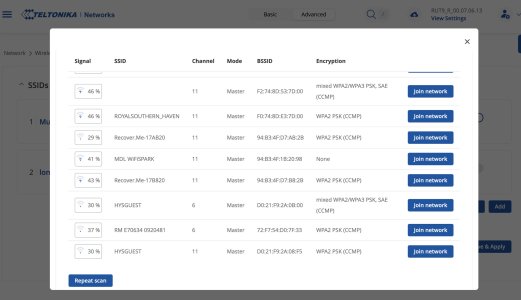
A couple of tips. You need really good cable to run from the antenna to the router something like RF400(50 ohm). I have just replaced the antenna's on my boat for Poynting to try to improve the signal in the process I found that whomever wired the boat had run two cables in RF400 and two in a more standard 3mm cable. I tested both cables with both WIFI and LTE(3/4G) and the difference was significent. Using the RF400 I was able to identify 36 local hotspots and with the 3mm cable only 11. There was a similar story for LTE the thick cables carried the signal from the antenna with fewer losses

Secondly many marina wifi will not allow a router to connect to their wifi so what I have done is used a "custom" MAC address from an old iPhone 3 so that the marina wifi does not know we are router and will think we are an iPhone.

Lastly we tend to buy local sims when abroad, I bought a PAYG sim in France a month ago with 340gb for about €40.


On a side note when scanning for hotspots it seems that most installers are really lazy and leave the routers on the default setting of channel 6 or 11. If you are installing these things please change the channel and avoid 11, 6 and 1 in that order, it is a simple change and will result in a more reliable connection for your users.

Screenshot 2025-09-07 at 12.55.09.jpg
You can clearly see that channel 11 is the default on most routers and so there is no excuse for not changing it.
 
Top