Victron VE CAN to NMEA 2000

PaulRainbow

Well-Known Member
Joined
16 May 2016
Messages
20,208
Location
Suffolk
Visit site
I have connected my Victron charger/inverter, battery monitor and solar controller to a Victron Cerbo, which in turn display all of the available data on a Touch 70 display. All working together very nicely. I want to be able to monitor charging from one of the plotters on the flybridge, the Victron VE CAN to NMEA 2000 cable looks just the job. With an RRP of £90 it's obviously more than just a metre of cable and a couple of plugs (you'd think). I found one for £57 inc Vat and ordered it. When it arrived it looks just like a 1 metre Ethernet cable with a Devicenet (NMEA 2000) connector on one end ! Never the less, i connected it and it does just what i want.

I decided to take a closer look at the cable to see just what Victron were supplying for their £90 RRP. Turns out it is exactly what it looks like, a 1m Ethernet cable with a N2K connector on one end. It does have a fuse in the power supply connection at the N2K connector, as this can be used to power the N2K network. Victron warn against powering the N2K network on systems with 24v or 48v power systems, as that voltage will be used to power the network, which should only be 12v, so they say take the fuse out. I cannot think of any good reason to power the N2K network from the Victron VE CAN anyway, so of the four wires used in the connector, only the two CAN wires are actually needed. You could make one of these cables in less time than it took to read this post. The 1m cable wasn't long enough, so i had to add a 2m N2K cable, another £25, taking the total to £82.

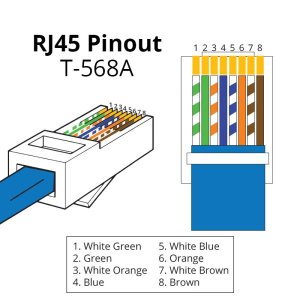
Making the cable could not be easier, just cut one end off of a straight through Ethernet cable. The brown wire should go to pin 8 and the white/brown should go to pin 7, see below.

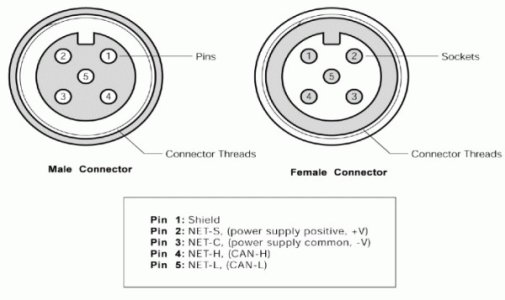
Connect the brown wire to terminal 5 of a male NMEA 2000 connector and the white/brown wire to pin 4

Job done. If you wanted to power the N2K network from the VE CAN, pin 6 (orange) from the RJ45 connector goes to pin 2 of the N2K connector and pin 3 (white/orange) of the RJ45 connects to pin 3 of the N2K connector.
RJ45-Pinout-T568A-9-600x600.jpg

N2K pinouts.jpg
 
Well the poor company have to make their money somehow! Cables are obviously a common con job - hence the EU insisting that all tech (almost) use a common charger in USB C and the UK now considering the same. Apple et al have screwed customers with proprietary cables at vastly inflated prices for years . Starlink use what appears to be a standard cable but they deliberately swap two pins over (4 and 5 IIRC) just so that should anyone have the temerity to plug in a £2 Amazon cable it won't work

Thanks for the very useful post Paul - it's good to know how to get around all these "proprietary" over priced cables
 
I have connected my Victron charger/inverter, battery monitor and solar controller to a Victron Cerbo, which in turn display all of the available data on a Touch 70 display. All working together very nicely. I want to be able to monitor charging from one of the plotters on the flybridge, the Victron VE CAN to NMEA 2000 cable looks just the job. With an RRP of £90 it's obviously more than just a metre of cable and a couple of plugs (you'd think). I found one for £57 inc Vat and ordered it. When it arrived it looks just like a 1 metre Ethernet cable with a Devicenet (NMEA 2000) connector on one end ! Never the less, i connected it and it does just what i want.

I decided to take a closer look at the cable to see just what Victron were supplying for their £90 RRP. Turns out it is exactly what it looks like, a 1m Ethernet cable with a N2K connector on one end. It does have a fuse in the power supply connection at the N2K connector, as this can be used to power the N2K network. Victron warn against powering the N2K network on systems with 24v or 48v power systems, as that voltage will be used to power the network, which should only be 12v, so they say take the fuse out. I cannot think of any good reason to power the N2K network from the Victron VE CAN anyway, so of the four wires used in the connector, only the two CAN wires are actually needed. You could make one of these cables in less time than it took to read this post. The 1m cable wasn't long enough, so i had to add a 2m N2K cable, another £25, taking the total to £82.

Making the cable could not be easier, just cut one end off of a straight through Ethernet cable. The brown wire should go to pin 8 and the white/brown should go to pin 7, see below.

Connect the brown wire to terminal 5 of a male NMEA 2000 connector and the white/brown wire to pin 4

Job done. If you wanted to power the N2K network from the VE CAN, pin 6 (orange) from the RJ45 connector goes to pin 2 of the N2K connector and pin 3 (white/orange) of the RJ45 connects to pin 3 of the N2K connector.

View attachment 184437

View attachment 184438
Paul,

Interesting. I'm beginning to lose a bit of respect for Victron. I've been reading about their customer support strategy on the Victron Community today, the service they (don't) offer is frankly a cop out and they must surely know it.
 
Paul,

Interesting. I'm beginning to lose a bit of respect for Victron. I've been reading about their customer support strategy on the Victron Community today, the service they (don't) offer is frankly a cop out and they must surely know it.
I get what you are saying, they say to contact their dealer network for support, so i suppose we should make sure we buy from a properly trained dealer, if only we knew who is who.
 
I have connected my Victron charger/inverter, battery monitor and solar controller to a Victron Cerbo, which in turn display all of the available data on a Touch 70 display. All working together very nicely. I want to be able to monitor charging from one of the plotters on the flybridge, the Victron VE CAN to NMEA 2000 cable looks just the job. With an RRP of £90 it's obviously more than just a metre of cable and a couple of plugs (you'd think). I found one for £57 inc Vat and ordered it. When it arrived it looks just like a 1 metre Ethernet cable with a Devicenet (NMEA 2000) connector on one end ! Never the less, i connected it and it does just what i want.

I decided to take a closer look at the cable to see just what Victron were supplying for their £90 RRP. Turns out it is exactly what it looks like, a 1m Ethernet cable with a N2K connector on one end. It does have a fuse in the power supply connection at the N2K connector, as this can be used to power the N2K network. Victron warn against powering the N2K network on systems with 24v or 48v power systems, as that voltage will be used to power the network, which should only be 12v, so they say take the fuse out. I cannot think of any good reason to power the N2K network from the Victron VE CAN anyway, so of the four wires used in the connector, only the two CAN wires are actually needed. You could make one of these cables in less time than it took to read this post. The 1m cable wasn't long enough, so i had to add a 2m N2K cable, another £25, taking the total to £82.

Making the cable could not be easier, just cut one end off of a straight through Ethernet cable. The brown wire should go to pin 8 and the white/brown should go to pin 7, see below.

Connect the brown wire to terminal 5 of a male NMEA 2000 connector and the white/brown wire to pin 4

Job done. If you wanted to power the N2K network from the VE CAN, pin 6 (orange) from the RJ45 connector goes to pin 2 of the N2K connector and pin 3 (white/orange) of the RJ45 connects to pin 3 of the N2K connector.

View attachment 184437

View attachment 184438
I wish you had posted this 7 days ago, I’ve just had delivered the cable to do the same to display power stuff on B&G plotter, 🥲 o well at least it’s got blue cable
 
Interesting. I'm beginning to lose a bit of respect for Victron. I've been reading about their customer support strategy on the Victron Community today, the service they (don't) offer is frankly a cop out and they must surely know it.
I've been extremely impressed with their customer support.

SmartShunt stopped broadcasting on BlueTooth. A quick email to the supplier, then return to supplier (en-route to the boat) and an immediate swap out.

Had it had needed to go back to manufacturer then that would have been at least a week. Assuming the part did not get held up crossing the hyperspace between the UK and EU.
 
I've been extremely impressed with their customer support.

SmartShunt stopped broadcasting on BlueTooth. A quick email to the supplier, then a return to supplier (en-route to the boat) and an immediate swap out.

Had it had to go back to manufacturer then that would have been at least a week.
That’s good to hear. I believe this is an example where it is essential to purchase from a knowledgeable and reputable Victron supplier rather than the discount warehouses for the latter have little knowledge or desire for customer support.
 
Just read this and it's very very interesting as I have some Victron Kit with VE can and an N2K system. Been wondering how to get charge info onto my Triton2 although it does show network voltage which is of some use. This could be my winter project and considerably cheaper than last years NAC2 and pelagic ram AP upgrade.
 
Just read this and it's very very interesting as I have some Victron Kit with VE can and an N2K system. Been wondering how to get charge info onto my Triton2 although it does show network voltage which is of some use. This could be my winter project and considerably cheaper than last years NAC2 and pelagic ram AP upgrade.
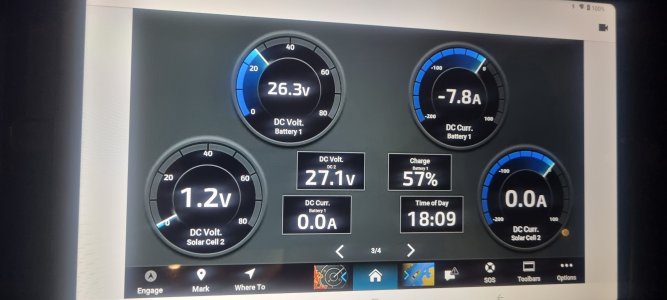
Costs about a tenner to make the cable. Plug it in and it just works. Just need to create a page on the plotter. Here's one of mine.

20241105_180910.jpg
 
I wish you had posted this 7 days ago, I’ve just had delivered the cable to do the same to display power stuff on B&G plotter, 🥲 o well at least it’s got blue cable
On B&G you just connect the plotter and the Cerbo to the same Ethernet switch, no need to faff with CAN.
I was going to ask Paul - does Garmin not support this (I assume you’re Garmin?)
 
On B&G you just connect the plotter and the Cerbo to the same Ethernet switch, no need to faff with CAN.
I was going to ask Paul - does Garmin not support this (I assume you’re Garmin?)
I’ve now just looked at this option, assume you can put the radar into a switch and then you have spare ports, my cerbro is already into multi port router so should be easy, do you still set up page as per can option?
 
I’ve now just looked at this option, assume you can put the radar into a switch and then you have spare ports, my cerbro is already into multi port router so should be easy, do you still set up page as per can option?
I have my radar, Cerbo, Vulcan and Zeus 3s into a switch that also connects to a wireless router for the Starlink and all works well.
You can put an rj45 cat5e shielded connector on the B&G connections - buy one long cable and make two out of it.

Whether that gives the same functionality Paul has is another question, I just get the Victron app on the plotter so it’s separate but shows me everything.
 
I have my radar, Cerbo, Vulcan and Zeus 3s into a switch that also connects to a wireless router for the Starlink and all works well.
You can put an rj45 cat5e shielded connector on the B&G connections - buy one long cable and make two out of it.

Whether that gives the same functionality Paul has is another question, I just get the Victron app on the plotter so it’s separate but shows me everything.
I’ve seen reference to the app on the plotter and now see how it is works
 
On B&G you just connect the plotter and the Cerbo to the same Ethernet switch, no need to faff with CAN.
I was going to ask Paul - does Garmin not support this (I assume you’re Garmin?)
Yes, Garmin does, but i'd need the switch. CAN isn't a faff, just connect a tenners worth of cable. My GPSMAP 1223 has two Ethernet ports, one i use for radar, the other networks a second plotter, a GPSMAP 923. Each plotter is mirrored to a tablet on the lower helm, which is where the picture was taken.

There's a few ways to do this, depending on what you have and how it's all connected, the Victron cable was the simplest and cheapest option in my case.
 
That's a mirror of my Garmin GPSMAP 923, on a tablet. Should work on any GPSMAP and something similar should be available on Raymarine, Simrad< B&G etc

Off topic - sorry - have you ever used the Garmin wireless units that just connect to wireless devices, ie iPhone or iPad? I know there’s obvious issues with than but as a secondary radar on a flybridge.
 
Top