Help with B&G network

AndyDavies

Active Member
Joined
13 Jul 2024
Messages
55
Visit site
I've been given a Triton t41 multifunction display which I'm hoping to add to my B&G network as a chart table repeater.
Naively, I thought this would be a simple case of plugging a cable into the back of it and into a vacant terminal on the boat's NEP-2 expansion port.
The t41 has 5 pins arranged like the spots on a dice, the expansion port's 5 pins are in a circular pattern. The only cables I have been able to find have the circular pin configuration at both ends.
Can anyone advise if there is an adapter available or where I can source a cable with the two different pin configurations?
 
I've been given a Triton t41 multifunction display which I'm hoping to add to my B&G network as a chart table repeater.
Naively, I thought this would be a simple case of plugging a cable into the back of it and into a vacant terminal on the boat's NEP-2 expansion port.
The t41 has 5 pins arranged like the spots on a dice, the expansion port's 5 pins are in a circular pattern. The only cables I have been able to find have the circular pin configuration at both ends.
Can anyone advise if there is an adapter available or where I can source a cable with the two different pin configurations?
You cannot connect the T41 Simnet (NMEA 2000) cable to the NEP-2 Ethernet ports. What other devices are on the B&G network ?
 
Thanks for the replies. I'm sure I don't have to state that I'm starting from a very low knowledge base. The boat has two Zeus plotters, two T41s, wind, Airmar, Autopilot and V50 VHF connected to its NMEA 2000.
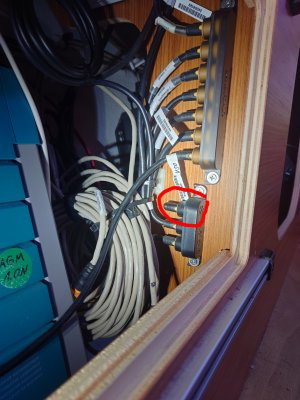
What, I think, to be the backbone connections are photographed below but they have a different plug to the new T41 I hope to install. For starters, is the unused connection, circled, a valid port for the T41?backbone_copy_1209x1612.jpg
 
The one you indicate appears to have a 120 ohm terminator in it, which is part of the network requirement.

The T41 does connect into one of those multi connectors but you need a micro C to simnet lead (see link below). Rather annoyingly, B&G only make that connector block in 3 way or 7 way (you have one of each in your photo). It may be easier to swap the 3 way for a 7 way (you can leave unused sockets empty but you do need to plug the terminator back in).

You'd end up using four of the 7 ways in the new block.

https://www.force4.co.uk/item/Simrad/Micro-C-female-to-SimNet-4-m/

The instruction manual for the T41 is here -

https://busse-yachtshop.de/pdf/bg-triton-install-en.pdf

Simnet connector block - (may find cheaper used one on Ebay)

https://www.force4.co.uk/item/Navico/SimNet-7-Prong-Multi-Joiner/
 
The one you indicate appears to have a 120 ohm terminator in it, which is part of the network requirement.

The T41 does connect into one of those multi connectors but you need a micro C to simnet lead (see link below). Rather annoyingly, B&G only make that connector block in 3 way or 7 way (you have one of each in your photo). It may be easier to swap the 3 way for a 7 way (you can leave unused sockets empty but you do need to plug the terminator back in).

You'd end up using four of the 7 ways in the new block.

https://www.force4.co.uk/item/Simrad/Micro-C-female-to-SimNet-4-m/

The instruction manual for the T41 is here -

https://busse-yachtshop.de/pdf/bg-triton-install-en.pdf

Simnet connector block - (may find cheaper used one on Ebay)

https://www.force4.co.uk/item/Navico/SimNet-7-Prong-Multi-Joiner/
That's really helpful, thank you. Now I now what I need and I must learn not to be so wildly optimistic about 'simple' upgrades.
 
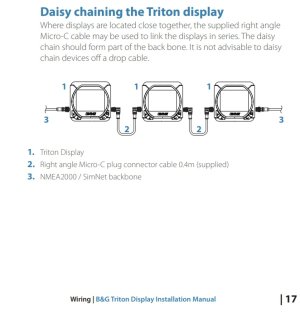
If you plan to fit the T41 near the existing one, all you need a a micro C to Micro C, daisy chain the two T41s.
Does this work? The manual (link above) advises daisy chaining them only if they remain a series component of the backbone rather than off a drop cable so the OP should determine how his existing displays are currently connected.

Andy, it may look complicated but it is almost "plug and play".


daisy.jpg
 
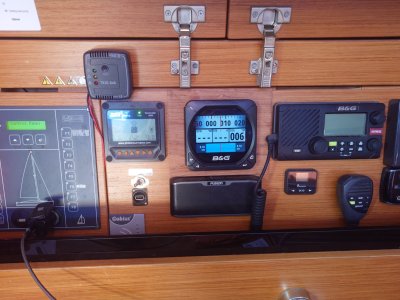
What's that orange coloured plug in bottom left of your photo? It looks like it might be a coiled up spare micro C labelled "companion way". Where is that connected to?

Ignore post, it's an ethernet cable.
 
Top