Tablet with gps reccomendation

fishfoxey

Well-Known Member
Joined
1 Sep 2020
Messages
77
Visit site
Hi have members got any experience of good value tablets with built in gps to use with the Navionics app as a chart plotter. Looking for members who have maybe used the app offshore where the tablet will be dependent on its in built in gps thx
 
Hi have members got any experience of good value tablets with built in gps to use with the Navionics app as a chart plotter. Looking for members who have maybe used the app offshore where the tablet will be dependent on its in built in gps thx

Any iPad with the cellular option. Have used iPad Air 2 & tthe current iPad Pro 13". Must have the cellular option. Does not need to have an active SIM card - neither of mine have.
 
Been using an Archos Oxygen 101b Android tablet with Memory Map software for about 4 years now, it does run Navionics tho I have not tried that in anger yet, used the Friesmeeren app (free!) when we were cruising around the canals and lakes in Friesland, I just stuffed the tablet in an Ikea ziplok bag and it worked well and kept it dry.
The Archos I have does not have a cellular option but all Android tablets have an inbuilt GPS, it cost me €120 4 years ago, it is on Android 6, but I have seen another Archos like mine on Android 8 for sale in the same shop I bought mine.
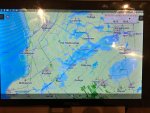
Friesemeeren App:
IMG_5164a.JPG

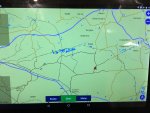
Navionics showing the canals around where I live
IMG_5167a.JPG
 
I've just got a Samsung Tab a - much cheaper than an iPad and works very well. I have the 10" and added a cover with built in keyboard - makes a good little chart plotter. The 8"is quite a bit cheaper.
 
Yep - I don't have any Apple stuff.
All my mobile devices are Android and all have GPS - its "kind of" inconceivable that at tablet these days wouldn't have a GPS.
For charts/navigating, I use OpenCPN and the same charts that I use on my PC.
A lot of cheap Android tablets have no GPS.
I've just picked up an Acer, No GPS.
But hey, it was £50 and mostly paid for with tokens, so it's perfect for what I want as I won't care to much if it meets a terrible fate.
Actually OK to use.

I was looking at Lenovo, their non-cellular tablets mostly don't have GPS.
I used to have a Hudl, that did have GPS, although it was a bit deaf.
We have an older Ipad, no cellular, does have GPS. Not sure what model it is.
 
It was having the GPS that was of particular interest to me about getting the tablet I have, it was not listed as one of it's devices but when I started to ask on various forums and such I was informed that having GPS is part of the spec in an Android tablet and was assured that they all have it.
It was only when I went and looked at this tablet and it's settings etc that I seen that it did have GPS and the sales man said "they all have it sir"
It caused a lot of frustration for me at the start not seeing GPS listed as an item included in the spec, I thought I was going have to spend real money and get an iPad.

My laptop is a Lenovo X201T with built in GPS and other such stuff, my wife has a much lower spec Lenovo X201T and though it was not listed as part of it, it still has GPS as one of it's inbuilt devices.

SHaa2Cq.jpg

I do however use an external USB GPS receiver while in the car, the front heated screen makes a fairly good faraday cage in respect to GPS signals.
Yeah it rains in Belgium too :D
 
The new iPad Pro 13” screen will do everything you ever need. as mentioned you need a cellular slot but no card. It is not cheap but you can use it for everything ie work etc etc and if you do go this way spend the extra on the 516 GB. Basically you can use it as a plotter, camera, music player, computer...and then put it in briefcase and take it home and to work. It is all I use these days work wise and on the boat when my Raymarine failed i used it to Navigate all summer.
 
Does anybody know if you can plug an external GPS usb receiver into a tablet with no built in GPS?
If it was on windows i dont see it being a problem but not sure about Android, will it recognise it??

Got an oldish HP Slate 21 that would be perfect as a chart plotter but no GPS but its a huuuuuuge touch screen. :)
 
Hi have members got any experience of good value tablets with built in gps to use with the Navionics app as a chart plotter. Looking for members who have maybe used the app offshore where the tablet will be dependent on its in built in gps thx
You might like to consider a second hand Iphone 6S Plus they are a good size and will have the GPS as they are a phone
 
Does anybody know if you can plug an external GPS usb receiver into a tablet with no built in GPS?
If it was on windows i dont see it being a problem but not sure about Android, will it recognise it??

Got an oldish HP Slate 21 that would be perfect as a chart plotter but no GPS but its a huuuuuuge touch screen. :)

There are bluetooth modules you can use I have one for my Ipad and it is very good Mine is a Garmin glow and works very well
 
[
There are bluetooth modules you can use I have one for my Ipad and it is very good Mine is a Garmin glow and works very well
Does it just connect via Bluetooth then as apposed to USB? Which Nav app do you use it with? As mine as no GPS installed it wont allow me to download Navionics HD onto my Tablet, my only other option is to cast it from my phone to the tablet but that relies on good internet connection to keep them both connected to each other.
 
[

Does it just connect via Bluetooth then as apposed to USB? Which Nav app do you use it with? As mine as no GPS installed it wont allow me to download Navionics HD onto my Tablet, my only other option is to cast it from my phone to the tablet but that relies on good internet connection to keep them both connected to each other.

It only connects via bluetooth to the Ipad.. I am using the Navionics app... It is an older app but it works very well
 
I
It only connects via bluetooth to the Ipad.. I am using the Navionics app... It is an older app but it works very well
I have the older Navionics on my Ipads at the moment but they wont update to the new version. The Slate 21 wont even download the old version.
Cant believe how quickly Tech goes out of date.
 
I

I have the older Navionics on my Ipads at the moment but they wont update to the new version. The Slate 21 wont even download the old version.
Cant believe how quickly Tech goes out of date.

There is nowt wrong with the old version in my view..... Never been one for updating software too quickly
 
I can highly recommend the Garmin Glo 2 Bluetooth GPS. Garmin GLO 2 GPS-GLONASS Sensor - 010-02184-01
I have heard that the built in GPS in a lot of tablets has a very low refresh rate so it may not be very good for navigating a fast motorboat.
I once wrote an app for the Android - a Passage Logger to log the actual route during a boat's passage.

Under Android, the system (later versions anyway) uses what Android (Google) call "Location Services".
AFAIK, Location Services is an amalgamation of GPS fixes and other technologies (Cellular Towers and WiFi/internet IP locations etc).
I believe that the more recent Android systems also use a tracking technology, using the inertial sensors and electronic compass etc to update the device's location.
Using all this data, the Android system can still receive "fixes" if it looses one or any of its external fixes.
For example if you enter a shopping mall, the device can still get its location even though it has lost its GPS fix.

In the app that I wrote, I overrode the generic "Location Services" and just collected position information from the internal GPS.
I never really used my app in anger but all my tests showed that the GPS receiver in all my Android devices was as accurate as any that we use on our boats and there wasn't an issue with refresh rate.
All my Android devices are Samsungs and all have GPS receivers.
 
Top