Tablet chartplotting- not Navionics

With normal boat equipment, a 7-8" chart covering both sides of the ocean will basically be blank; if one can work on a 24" screen then it's a different story. Commercial equipment has features not present in pleasure market plotters.

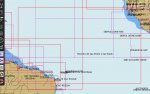
As to avoid hazards, first you must know roughly where they are: either one zooms in chunk by chunk in a blank chart (except Vestas) but loses them when zooming out to the big picture, whereas a small raster chart like this, on a small screen or printed, gives ample warnings, one can zoom in when nearer the areas (plus my 12yo daughter could take her first steps at weather routing :D ) I find it a lot more useful than getting lost in a blank screen while zooming in and out.


If I had a vector chart giving the same informations as that raster chart of course I would have no problems in using it.


Anybody using a chart view of that scale (ie large chunks of Africa, the entire width of the Atlantic and chunks of South America on the same page) for actual on board navigation to avoid hazards / islands would deserve anything they got. Would be better using a child’s inflatable globe.
So not a very relevant example to use
 
It is worth bearing in mind that a raster chart zoomed out to (say) cover an oceanic area is at least as likely to miss important small features as a vector chart - perhaps more so, as vector data can (if the plotter manufacturer and/or user makes the right choices) always represent dangers at all scales. But the resampling involved in displaying a raster chart can eliminate small features or narrow lines without warning. It's also a major problem in generating raster charts - we learned very early on NOT to use "minimum thickness lines" in final versions of maps, because they could easily disappear when the data were rasterized for printing!
 
I can't speak to how those vendors implement their charts, but it seems somewhat dangerous to simply provide "all the detail" and abdicate the decision-making to the whims of whichever software was used to display it.

Those objects are tagged with a minimum scale attribute, and the display software has the option to use that as a guide for de-cluttering. For example, the green buoy has it set to 59999, meaning that if you enabled such options it might no longer display once you zoom out to 1:60k.
Not dangerous at all, it's the purpose of vector charts. With a raster chart you definitely lose detail on different sheets, with raster you don't have to, and can hide things you don't care about if you wish. In fact, you can do anything you want with the data because it's just data, whereas raster charts are literally an artists impression of the area which can't be changed. Often with raster charts you'll fall off of the edge of a zoomed in scale sheet and suddenly have less detail without changing the zoom, and that's simply because it's a less popular area away from port.
Can you show that chart on a 7" plotter? Maybe you're lucky enough to have a megascreen like ships?
Yes, of course you can if the plotter supports it. My point was that the previous post had detail turned off but the detail is there and can be shown. I used the webapp since I'm not at the boat - this doesn't have options so I just showed what Navionics include by default in their own app. The obvious conclusion is that it's not Navionics causing that issue, it's the plotter or user. A raster chart on a small low resolution screen wouldn't show any of that detail either, there simply aren't enough dots. Don't forget plotters are not using high DPI screens usually, the Axiom 7" is 800x480 which is a distinctly 1990s resolution. You don't get many contours with 800 dots width!
 
whereas a small raster chart like this, on a small screen or printed
That print will likely be 600dpi, the small screen will be 800 dots total. Surely better to set up a vector chart to show the dangers with nice clear icons while zoomed out if insisting on electronic charting. I actually agree that the initial cursory look is nicer on paper, although I am starting to prefer Navionics webapp on my 28" widescreen monitor for planning at home first.
 
Navionics, unless one zooms in, also leaves out the Ilhas Selvagens which are on the direct path from Madeira to Grand Canaria - a set of islands with lighthouse and a very frequently travelled passage! It's true that such bad decisions on scaling / decluttering are not inherent to vector data, but seem to be commonplace with Navionics. Hence I like to have raster charts as well as - not instead of - vector.
+1
Selvagens are interesting re charting: this is our track there (old CMAP).
The names are all shifted with regard to their actual land reference (ex. Pta da Atalaia is the W-most, above "Landing place"; the landing place is where "Forno" is). Land is out against gps by a few hundred meters.
What *may* have happened (just my interpretation), is overscaling: these data have been vectorized from charts probably made at scales like 1:100 000/200 000, possibly smaller; when seen in larger scale they keep on indicating very tiny lines and objects, whereas they should be drawn a lot fatter, or at least indicate that based on original surveys there is the possibility the line is shifted around a few tens/00s meters. As I say maybe there are other factors, wgs84 datum is indicated as being applied.


Selvagens6.jpg


An accident due to Overzooming happened to a French custom powerboats in the Pacific: they followed a route towards an atoll after having zoomed in to choose and plot the destination waypoint, the surveys were to a much more general scale (most detailed chart at 1:595 000 (!), no final approach chart), boat aground and lost. Report in French but there are images of original paper chart, maxsea charting system, google earth overlay and the like: their charted route split the atoll in two.
http://www.bea-mer.developpement-durable.gouv.fr/IMG/pdf/RET_ARAFENUA_06-2014_Site.pdf
 
Yes, of course you can if the plotter supports it. My point was that the previous post had detail turned off but the detail is there and can be shown.
This is the same area with CMAP, the slider "Show details" set at maximum.
To see where the "Penedos" are actually located one has to zoom in three additional levels.
Personally, I cannot see any reasons to prefer this chart to the other one.
cmatl.jpg
 
The data are vector points they don’t go to some master painting in a room somewhere and create them. Surveys are tabular data!
With the difference that data from a survey at 1:X0000.., or made with old methods, may show coordinates like
45° 15' N, which should be interpreted 45° and minutes between 14. 50 and 15.50 (or whatever method they used to determine decimals).
The vector will read and plot 45° 15.000....' that's what it did in the Atoll accident.
 
Not dangerous at all, it's the purpose of vector charts. With a raster chart you definitely lose detail on different sheets, with raster [ed. assume 'vector'] you don't have to, and can hide things you don't care about if you wish.

But that is the problem; who makes the decision that when zoomed out it's OK to hide one buoy but but not another? Or if reducing the number of soundings to prevent an unreadable mess, which soundings should be retained? These are cartographic questions that should be left to the cartographer, not some display algorithm. Thus my example to show how ENCs have intended scales just as do raster charts; an ENC file compiled at small scale may mark a reef as a single point, or leave off a buoy, when a larger scale ENC file of the area might include said buoy and lay out the dimensions of the reef. I would very much expect CMAP, etc. to similarly encode their data with appropriate rendering information, even if it may be combined into a single file.
 
Selvagens are interesting re charting: this is our track there (old CMAP).
The names are all shifted with regard to their actual land reference (ex. Pta da Atalaia is the W-most, above "Landing place"; the landing place is where "Forno" is). Land is out against gps by a few hundred meters.

I shall have to take a closer look; I see older CMAP charts have the warning: "Positions derived from satellite navigation systems are not to be plotted on this chart. Use relative positioning based on bearing and range."
 
I shall have to take a closer look; I see older CMAP charts have the warning: "Positions derived from satellite navigation systems are not to be plotted on this chart. Use relative positioning based on bearing and range."

I think no one would attempt to approach such places say by night or with fog relying on electronic charts alone.
Most pleasure market charts bear the indication "not to be used for navigation", at least they recognize the drawbacks.
Instead of a neatly defined island contour, why not make it very thick, or with a shaded area all around, in order to warn sailors generally using gps positions to one thousand of a minute ?
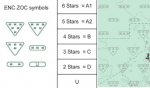
Similarly, is there any pleasure yacht electronic charting system showing the ZOC areas?
zoc.jpg

There are places where I prefer to have indications more like "There be dragons", rather than fictive contours with 1m spacing (commercially very appealing of course), or a neatly defined land a hundred meters away from where it is shown.
Just have to wait that Google buys a thousand Lidar to eventually add depth to their satellite images :)
 
I think no one would attempt to approach such places say by night or with fog relying on electronic charts alone.
Most pleasure market charts bear the indication "not to be used for navigation", at least they recognize the drawbacks.
Instead of a neatly defined island contour, why not make it very thick, or with a shaded area all around, in order to warn sailors generally using gps positions to one thousand of a minute ?
Similarly, is there any pleasure yacht electronic charting system showing the ZOC areas?
View attachment 128455

There are places where I prefer to have indications more like "There be dragons", rather than fictive contours with 1m spacing (commercially very appealing of course), or a neatly defined land a hundred meters away from where it is shown.
Just have to wait that Google buys a thousand Lidar to eventually add depth to their satellite images :)
Unfortunately, the cartographic depiction of uncertainty is difficult - I don't think I've seen or heard of a really convincing way to do it that improves on "Here be dragons" or "MMBA" (miles and miles of bloody Africa). Survey diagrams (which of course we all look at, don't we?) are pretty much as good as it gets. And from professional interest, I do look at survey diagrams when I can - but that is one thing that is lacking on vector charts. It's there in the base data, but of course, the redistributors strip it all out to save storage space. The dubiously legal but widely available CM93 charts show what should be available; if you get the object information up, there's a wealth of information that gives an indication of the reliability of the data. And, as others have hinted, the S63 data used in ECDIS systems has it all, too - indeed, S57 and its derivatives include an audit trail for all the data. So, the DATA are there, or could be; it's a means of depicting it that won't conflict with other cartographic requirements that is difficult.
 
So, the DATA are there, or could be; it's a means of depicting it that won't conflict with other cartographic requirements that is difficult.
With the availability of data in vector form (and seeing what it can do in professional charting systems, to be used by trained operators), is it a wild dream to think of electronic charts for the general public where "error" is included in the display (thicker lines/shaded areas, whatever for land), or systems to indicate when there is a written "4m" sounding in CatZoc 3 area it might be between 3 and 5-ish and at +-50m from the charted position, etc etc.
Hydro offices go to great lengths to provide a sort of error evaluation for the data they offer, it is a pity it all disappears in difficult to interpret data, or behind heavy disclaimers, or even worse in forgetting the error appraisal and derive data to provide fictitious accuracy.
A totally unmarketable product maybe :)
 
With the availability of data in vector form (and seeing what it can do in professional charting systems, to be used by trained operators), is it a wild dream to think of electronic charts for the general public where "error" is included in the display (thicker lines/shaded areas, whatever for land), or systems to indicate when there is a written "4m" sounding in CatZoc 3 area it might be between 3 and 5-ish and at +-50m from the charted position, etc etc.
Hydro offices go to great lengths to provide a sort of error evaluation for the data they offer, it is a pity it all disappears in difficult to interpret data, or behind heavy disclaimers, or even worse in forgetting the error appraisal and derive data to provide fictitious accuracy.
A totally unmarketable product maybe :)
The problem is not merely depicting error, but doing so in a manner that a) does not conflict with the essential information being conveyed and b) is reasonably intuitive. I've created maps depicting error - but that was all they did, as part of a wider analysis; the data were on separate maps. Charts have a high degree of conventional symbolisation, necessarily so. So you have to come up with something that doesn't conflict with any of that. Given that the standard key for charts is a document with many pages, that's a real problem. Point b) is about information density. Charts already present many dimensions of data (depths, navigational markers, hazards, legal and navigational boundaries etc.) Adding an extra one that will vary in its meaning according to the information being conveyed is a real problem, and it's got to be visually intuitive.

It's also worth bearing in mind that the uncertainty itself may have more than one dimension. For example, is the value of a sounding in error, or the position? Both could be in error. It's not hard to think of other examples where the error is at least two-dimensional; tidal streams (time, rate and direction) have three!

A further problem particular to charts is that they deliberately use a restricted colour palette to aid visibility in low light. So you have fewer options available to the cartographer.

I should say that I don't call myself a cartographer; I'm a Geographic Information specialist. But I've worked with cartographers for much of my career, and I've absorbed a fair amount of understanding!
 
I think no one would attempt to approach such places say by night or with fog relying on electronic charts alone.
Most pleasure market charts bear the indication "not to be used for navigation", at least they recognize the drawbacks.
Instead of a neatly defined island contour, why not make it very thick, or with a shaded area all around, in order to warn sailors generally using gps positions to one thousand of a minute ?
Similarly, is there any pleasure yacht electronic charting system showing the ZOC areas?

And yet, that seems almost precisely what that French patrol vessel had done. The charts were zoomed to an improper scale, insufficient allowance was made for the accuracy of the data, and the radar wasn't adjusted to tune out the clutter. One of the basic checks that should be done with new charts is to verify the datum (WGS84 or something else?), the intended scale (decent software will alert when over-zoomed), and the quality of the data (be it ZOC or a source diagram).

I'm not sure which, if any, recreational chartplotters support CATZOC overlay, but that's one of various reasons I don't consider them suitable for navigation. I do know that I can display it on my laptop, tablet, and even phone. And, since I see OpenCPN in your screenshot, from there it's only a keypress away (simply press 'u', for charts that include the data). IMO that overlay is quite reasonable, as you can instantly tell at a glance which areas need closer attention and how much of a buffer it might be wise to allot. Similarly the overzoom warning provides a hint that one has exceeded the chart's intended scale. This doesn't address the point raised by AntarcticPilot regarding the dimension of uncertainty, but that can be often be resolved by compass, radar, or depth sounder.

Regarding "professional charting systems, to be used by trained operators", in my opinion there isn't that great a difference in training someone to use paper charts effectively vs. training them to use electronic charts effectively. Electronic does not eliminate the need for training or knowledge, despite what dumbed-down software and marketing teams may imply.

checking.png
 
I don't understand much of what is in this thread?. (Insufficient brain power available)

A hint a friend gave me, which might have saved Vestas, is that when using Navionics, is to place a marker on obstacles which tend to dissapear except at lower zooms. These markers remain visible even when zoomed well out.
 
And yet, that seems almost precisely what that French patrol vessel had done. The charts were zoomed to an improper scale, insufficient allowance was made for the accuracy of the data, and the radar wasn't adjusted to tune out the clutter. One of the basic checks that should be done with new charts is to verify the datum (WGS84 or something else?), the intended scale (decent software will alert when over-zoomed), and the quality of the data (be it ZOC or a source diagram).

I'm not sure which, if any, recreational chartplotters support CATZOC overlay, but that's one of various reasons I don't consider them suitable for navigation. I do know that I can display it on my laptop, tablet, and even phone. And, since I see OpenCPN in your screenshot, from there it's only a keypress away (simply press 'u', for charts that include the data). IMO that overlay is quite reasonable, as you can instantly tell at a glance which areas need closer attention and how much of a buffer it might be wise to allot. Similarly the overzoom warning provides a hint that one has exceeded the chart's intended scale. This doesn't address the point raised by AntarcticPilot regarding the dimension of uncertainty, but that can be often be resolved by compass, radar, or depth sounder.

Regarding "professional charting systems, to be used by trained operators", in my opinion there isn't that great a difference in training someone to use paper charts effectively vs. training them to use electronic charts effectively. Electronic does not eliminate the need for training or knowledge, despite what dumbed-down software and marketing teams may imply.

View attachment 128467
I think that the essential thing with ANY navigational tool is to have at the back of your mind the idea that it MIGHT be wrong! I perform sanity checks as a matter of routine - simply comparing what I can see with what the chart-plotter says and making sure that the two can be reconciled. That's a lot of words to describe an almost automatic process! But if I can't reconcile what I can see with what the chart or chart-plotter says, that's when I start to be very cautious and consider alternatives.

Oliver Cromwell got it right when he said "I beseech you, in the bowels of Christ, to think it possible you may be mistaken"!
 
the essential thing with ANY navigational tool is to
learn how to use the tool you're using. Never assume it works like the tool you learned in the past. All of these tools are fit for purpose in my opinion, most of the complaints on this thread boil down to user error or lack of proper training/understanding.
The Titanic might have survived if they'd put the helm to the other side. Experience isn't always a good thing, it can turn against you when things change if you don't change with them.
 
learn how to use the tool you're using. Never assume it works like the tool you learned in the past. All of these tools are fit for purpose in my opinion, most of the complaints on this thread boil down to user error or lack of proper training/understanding.
The Titanic might have survived if they'd put the helm to the other side. Experience isn't always a good thing, it can turn against you when things change if you don't change with them.
Actually, the Titanic might well have survived if there had been no attempt to miss the iceberg. She could survive up to 4 compartments being flooded; the side-swipe opened up 5 or 6, and that was not survivable. But a head-on collision would probably not have opened so many, and she'd have remained afloat. People would undoubtedly have been killed or injured by the collision, but given the eventual casualty figures, it would probably have been a good trade. Then the lifeboats could have been used for what they were meant for - ferrying people to rescue vessels.
 
I don't understand much of what is in this thread
If you wish to learn a little more, this booklet by the Royal Institute of Navigation is very well made, they just require to answer a short survey before downloading it
https://rin.org.uk/page/ENav

They also provide a number of suggestions for improvements to manufacturers of navigation equipment for the leisure market,
https://cdn.ymaws.com/rin.org.uk/re...s/smallcraft/Recommendations_for_eNav_imp.pdf
you can make your own opinion as to what is available today :)

1 Chart data, presentation and software:

1.1 Leisure chart suppliers and IHO must agree some key standards for both the chart data and the operating systems for approved use on small vessels (pleasure and commercial). ECDIS provides a good example of how common standards, manufacturer independent, could underpin electronic leisure charts and systems if driven by regulators and/or commercial pressure.
1.2 It would be beneficial to leisure chart users if standard categories of accuracy (equivalent to zones of confidence) could be available to be presented in some simple way on electronic leisure charts. It should be user-configurable such that it could be turned on/off easily to reduce clutter.
1.3 In the same way, the date of the survey should be easily available, for example, at the beginning of a session, when the vessel crosses a category of accuracy boundary or by interrogating the chart.
1.4 Recent changes to CD in the Baltic have highlighted the importance of Chart Datum information being clearly presented on electronic charts at the start of that chart’s use.
1.5 Sufficient coastal topographical features should be displayed on all leisure charts to allow bearings to be taken.
1.6 An agreed standard presentation/standardised set of symbols across all leisure charts, conforming to IHO symbols.
1.7 There should be a clear indication when the zoom level is inappropriate for the available data (“overzooming”).
1.8 The date the chart was last updated in the installed card/memory should be clearly displayed at start-up. If the system is aware that updates are available the length overdue should also be displayed.
1.9 The ability of vector charts to ‘hide’ information, depending on levels of zoom, needs to be constrained (see Team Vestas Wind report*) e.g. shoals or TSSs. Standards of display can and should use the best features of both RASTER and vector charts. In particular, any area zoomed out should always show, and be coloured according to, the lowest depth (or highest drying height) within the area summarised to a smaller scale – i.e. to show any danger present which would be visible at a higher scale/level of zoom. *
1.10 Consideration could be given to the obliteration of all data below, say, 20 metres, apart from major contour lines, on leisure charts (if it saves production cost and memory).

2 Chart Display Systems (hardware):
2.1 All chart display systems should have a simple method of supporting chart data and software updates, ideally via direct downloads or downloads to a card for insertion in the equipment. These can and should be inexpensive and extend to legacy systems where possible. The update status of all the installed charts should be available through the system menus.
2.2 An agreed selection of key functions should be standardised across all leisure chart display systems. Possibly including an “S” mode button which would access a standard basic function menu and setup.
2.3 The ability to plot bearings easily on charted features in order to create position fixes is considered essential as a backup in case of loss of GNSS fix.
2.4 Verification of quality of the GNSS fix should be available and intuitively presented (NB HDoP values may not be understood by all users), for example a coloured dot at the corner of the screen.
2.5 If the system can operate in DR mode and is so doing (no GNSS fix) then this should be clearly shown on the screen.
2.6 It should be clear to the user, at all times, whether chart display systems are online only. Charts for navigational use should be installed on the device, not reliant on data transfer, and there should be clear differentiation – potential misunderstandings arise where ‘passage planning’ info suddenly becomes inaccessible at sea.

3 New Technology:

3.1 All 3 GLAs should consider extending the trial Irish Lights MetOcean data provision as it is a very useful source of near real-time local weather information for small craft users.
3.2 Manufacturers should consider how the GLA ePelorus system could be standardised in leisure systems either via an electronic hand-bearing compass or binoculars to enable the rapid addition of bearing lines to the electronic chart.
 
Top