Open CPN, UK charts. Admiralty & alternatives

That has nothing to do with vector/raster at all. It’s a warning that the system does not comply with legal requirements for navigation. Vector is the very clear winner and has many advantages when used properly.
The post that I was responding to "Raster charts are a bye product of creating paper charts which is ceasing in the near future." which I understood was in fact the case, indicates a connection between paper and raster disappearance, so it clearly has something to do with vector/raster.

I daresay vector does have many advantages, which I may eventually discover if I can ever get the bloody thing to do anything. So far aqtVlm (Eee, its a catchy tewn is that, they'll orl be wistlin it termorrer) has shown me a bit more function than OpenCPN, but it aint no walk in the park
 
No, I got them, but they are a proprietary vector format. I believe OpenCPN is supposed to be able to open them, and so they might be useful eventually, but I was thinking of starting with SeaClear if there were freebie charts for it, since it looked simpler. I'd buy them for actual use, but this is just an initial fiddle with the softwares.

Of course there are lots of freebie vector charts available. Havn't been able to get OpenCPN or qtVlm to do anything much yet, but its early days
In the past week I went from never having downloaded OpenCPN to up and running with O-Chart SENC vector charts for UK and Ireland in a few hours. All seemed pretty simple and smooth. They also have raster charts if preferred.
Using for planning rather than at helm navigating (have 2 Raymarine plotters with Navionics on board), but many others do seem to use OpenCPN for this with no issues.
 
I'm the UK, the coastguard has just published the small vessel ECS specification which removes not for navigation warnings - and most of the chart content useful to small vessels.
Have you read the detail on this - and as this thread was about charts, read the chart requirements for SV-ECS. This mandates only formal ENCs, as used by large commercial ships.
Worth researching the prices for these as from what I am hearing on other places, the costs seem closer to south coast marina fees than what you might be paying for charts today!
 
Have you read the detail on this - and as this thread was about charts, read the chart requirements for SV-ECS. This mandates only formal ENCs, as used by large commercial ships.
Worth researching the prices for these as from what I am hearing on other places, the costs seem closer to south coast marina fees than what you might be paying for charts today!
I have, the spec won't work for what the RYA are intending. ECS can only have Government agency data - so no harbour master, marina owner or private survey (most of the shallow water data in use in commercial charts) and as you say is eye wateringly expensive
 
...
I daresay vector does have many advantages, which I may eventually discover if I can ever get the bloody thing to do anything. So far aqtVlm (Eee, its a catchy tewn is that, they'll orl be wistlin it termorrer) has shown me a bit more function than OpenCPN, but it aint no walk in the park
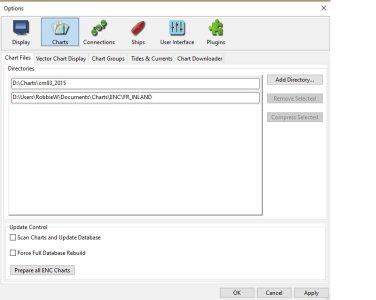
Lets check the basic with OCPN. Have you added the cm93 charts to the set OCPN can use ? You should see an options screen that looks something like this with your chart locations listed. Also, the file needs to unzipped so that you get a top level of folders with 8 digit numbers, each of which has a number of folders beneath.
OCPN Charts.jpg
 
Thanks. I'll get back to it, but for the moment (unless I stumble upon some charts I can use with SeaClear) I'm going to stick with qtVlm, which seems to work a bit with the free ENC download from the Hong Kong Hydrographic Office,
 
Thanks. I'll get back to it, but for the moment (unless I stumble upon some charts I can use with SeaClear) I'm going to stick with qtVlm, which seems to work a bit with the free ENC download from the Hong Kong Hydrographic Office,

Interesting ... I still use Seaclear at times - especially for rough planning. It was one of the first PC based to accept not only GPS input - but AIS and other data as well.
I started the Seaclear Owners Group, agreed with Olle the author - but later Yahoo shut down their support of groups.
 
Could you list the advantages?
Probably not comprehensively, but they require fewer updates since it’s a single data set. All chart features are always available regardless of zoom level and are configurable. Nothing is hidden if you’re at the wrong zoom level. You don’t cross a boundary and suddenly lose resolution of data. Zooming in doesn’t pixelate them and zooming out doesn’t make them unreadable.
I’m sure there are others but that’s off the top of my head. Raster only have the benefit of a human curating the information, but that’s not always a benefit since they may not value what you wanted to see.
 
The post that I was responding to "Raster charts are a bye product of creating paper charts which is ceasing in the near future." which I understood was in fact the case, indicates a connection between paper and raster disappearance, so it clearly has something to do with vector/raster.
You’re conflating different things. The warning on a plotter is specifically because the law requires things it cannot currently provide. That’s currently true regardless of the chart type.
There are aspects of the proposed spec which may require specific charts, but that’s not got anything to do with the warning and is not yet the law. The proposal is for specific chart sources rather than types as far as I can tell. It would be surprising if the law changed to allow plotter use on private pleasure vessels but excluded all current chart providers who offer mainstream charts for those devices. The proposal is for small commercial vessels, which is a very different thing.
 
Probably not comprehensively, but they require fewer updates since it’s a single data set. All chart features are always available regardless of zoom level and are configurable. Nothing is hidden if you’re at the wrong zoom level. You don’t cross a boundary and suddenly lose resolution of data. Zooming in doesn’t pixelate them and zooming out doesn’t make them unreadable.
I’m sure there are others but that’s off the top of my head. Raster only have the benefit of a human curating the information, but that’s not always a benefit since they may not value what you wanted to see.
Thank you. Why do they require fewer updates? Do you mean an update needs to correct several raster charts because they are of the same area at different scales?

I was hoping for a few more advantages. I use both raster and vector. On the raster there is no boundary issue, lose of resolution or pixelation on the platform I use. Perhaps other platforms do fail.

Can I ask: do you ever check to see if any echart is properly updated - by which I mean a change is updated promptly, fully and correctly?
A final question: When you are planning a passage plan on vector echart, what zoom level do you use? Do you mix and match difference zoom levels when make a plan?

Thanks.
 
Thank you. Why do they require fewer updates? Do you mean an update needs to correct several raster charts because they are of the same area at different scales?

I was hoping for a few more advantages. I use both raster and vector. On the raster there is no boundary issue, lose of resolution or pixelation on the platform I use. Perhaps other platforms do fail.

Can I ask: do you ever check to see if any echart is properly updated - by which I mean a change is updated promptly, fully and correctly?
A final question: When you are planning a passage plan on vector echart, what zoom level do you use? Do you mix and match difference zoom levels when make a plan?

Thanks.
I think the dynamic interactivity is an oft quoted advantage, as per, for example, clicking on an object (which couldn't exist as an object on a raster chart, it'd just be an undifferentiated region of pixels ) and getting some notes pop up. Thats just my theoretical understanding, though. Havn't actually seen it.
 
I think the dynamic interactivity is an oft quoted advantage, as per, for example, clicking on an object (which couldn't exist as an object on a raster chart, it'd just be an undifferentiated region of pixels ) and getting some notes pop up. Thats just my theoretical understanding, though. Havn't actually seen it.
That is correct, and the CM93 dataset displays its full advantages - clicking on any object gives full data about the object and also source information. However, the reduced set of attributes provided by more current data sources also includes many things that a raster image can't. Of course, CM93 was originally ECDIS compatible.

A raster image can also degrade unpredictably when zoomed out; ornamentation of lines or filled areas can be obscured or changed, and small objects or thin lines can even be removed entirely. This is a result of resampling and as resampling will be carried out differently in different systems (nearest neighbour, averaging, weighted average and others!), it is totally unpredictable and not under the control of the user.

Another advantage is that the display of a vector dataset can be changed to accommodate various viewing situations; raster can't (except by being brighter or darker). So a vector dataset can switch to colours suitable for night time use; raster can't. This is so common that it's quite usual on car satnavs!

A characteristic of vector datasets to be used with caution is that the user can select which objects to display. Of course, systems should (and mostly do) limit this capacity, so that safety-critical features are not removed. But you can de-clutter a vector dataset; you can't do so for a raster dataset. But in many areas, it's convenient to remove features that are irrelevant to a yacht.

I don't think I've seen it used, but a vector chart would allow features to be highlighted and perhaps an alarm sounded if they pose a hazard if the vessel continues on its present course.
 
Probably not comprehensively, but they require fewer updates since it’s a single data set. All chart features are always available regardless of zoom level and are configurable. Nothing is hidden if you’re at the wrong zoom level. You don’t cross a boundary and suddenly lose resolution of data. Zooming in doesn’t pixelate them and zooming out doesn’t make them unreadable.
I’m sure there are others but that’s off the top of my head. Raster only have the benefit of a human curating the information, but that’s not always a benefit since they may not value what you wanted to see.

Just like to comment :

Vector does not Pixellate regardless of zoom level .... but "All chart features are always available regardless of zoom level" is not actually true for commercial Vector charts. As you change zoom level - the data displayed on screen can change ... user can configure to keep various - but not all.
Raster are based on a single graphic and this makes them poor for zooming in and out ... Vector are based on layers and many of the layers can be turned ON .. OFF as desired.

But there is one aspect of Vector charts that some do not appreciate : Just because you can zoom in very high level ... the data does not improve as in depths etc. Soundings and bottom / rocks - will not magically appear because you zoomed in.

One point though :

Both Raster and Vector (Commercial Professional) have the same source information. It is how its presented in final form that is different.
 
The post that I was responding to "Raster charts are a bye product of creating paper charts which is ceasing in the near future." which I understood was in fact the case, indicates a connection between paper and raster disappearance, so it clearly has something to do with vector/raster.

I daresay vector does have many advantages, which I may eventually discover if I can ever get the bloody thing to do anything. So far aqtVlm (Eee, its a catchy tewn is that, they'll orl be wistlin it termorrer) has shown me a bit more function than OpenCPN, but it aint no walk in the park

Both Vector and Raster are produced from same source material.

ALL charts were based on engraved plates at HO's ... this then produced the Paper Charts we all know. This then changed to digital version with plates phased out. The Digital were then used to produce Paper and Raster charts. It was a logical step to vectorise the charts as the data information used in vectors is layered and this means HO correction is far simpler as they do not need to correct whole chart for a simple change - it can be just the layer ... as the layers are treated as 'overlays'.

I know many people do not like the 'look' of vector charts - preferring the more 'artistic' raster form where it relates to the paper chart in looks.
 
On the raster there is no boundary issue, lose of resolution or pixelation on the platform I use. Perhaps other platforms do fail.

Interested to know what charting program does not pixellate Raster ?? The format of Raster makes it impossible not to pixellate if you zoom out too far. But always ready to be corrected .....
 
I think the dynamic interactivity is an oft quoted advantage, as per, for example, clicking on an object (which couldn't exist as an object on a raster chart, it'd just be an undifferentiated region of pixels ) and getting some notes pop up. Thats just my theoretical understanding, though. Havn't actually seen it.

Correct .... you can place cursor over an object on a Vector Chart and have a small dialogue box pop up saying rock drying at xx etc etc ...

Raster will not do this.
 
I don't think I've seen it used, but a vector chart would allow features to be highlighted and perhaps an alarm sounded if they pose a hazard if the vessel continues on its present course.

A variation of this actually is used in Navionics ..... depending on User set parameters ... ie - when constructing a route plan - it can trigger a warning of shallows .....

CM93 does not in any of the 'yachties' setups ! In fact I cannot even remember seeing such in the full Commercial Setup we use in my work ..
 
Nothing is hidden if you’re at the wrong zoom level. You don’t cross a boundary and suddenly lose resolution of data.
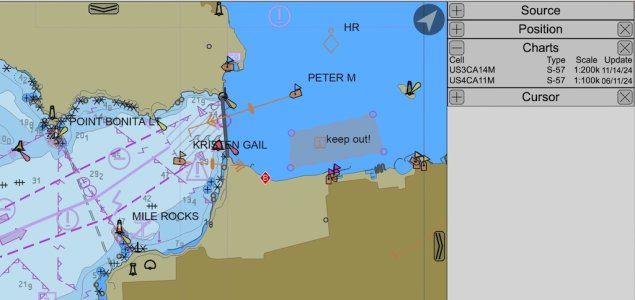
Eh, this is quite possible. Here's one annoying example; the right-hand side is a 1:200k scale chart, and the next-most-detailed chart is 1:40k, so you need to zoom in a bit more before it kicks in. (This is really app-dependent, with some allowing you to override the default selection.)
vectors-2.jpg
I don't think I've seen it used, but a vector chart would allow features to be highlighted and perhaps an alarm sounded if they pose a hazard if the vessel continues on its present course.
For this I'd just draw an area (as shown above) and tick the box to enable an entry or exit alarm as appropriate.

What else... ah, pricing. It generally seems to be often similar to that of paper charts, sometimes cheaper (particularly if you only take out a 3 month subscription rather than a full year). This is also why you have similar zoom issues to raster; if I purchase only 1:200k scale ENCs covering the Solent, many details on the 1:20k harbour charts won't be included. Each ENC has a compilation scale, similar in concept to the scale on a raster chart, reflecting similar decisions about which features to include, omit, or modify (e.g. portraying a reef as an area vs as a point feature).

In terms of strengths and weaknesses, raster charts require fitting explanatory notes somewhere on the chart. That doesn't work so well on a screen where many charts are tiled together. Thus, being able to query an object directly makes far more sense than having to hunt for the open patch where the cartographer could fit the data.
 
; if I purchase only 1:200k scale ENCs covering the Solent, many details on the 1:20k harbour charts won't be included.
I think it's can't rather than won't. Many harbour plans added on small craft charts or commercial packages like Navionics come from harbour authorities or marina operators. Really useful stuff for yachties. But the international standard, and the new UK Small Craft spec. doesn't allow this data to be on a chart - government agencies only.
 
Thank you. Why do they require fewer updates? Do you mean an update needs to correct several raster charts because they are of the same area at different scales?

I was hoping for a few more advantages. I use both raster and vector. On the raster there is no boundary issue, lose of resolution or pixelation on the platform I use. Perhaps other platforms do fail.

Can I ask: do you ever check to see if any echart is properly updated - by which I mean a change is updated promptly, fully and correctly?
A final question: When you are planning a passage plan on vector echart, what zoom level do you use? Do you mix and match difference zoom levels when make a plan?

Thanks.
Yes with vector there’s one set of data that scales to all views and the display decides what to show based on user preferences. With raster you’re reliant on someone redrawing every zoom level.
The boundary issues are there, you just may not have noticed them. Zoom in on a harbour and then scroll out to sea and at some point you’ll see detail drop away since raster charts don’t do detail for the whole ocean.
Nothing I do with charts is reliant on immediate updates that I can think of. I don’t know anyone on a private boat in the real world who updated paper charts regularly, and I don’t believe raster charts are necessarily updated faster than vector so this is a non issue as far as I’m concerned. In theory vector can be updated fastest since it doesn’t require an artist to place the items and make decisions, the data is just updated.
 
Top