Hurricane
Well-Known Member
I had a spare Raspberry Pi so I thought I'd have a go installing a new (to me) distro called OpenPlotter.
Essentially, OpenPlotter is a Linux Distribution that gathers together a number of software projects into one place.
The main project component is OpenCPN which I have been using for a few years in a live environment on our Princess.
There are also a number of other useful utilities included in the distribution.
It is dead easy to install - all you need is a computer attached to the internet to download the necessary software and install it onto a microSD card.
Then you just assemble the parts and switch on.
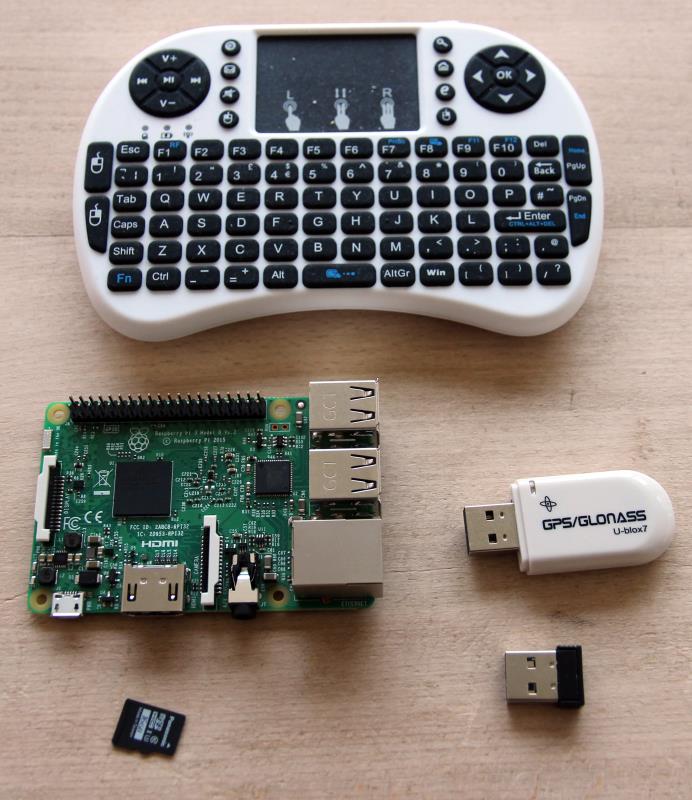
The parts I used are:-
A Raspberry Pi 3 Model B
An 8Gb microSD card
A cheap keyboard
and a GPS dongle.
I'll provide links later to where the parts can be bought.
Here is a pic of all the parts.
The software installation process is described simply in the download.
Here is a link to the OpenPlotter web site.
http://www.sailoog.com/en/openplotter
You will need a microSD card reader but, essentially, you download a free formatting program, format a microSD card and copy the project files onto it.
Then you connect it up to a monitor or TV, power it from a USB power supply and there you have it - a fully functioning plotter.
OK - I know that it will need a case/box and a TV/monitor isn't for external use but this test was designed to see how cheap a plotter could be made.
Maybe the Raspberry Pi could be stuck inside or to the back of a marine monitor or domestic TV.
I have a friend in Sant Carles who has a secondary TV mounted inside his cabin facing out so that he can see the display at the helm.
Anyway, I put this together to see how well it works and how cheap it could be - not to make it robust to use as a main plotter.
I copied all my OpenCPN charts from my ships systems and then took these screen shots:-
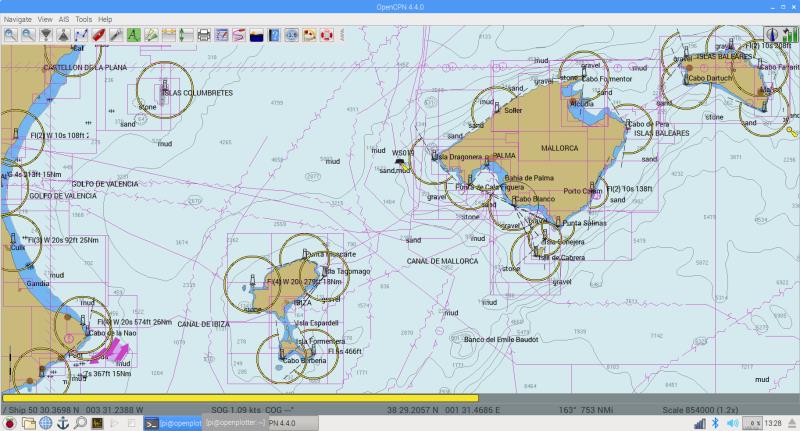
There is enough space on the microSD card to load the vector charts for the whole world - this is a view of the Balearics.
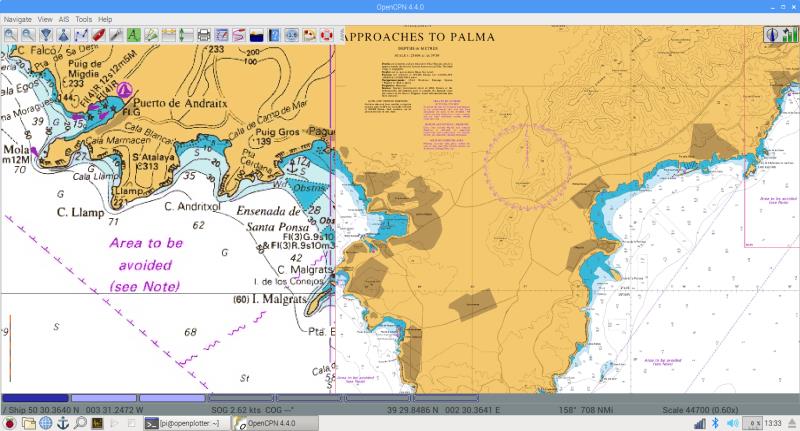
And this shows some British Admiralty charts on Mallorca - note charts at different scales are "quilted" together.
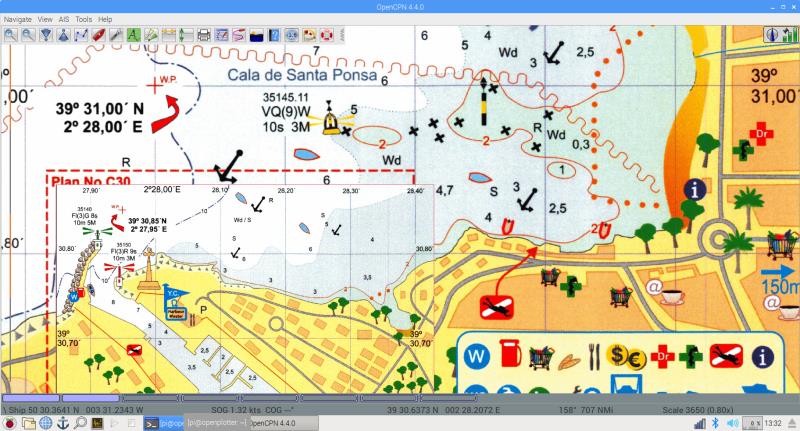
And some zoomed in to local chartlets that have been georeferenced so that they work accurately.
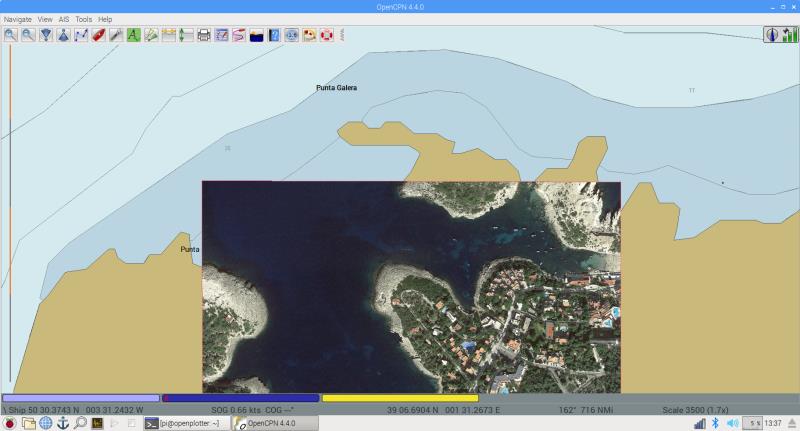
The software also worked with my own accurately georeferenced Google Maps overlays - this one of Portinatx in Ibiza
So, how well did it work.
To be honest, it is a lot slower than my ship's PC but it is fast enough to be useful if someone wants to make a really low cost plotter.
Panning is ok - zooming in can take half a second or so to draw the screen.
However, I have seen some commercial plotters that are slower so maybe I'm being a bit unfair.
And you have to remember that this is a complete plotter system with charts in a credit card sized microprocessor.
Other software
There are a number of other features that come with it.
These new Raspberry Pis have WiFi built in so you can connect to the internet using (say) the marina WiFi.
Chromium is supplied so browsing the internet is just like using a desktop computer.
The Linux desktop environment is very like Windows - I moved the task bar from the top and put it at the bottom of the screen - it then works just like Windows.
Once running, anyone familiar with Windows would be able to use it straight away.
A useful extra that has been added is a program called ZyGrib.
Some will know that Grib files are a standard format used to transmit weather forecasts round the internet.
ZyGrib is a nice little interactive reader/displayer that allows you to download the latest set of Grib files for a particular area and display them graphically.
The latest set of Grib files provides weather forecasts for a few days ahead.
The beauty of this concept is that once downloaded, the Grib files can be used off line - at sea for example.
Here is an example of the Raspberry Pi's ZyGrib display.

I wanted to put this system together as a challenge to make the cheapest plotter.
So, here is a list of the components and their costs.
The Raspberry Pi itself £32
from here:- https://thepihut.com/collections/raspberry-pi/products/raspberry-pi-3-model-b
A GPS Dongle £12.95
http://www.ebay.co.uk/itm/112340945352?_trksid=p2057872.m2749.l2649&ssPageName=STRK:MEBIDX:IT
A cheap keyboard/pointer device £6.98
http://www.ebay.co.uk/itm/2-4G-Mini...478876?hash=item2100a11a9c:g:WhkAAOSwr~lYq~-z
An 8Gb microSD card £4.21
(bigger one might be better but this project is all about being cheap)
http://www.ebay.co.uk/itm/8GB-Kings...hash=item4d4fc5e337:m:mBtd8mF9Eeh-9oZbq_FGoZw
That makes the whole lot £56.14 - all components new and available now.
I have excluded the monitor/TV and power supply from my costs - as explained above.
Anyway, I wanted to build this as an exercise.
So, could it be used in anger - yes, I think it could but I will be sticking with my "power hungry" ships PC.
Once I'd built it, I thought it might be interesting to post it on here.
Essentially, OpenPlotter is a Linux Distribution that gathers together a number of software projects into one place.
The main project component is OpenCPN which I have been using for a few years in a live environment on our Princess.
There are also a number of other useful utilities included in the distribution.
It is dead easy to install - all you need is a computer attached to the internet to download the necessary software and install it onto a microSD card.
Then you just assemble the parts and switch on.
The parts I used are:-
A Raspberry Pi 3 Model B
An 8Gb microSD card
A cheap keyboard
and a GPS dongle.
I'll provide links later to where the parts can be bought.
Here is a pic of all the parts.
The software installation process is described simply in the download.
Here is a link to the OpenPlotter web site.
http://www.sailoog.com/en/openplotter
You will need a microSD card reader but, essentially, you download a free formatting program, format a microSD card and copy the project files onto it.
Then you connect it up to a monitor or TV, power it from a USB power supply and there you have it - a fully functioning plotter.
OK - I know that it will need a case/box and a TV/monitor isn't for external use but this test was designed to see how cheap a plotter could be made.
Maybe the Raspberry Pi could be stuck inside or to the back of a marine monitor or domestic TV.
I have a friend in Sant Carles who has a secondary TV mounted inside his cabin facing out so that he can see the display at the helm.
Anyway, I put this together to see how well it works and how cheap it could be - not to make it robust to use as a main plotter.
I copied all my OpenCPN charts from my ships systems and then took these screen shots:-
There is enough space on the microSD card to load the vector charts for the whole world - this is a view of the Balearics.
And this shows some British Admiralty charts on Mallorca - note charts at different scales are "quilted" together.
And some zoomed in to local chartlets that have been georeferenced so that they work accurately.
The software also worked with my own accurately georeferenced Google Maps overlays - this one of Portinatx in Ibiza
So, how well did it work.
To be honest, it is a lot slower than my ship's PC but it is fast enough to be useful if someone wants to make a really low cost plotter.
Panning is ok - zooming in can take half a second or so to draw the screen.
However, I have seen some commercial plotters that are slower so maybe I'm being a bit unfair.
And you have to remember that this is a complete plotter system with charts in a credit card sized microprocessor.
Other software
There are a number of other features that come with it.
These new Raspberry Pis have WiFi built in so you can connect to the internet using (say) the marina WiFi.
Chromium is supplied so browsing the internet is just like using a desktop computer.
The Linux desktop environment is very like Windows - I moved the task bar from the top and put it at the bottom of the screen - it then works just like Windows.
Once running, anyone familiar with Windows would be able to use it straight away.
A useful extra that has been added is a program called ZyGrib.
Some will know that Grib files are a standard format used to transmit weather forecasts round the internet.
ZyGrib is a nice little interactive reader/displayer that allows you to download the latest set of Grib files for a particular area and display them graphically.
The latest set of Grib files provides weather forecasts for a few days ahead.
The beauty of this concept is that once downloaded, the Grib files can be used off line - at sea for example.
Here is an example of the Raspberry Pi's ZyGrib display.
I wanted to put this system together as a challenge to make the cheapest plotter.
So, here is a list of the components and their costs.
The Raspberry Pi itself £32
from here:- https://thepihut.com/collections/raspberry-pi/products/raspberry-pi-3-model-b
A GPS Dongle £12.95
http://www.ebay.co.uk/itm/112340945352?_trksid=p2057872.m2749.l2649&ssPageName=STRK:MEBIDX:IT
A cheap keyboard/pointer device £6.98
http://www.ebay.co.uk/itm/2-4G-Mini...478876?hash=item2100a11a9c:g:WhkAAOSwr~lYq~-z
An 8Gb microSD card £4.21
(bigger one might be better but this project is all about being cheap)
http://www.ebay.co.uk/itm/8GB-Kings...hash=item4d4fc5e337:m:mBtd8mF9Eeh-9oZbq_FGoZw
That makes the whole lot £56.14 - all components new and available now.
I have excluded the monitor/TV and power supply from my costs - as explained above.
Anyway, I wanted to build this as an exercise.
So, could it be used in anger - yes, I think it could but I will be sticking with my "power hungry" ships PC.
Once I'd built it, I thought it might be interesting to post it on here.
Last edited: