
A challenge to make a cheap plotter for under £60

I have a load of old OS qct maps I'd like to try in opencpn, any chance of a copy of the converter program please?
If they are the old QCT Version 2 format (note not the newer QCT 3 format), my conversion application might work but there is a limit if the .QCT file is a large one.
Thankfully all the chart files that I used were quite small and all worked quite well.

As said above, I don't run Windows anymore and I wrote my conversion program whilst I was using Windows.
So, I dug it out and hey ho - it runs under Wine under Linux (so TwoHooter - Wine does work!!!)
I too have lots of old OS .QCT format maps so I dug out my old converter and picked an OS map of Dartmoor.
I then "racked my brains" to remember how my conversion program worked and this was the result.
An OS map of Dartmoor running inside OpenCPN
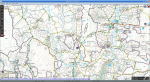
Screenshot_2021-11-10_18-10-31.resized.png

How good is that!!!
Shame my boat doesn't go on land!!

Send me a PM if you want to take it any further.
 
Yes, I can't understand how people manage to use touch screens at sea - on a trip last year to Mallorca delivering a Sealine with a touchscreen plotter, I spent most of my time swearing at it because every time I wanted to make an adjustment, I seemed to press the wrong part of the screen.
The best solution I've found is the controller that I have on my boat - Raymarine wireless controllers that you hold in your hands and as a result, you don't inadvertently press the wrong button as the boat moves.
These are the ones that I have:-
Monitor_Keyboard_Group.jpg


Linux Starting Point
I suggest that you start with the Manjaro Linux distribution.
Virtually all the applications can be installed using the Pamac Package Manager which had a GUI and is dead easy to use.
For example, OpenCPN needs to be compiled but Pamac automatically does all this with a click of a button.
We used the Linux Mint Distribution when we did that workshop 4 or 5 years ago but I think Manjaro is a bit more intuitive.
I suggest that you give it a try anyway.
Let me know if you have any questions.

Visit My Harbours Charts for Linux
What software do you use for the VMH charts?
IIRC, VMH used to supply charts that were compatible with the Memory Map software.
It may be possible to run whatever software you use under Wine which enables Windows applications to run under Linux.
For example, I run Photoshop for Windows and the Reolink cameras on my Lunux machines using Wine.
I use OpenPlotter as a one package option to get OpenCPN on the Pi, what's the advantage of using Manjaro?
 
I forgot the other big thing about monitors which you get from the marine electronics companies - screen dimming.
No point in having a really bright sunlight-readable screen at night!
I use Display Fusion to dim my monitors at night.
What do others use?
I have not done a night trip with one of my main monitor solutions yet, but both have dimmable displays. Does OpenCPN have a night mode? I used Nobeltec prior to OpenCPN - that had a night palette which worked reasonably well. The 12 inch displays I bought actually have a proper variable brightness backlights on a separate rotary control.
 
I use OpenPlotter as a one package option to get OpenCPN on the Pi, what's the advantage of using Manjaro?
None at the moment - the Manjaro ARM build for the Raspberry Pi is 64bit and the OpenCPN oeSenc chart module hasn't been written for 64bit yet.
So oeSenc charts won't work on the Raspberry Pi under Manjaro at the moment.

OpenPlotter gives you a complete package with a load of other stuff - most of which I wouldn't myself use.
If I were to build a working system for the Raspberry Pi, I would probably use the 32bit Raspberry Pi OS (formally Raspbian) and install OpenCPN onto it separately.
I prefer to install my own software - that way, I know what is actually installed.
However, I am a great fan of Manjaro for the PC (x86) computers and it is nice to have my Raspberry Pi systems using the same Linux distrobution.
Thats why I've been mentioning Manjaro a lot.

OpenPlotter used to include a really good piece of software - Kplex
I don't know if they still do but Kplex is really good at distributing NMEA data around the boat.
For example Kplex can take a NMEA 0183 channel and send it to other devices - even via WiFi.
So, you could feed AIS signals into Kplex and pick them up on a tablet of phone.
It can also multiplex multiple NMEA channels into a single NMEA stream and/or allow multiple devices to access the same NMEA data.
Only runs under Linux but there is an ARM Raspberry Pi build as well as a PC (x86) version.
I use it a lot.
For fun, during lock down, I rewrote my "talking logger" to work under Linux.
I tested it on the boat's computer remotely from home but I couldn't start up the boat's full Nav system remotely.
So, I used Kplex to collect NMEA data (GPS etc data) here at home and feed it to the boat over the internet.
Kplex worked really well and I was able to test my application on the boat without actually being there.
 
Top