Volvo EVC 2.5inch Display

wakeup

Well-Known Member
Joined
5 Mar 2002
Messages
3,033
Location
Cote d'Azur
Visit site
HI, I have a D4 EVC (a) boat. I was thinking about adding the EVC 2.5inch display to be able to access a few more readings than I can currently get out of my gauges.

Do any of the volvo experts out there know if this unit will work with EVC (a)?
 
HI, I have a D4 EVC (a) boat. I was thinking about adding the EVC 2.5inch display to be able to access a few more readings than I can currently get out of my gauges.

Do any of the volvo experts out there know if this unit will work with EVC (a)?

Wakeup I have had both evcA and C boats with these displays retrofitted by me and you have to get the right display. They look the same from the front (same size as raymarine 110mm sq displays, 4 buttons along the bottom) but the part number and functionality are differnet. There is a specific part number for the A version. (You can still connect speed to it and get a litres per mile readout iirc)

All iirc
 
EVC display

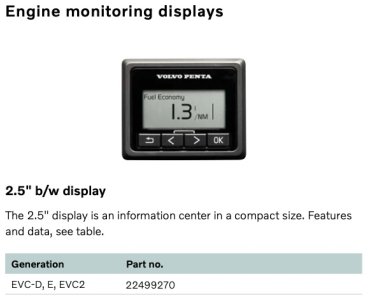
2.5inch display is an EVC-D & later item-no retrofit to EVC-C3 or earlier. It's a rectangular display with 4 buttons (a back button, left arrow, right arrow, OK button). It displays digital readout of engine parameters, including fuel info if activated.

JFM is referring to a 4" display, and is correct, there is a 4" screen available for all EVC generations, with the latest colour version only being suitable for EVC-D & later. You would need to order the correct screen for your EVC generation, so would need your 10 digit serial number or Chassis ID number (starting 'VV' for your engines I guess) to ensure of what the generation is. Serial number & possibly the Chassis ID should be on the engine cover. If not they may be on the stickers on the PCU or HCU. If they are silver boxes then it's EVC-A, plastic boxes could be B or C. A dealer will tell you in minutes if there is any doubt which system you've got.

The system may well need auto-configuring when you have plugged the screen in, as it allows everything to communicate with everything else. Finally, it may be worth asking of there are any updates available for your EVC system so that you can get those done at the same time to ensure everything works as it should when the screen is plugged in-not essential though.

Andy
 
Thanks all for the very detailed replies, very useful information thanks Andyroot.

I am very sure that I don't have shiny silver HCU and PCU boxes. I am sure that they are black plastic so I guess that means I probably have an EVC b boat circa (2006) does that sound about right?

I will talk to my dealer re version number. Is it easy to upgrade the EVC versions? I guess the PCU and HCU would both need upgrading. I guess Volvo don't give this away for free?
 
Hi

EVC-B Cannot be upgraded without changing hardware - you'd need a new HCU, PCU, tacho & button panel, and that would only get it as far as EVC-C. Your only option I guess is to get the 4" display suitable for EVC-B. Let me know your serial numbers & I'll be able to check generations & suitable part numbers if you'd like.

Andy
 
Hi

EVC-B Cannot be upgraded without changing hardware - you'd need a new HCU, PCU, tacho & button panel, and that would only get it as far as EVC-C. Your only option I guess is to get the 4" display suitable for EVC-B. Let me know your serial numbers & I'll be able to check generations & suitable part numbers if you'd like.

Andy

Thanks, I'll look this weekend. I suspect it won't be worth the £ for the amount of extra info I would get. Would I get better performance from an upgraded HCU and PCU?
 
Anyroonot thanks for the correction. Yes i was referring to the 4inch square display and didn't know about the newer 2.5inch. When wakeup said 2.5inch I thought he was referring to the LCD panel within the 4 inch display, which must be about 2.5 inch I guessed! Anyway thanks for the orrection

Wakeup the best/simplest for you would be to fit the 4 inch dispplay that is compatible with your B version of EVC, surely? Gives plenty of info, including fuel management data. One displaly works fine for 2 engines; you dont need 2 displays
 
Anyroonot thanks for the correction. Yes i was referring to the 4inch square display and didn't know about the newer 2.5inch. When wakeup said 2.5inch I thought he was referring to the LCD panel within the 4 inch display, which must be about 2.5 inch I guessed! Anyway thanks for the orrection

Wakeup the best/simplest for you would be to fit the 4 inch dispplay that is compatible with your B version of EVC, surely? Gives plenty of info, including fuel management data. One displaly works fine for 2 engines; you dont need 2 displays

JFM agreed re 4 inch. The reason I was considering the 2.5inch is that I have room on my dash area for it whereas I will have to move an instrument to fit the 4inch. But that I can see now that is easier than upgrading PCU and HCU. So I will look at the 4inch version. Thanks.
 
Anyroonot thanks for the correction. Yes i was referring to the 4inch square display and didn't know about the newer 2.5inch. When wakeup said 2.5inch I thought he was referring to the LCD panel within the 4 inch display, which must be about 2.5 inch I guessed! Anyway thanks for the orrection

Wakeup the best/simplest for you would be to fit the 4 inch dispplay that is compatible with your B version of EVC, surely? Gives plenty of info, including fuel management data. One displaly works fine for 2 engines; you dont need 2 displays

Just about to order 4 inch display. 2.5 inch display £200. 4inch display £800! For a monochrome display. I'd rather buy a dedicated helm iPad, screw it to the dashboard and buy an interface to the EVC network if one existed.

Common Volvo £800 for a 4 inch crappy display.
 
Just about to order 4 inch display. 2.5 inch display £200. 4inch display £800! For a monochrome display. I'd rather buy a dedicated helm iPad, screw it to the dashboard and buy an interface to the EVC network if one existed.

Common Volvo £800 for a 4 inch crappy display.

Yup crazy price. Both mine were that price. The display is a generic item bought in by Volvo for £30 and they squirt their software into it- you see the same unit in other applications. About £750 gross margin
 
Yup crazy price. Both mine were that price. The display is a generic item bought in by Volvo for £30 and they squirt their software into it- you see the same unit in other applications. About £750 gross margin

I would have bought it for £300 but not £800 as on a boat of my size and value no point really.
 
Hi all— Apolgoies for resurrecting this 12 year old thread but I too have purchased one of these 2.5 inch Penta displays and want to hook it up to my D2-60F. Can anyone confirm whether it connects to the Multilink or the Panel cable? They both lead back into the MDI box and have identical 6-pin connectors.

I tried unplugging my tach and plugging the display into that Multilink cable, as a test, but the system wouldn’t turn on.

So I bought a Y-adapter and plugged that into the Panel cable but same thing — system does not respond when pressing ON/OFF. However, the Y-cable was quite old and it’s possible one of the connections was bad, causing the issue.

The trouble is the unit didn’t come with any instructions, so I don’t even know which network I should be troubleshooting here.

Any help much appreciated!
 
Hi all— Apolgoies for resurrecting this 12 year old thread but I too have purchased one of these 2.5 inch Penta displays and want to hook it up to my D2-60F. Can anyone confirm whether it connects to the Multilink or the Panel cable? They both lead back into the MDI box and have identical 6-pin connectors.

I tried unplugging my tach and plugging the display into that Multilink cable, as a test, but the system wouldn’t turn on.

So I bought a Y-adapter and plugged that into the Panel cable but same thing — system does not respond when pressing ON/OFF. However, the Y-cable was quite old and it’s possible one of the connections was bad, causing the issue.

The trouble is the unit didn’t come with any instructions, so I don’t even know which network I should be troubleshooting here.

Any help much appreciated!
I found some helpful info in the installation manual for the engine. It seems to confirm that the 2.5" display connects via the Multilink network, which is what I would expect. I purchased a Multilink Y-adapter and will see if that works.
 
Do you definitely mean the 2.5” display with 4 buttons on the bottom, or do you mean the 4” display with 5 buttons on the bottom?
A photo would be good if in doubt
The 2.5” display will not work with a D2-60
 
Do you definitely mean the 2.5” display with 4 buttons on the bottom, or do you mean the 4” display with 5 buttons on the bottom?
A photo would be good if in doubt
The 2.5” display will not work with a D2-60
Oh... darn. I definitely mean the 2.5" with the 4 buttons across the bottom. Why do you think it won't work? Volvo's product brochure claims that it does (albeit not all readings will work because the D2 line is lacking some of the associated sensors, e.g. oil pressure). Would not be shocking if their brochure was incorrect.
 
Oh... darn. I definitely mean the 2.5" with the 4 buttons across the bottom. Why do you think it won't work? Volvo's product brochure claims that it does (albeit not all readings will work because the D2 line is lacking some of the associated sensors, e.g. oil pressure). Would not be shocking if their brochure was incorrect.
I will double check but I’m pretty certain it’s not an option, as they are only for EVC-D and onwards.
Do you have a copy of the brochure, or could you send a photo? If it states that it’s compatible then I believe that is wrong and so will raise it with them!
 
I will double check but I’m pretty certain it’s not an option, as they are only for EVC-D and onwards.
Do you have a copy of the brochure, or could you send a photo? If it states that it’s compatible then I believe that is wrong and so will raise it with them!
The more closely I look, the more I think you are correct. This is the only thing I could find that "may" indicate support. I thought I had seen another brochure that listed some (limited) support for D1/D2, but now I cannot find it.
 

Attachments

  • penta-display.jpg
    penta-display.jpg
    49.3 KB · Views: 9
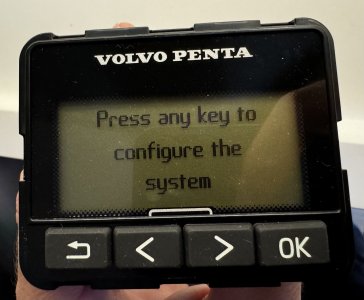
It does not seem to work. While it powers up, there is no way to get past this screen. Pressing buttons has no effect.
 

Attachments

  • IMG_1407.jpeg
    IMG_1407.jpeg
    1 MB · Views: 5
Top