Remote Monitoring - Again.........

Richard.C

Well-Known Member
Joined
31 Jul 2014
Messages
455
Location
Lincoln
Visit site
It seems the subject of remote monitoring comes up almost every year, a few years ago I installed a
Raspberry Pi/Arduino based system from Skippersmate. That system worked very well and I was pleased
with it. A few minor niggles, the comms from the Arduino sensors was via bluetooth which occasionally
dropped out due to range limitations for the sensors in the engine room and lazarette, the video
feed was low res and the home made nature of the setup meant it was vulnerable and a little untidy.

So this year I set about using off the shelf solutions for video and temp/humidity monitoring.
This has meant it is not one system but it is all visible from my smart phone on 3 seperate apps
that actually gives me a better solution.

Firstly a Teltonika RUT950 provides internet connection via the marina wifi with fail over to 4G.
Having 2 sims seemed like a good idea at the time but thinking more now the RUT240 would be fine
and save a few quid. This is powered from the domestic 12V to maintain connection if mains fails.

Three Reolink cameras are giving 1080p quality video at a reasonable cost, Reolink app lets me see
those anywhere and control the one pan/tilt camera I placed in the boat. These are all battery
cameras so can be positioned anywhere.

I had been using thermostat plugs from B&Q for the heaters during the winter but once set there
was no adjustment without physically being on the boat. So the search began for a smart thermostat
plug and I've purchased a few Nashone wifi thermostat plugs from Amazon:

https://www.amazon.co.uk/NASHONE-Th...shone&qid=1638734096&s=kitchen&sr=1-1-catcorr

With these I am able to see the temperature, change the thermostat setting or manually turn on/off
all via the app from anywhere. Time will tell if these are reliable.

For temp and humidity I found an American company called Trakkit, they have small battery powered
units that connect to your wifi network and can be viewed in their app or via the web:

Trakkit THS - WiFi Temperature & Humidity Sensor

I currently have one in the lazarette, one in the engine room and one in the forward cabin. As well
as temp/humidity, powering one sensor from a USB plug allows me to also get a power failure alert.

Main device screen on web app:

Device page.jpg

Next level device summary:

Interior page.png

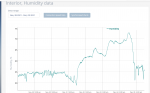
All of this has been set up in the last 2 weeks and already proven valuable, for the first few days
of operation the interior sensor was recording humidity of around 54% +/- a percent or so. However
from Wednesday last week I noticed the humidity climbing to the point on Saturday that it was over 70%.

Last weeks chart of humidity:
Interior humidity chart.png

I hadn't planned to visit the boat for a few weeks but at this point I decided there must be an issue
with the dehumidifier and made the trek down to the south coast. I did indeed find the drain pipe
blocked and the de-humidifier automatically shutdown. So glad I had the sensors on board and was able to
avoid any damp issues.

I hope this of help to anyone, obviously there's a lot of ways to skin this cat but this where I have gone this year.
 
The RUT950 comes with a power supply that delivers 9vdc but spec is power anywhere between 9v and 30v so ideal to power straight from 12vdc or 24vdc.
I've been considering changing my router to an RUT950 but I tend to power my electronic devices through an inverter and use the power supply that came with the device.
The reason is that, on a boat, we can get surges etc that could knacker the electronics.
IMO, the inputs of inverters are better protected and will provide a safer output for electronic devices.
But I did notice the spec (as you say) for the RUT950 does indeed allow a large voltage range.
 
my smaller Teltonika 240? is running 24/7 now for over six months using a 2euro buck converter dropping it to 9V out of boat 24V. Didn't realise I don't even need to use the buck converter! will rip it off and feed it with 24V from the service bank :-)
 
Three Reolink cameras are giving 1080p quality video at a reasonable cost, Reolink app lets me see
those anywhere and control the one pan/tilt camera I placed in the boat. These are all battery
cameras so can be positioned anywhere.

what sort of battery life do you expect to get out of the cameras? I know it will vary depending on usage, but are you thinking 6 months between charges, or longer?
 
what sort of battery life do you expect to get out of the cameras? I know it will vary depending on usage, but are you thinking 6 months between charges, or longer?
My Reolink camera that I've put on the radar arch has a Reolink solar panel which keeps the camera battery at 100%.
I was surprised at how well it works.
 
After extolling the virtues of the Dlink DWR-921 router on the other thread and saying that it has been working 24/7 for four and a half years, it promptly packed up!!
Sods law!!
I managed to get a local guy to reboot it and it worked for a further 4 days before stopping again.
I got the local guy to reboot it again but this time, I set it up to reboot itself once a day.
It is still failing but the automatic reboot seems to fix it for a while.

So, I'm thinking that I will replace it with a RUT950 - mainly because it has dual SIM card slots.
You can't use both at the same time (it only has one modem) but you can remotely switch SIMs.
I say this because us Brits are about to be screwed with UK roaming charges.
The service providers are saying that they won't change existing contracts but companies like Vodafone can't be trusted.
So I was thinking of running two SIMs whilst we discover what service is best local contract.
Any comments on a good EU data service.
I don't have a Spanish bank account so it is difficult to get a local contract - any ideas.
 
what sort of battery life do you expect to get out of the cameras? I know it will vary depending on usage, but are you thinking 6 months between charges, or longer?

I'm honestly not sure, I'd be happy with 3 months though as I will never go that long without visiting the boat, of course as I visited this weekend I charged them all. I also have the solar panels for these but they are not in positions to take advantage of that. Two of them are close enough to sockets that they are plugged into a USB plug all the time so it's just one camera in the cockpit that's on battery power at the moment.
 
If anyone was unsure how well the Meaco DD8L Junior de-humidifier works here's the latest chart, I have it on it's middle setting which according to the manual has a humidity target of approx. 50%. As can be seen below it has recovered the humidity in the boat to around 53%-54%:

Interior humidity Dec 6.jpg
 
I'm honestly not sure, I'd be happy with 3 months though as I will never go that long without visiting the boat, of course as I visited this weekend I charged them all. I also have the solar panels for these but they are not in positions to take advantage of that. Two of them are close enough to sockets that they are plugged into a USB plug all the time so it's just one camera in the cockpit that's on battery power at the moment.
This is the Reolink camera that I'm using on the radar arch.
Argus PT 2K: 4MP Wireless Pan-Tilt Battery Security Camera with Person/Vehicle Detection
Scroll down to see the Reolink solar panel that goes with it.

This is the view from that Reolink camera

Jennywren-ch1 25-07-2021, 10-13-59.resized.jpg
 
It seems the subject of remote monitoring comes up almost every year, a few years ago I installed a
Raspberry Pi/Arduino based system from Skippersmate. That system worked very well and I was pleased
with it. A few minor niggles, the comms from the Arduino sensors was via bluetooth which occasionally
dropped out due to range limitations for the sensors in the engine room and lazarette, the video
feed was low res and the home made nature of the setup meant it was vulnerable and a little untidy.

So this year I set about using off the shelf solutions for video and temp/humidity monitoring.
This has meant it is not one system but it is all visible from my smart phone on 3 seperate apps
that actually gives me a better solution.

Firstly a Teltonika RUT950 provides internet connection via the marina wifi with fail over to 4G.
Having 2 sims seemed like a good idea at the time but thinking more now the RUT240 would be fine
and save a few quid. This is powered from the domestic 12V to maintain connection if mains fails.

Three Reolink cameras are giving 1080p quality video at a reasonable cost, Reolink app lets me see
those anywhere and control the one pan/tilt camera I placed in the boat. These are all battery
cameras so can be positioned anywhere.

I had been using thermostat plugs from B&Q for the heaters during the winter but once set there
was no adjustment without physically being on the boat. So the search began for a smart thermostat
plug and I've purchased a few Nashone wifi thermostat plugs from Amazon:

https://www.amazon.co.uk/NASHONE-Th...shone&qid=1638734096&s=kitchen&sr=1-1-catcorr

With these I am able to see the temperature, change the thermostat setting or manually turn on/off
all via the app from anywhere. Time will tell if these are reliable.

For temp and humidity I found an American company called Trakkit, they have small battery powered
units that connect to your wifi network and can be viewed in their app or via the web:

Trakkit THS - WiFi Temperature & Humidity Sensor

I currently have one in the lazarette, one in the engine room and one in the forward cabin. As well
as temp/humidity, powering one sensor from a USB plug allows me to also get a power failure alert.

Main device screen on web app:
View attachment 126878

Next level device summary:

View attachment 126879

All of this has been set up in the last 2 weeks and already proven valuable, for the first few days
of operation the interior sensor was recording humidity of around 54% +/- a percent or so. However
from Wednesday last week I noticed the humidity climbing to the point on Saturday that it was over 70%.

Last weeks chart of humidity:
View attachment 126880

I hadn't planned to visit the boat for a few weeks but at this point I decided there must be an issue
with the dehumidifier and made the trek down to the south coast. I did indeed find the drain pipe
blocked and the de-humidifier automatically shutdown. So glad I had the sensors on board and was able to
avoid any damp issues.

I hope this of help to anyone, obviously there's a lot of ways to skin this cat but this where I have gone this year.
Are you using a fixed IP SIM ?

If not how do you get along with a non fixed IP SIM ?

We use the RUT955 for industrial applications and I would like to learn how to use a non fixed IP SIM as this would save us a fortune in SIM fees. I understand this might be possible with a VPN set up, but I am clue less as to how to do this.
 
Are you using a fixed IP SIM ?

If not how do you get along with a non fixed IP SIM ?

We use the RUT955 for industrial applications and I would like to learn how to use a non fixed IP SIM as this would save us a fortune in SIM fees. I understand this might be possible with a VPN set up, but I am clue less as to how to do this.
The first thing that comes to mind would be to use DDNS (Dynamic Domain Name Service)
You pay a small fee to connect to a dedicated internet server that will always know the IP address of your SIM.
You then connect to this DDNS server and your connection appears to be static.

The second solution is the one that I use.
You create a connection from the remote SIM (the boat - client) to a VPN server that IS on a static address.
The tunnel created by the client to the server is two way.
The client system can therefor be a dynamic SIM IP address because it connects to the static address of the VPN server.
The RUT950 has OpenVPN built in to its firmware.
As I say, I am thinking of buying a RUT950 but I wouldn't use its OpenVPN feature.
Instead, I use DDWRT which is an open source project that replaces the firmware of a range of routers.
Notably, the WRT range of Linksys routers which were first used to develop the DDWRT project are suitable routers for this software.
It is quite a complicated setup but I created my own CA (Certificate Authority), Server and Client Certificates and Keys thus making the tunnel as secure as any bank connection.
These certificates and keys are "patched" into the DDWRT router to create a secure OpenVPN connection.
Any computer or mobile device can have similar sets of keys to "connect in" to the DDWRT server (router)
I have also installed a second DDWRT router on the boat that creates a downstream LAN that is connected (virtually) to the DDWRT's server's LAN.
The end result is a secure single LAN that all the devices can connect to as though they were in the same geographical location.
OpenVPN takes this concept further - multiple devices can connect to the DDWRT server at the same time, in which case, all the devices will appear to be on the same LAN at the same time.

Finally, if is just cameras that you want to connect to, the simple solution is to use Reolink's server.
All the Reolink cameras connect to a server managed by Reolink which relays the connection from the Reolink App/PC Application to the actual Reolink camera.
Simply, load the Reolink App and connect to the camera.
 
using ZeroTier One on a raspberry pi3B+ running VictronOs on the boat wired to the RUT240. easy to connect remotely with a plain non fixed IP sim.
Before I was using dyndns or whatever was available at the time. Same thing at home, bit convoluted at first but I'm sure Trev could sort it soon!

V.
 
Are you using a fixed IP SIM ?

If not how do you get along with a non fixed IP SIM ?

We use the RUT955 for industrial applications and I would like to learn how to use a non fixed IP SIM as this would save us a fortune in SIM fees. I understand this might be possible with a VPN set up, but I am clue less as to how to do this.

I am not very technical when it comes to this stuff, suck it and see as I go along, hopefully learning on the way. Experienced people like Hurricane and Vas are best for the deeper technical stuff.

It's connected to the marina wifi at the moment but they normally change password in December so I expect it to disconnect and hopefully fail over to 4G at some point in the next couple of weeks. I'll let you know if my monitoring is still available to me remotely when that happens. Assuming I set the router up properly for 4G that is............
 
Just thought I'd add a quick update here relative to the Nashone thermostat smart plugs as they were new to me and I have learnt something in the past week.

I had 3 of these smart plugs, one in the saloon, one in the engine room and one in the lazerette. Last week my Trakkit sensor alerted me to a loss of shore power which lasted only a few seconds before shore power was restored. After this however the Nashone smart plug in the saloon lost it's thermostat function and would only operate as a straightforward smart plug.

I visited the boat this past weekend to check on the Nashone and also place 2 additional Trakkkit sensors onboard. I wasn't sure why the Nashone plugs in the engine room and lazarette were still operating correctly until I realised I had used an extension cord for those two that has surge protection.

I'm guessing there may have been a little spike when the shore power returned that damaged the Nashone plug in the saloon. So if you are considering using these plugs or potentially any similar devices I would recommend using a surge protected socket of some form, there's plenty plug-in adapters available.

Apart from that little blip the Nashone plugs are doing what I expect of them, the Trakkit sensors have been faultless and the Reolink cameras are working great. The marina have not changed the wifi password yet so haven't checked if my setup of the Teltonika RUT950 is correct to fail over to 4G.
 
I have one of those little cheap cubes off of Amazon, it's a 4k camera with IR light and wifi connectivity, it works well with the iPhone but the app wont work on my android tablet.
it has a 64GB mini SD card for recording events and pushes any activations through to my phone, it's been running in my house as a test to see how well it works remotely, so far it has been up since beginning of October, for £34 it does as it says on the tin. just looking on Amazon to get the link and the price has risen to £42.
Spy Camera,KEAN 4K HD Mini WiFi Wireless Hidden Camera Smallest Security Cameras with App Micro Nanny Cam Night Vision Motion Activated Alerts Secret Surveillance Cameras for Indoor/Home: Amazon.co.uk: Electronics & Photo


From today
RDfC4iN.jpg
 
After extolling the virtues of the Dlink DWR-921 router on the other thread and saying that it has been working 24/7 for four and a half years, it promptly packed up!!
Sods law!!
I managed to get a local guy to reboot it and it worked for a further 4 days before stopping again.
I got the local guy to reboot it again but this time, I set it up to reboot itself once a day.
It is still failing but the automatic reboot seems to fix it for a while.

So, I'm thinking that I will replace it with a RUT950 - mainly because it has dual SIM card slots.
You can't use both at the same time (it only has one modem) but you can remotely switch SIMs.
I say this because us Brits are about to be screwed with UK roaming charges.
The service providers are saying that they won't change existing contracts but companies like Vodafone can't be trusted.
So I was thinking of running two SIMs whilst we discover what service is best local contract.
Any comments on a good EU data service.
I don't have a Spanish bank account so it is difficult to get a local contract - any ideas.
Update

My Dlink DWR-921 router is just about still working.
It seems that the change that I made was to get it to restart its 3G/4G connection daily has partially worked.
That seems to resolved the internet connection.
But now, it regularly looses the WiFi connections to the ReoLink cameras.
So, I manually connect to the router and force a full reboot and it then works for another couple of days.
These routers contain NVRAM which I suspect can fail after a few years use.
I think that is the reason my Dlink DWR-921 has become unreliable after about 4 years continuous use.

So, I am now the proud owner of a new Teltonica RUT950 that I will fit the next time I am out in Spain.
I am still looking for a good method of buying a local Spanish 3G/4G contract.
Local because I think that UK roaming contracts will become too expensive.
The dual SIM facility of the RUT950 was one of the reasons that I chose it.
Anyone have any ideas for a good Spanish or EU contract?
 
I have one of those little cheap cubes off of Amazon, it's a 4k camera with IR light and wifi connectivity, it works well with the iPhone but the app wont work on my android tablet.
it has a 64GB mini SD card for recording events and pushes any activations through to my phone, it's been running in my house as a test to see how well it works remotely, so far it has been up since beginning of October, for £34 it does as it says on the tin. just looking on Amazon to get the link and the price has risen to £42.
Spy Camera,KEAN 4K HD Mini WiFi Wireless Hidden Camera Smallest Security Cameras with App Micro Nanny Cam Night Vision Motion Activated Alerts Secret Surveillance Cameras for Indoor/Home: Amazon.co.uk: Electronics & Photo


From today
View attachment 127516
Hi A, this looks like a simple solution for those of us with Wi-Fi at the marina. Do you know how often the camera will need a recharge? Ta John
 
I have mine plugged in to a USB wall wart to charge it, I have ran it from a full charge from one day to the next then had to recharge it, it is not that sophisticated, it does push notifications on motion detection but you cannot adjust the sensitive area. For what I was needing it is fine, wish I had bought a few more of them :)
 
Top