Raynet network switch

AngusMcDoon

Well-Known Member
Joined
20 Oct 2004
Messages
9,046
Location
Up some Hebridean loch
Visit site
I (will) have 2 Axiom+ chartplotters connected together by a Raynet cable so that they can share the same chart data. Each Axiom+ has a single Raynet socket on the back, and it's a standard Raymarine cable to do so. However, I wish to add a physical keypad to one of the Axiom+ plotters, a RMK-10...
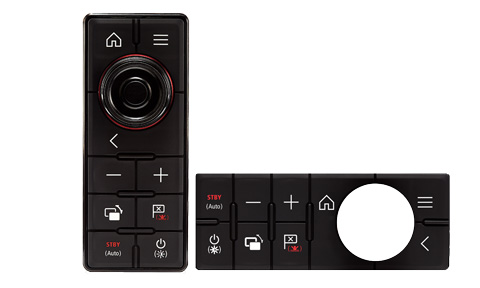
T70293-Raymarine-System-Remote-Control-Keypad-(RMK-10)-Portrait-and-Landscape.jpg

This also connects via Raynet to the Axiom, but there's no spare connector. As Raynet is just ethernet the answer is a network switch. Raymarine do one, but firstly it's stupidly expensive, and secondly there are none available with no delivery date...
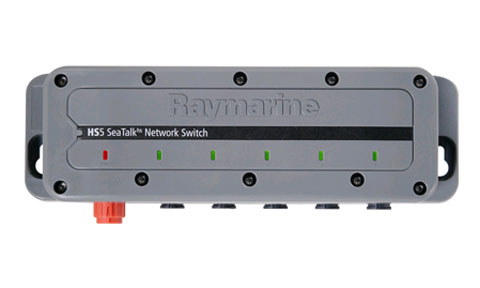
A80007-Raymarine%20HS5%20RayNet%20Network%20Switch.jpg

My supplier says that you don't need to use a Raymarine one, any network switch would do. Here is one that is designed for vehicle, industrial or marine use for a lot less wonga...

https://cpc.farnell.com/brainboxes/sw-005/ethernet-switch-industrial-5-port/dp/CS26744

2383213-40.jpg

It takes 5-30V, so that's good. It has standard RJ45 ethernet sockets on it, and my Raymarine supplier says either buy Raymarine expensive Raynet to RJ45 cables, or snip one of the Raynet connectors off and splice on a RJ45 connector myself using a cheapo tool like this...

RJ45 EZ Pass Through PRO HD Crimping Tool Crimper CAT 5 5E 6 7 Connector LAN | eBay
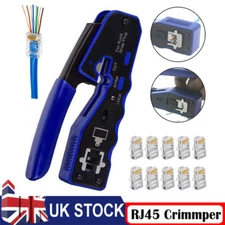
s-l225.webp


There appears to be 2 ways to wire up RJ45 for ethernet, T-568A or T-568B...

T568A-and-T568B-wiring-spec-standards.jpg


A bit of searching on Raymarine's forum says that they use T-568B.

Before I start chopping up my expensive Raynet cable has anyone done this successfully?
 
A also just use 8 port tp-link switches on board that can be found for about a tenner each.

If you use an old dsl router, you could even put dd-wrt on it, use the ethernet ports for what you're wanting and even broadcast the data onto WiFi.
 
There appears to be 2 ways to wire up RJ45 for ethernet, T-568A or T-568B...

3JVSeWx.jpg


A bit of searching on Raymarine's forum says that they use T-568B.

Before I start chopping up my expensive Raynet cable has anyone done this successfully?
I believe that the "Auto MDI/MDI-X crossover support on all ports" in the description of the switch at CPC Farnell means that it doesn't matter which way around you wire the cables.

20+ years ago you needed to use a crossover cable if you wished to connect two PCs directly to each other (with no hub), and straight-through cables if you were using a hub (or switch). At some point auto-sensing NICs and switches came in, and the two types of cables became, I think, interchangeable.

 
I believe that the "Auto MDI/MDI-X crossover support on all ports" in the description of the switch at CPC Farnell means that it doesn't matter which way around you wire the cables.

20+ years ago you needed to use a crossover cable if you wished to connect two PCs directly to each other (with no hub), and straight-through cables if you were using a hub (or switch). At some point auto-sensing NICs and switches came in, and the two types of cables became, I think, interchangeable.

Thanks. In the datasheet for the switch it shows each RX pin as also TX and vice versa, so I suspected that was happening. As you can connect 2 Axioms together directly with the same cable as you use to connect to a switch I guess they support it as well.
 
I (will) have 2 Axiom+ chartplotters connected together by a Raynet cable so that they can share the same chart data. Each Axiom+ has a single Raynet socket on the back, and it's a standard Raymarine cable to do so. However, I wish to add a physical keypad to one of the Axiom+ plotters, a RMK-10...

T70293-Raymarine-System-Remote-Control-Keypad-(RMK-10)-Portrait-and-Landscape.jpg

This also connects via Raynet to the Axiom, but there's no spare connector. As Raynet is just ethernet the answer is a network switch. Raymarine do one, but firstly it's stupidly expensive, and secondly there are none available with no delivery date...

A80007-Raymarine%20HS5%20RayNet%20Network%20Switch.jpg

My supplier says that you don't need to use a Raymarine one, any network switch would do. Here is one that is designed for vehicle, industrial or marine use for a lot less wonga...

https://cpc.farnell.com/brainboxes/sw-005/ethernet-switch-industrial-5-port/dp/CS26744

2383213-40.jpg

It takes 5-30V, so that's good. It has standard RJ45 ethernet sockets on it, and my Raymarine supplier says either buy Raymarine expensive Raynet to RJ45 cables, or snip one of the Raynet connectors off and splice on a RJ45 connector myself using a cheapo tool like this...

RJ45 EZ Pass Through PRO HD Crimping Tool Crimper CAT 5 5E 6 7 Connector LAN | eBay

s-l225.webp


There appears to be 2 ways to wire up RJ45 for ethernet, T-568A or T-568B...

T568A-and-T568B-wiring-spec-standards.jpg


A bit of searching on Raymarine's forum says that they use T-568B.

Before I start chopping up my expensive Raynet cable has anyone done this successfully?
A way for raymarine to make more profit!
Previous models had 2 hs ports, another way is to upgrade one of the plus plotters to a pro, which has 2 hs ports.
 
A way for raymarine to make more profit!

As every business that has ever existed needs to do. I don't begrudge their needing to make a profit.

It's significantly cheaper to buy the Axiom+ and the RMK-10 remote keypad to get the buttons, even when connecting them using the Raymarine network switch, rather than buying the Axiom Pro. Using an alternative manufacturer network switch, it's less still.

If/when I've done it and got it to work I'll post a thread here on what I used and how I did it so others can go this route if they're parsimonious like me.
 
Last edited:
As an ethernet installer during my career, that all looks fine. If Raymarine allow it then, you could also use any pre made ethernet cable. Theres an expressed condition in Garmin’s warranty about the use of non Garmin cables, theres a seal built on to the connector RJ45 plugs on their cables. Clearly a 50p ethernet cable works, it‘s long term water ingress they worry about. You can certainly check your system works on cheap cable before hacking a raynet cable about. Another handy hint….. most pre made cables, probably including Raynet, are multi strand copper. Installation Cat6 cable is solid core. Multi strand cable is extremely difficult to terminate yourself, even as a pro. I would never attempt it on site, too much time required. Threading 8 tiny floppy cables through the plug in the right order is the issue, solid core, you line them all up before presenting the cable to the plug. Then the teeth in the plug are a crap grip on multistrand. If you possibly can, use pre made cable, or buy some solid core. Or else enter a private world of pain.
 
That’s interesting because Garmin used to give you a field installable RJ45 with their radars so that you can adapt the cable to a custom length and feed it through conduit more easily.
 
I used this one

https://www.amazon.co.uk/TP-Link-LS1005G-Wallmount-Ethernet-Splitter/dp/B07VWB347G/ref=mp_s_a_1_4?crid=17GT7EXRQMFQ4&keywords=Ethernet+switch&qid=1659859433&sprefix=ethernet+switch,aps,169&sr=8-4

Chop the plug off, used a cheap 12v to 5 volt power supply, and chopped the ends off a raynet cable and reterminated them.

Works like a charm

Was re-terminating the cable ok, or a near impossibly fiddly professionals-only operation of infuriatingly squiggly wires?

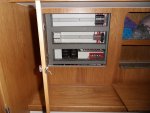
I looked at that type of network switch, but have decided to go for the more expensive industrial type because it can take 12V already, and can be DIN rail mounted. It's still a fifth of the price of Raymarine's (unavailable) offering. The boat comes with a DIN rail with plenty of spare space, so it will fit there nicely. It's a very protected location as well.

SDC12698 (1).JPG
 
The Netgear metal clad range of switches are recommended by the one of the OpenCPN radar plug in devs. They run quite happily from a 12V battery supply. I have been running the GS108, 8 port version this year without any problems although I haven't yet connected it to my Raymarine kit.
 
To answer my own question, the kit I proposed in post 1 all works fine, and I have my Raynet stuff talking to each other. I had to snip the Raynet cables and change the proprietary end fittings to RJ45's with the tool I also showed in post 1. I used the T-568B configuration as Raymarine recommend, but I understand that the T-568A layout would probably also work.

There was no problem pushing the strands of the Raynet cable through my pass-through RJ45 terminal as they are quite stiff, although it took a few goes to get them through in the right order. The Raynet cable appears to be Cat 6 as it's shielded and has the + cross section core.
 
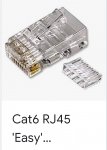
I forgot to say... you can get 'easy' plugs where you put the individual wires through a small bit of plastic first. It keeps them all inline as you push the lot into the actual plug.

Screenshot_20220808-171815_Samsung Internet.jpg

Never used one but I guess if you've got shakey fingers or wires that just won't stay straight, they might just help.
 
The Netgear metal clad range of switches are recommended by the one of the OpenCPN radar plug in devs. They run quite happily from a 12V battery supply. I have been running the GS108, 8 port version this year without any problems although I haven't yet connected it to my Raymarine kit.
+ 1 for the GS108. ‘Fit and forget’ quality hardware.
 
You need crimping pliers to reterm a cat 6 cable but it's Actully not that hard, just strip the wire carefully spley the cable and insert, check the order of the wires and the.n crimp down.
 
You need crimping pliers to re-term a cat 6 cable but it's actullay not that hard, just strip the wire carefully, splay the cable and insert, check the order of the wires and then crimp down.

Indeed I do, and I have a snazzy blue pair as shown in post #1 above, £13 from ebay. They are for pass through plugs, so they snip off the excess at the same time.

Like lots of these cable jobs it's a lot cheaper to buy the tool and DIY than pay for ready made up cables. A Raynet to RJ45 1m cable from Raymarine is £61.
 
Top