Ian_Edwards
Well-Known Member
I have an old Seatalk NG cable which I'd like to reuse to extend an existing Seatalk NG network, there are no Seatalk 1 instruments on board.
I've just checked the continuity of the cable, and the 5 connections around the outside of the plugs all check through with very low resistance, but the centre pins aren't connected. The cable has been used before, some years back and is in superficially good condition, no corrosion and no obvious mechanical damage.
When I check another Seatalk cable, all 6 pins check out OK.
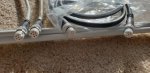
The cable with only 5 pins connected is white cable, where as the cable that has all 6 pins connected is white and black, is this colour coding for different cable specs'?
Does anyone know if different cable specs' where sold, and if my cable with only 5 connections will work on a Seatalk NG network. I've read somewhere that Seatalk NG cables have the same cores as CanBus, but with the addition of a 6th core to make it backward compatible with Seatalk 1.
I could just try it I suppose, but it would be time consuming to run the cable and difficult to know if it had full functionality.
I'd really like to us the old cable, Raymarine cables are very expensive.
I've just checked the continuity of the cable, and the 5 connections around the outside of the plugs all check through with very low resistance, but the centre pins aren't connected. The cable has been used before, some years back and is in superficially good condition, no corrosion and no obvious mechanical damage.
When I check another Seatalk cable, all 6 pins check out OK.
The cable with only 5 pins connected is white cable, where as the cable that has all 6 pins connected is white and black, is this colour coding for different cable specs'?
Does anyone know if different cable specs' where sold, and if my cable with only 5 connections will work on a Seatalk NG network. I've read somewhere that Seatalk NG cables have the same cores as CanBus, but with the addition of a 6th core to make it backward compatible with Seatalk 1.
I could just try it I suppose, but it would be time consuming to run the cable and difficult to know if it had full functionality.
I'd really like to us the old cable, Raymarine cables are very expensive.