Navionics.

dansaskip

Well-Known Member
Joined
12 Nov 2004
Messages
821
Location
Various
seabear.uk
I have just fired up my old iPad, which had a number of Navionics charts on, all fully downloaded. This was kept as a backup. However I find that the app will not now proceed to open without logging in. This is the case whether or not there is an internet connection. It would seem that Garmin in their stupidity have decided that you can only use the app if you have an internet connection and you log on. So Garmin has taken a perfectly good and useful app and ruined it .
Fair enough if you want to keep your charts updated but I paid for and downloaded the charts before the Garmin takeover and their imposition of the subscription model.
Searching the web elsewhere eg the cruisers forum reveals this To state what might be obvious, it is impossible to sign in to the Boating App without an internet connection.
Have any other users experienced this?
 
I can open my Tablets / Phone Boating App Navionics fine ... no need to be connected unless I want to update or download other charts.

If that's not true - how am I able to use the charts when out in middle of Baltic with no Internet connection ???
 
When you log in you’ll get an authentication token which will be valid for a given time period. I imagine it’s something like 3 months for this app but have no knowledge of it specifically. Each time you are connected it will renew that token so you don’t have to keep logging in. There’s no requirement to be connected, but the terms Garmin/Navionics have to obey with their content suppliers will require that they authenticate their users. This is pretty standard stuff with modern IT systems.
 
Prompted by this thread I’ve just switched on my truly ancient ‘emergency’ Ipad with Navionics and whole of uk charts downloaded years ago. Works fine and no login required, as usual. However, I deliberately never put a SIM card in it and never connect it to Wi-Fi for this very reason.
 
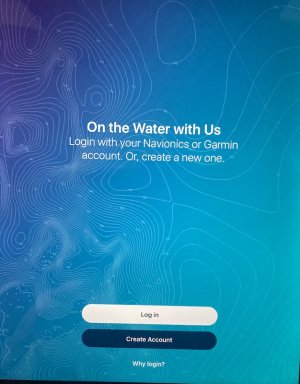
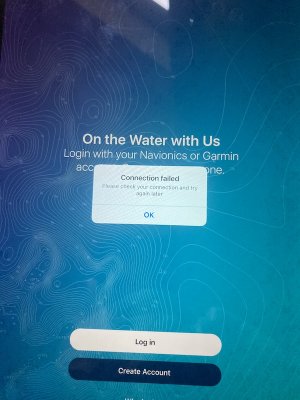
It would seem for some replies that I am not believed in my post so here are two screen shots. Yes I have an account but cannot log in as no internet connection. So I stand by my original post. I don't know how or why it works for Refueler or fredrussel. Maybe it its something to do with an authentication token as lustyd suggests. Certainly I can still open Navionics (now renamed Garmin) on my more modern but still old iPad without it prompting for a log in but I am still frustrated that the Navionics on my back iPad is now rendered inoperable. So has anyone else out there had this problem?
 

Attachments

  • Navionics screen shot.jpg
    Navionics screen shot.jpg
    169.5 KB · Views: 20
  • no connection.jpg
    no connection.jpg
    156.5 KB · Views: 20
Last edited:
Very strange ....

But I know I have a Subscribed Account ..... and a non subscribed account .... which serves which ?? No Idea ... as I have the Garmin UHD plotter on the boat with current Swedish Navionics ... and my Tablet Boating App with Baltics.

Both work without any my needing to login.
 
It would seem for some replies that I am not believed in my post so here are two screen shots. Yes I have an account but cannot log in as no internet connection. So I stand by my original post. I don't know how or why it works for Refueler or fredrussel. Maybe it its something to do with an authentication token as lustyd suggests. Certainly I can still open Navionics (now remained Garmin) on my more modern but still old iPad without it prompting for a log in but I am still frustrated that the Navionics on my back iPad is now rendered inoperable. So has anyone else out there had this problem?
Is it an iPad update issue with it being an older iPad
 
Is it an iPad update issue with it being an older iPad

Given that many Drone users with Tablets have issues with iPads ... I tend to think that may be the case here.

I have the number of installations of Boating max'd out on old and new Android Tabs as well as my main Samsung Phone ... no issues at all. All with the same downloaded charts
 
I have kept my Navionics working by NOT updating the (Android) app on my tablet for past 1+ years. As soon as I update the app, the charts etc are toast until I resubscribe (discovered when I accidentally updated app on my phone) .

Given I am no fan of Navionics' charts (!), little chance I'll re-subscribe.
 
Well older iPads cannot be updated past a certain point. The iPad is updated as far as able. Anyway that does not affect any other app that is on the iPad - they all work as normal

Android Tabs / Phones have a limit on updates as well ... basically whether the 'architecture' can accept the update / upgrade ... I have a bunch of old tablets ... some with no chance to upgrade higher than 6 or 7 ... some stuck on 10 etc.

But they all work ... agreed that some apps require later versions of Android and cannot install on the older.
 
Just had a similar problem after upgrading my phone from an Android 9 to a 13. Current version of Boating requires a subscription to download any charts, including those purchased before the subscription model was introduced. Not had this problem when upgrading between earlier Android versions. I managed to backup the old Boating App (v17.0.2) from my old phone using File Manager+ and install it on the new one, despite dire warnings of incompatability. Purchased charts are once more accessible. Probably not much use to iPad users but it works with Android.
 
Something I found elsewhere to deal with the Garmin model for Navionics...
On Android delete the app, downgrade to 19.2.1 from apkmirror or similar - https://www.apkmirror.com/.../navionics-boating-19-2-1-2.../
Then login again and you can then download and use any previously purchased charts (even if expired). Then go to playstore, find the navionics app, click the 3 dots in top right and disable auto updates..
 
Top