Navionics new Boating App has anyone used this yet?

If your iPad is wireless only (i.e. Won't connect to a a mobile phone network, then it has no inbuilt gps.)
It can still be used for navigating very successfully if you add an external Bluetooth gps, like the garmin go or bad elf. These are excellent.
how do you connect these GPS devices to an iPad?
 
I use it all the time on an iPad with cellular, however the memory is getting full so I purchased a Dragon Touch android tablet from Amazon cost £75.00 and downloaded it there along with C-map Embark seems to work ok and will overlap AIS
 
Thanks for all the replies! My iPad is a cellular model with GPS. According to YM or is YW who ran an article on this, there is no need to actually have a connection to a network.
 
I have it running on an Android Tablet with 4G data plan ... it works very well and replaced my old and defunkt monochrome chart plotter.

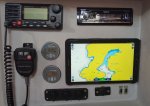
ChartTable.JPG

... added benefits, it also includes:

Marine Weather Forecast Shortcut (Browser) and Windy App
Victron Connect App for battery status, charging status, solar status
Netflix and Amazon Prime for films (will send Video to a TV eventually)
YouTube for "How to" videos and my favourite channels.
Spotify for Music
Mail (The boat has its own E-mail account) for communication with people at home.
WhatsApp (The boat has its own WhatsApp account) for communication with crew ashore
Internet Browser
Google Maps and Google Earth
Skype for audio/video calls (also possible with WhatsApp)

It also holds all the user manuals and wiring diagrams for everything on board in PDF format.

It has a bluetooth audio connection to the boat stereo for music, films, hands-free telephony.

But best of all .... it can access the YBW Forums ;)

... next improvement - investigate WiFi NMEA data to/from tablet for AIS and transfering of course to Autopilot. The 2 NMEA busses for AIS and Navigation are currently on the serial connectors in the bottom right.

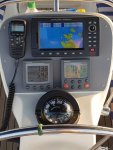
This is the helm station ... currently only this plotter can set a course for the autopilot.

Helm.JPG

The two plotters are completely independent.
 
Last edited:
What about I NavX. This seems to have Ais and all the other bits of navionics... Does anyone use this.

I bought a package from London plotters a few weeks ago...ais seems not to be working.. charts are just like paper charts with poor detail compared to 12 year old bluecharts or navionics charts on a raymarine plotter. I think this is a vector versus raster issue..
 
What about I NavX. This seems to have Ais and all the other bits of navionics... Does anyone use this.

I bought a package from London plotters a few weeks ago...ais seems not to be working.. charts are just like paper charts with poor detail compared to 12 year old bluecharts or navionics charts on a raymarine plotter. I think this is a vector versus raster issue..

I have both iNavx and Navionics Boating. iNavx does allow AIS, but the cost of the charts is astronomical as compared with Navionics Boating ( as far as I can tell, they are exactly the same charts), thus I have reverted to Navionics Boating for my recent purchases.
 
A couple of points from this thread

- I think some confusion has been caused by the term "got cellular" . What you need is an ipad with a gps chip which comes with those models which can take a sim card. You dont need to have a sim card installed to use the gps facility and hence navionics. So you dont need cellular facilities just the right model ipad.

- I have Inavex but it is so clunky I do not use it.
 
A couple of points from this thread

- I think some confusion has been caused by the term "got cellular" . What you need is an ipad with a gps chip which comes with those models which can take a sim card. You dont need to have a sim card installed to use the gps facility and hence navionics. So you dont need cellular facilities just the right model ipad....

That's correct. I don't think anyone suggested you need to have a SIM installed but I understand the confusion! These iPad models are called the "WiFi plus Cellular" versions by Apple.
 
Last edited:
Same question please...
I have the wifi only ipad so cannot use it for my navionics.
For you and ghostlymoron, my Bad Elf gps dongle just plugs into the lightning charging port- some will tell you that this means you have to choose between charging or gps but that is not so- I have a charge splitter cable so both functions are simultaneously available
 
I have an iPad with the latest Navionics pack (UK maps downloaded)and I bought a Garmin GLO 2 GPS (about 2 inches long) that connects via bluetooth to the iPad and recharges off the USB charging point. Both iPad and GPS sit on my nav table and I've found the whole package to be superb an no glitches to date.

If you look at £24 for the Navionics and c£90 for the GPS, it's way cheaper than a chart plotter and very capable. I don't need auto pilot functionality from a chart plotter as I have a 14yo son who is embracing his character building!!
 
What about I NavX. This seems to have Ais and all the other bits of navionics... Does anyone use this.

I bought a package from London plotters a few weeks ago...ais seems not to be working.. charts are just like paper charts with poor detail compared to 12 year old bluecharts or navionics charts on a raymarine plotter. I think this is a vector versus raster issue..
I have INav X on my ipad 4 it works very well indeed i also have a wifi router to give me AIS SEAtalk and NMEA the only thing missing it uses another app for tides which is a pain It runs Navionics. I also have the Navionics app so when I need tidal data I swap over get the tides the swap back. I believe the Nav app now receives AIS if you are with in range of 3G or 4G but that is not very reliable off shore. I have a trancever ? sends and receives AIS connected to a wifi router I have this mounted in my cockpit under the spray hood mounted on top of the screen cover of my Raymarine C 120 far too power hungry just use it for radar when needed.
Mike
 
On Android I have found the Navionics Boating app a bit of a disaster. Previously I had UK & Holland as a stand alone app and Europe integrated with the Canaries and Carribean and S America. The only problem with this setup was the irritating demand that I purchase Europe or UK everytime I viewed an area near the boundary of the two areas, despite already owning both.
The Boating app, which I was forced to upgrade to, makes constant demands to update my charts. When I try nothing happens and the app freezes. I now only use Navionics when off line, which is inconvenient to say the least if I'm also looking at weather data. This problem has become so limiting that I intend to request Navionics for a refund and look elsewhere for a mobile plotting app.
 
I'm thinking of getting the new Navionics Boating app for my 10.5" iPad Air (2018 model with mobile data) for passage and route planning but also as a backup for the Standard Horizon CP (fixed at the chart-table and interfaces for AIS data into the Std Horizon VHF). A couple of questions:

Does the iPad contain an actual GPS receiver, or does it just triangulate position using mobile data? If the latter, what then happens offshore when there's no data?

Does the Boating app have a capability for displaying AIS data? If so, how would one get the data into the iPad?

Finally, how does one go about downloading the app and getting the correct charts? Click buy for the basic unit with no charts, then buy the chart package (UK etc)?
 
If your iPad has socket for phone SIM card it has GPS receiver, you cannot get AIS overlay on Navionics app and the charts are downloaded from within the app for the areas you what.
 
I'm thinking of getting the new Navionics Boating app for my 10.5" iPad Air (2018 model with mobile data) for passage and route planning but also as a backup for the Standard Horizon CP (fixed at the chart-table and interfaces for AIS data into the Std Horizon VHF). A couple of questions:

Does the iPad contain an actual GPS receiver, or does it just triangulate position using mobile data? If the latter, what then happens offshore when there's no data?

Does the Boating app have a capability for displaying AIS data? If so, how would one get the data into the iPad?

Finally, how does one go about downloading the app and getting the correct charts? Click buy for the basic unit with no charts, then buy the chart package (UK etc)?

Your iPad has mobile data so has the GPS module implemented.
 
Top