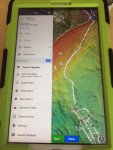
Navionics app

andydavy

New Member
Joined
24 Jan 2021
Messages
13
Visit site
Hi I'm running the navionics app on android.

I seem to have a track showing on the chart that I can't delete. It doesnt show in the tracks list.

Anyone know what I can do to get rid of it?
 

Attachments

  • navionics.JPG
    navionics.JPG
    274.2 KB · Views: 45
To delete,

Go to menu and into Routes,Tracks and markers,

Click on track in question and hit the 3 dots in top right corner of screen, theres an option to delete,

To remove off the screen but keep track saved....

Hit START and start a new track, then hit start again and will give option to delete current track. Go ahead and delete this track you've just started and it will automatically have hidden the stubborn track you cant get rid of but it is still saved in the Routes,Tracks and markers folder its just hidden offscreen.

 
Andrew - definitely tracks of my last few trips.

MystyBlue - thats what i thought but it still leaves these stubborn tracks!
 
I think you may be right. The navionics app is linked to a sonarphone wifi fishfinder. Still don't know how to get rid of the white lines?
 
Top