navionics app

NornaBiron

Well-Known Member
Joined
6 Jan 2009
Messages
966
Location
Greece
www.flickr.com
We're considering purchasing navionics for our android tablet but before we do can anyone explain the differences between 'Boating Europe' and 'Boating Europe HD' please (apart from the cost!).

Thank you
 
HD versions are for tablets, the other for phones. The phone version will work on a tablet but the definition will be degraded. Best to get the right version.
 
HD versions are for tablets, the other for phones. The phone version will work on a tablet but the definition will be degraded. Best to get the right version.

Spot on ... http://navionics.force.com/kb/artic...-App-iPad/?q=HD+normal&l=en_US&fs=Search&pn=1

The Navionics Mobile Apps for navigation are available in two different versions, the standard, and HD versions. The HD Apps have optimized charting & user interface for the tablet screen size. The HD quality apps are at a higher price point because it requires further development in order to fit the tablet’s HD screen resolution.

The Navionics Mobile Standard apps for the iPhone are also compatible on the iPad device. However, this app will be displayed in the same screen resolution as on the iPhone. Therefore, viewing the app in full screen on the iPad will result in the image becoming slightly distorted.
 
I've got the Navionics HD version. It works perfectly, with good resolution on both my Hudl tablet and my Galaxy S5 Neo phone.

bigguy
 
Incidentally, if your device will run iSailor (depends upon chip) then their charts are much clearer than Navionics, in my opinion. £25.99 for the Greek charts.
 
The non HD version works well on the small HUDL , you can try them for a month to see what you think as I understand it.
 
ISailor is for both ios and Android. The ios version is a little more polished, but I am very happy with the android version.
 
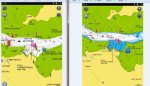
I have Europe HD and UK standard on my Hudl and I can't tell the difference in resolution, which is perfectly adequate. It might be more noticable on a higher res display.

HD is on the right:

hudl nav.jpg
 
Been highly impressed with Navionics HD this year. Great for route planning on PC and then syncing routes to the tablet. Can handle the thames estuary easily. I have invested in a GPS dongle and visit my harbour maps on opencpn for redundancy and to get ais next season. But the first thing I reach for is the nexus 7 and Navionics . v good value.
 
The Marine Navigator app with Visit My Harbour charts works fine on my Android tablet. The charts can also be used on an Android phone (or another tablet) and a PC. I use mine on my laptop with OpenCPN.
 
I use Navionics on my mobile devices too because it is extremely useful and easy to whizz round the charts and zoom in and out .... my plotter is a bit clunky in comparison. For navigation using mobile consumer devices, be aware of the nuances of the positioning hardware and software on your device. (Which in most cases uses assisted GPS which tringulates cell-phone masts and uses GPS, Android devices also use WiFi information in a similar manner). This is not as good as WAAS found on plotters, and you don't necessarily know how accurate the position is, which makes it less than ideal for that one time when it gets a bad fix and plots you somewhere you are not.

Adroid platform

If your GPS position is not being displayed correctly, please make sure that your mobile device has an internal GPS receiver.
If it does not have an internal GPS receiver, you will not be able to determine your location outside of Wi-Fi range.

If you are using a device with an internal GPS receiver, please follow these instructions to resolve your issue:

1.Make sure that the Use GPS Satellites feature is selected in your Android phone’s Settings/Location & Security.
2.Make sure the phone is exposed to the sky and out of doors.
3.Give the phone enough time to locate a signal (sometimes minutes).
4.Re-Boot phone if a signal cannot be made.
5.Check against other apps using GPS, such as Google Maps, if they place you in the same position as Navionics Mobile.

If it is still not working after enabling GPS Satellites it is possible that it could be an issue with your device's internal GPS receiver, or a software issue with the Navionics mobile app. In order to determine the cause of the problem you can perform a test following the procedure below:

1.Go to the device’s “Settings” menu
2.Go to “Location” and disable “Use Wireless Networks”
3.Verify if the GPS is still working on the Google Maps App, and then using the Navionics app.

​These steps will vary depending on the device you are using. Some may require to turn Locating Method to GPS only or to use all available options (GPS, Wi-Fi and mobile networks) to determine your location.

This will determine whether or not it is the GPS that is not working correctly, or the Navionics mobile app.

http://navionics.force.com/kb/articl...fs=Search&pn=1

I don't get the same advice from my Plotter manufacturer. My GPS antenna is mounted in a place where it has a 360° view of the sky. It also informs me how accurate the fix is and when the WAAS symbol appears (shortly after start-up) I can rely on it to a few metres but I still always cross-check by looking at relative positions of things on the chart, and then in the real world around me. I'll often put the cursor on an AIS taget, a buoy or some other landmark to get the magnetic bearing and then check it against my compass. If it all matches up I'm happy.

I wouldn't criticise anyone using mobile devices as long as they are fully aware of the limitations, and have a healthy dose of paranoia concerning their accuracy - not to mention a means of cross-checking. (charts, multiple devices, hand bearing compass etc.)

This is a design constraint of mobile devices, the hardware needs to be very cheap, the GPS chips used are usually combined GPS, BT, WiFi chips and the antenna for GPS is usually packaged assuming usage in portrait mode or landscape dependent on the device. Cases, location and orientation can affect GPS antenna performance adversly. As consumer devices will spend most of their life on land and indoors, the positioning requirements of the device manufacturers and the OS suppliers are optimised for this scenario and hence augment GPS with other wireless signals like Phone Masts and WiFi which do go through buildings but occasionally aren't very accurate.

PS: This is not just Navionics specific. It applies to all Apps and devices as the positioning APIs (Application Programming Interfaces) are part of the Operating System and are used by all the device Apps that have a requirement to know the device position. I would expect the marine navigation app developers to use the APIs correctly but who knows what's really going on "under the hood".
 
Last edited:
I use Navionics on my mobile devices too because it is extremely useful and easy to whizz round the charts and zoom in and out .... my plotter is a bit clunky in comparison. For navigation using mobile consumer devices, be aware of the nuances of the positioning hardware and software on your device. (Which in most cases uses assisted GPS which tringulates cell-phone masts and uses GPS, Android devices also use WiFi information in a similar manner). This is not as good as WAAS found on plotters, and you don't necessarily know how accurate the position is, which makes it less than ideal for that one time when it gets a bad fix and plots you somewhere you are not.

Without an actual GPS chip, that is the case, but it's a rather pessimistic and somewhat dated view of modern tablets and phones. My phone and tablet both have proper GPS chips and give position fixes to within a few feet, which is far more accurate than any chart.

I have just checked the co-ordinates of my phone and my tablet against the onboard Garmin N2K GPS and they both agree exactly at 2 decimal places. There are differences of a point here and there on the third decimal place, but who navigates to 1000th nM.
 
Without an actual GPS chip, that is the case, but it's a rather pessimistic and somewhat dated view of modern tablets and phones. My phone and tablet both have proper GPS chips and give position fixes to within a few feet, which is far more accurate than any chart.

I have just checked the co-ordinates of my phone and my tablet against the onboard Garmin N2K GPS and they both agree exactly at 2 decimal places. There are differences of a point here and there on the third decimal place, but who navigates to 1000th nM.

I only said be aware of the positioning capabilities of your device .... not many people know that in power saving mode a Samsung Galaxy Tab 4 will rely solely on WiFi and mobile networks to estimate position for example - not much use if out at sea and the worse the wifi or cellular connections, the lower the positioning accuracy. The Tab 4 positioning accuracy can be configured as follows, and these configuration settings are also available to some 3rd party power saving and optimisation apps - which can obviously change them. These settings are on my Galaxy S phone too.

1.From the Home screen, touch Apps .
2.Touch Settings .
3.Touch the CONNECTIONS tab.
Note: To switch to the tab view, touch More options > Switch to tab view.
4.Touch Location .
5.Touch Mode.
6.Choose from the following options:

•High accuracy: This option has the highest level of accuracy, using GPS, Wi-Fi®, and mobile data networks interchangeably to estimate your location. Data charges may apply when using this option.
•Power saving: This option uses only Wi-Fi and mobile data networks to estimate your location. Data charges may apply when using this option.
•GPS only: This option uses only the GPS network to estimate your location.

http://www.samsung.com/us/support/answer/ANS00042777/

I stand by the comments about the GPS antennas too. This is one of the most popular Android tablets on the market and has no WAAS capability. I'm not saying they are bad, they are very good, but not always and you need to know when that not always will occur, like if power saving mode isn't configured optimally for positioning for example.

PS: Found the antenna link ....

Smart Antenna Technology’s device combines Wi-Fi, GPS and Bluetooth and 3G/4G LTE and WiGig 60GHz wireless standards in one unit. .....
..... Another problem that affects laptops is if you are working on a laptop and your hand is placed on the keyboard it often interferes with any of the five antennas. With our invention there is no interruption.’

http://www.smartantennatech.com/sma...echnology-for-future-wireless-connectivity-2/
 
Last edited:
I think the main risk on using a phone as a primary nav aid is that the batteries can go quickly outdoors as most devices ramp up screen brightness. If I'm using mine for rock spotting as I've just been doing in the Stockholm Archipelago wifi is off and it's in airplane mode. Accuracy has been very good and battery life excellent for a full days sailing.
 
I am a slight cynic on apps but have used the Navionics one on ipad for a number of years and found useful for logs and distances and ( apart from apparent lack of ability to display AIS) its very useful as back up to chartplotter down out of glare below provided you have downloaded relevant chart sections before you set off for the price . The great advantage is its portable in the cabin so the screen can where the paper chart is for example or where you might be sitting /lying down. I have never tried on iphone though and just wonder if given screen size it is worth having on small screen phones?
 
Agree about screen size. It's OK on my Nexus 7 but I would not want to be any smaller.

Also a god point about battery drain . having screen brightness set to max is a must in sunny conditions and this obviously hammers the battery. I have a 3 m cable and Velcro the tablet inide the hood, or on a non slip mat below and always keep it plugged in . If im going anywhere significant I take a portable battery backup. This would give me extra hours if the on board power went down. Also spare cable and USB to cigarette socket plug thingy.
I also have charts for East coast.

Accuracy seems pretty good to me. Everything has always been where it should be .

I have an old GPS plotter on board but never use it.

Lots of redundancy is important as, on boats, we all know sods law applies .

But let's not pretend it isn't a massive leap forward in navigation. I get all the UK and French Dutch coast for £30. Compared to the dead reckoning trips to Alderney of my youth I feela LOT safer.
 
You don't get the same thrill at making a landfall when using a plotter of any kind. I've had Navionics (SD) for several years originally on tiny Samsung, now on larger Motorola and tablet. Very satesfied with it and such good value at £12. Can't be a**ed to mess with vmh, CNET etc when Navionics has it all.
 
We're considering purchasing navionics for our android tablet but before we do can anyone explain the differences between 'Boating Europe' and 'Boating Europe HD' please (apart from the cost!).

Thank you

Thanks for starting this debate, very useful to me too. i am happily using Marine Navigator app with Visit My Harbour charts and am waiting for Navionics to incorporate AIS before i switch.

Www.solocoastalsailing.co.uk
 
Top