Has the PC finally come of age? – a review of OpenCPN

Hurricane - a quick question on the integration, and SPOFs if I may.

I am all in favour of systems redundancy, so does the 'integration' mean that the current data on Sys A is automatically ported to SysB and overlaid, and then back again ? Is this a potential point of failure in Sys B, if Sys A decides to go loopy and send erroneous info ?

I'm aware of the independence of the original chart data (which can't be overwritten ?), but concerned that your current geolocation may shuttled back and forth in a terminal loop. (I know from previous posts that you religiously keep the paper ones updated, so have little fear of JW going round in ever-decreasing circles).

Can the systems be run independently using separately sourced GPS data data if the other one fails ?


TIA

I'm not sure what your concern is but I think I agree with you.

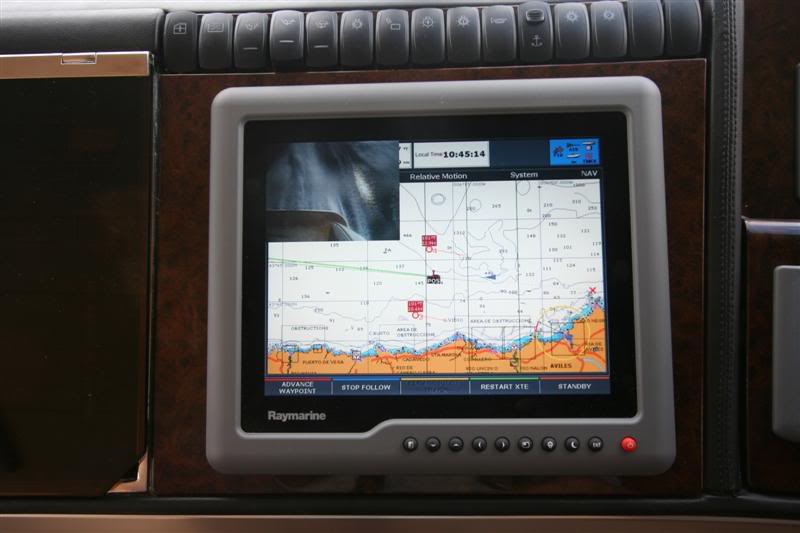
My Raymarine system functions entirely separately. My PC systems feed individually into each display as "external video feeds". The PC keyboard is a long range wireless device that works throughout the boat. The PC mouse is a similar wireless device (an air mouse that doesn’t need a flat surface to work). The PC's video is also connected to other separate monitors. The PC can read/write out to the main NMEA GPS but also has two other separate GPS feeds – one of which works entirely off the PC’s power supply. Data is shared using the common NMEA feed so waypoints/routes can be set up on the PC and transferred to the Raymarine kit as necessary.

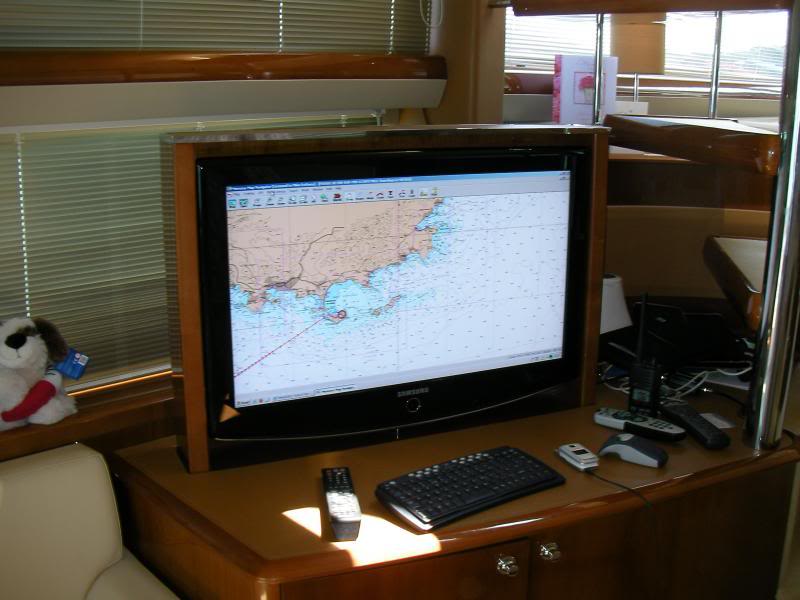
The resultant PC system provides an excellent planning system using the large saloon TV and then a good parallel system whilst “in passage”.

Here’s a couple of photos that may help understand it.

PC display on main saloon TV - good for planning but as you can see from this pic it works at sea as well.
SANY1590_Small.jpg


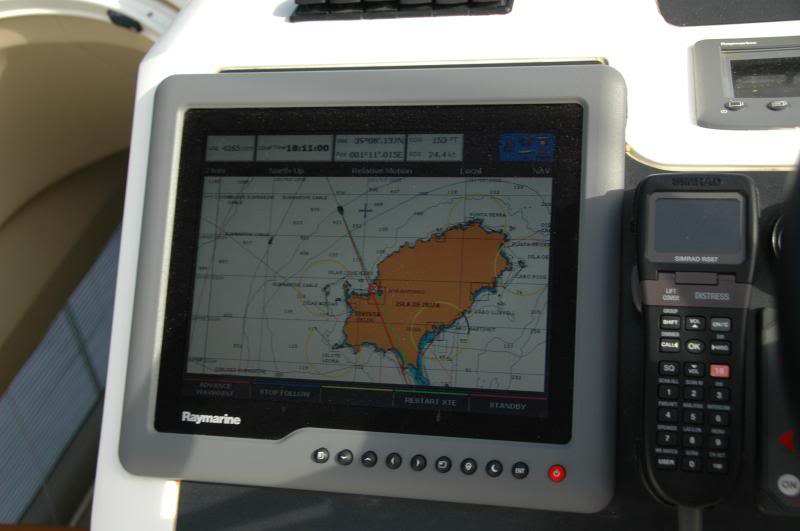
Here is one of the Raymarine G series displays whilst under way.
DSC_0089_Small.jpg


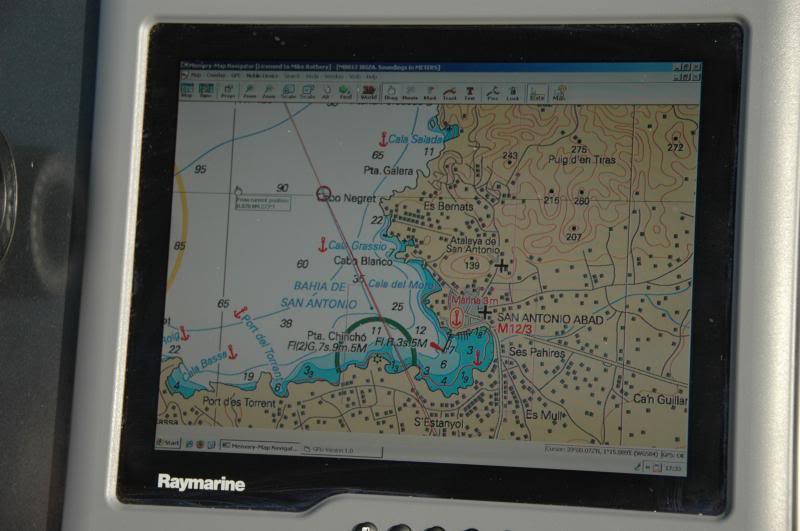
And the same display a few minutes later but, in this photo, showing the PC's feed - note how useful it is to have more than one database of charts available.
DSC_0106_Small.jpg


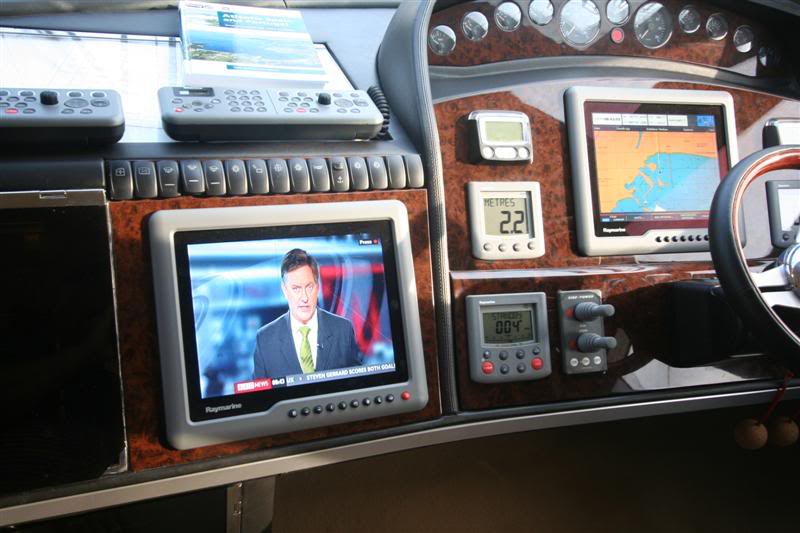
I've also set the system up so that all the video feeds go to each of the displays. This reduces the chance of one piece of kit failing and screwing up the whole system but, more importantly, it means that you can very quickly switch any of the video feeds as you need them.

This pic shows the main helm with a TV (Sky) feed - not important in this discussion but it illustrates the point.
IMG_5504Medium.jpg


Here are some other pics that are already on Photobucket so easy to include in this post

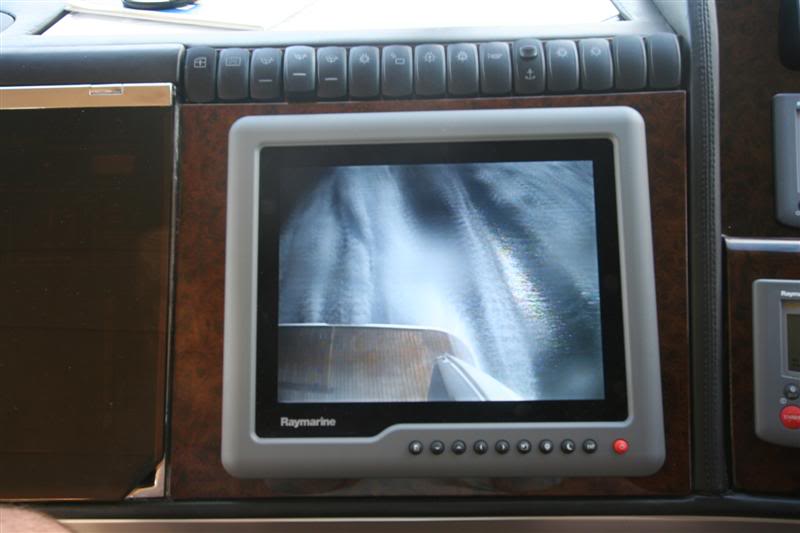
Docking cameras
IMG_5281Medium.jpg


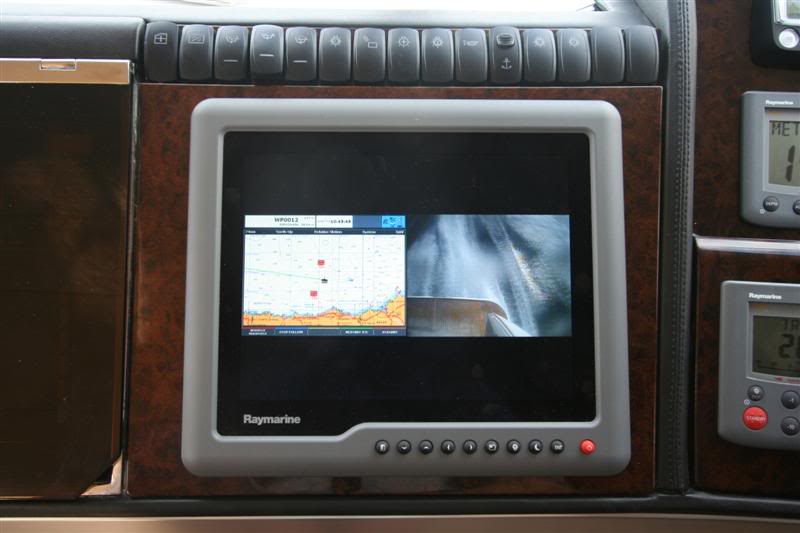
and a mix of docking cameras and charts on a single display.
IMG_5282Medium.jpg


IMG_5285Medium.jpg


The point though is that the PC system is separate and individual feeds can be switched immediatly using a single button.
 
Last edited:
that deals with my concern that you might have two systems mutually dependent.

You have done more than design the interfaces on the back of a fag packet ! Neat and very functional.
 
Interesting thanks ... although I have some concern that you're using a touch too much throttle whilst docking - according to the docking cam anyway! ;)


We have Raymarine RL70 (with radar) at the wheel and a SH CP180i (with AIS) further forwards - neither are ideal for the job and hopefully we'll be replacing the RL70 soon - whilst it would be easy to replace it with a dedicated plotter/radar from the Raymarine or Garmin stable I do wonder if we'd be better off replacing it with a daylight viewable screen and feed a PC into it. This would give us much greater flexibility than we currently have - if I can sort a radar input into the PC too!
 
Well - Koden already have a scanner and control box that will interface with a PC - numerous bits of chart software it will do this with - but at £2k for the 2kw raydome it's still quite an expensive option - probably cheaper than a marine plotter & radar overall though.
Just need it to interface into OpenCPN (plugins now available) and bobs ya uncle...
 
Hurricane,

Fantastic post’s……………………………

Just a quick 1……………..

I love looking at charts and maps, always have.

Unfortunately, I am not very thech’y…………….. so

This may seem a bit of a Neanderthal question……………….. but

I have a laptop.

I have a GPS mouse.

What do I need to get in the most basic of explanations, to be able to do passage planning at home.

Sorry for being thick.

I apologise if the above post is incorrect, unlike some I am not perfect.
 
Actisense USG-1

somewhere in this thread (I think) Actisense USG-1 is mentioned as an interface adapter from USB to NMEA0183.

Got a reply from the company and it costs 88euro + 48euro p&p to Greece, EEEK!!
I already asked for any other cheaper postage option and am waiting.

Now, is there any other (preferably cheaper!) solution?
Mind you, galvanic protection aside, such devices cost around 20euro (ok 30max!)

Would a simple serial cable work through an USB2Serial adapter??

cheers

V.
 
somewhere in this thread (I think) Actisense USG-1 is mentioned as an interface adapter from USB to NMEA0183.

Got a reply from the company and it costs 88euro + 48euro p&p to Greece, EEEK!!
I already asked for any other cheaper postage option and am waiting.

Now, is there any other (preferably cheaper!) solution?
Mind you, galvanic protection aside, such devices cost around 20euro (ok 30max!)

Would a simple serial cable work through an USB2Serial adapter??

cheers

V.

It looks like it is an upmarket USB2Serial adapter ...
I've used a simple USB2Serial adapter to connect the AIS and/or GPS output to the laptop. I no longer need GPS output as I've got a USB dongle for that now - but the AIS feed can still come in through it.
AIS is NMEA2000? whilst the GPS feed was NMEA0183 - so the simple (cheap!) connector can cope with it - it just doesn't have the electrical isolation that the above device has....
 
It looks like it is an upmarket USB2Serial adapter ...
I've used a simple USB2Serial adapter to connect the AIS and/or GPS output to the laptop. I no longer need GPS output as I've got a USB dongle for that now - but the AIS feed can still come in through it.
AIS is NMEA2000? whilst the GPS feed was NMEA0183 - so the simple (cheap!) connector can cope with it - it just doesn't have the electrical isolation that the above device has....

thanks,

well, I want to pass NMEA0183 strings from the netbook running OPENCPN to the 90ies vintage autopilot. I guess it's a matter of connecting the transmit pin from the serial thingy to the + and ground to - on the AP controller...
Will investigate further and decide (and skip purchasing the 140euro thing for now!)

cheers

V.
 
advice with setting up system from scratch

Hi all
New at this, so apologies if I ask questions that have already been answered (in this or other threads)
First, fantastic thread, Hurricane et al that contributed; insightful and informative
I’d like to ask for advice from those that have done it, took the picture, bought the T-shirt, etc, on designing and building electronic navigation capability on my new boat from scratch. This includes SW, HW and architecture.
Below will list a number of requirements and assumptions I’ve used scope the solution. If you think any of those are nonsensical or need to be challenged, please DO! :) (hehehe… fuzzy requirements lead to inadequate solutions!!) ;)

Idea is to go the PC route. Rationale for this is:
1) I hate (with a passion) small displays on dedicated charplotters …models within my price range anyway!
2) use of multiple chart file formats
3) PC is a multi purpose device, so other uses as well.
4) relatively low-cost, standard HW components and peripherals

Functional approach and constrains are as follows:

a) Navigating is done below, steering to a course is done at the helm. In consequence, I will not need a chartplotter on the cockpit. What I will need (or would like to have) is an LCD display at the wheel.
b) electronic system will be primary system, paper charts backup
c) preferably do away with need for permanent navigation table (it intrudes in the saloon of my 30 footer!!). can put the space to better use. If and when I need to spread big charts, I can do on the main table
d) all navigation related info fed to a single display. (this includes not only chart plotter and related interfaces, but also Radar (in the future), weather info, etc., etc). In other words, I want to have a single screen in the cabin, no more
e) minimise power consumption (evidently!); 12 volt feed

Current equipment on board is:
GPS (Garmin 126/128) – cockpit; removable
Tridata and Wind (Autohelm ST50) – cockpit –fixed on panel
Steering (Autohelm 4000) – cockpit -removable
VHF – below

Budget: back-of-the-fag-pack calculation of about GBP 600 – USD 900 – may stretch to GBP 1000 if I can spread over two years

So… on my sketchpad, the architecture looks like this:

Component 1 - PC: Wintel (Windows 7 is what I have), 1 serial, 6 USB ports, 12 Volts power supply. No disk reader, internal HD. Have been looking at commercially available car computers (used by mobile services, ambulances, police, etc). Specs seem appropriate and they are compact and well built. Cost varies with model but entry level is ca GBP 250. Can also have one custom build by my local computer shop for less than that. Same specs.
USB port allocation as follows: (1) GPS, (2) tridata (3) external HD or disk reader or infrared mouse or keyboard – one at a time! :)- (4) Wind, (5) AIS, (6) helm display, (7) serial port for Radar…. Have I forgotten anything?

Component 2 - Cabin LCD display, 14’ to 17’. Here it gets a bit more complex. To comply with (c) above, ideally I would like to have a touchscreen monitor, so I can input directly on the screen with fingers or stylus. I can attach the monitor to the bulkhead. Now, I’ve read posts about inconvenience/difficulty of operating a more or less vertical touch screen on a rocking & rolling boat. I have no experience, so input appreciated. Again, price varies (wildly) but lower range is about GBP 300. Being in the cabin, this unit does not need to be weatherproof, but it needs to be well protected from ambient humidity and temperature changes.

If I do away with requirement (c), then the cost goes down by half!

But then again, if I do away with (c) then I can consolidate the system into a single beefed up laptop with a wide screen just as well, at about GBP 400 (though would struggle to find one with 6 USB ports off the shelf!)

Component 3 - Repeat station at helm. Since, in principle, I will not need to input from the helm, all I need is an adequate LCD display of the computer output. Struggle to find rugged, waterproof small LCD displays at a reasonable price, but can get a non-rugged USB 6’ LCD display for about 100 quid, and build the weatherproof casing myself. Part of the fun of these projects…

So, these are my ideas so far….

So, the advise I ask for is a sanity check of the whole project from the technical, functional, or budgetary perspectives, and for insight, input, and tips from others that have done something similar in part or whole.

In terms of SW, I’m still doing research, but I lean towards using opencpn.

Many tanks in advance four your input!

Seadago
 
In this case, I think your expecting too much for the PC to be integrated to that level.

The big thing you seem to have forgotten is charts.
With your budget, IMO you should start here.
Deciding which charts you are going to use will also determine the software.
That will in turn determine what can actually be done.
OpenCPN and Maptech charts is probably the way forward.
OpenCPN also has an interface to the pilot but I think radar might be a problem - even later.
Also touch screen displays might not work well with OpenCPN and might not fit the budget anyway.

In your case, with your requirement, it pains me to say - get a chart plotter.
Like this one http://www.standardhorizon.co.uk/product_info.php?cPath=178_172&products_id=99998
Standard Horizon kit has a reputation of being bullet proof.
With a unit like this, you could still do away with the chart table – maybe get the one with an internal GPS and move it to the cockpit as you need it.
I believe there is an option with some Standard Horizon systems to upgrade to radar.

Sorry. IMO you are asking too much from a PC – it will take you ages to set it all up and the same expenditure on a good plotter will give you a neater and more reliable system.

Oh – and that’s from someone who has done loads of work with PCs on boats.
 
hi, don't have the time to carefully go though this lot (I'm working along the same line as well) but there is a radar plugin for OpenCPN3.0
Catch is it needs the newish 1K digital/whatever you call them HD radomes by Garmin only (ATM at least) check it out.

V.
 
pc based navigation system

Thank you Hurricane, Virtuvas
:) This is the kind of feedback in looking for!
Hurricane, I tend to look at the chart issue in this way. Chart library will depend on the waters I will be sailing. Let's say... year 1: UK coastal, maybe Channel, year 2: Europe Atlantic seaboard (France and Spain, too cold further north), year 3: Med, and so on. In 5 years time, maybe the Caribbean or beyond, depending how early I can quit the rat race!
In his context, I can spread he cost over several years. That's why I excluded the cost from the budget. In this case, for the first two years, I would be needing little more than UKHO charts... which just happen to be outrageously expensive to licence! I don't want to be tied to admiralty stuff from the start, or any commercial supplier... who knows what the copyright situation will be in 5 years?...
The interfaces I need with OpenCPN are the basic ones to make full use of the software functionality. I probably will never need to interface radar (or the pilot) to the application, but it would be a neat solution to be able to display it on the same screen...
....if there is a Windows driver for the radar! Mmm good point, didn't think of that!
I am curious though... your comment "you are asking too much from a PC" refers to:
a - the specs/price range of the PC I'm scoping are not high enough?
b - the inherent technology is not sufficiently mature/integrated/sophisicated?
c - it would be too flaky/unreliable? - you already mentioned difficulty and time to setup - Noted!
d - all the above?

All the above said, if ask you: what PC based system would you confidenty scope and set up for a budget between 600 and 1000 GBP, I can see what compromises I have to make on my requirements. :)

Hey, thanks for the input guys
Seadago
 
I think my point still stands

A plotter like the SH one above will in the end be cheaper and more effective.

If I were you, I'd allocate my budget to a conventional plotter and have a PC/laptop running either OpenCPN or MM or both as a backup/alternative system.

I know my system is significantly more complex but essentially it is just that - a Raymarine system with a PC running in parallel.

I think you will find the charts for something like the SH cheaper as well.

A full stand alone chartplotter like the one I mention complete with all the charts you mention should be well inside your budget.

An old/cheap laptop with a cheap GPS dongle (sub £20) will give you the equivalent of my parallel PC system.

I'm sure you would be best advised to keep your main simple and robust.

A really good example - enroute to Malta, our PC system packed up - hard dis failure - so we simply continued with the more robust Raymarine kit. The PC was eventually fixed and I now use a solid state drive and have a completely spare PC to swap in if needed. But this shows that domestic PCs are not as robust.
In your case you could spend more on a PC system and have (IMO) something more likely to fail.
 
Hurricane
I see your point about having two separate independent systems and I tend to agree. it's good a good continuity policy. Will estimate cost of your option, compare, and see what comes out.
Thanks again
Seadago
 
Thats what we've got, a standard horizon plotter with an old lappy along side running opencpn with a cheap GPS dongle.
 
If you fit a Garmin plotter at the helm you can use the plotter GPS data for a laptop at the chart table, via NMEA. You then have options with routes, tracks and waypoints, as Garmin and OpenCPN will both use GPX files to transfer the data. I don't think you can import/export GPX files directly to/from the plotter, so you'd need to use Garmin Homeport on the laptop. It would be very simple to plan a route in Homeport, then save it back as a GPX file for OpenCPN and a .adm file for the plotter.

Fitting a plotter at the helm will exceed your budget, but will give you a vastly superior system with inbuilt backup. By carrying a handheld GPS the laptop could be uses stand alone. The Garmin GPSMAP 750 is a very nice 7" touch screen plotter that supports AIS and radar. AIS can currently be overlaid on OpenCPN and a radar plugin that uses the Garmin radome is also under development.

I agree with all that Hurricane said, apart from the make of plotter. The SH CP300 was a good plotter and great value for money, unfortunately for them, Garmin has overtaken them. The Garmin 750 looks more expensive than the SH, but is a modern touch screen plotter that includes Garmin G2 charts for the whole of the UK. By the time you buy the charts for the SH, even as part of a bundle, it'll cost as much, or more, than the SH.
 
If you fit a Garmin plotter at the helm you can use the plotter GPS data for a laptop at the chart table, via NMEA. You then have options with routes, tracks and waypoints, as Garmin and OpenCPN will both use GPX files to transfer the data. I don't think you can import/export GPX files directly to/from the plotter, so you'd need to use Garmin Homeport on the laptop. It would be very simple to plan a route in Homeport, then save it back as a GPX file for OpenCPN and a .adm file for the plotter.

Fitting a plotter at the helm will exceed your budget, but will give you a vastly superior system with inbuilt backup. By carrying a handheld GPS the laptop could be uses stand alone. The Garmin GPSMAP 750 is a very nice 7" touch screen plotter that supports AIS and radar. AIS can currently be overlaid on OpenCPN and a radar plugin that uses the Garmin radome is also under development.

I agree with all that Hurricane said, apart from the make of plotter. The SH CP300 was a good plotter and great value for money, unfortunately for them, Garmin has overtaken them. The Garmin 750 looks more expensive than the SH, but is a modern touch screen plotter that includes Garmin G2 charts for the whole of the UK. By the time you buy the charts for the SH, even as part of a bundle, it'll cost as much, or more, than the SH.


I bow to your better judgement of the plotter.
My selection of plotter was based on my like of SH equipment generally and an SH plotter that I recently used on a sailing boat.
But as you say, it is generally accepted that Garmin pips all the other manufacturers these days.

I like your idea of having the plotter out in the cockpit and linking to it with a PC/laptop from below.
I think I can add a possible option to this idea.
If you have linked the two with NMEA, you will be receiving the GPS data from the plotter on the PC - right?
NMEA can be bi-directional so using this technique, you can also "upload" waypoints and routes from the laptop to the plotter.
Memory Map for example has an option (Send to GPS).
So you would do all your planning on the PC and upload waypoints/routes to the plotter.
Then, when underway, you will have both systems recording the track - a kind of backup.
This technique works with my Raymarine kit - maybe it could work for other manufacturers.
All my planning is done on the PC and then uploaded to the Raymarine kit before we leave.
You can also have different chart data. For example the PC could be using Admiralty charts and the plotter could be using Navionics (as in my case).
 
Top