Has the PC finally come of age? – a review of OpenCPN

Very interesting stuff Hurricane. It's interesting because the software appears to be very comprehensive and powerful whereas traditionally PC navigation software has been lacking.

However, I would most definitely not want a PC based system as my primary navigation system. They are just not reliable or rugged enough for use on a boat especially if long or night passages are planned in potentially rough weather.

Ahh - yes - you know the G Series
Its really good at integrating a PC alongside the dedicated systems.
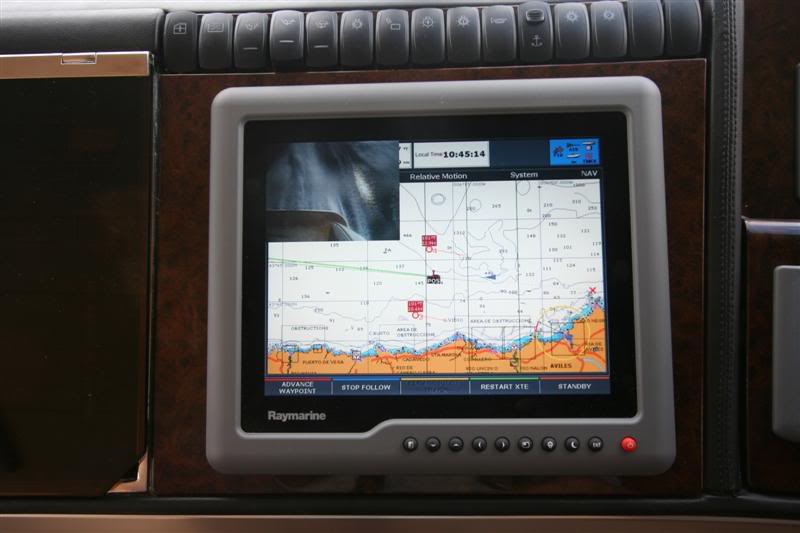
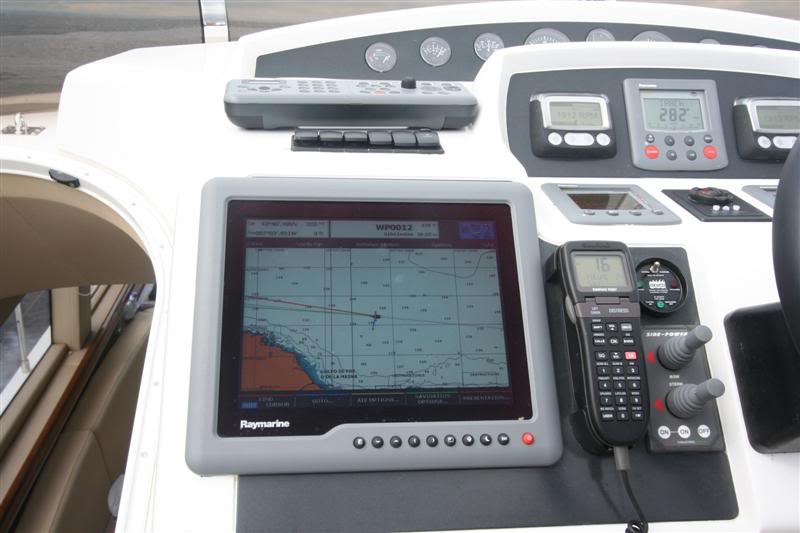
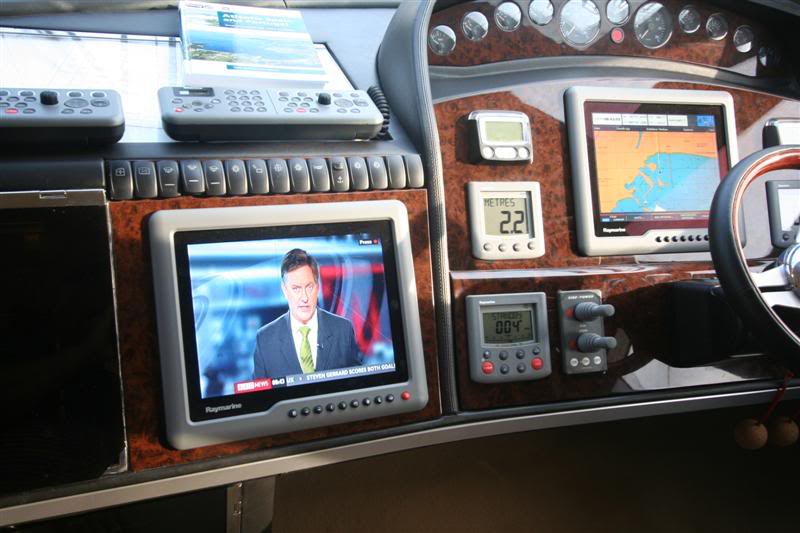
The G Series displays have a row of buttons along the bottom that can be allocated to various different feeds.
I have the Raymarine GPMs on the first button, the PC on the second, the satellite TV on the third, port docking camera on the forth etc....
But without integration like this, I agree, the PC needs careful planning or it just isnt robust enough.
For thos not familiar with the G Series here's a few photos
IMG_5289Medium.jpg


IMG_5504Medium.jpg


IMG_5285Medium.jpg


OpenCPN will simply pop up on the PC feed - no hardware changes to my system necessary.
 
Last edited:
Thanks for the comprehensive reply, Hurricane. The ability to scan in charts is an interesting option because the detail available from, say, an Admiralty chart is far better than typical plotter cartography but I guess you're not talking about a desktop scanner? How exactly do you scan a full size Admiralty chart? Why should this give you 'better control' than buying Admiralty charts in electronic format to begin with?
 
Thanks for the comprehensive reply, Hurricane. The ability to scan in charts is an interesting option because the detail available from, say, an Admiralty chart is far better than typical plotter cartography but I guess you're not talking about a desktop scanner? How exactly do you scan a full size Admiralty chart? Why should this give you 'better control' than buying Admiralty charts in electronic format to begin with?

By control, Mike, I mean that I'm not dependant upon any one supplier of charts.
If you just stick to Navionice, thats all you have.
I remember arriving at Gijon (in the dark) having just crossed the Bay of Biscay with my latest Navionics card plugged into my latest G Series kit to find a complete harbour had been built. I had been told by the Navionics salesman that they had "flown" the entire coastline taking aerial photos so their charts were "right up to date". This was a blatant lie. IMO the newly developed port must have been there several years before and Navionics should have had information indicating that a port was going to be built years before it was anyway. I was furious and when they said that they are not responsible and suggested giving me my money back, I replied that wasn’t the point – I was sold a lie.

So, putting that aside, I still use Navionics. But in parallel to other systems. I still have to be careful but by having as many different sources as possible, I believe you can minimise problems. That’s what I meant when I say I like to be in control.

Now to a little rant.
Admiralty (UKHO) are a PIA.
My research has shown that not only are they VERY expensive but they only release their charts for limited specific software systems. Maptech who distribute a “standard” BSB format haven’t updated their Med charts for about 5 years and some the charts that they have released 3 years ago are so old they are a joke!!! Here’s one I bought “as current” 3 years ago:-

BW.jpg


There is an argument that the UKHO data is now well out of copyright and should be available like it is in the US and more recently, New Zealand. So actually obtaining UKHO electronics charts for a free system like OpenCPN is very difficult – in fact, up until I wrote my little conversion utility, it was impossible.

Scanning
As you say, locally bought charts usually have more detail than the ones you find in your plotter. The ones we bought in Spain are, physically, huge. A good 4 feet by 3 feet. The last thing you want to have lying around getting sat on. Most of my electronic charts were bought already scanned but not these local ones. Of the charts that I’ve had to scan, some I’ve sent away and had professionally scanned, others, I’ve just put sections under an A3 flatbed scanner. Either way, I now have an easy and accurate method of geo referencing them into my systems.

Finally, there are lots of other advantage of keeping your charts electronically- here’s a few:-
1. You can print very low cost copies that you use just once and then throw away after use.
2. Transfer updates to and from the boat easily on a memory stick or USB hard drive.
3. Plan your trips at home.
4. My system is so easy to “pull up” on the TV that we use the charts in general discussions with friends when we are planning on going somewhere or explaining where we’ve been.
5. You can also tie the electronic charts in with your favourite waypoints etc.
 
Last edited:
What I dont understand, Hurricane, is that presumably Admiralty electronic charts are sold to commercial shipping lines. Surely they wouldn't accept outdated chart info or are you saying that the software available to pleasure boaters is inferior?
Agree with you about inaccuracies in Med plotter cartography. I remember approaching Ibiza Town for the first time and finding somebody had plonked a bloody great big breakwater across the harbour which wasn't shown on my brand new C Map chart. Similarly, the first time I went into Barcelona harbour, my new C Map chart didnt show that one of the main entrances had been blocked off and a new entrance constructed further south. A large clump of drying rocks close to my current marina in Croatia is not shown on my new Navionics chart for the area. I dont trust Med plotter cartography at all and I always try to buy local paper charts and least 2 pilot books for cross reference.
Anyway, your post has given me food for thought. I have collected some good local Croatian charts which are half Admiralty size and it would be easy to get them scanned. Thanks again for this post. Its been very interesting
 
Hurricane.

Just to add to the praise for your writeup, I have opencpn on a laptop with cm93 charts, it has been useful on occasion, but, not really used in anger - yet, one attempt at scanning in a chart fragment, but that is all. You have persuaded me to dig deeper into the software.

The ideas for a touch screen monitor for use at the helm, with the pc safe below, sounds like the way to go.

Perhaps you could write up the details in a more permanent place, maybe with a detailed 'how-to' for some of the items ?.

I for one would appreciate that.
 
Deleted User
You very slightly missed my point.
Apart from Admiralty charts, there isn’t much out there that’s up to date.
To date, Maptech dont sell Admiralty charts for the Med.
Admiralty charts are up to date but (I guess due to an over bureaucratic organisation) they don’t make them easily available – insisting on supplying to a very limited range of applications. There’s lots of unrest on this subject if you look round.


starfire
Actually, I'm not sure that a touch screen is the way to go.
It's not so bad on an iPad but at sea if you had a fixed touch screen, I think you would have trouble controlling it with the boat moving.
My G Series system has robust wireless keyboards that you hold in your lap and is definately easier to use.
I think its because you are moving at the same time as the boat so each keypress is much easier - rather than leaning over to a touch screen where your finger will slip as the boat moves.

So for a lower cost option, I suggest something similar but using PC equipment - unless someone knows of a robust keyboard?????

BTW the Gyration keyboard that comes with the Air Mouse would be good enough as long as it didnt get wet - I have one to control the PC when its is displaying through the Raymarine system.

Hope that helps.
 
RE updating charts

CMap charts are updateable on a "by demand" basis, I update once a week and find the download to be about 300k. The information is seldom too bad, unless you are sailing in the Rio La Plata area, where sailing through fields is a regular occurrence. A lot of people dont seem to realise that even if you buy a "new edition" it will still be only as up to date as the edition date.
The "free" version of Cmap is however - free of the ability to update - until some kind soul posts a link to an updated database !
The original article is brilliantly written and descriptive, and as someone who uses charts professionally I must say that it knocked spots off most " how its done" articles. Well done.
CC
 
I have also joined the ranks of OpenCPN users in readiness for our move to live aboard a trawler style motor yacht in the USA, where electronic charts are free of charge to download from Uncle Sam in both raster and vector formats. Updating in this case is easy, just download a new set for the area whenever you need to, they update weekly! I do have CM93 charts installed for 'training' use with OpenCPN before we move as currently we are boatless over here. Hurricane's excellent post has been copied, many thanks as others have said already!

Previously I only ever considered dedicated plotters because as raggies power consumption was a big factor, as was sunlight viewing and waterproof for cockpit use. Our next boat will have a dry steering position below or even in a pilothouse where direct sunlight will also be less of a problem, as will power consumption under way. What we will have on the flybridge is a different matter yet to be resolved, but the likelyhood is there will be an existing plotter or two anyway.

As far as chart updates are concerned here, no chart is ever really up to date. Over the years we have seen major changes made to buoyage and harbour plans especially that have taken some time even to appear in Notices to Mariners. 'Temporary' changes like once some data buoys in central Channel some years back or an oil rig were gone again even before the chart updates were issued, in the former case I got the information from a French source before I saw it over here. Poole harbour buoyage changes (quite major ones at the time) took nearly a year to show up on the Admiralty charts although the details were published in the local harbour office and circulated to yacht clubs etc. almost immediately. On that basis it is hardly surprising that C-Map et al are never fully up to date.
 
great stuff this Hurricane - brilliant post.

I too am keen on the pc backup approach and use laptop and older PDA with built in GPS on Mapteck charts.

I cannot wait to try the free software you recommend - once I finish this post and sort out the day job issues this morning :-)

Problem with the S coast Maptech charts i have is that they are very slow indeed in getting the tidal updates to the market. I still await 2011 data so the tidal streams etc will not function.
 
CMap charts are updateable on a "by demand" basis, I update once a week and find the download to be about 300k. The information is seldom too bad, unless you are sailing in the Rio La Plata area, where sailing through fields is a regular occurrence. A lot of people dont seem to realise that even if you buy a "new edition" it will still be only as up to date as the edition date.
The "free" version of Cmap is however - free of the ability to update - until some kind soul posts a link to an updated database !
The original article is brilliantly written and descriptive, and as someone who uses charts professionally I must say that it knocked spots off most " how its done" articles. Well done.
CC

Yes, as you say, we mustnt "write off" CMAP.
On the recent trip up the Spanish coast, we called into Puerto de Mazarron for fuel. In fact, the raster charts we had only showed the main port (mainly because it was right on the edge the highest resolution one).
In this case, CMAP had the best coverage.
 
Many thanks for your time to share this with us Hurricane. This is a fascinating post and has got me thinking too.

I personally am not so interested in having the option of using a PC as a backup to chart plotting on board (although appreciate the huge benefit of having various sources of charts at your finger-tips), but more in the ability to route plan electronically away from the boat and then transfer routes / waypoints to the E series on board.

1st thought (as I have Navionics on iPhone) was to use that (a wireless router can be connected to the E series and the app will then transfer routes)…but the screen is far too small obviously……so 2nd thought is to get an iPad (with the new higher res screen) and plan on that. Advantages are that I’d always have the latest Navionics maps on the iPad when planning…….(Hurricane – what did you think of your mate John’s iPad running Navionics?)

Or perhaps better still, use something like OpenCPN and scan my charts as you suggest – but still slightly unsure if / how I’d then get planned routes onto my E series. I’d also need to work out how to geo reference them (assuming that’s possible on OpenCPN).

So, for electronic route planning away from the boat, what do you reckon is best in my case (as already E Series and Navionics on board)– iPad and Navionics App, or PC running OpenCPN??
 
Where can I download the Cmap charts, not CM93, the later ones?
Please.

Belay that question, have found out!
 
Last edited:
Many thanks for your time to share this with us Hurricane. This is a fascinating post and has got me thinking too.

I personally am not so interested in having the option of using a PC as a backup to chart plotting on board (although appreciate the huge benefit of having various sources of charts at your finger-tips), but more in the ability to route plan electronically away from the boat and then transfer routes / waypoints to the E series on board.

1st thought (as I have Navionics on iPhone) was to use that (a wireless router can be connected to the E series and the app will then transfer routes)…but the screen is far too small obviously……so 2nd thought is to get an iPad (with the new higher res screen) and plan on that. Advantages are that I’d always have the latest Navionics maps on the iPad when planning…….(Hurricane – what did you think of your mate John’s iPad running Navionics?)

Or perhaps better still, use something like OpenCPN and scan my charts as you suggest – but still slightly unsure if / how I’d then get planned routes onto my E series. I’d also need to work out how to geo reference them (assuming that’s possible on OpenCPN).

So, for electronic route planning away from the boat, what do you reckon is best in my case (as already E Series and Navionics on board)– iPad and Navionics App, or PC running OpenCPN??

Personally, I'm still with the PC but the iPad was VERY good. I think it falls down on compatibility. Also for me, (as I say above) I dont like to be tied down to one chart supplier - the good iPad app uses Navionics but a PC has a much wider range of options. I read recently that there is another free app that runs on Android - seemed to have good reviews - maybe, being Android, there will be more options.

But for use at sea, the iPad was very good. Like my comments on keyboards, having a display in your lap meant that the boat movement didnt affect its use. It was even quite easy to see the display on the flybridge. Excellent and very simple solution as a backup or planing aid - use it to plan the next day in the bar over a cool beer, perhaps. But as I say, doesnt integrate as well as a PC so not much good if you want to connect to the E Series.
 
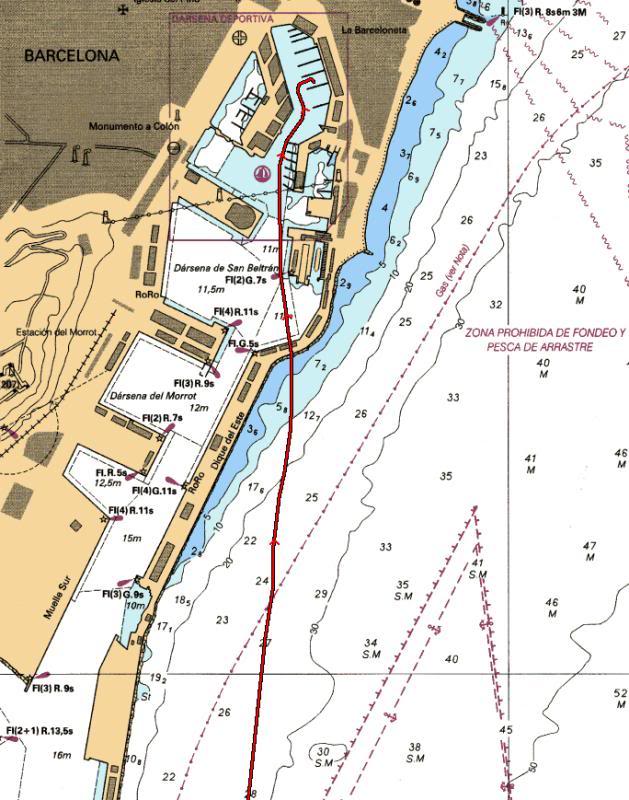
Similarly, the first time I went into Barcelona harbour, my new C Map chart didnt show that one of the main entrances had been blocked off and a new entrance constructed further south.

I know what you mean - that same set of Maptech charts that I mention above (bought 3 years ago) - this is a snip from one of them - and our track into Port Vell.

BarcelonaG3_Small.jpg


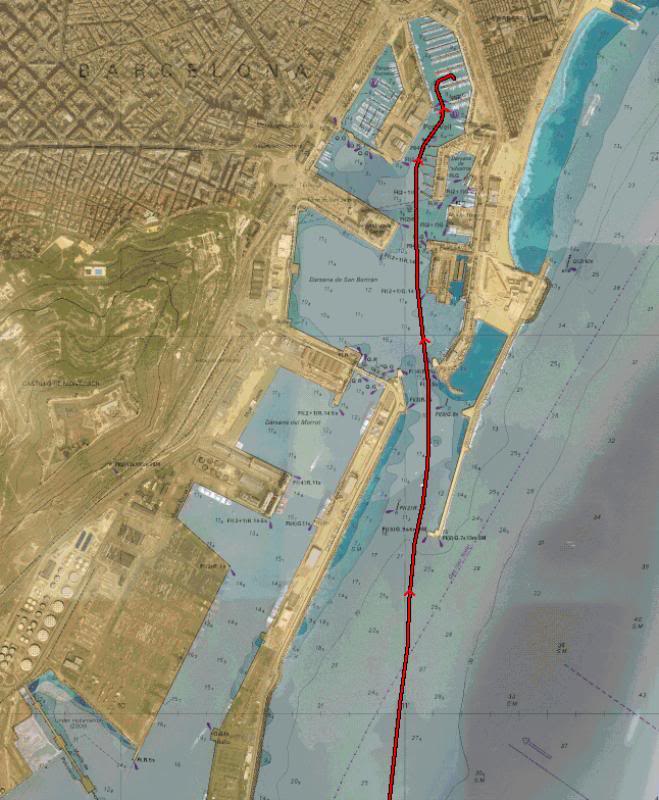
Your post also caught me in the middle of doing a Google Earth overlay for Barcelona - might be using it next month on our way over to the SoF.

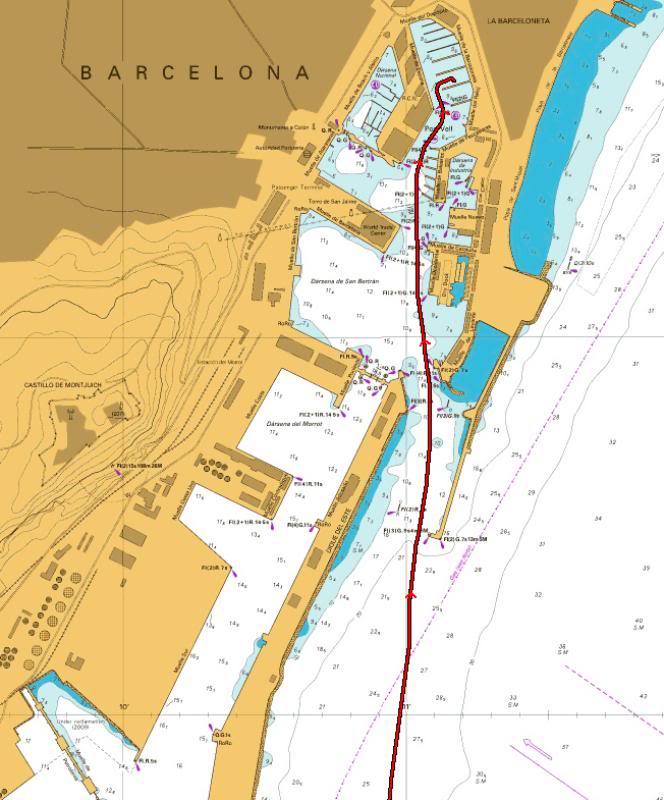
So, here's a snip of same area except this is the current Admiralty chart

BarcelonaG2_Small.jpg


and here's a snip of the Google Earth overlay

BarcelonaG1_Small.jpg


It was easy to leave the boat's track on.

Highlights your point though.
 
Last edited:
But as I say, doesnt integrate as well as a PC so not much good if you want to connect to the E Series.

Thanks Hurricane - am hoping though that the Navionics app on the iPad (if I go down that route) will do the same as the Navionics app on the iPhone - i.e. let you transfer wirelessly routes / waypoints straight to the E series...
 
Hurricane, thanks for the insight. Duly prompted I have had a bit of a session with OpenCPN.

I use Chart Navigator Pro as my PC nav application and have been generally pleased with it for both planning and passage use, however, I have been looking for an alternative (their regular delayed issueing of tide data being a big factor).

I have installed OpenCPN 2.4.0 and the BSB4 plugin for use with my existing (licenced) BSB4 charts, results below:

CropperCapture2.png


CropperCapture1.png


CropperCapture3.png


Not got the tide info running yet though :>(

GRIB files next challenge.

Will check GPS and AIS when next on the boat.
 
Now got the open CPN stuff into the computer, which chart set would folks recommend, given that my requirmemnts are quite limited, basiocally Thames Estuary, Channel, Belgium/Holland and that area. I''ve wondered about a tedious session of scanning my own charts but that looks to involve scissors, cunning folding and some serious stiching afterwards, together with being vast jpegs so not convinced by that solution!
 
Cant remember exactly, but I thought that when I played with Grib files and OpenCPN, the chart had wind arrows showing the wind strength/direction etc. It was a month ago that I played with Grib files so I may have forgotten - and I've been to sleep since then!!.

My thoughts were that you get a better display with something like UGrib and it was better to keep weather separate from navigation but I would be keen to hear your thoughts.

Grib files are definately on my list to experiment with sometime.

Edit: - Sorry - I need new specks - there are arrows on your chart - sorry
 
The ability to turn GRIB data on and off as required as a main nav screen overlay seems like an easy interface to use when underway, probably easier than going to a different window. Selecting the appropriate grib data also allows an easy look-ahead. Needs a bit of real life evaluation rather than desktop.
 
Top