
External camera interfaced with Raymarine Axiom Pro chart plotter.

So, did you unplug the ethernet cable from the camera so that it was only the axiom which was connected?
You now what? No, I didn’t try that combination. I’ll set up the IP addresses on the PoE camera and take it down. But try your combination of leaving camera sis connected first. Mind you if that is the issue stumped to what I can do. Oh by the way I get interference even if the power is disconnected to the camera but Ethernet connected to axiom.
 
A couple of things I thought about.
  • You may have a ground loop. Are you powering the VHF, Plotter and Camera from the same 12v breaker and using the same 0v return?
  • Is the VHF connected to the Plotter via a NMEA cable? - if so disconnect it temporarily and see if the interference goes.
  • Raymarine sells a Raynet to Ethernet cable. - 10Mts, this will be properly screened and earthed into the plotter.
 
A couple of things I thought about.
  • You may have a ground loop. Are you powering the VHF, Plotter and Camera from the same 12v breaker and using the same 0v return?
  • Is the VHF connected to the Plotter via a NMEA cable? - if so disconnect it temporarily and see if the interference goes.
  • Raymarine sells a Raynet to Ethernet cable. - 10Mts, this will be properly screened and earthed into the plotter.
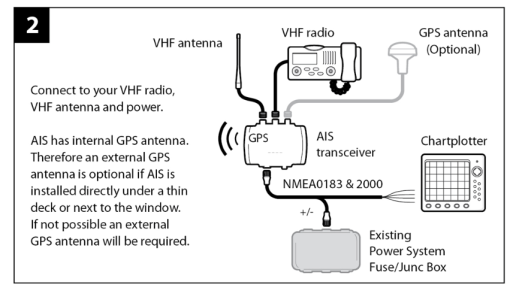
I was powering the Camera from the same breaker as the plotter and camera but yesterday I put in a separate power feed from a different breaker. I dont think the VHF is actually connected to the Axiom; however, I do hava an Em-Trac AIS transponder that is working on the same vhf aerial so that the vhf goes to the AIS transponder and vhf and NMEA to the axiom. See diagram. I dont know whether this would make a difference?
1747827187239.png
 
A couple of things I thought about.
  • You may have a ground loop. Are you powering the VHF, Plotter and Camera from the same 12v breaker and using the same 0v return?
  • Is the VHF connected to the Plotter via a NMEA cable? - if so disconnect it temporarily and see if the interference goes.
  • Raymarine sells a Raynet to Ethernet cable. - 10Mts, this will be properly screened and earthed into the plotter.
I was powering the Camera from the same breaker as the plotter and camera but yesterday I put in a separate power feed from a different breaker. I dont think the VHF is actually connected to the Axiom; however, I do hava an Em-Trac AIS transponder that is working on the same vhf aerial so that the vhf goes to the AIS transponder and vhf and NMEA to the axiom. See diagram. I dont know whether this would make a difference?
View attachment 193697
 
Well Father Ted you sent me down an interesting route by suggesting I leave the wiring in place but disconnect the camera. Did this today and interference still there so not the camera. I suspect that when I was pulling the cables through I may have loosened a connection on the vhf or axiom cabling. Further investigation required.
 
For the engine room I went for the 2.8mm.
Go for the 12v version.
If you have the Axiom Pro it has 2 Raynet ports so you can add 1 camera on each port, alternately you can add a hub into 1 Raynet port and connect via that.
@FatherTed - am just about to order the camera's - I have the now retired Es127 with Lighthouse.
you mention for the engine room you went for the 2.8 option - what would you recommend for the external camera ?
Jon
 
I think the 2.8 will also be fine. It’s the same as I use on my garage. I have 2 monitoring my driveway.

Also from Google…….

For fixed lenses, you will often find them in two common varieties; 2.8mm and 4.0mm. In this case, the amount of mm is referring to the focal length of the camera lens. A shorter focal length (2.8mm) results in a wider angle shot, while a longer focal length (4.0mm) results in a narrower shot.
 
I think the 2.8 will also be fine. It’s the same as I use on my garage. I have 2 monitoring my driveway.

Also from Google…….

For fixed lenses, you will often find them in two common varieties; 2.8mm and 4.0mm. In this case, the amount of mm is referring to the focal length of the camera lens. A shorter focal length (2.8mm) results in a wider angle shot, while a longer focal length (4.0mm) results in a narrower shot.
@FatherTed many thanks for that - 2 on order now
Jon
 
Last edited:
As an update to this - I ordered 2 Gadinan cameras and they took 2 weeks to get to the UK with tracking updates from ali express - the cameras themselves are housed in a cast aluminium casings and feel robust overall very happy - Now comes the planning of the install.
I noticed on @FatherTed 's github page there is a poe splitter is this a wise move to get one ?
Jon
 
As an update to this - I ordered 2 Gadinan cameras and they took 2 weeks to get to the UK with tracking updates from ali express - the cameras themselves are housed in a cast aluminium casings and feel robust overall very happy - Now comes the planning of the install.
I noticed on @FatherTed 's github page there is a poe splitter is this a wise move to get one ?
Jon
Jon, it depends whether you purchased the PoE version or the straight 12volt version. If the PoE version then yes a passive PoE 12 volt injector works well or if a 12 volt version you will need to run 12 volts to the camera. I ran a seperate 12 volts to the camera and later realised I could have teed off the 12 volts running to my cockpit light. Where I struggled was getting the IP addresses correct as it is very important to follow prvious advice on the IP addresses. Raymarine IP addresses are completely different to ones yo may be used to on PC and router connected devices.
 
Jon, it depends whether you purchased the PoE version or the straight 12volt version. If the PoE version then yes a passive PoE 12 volt injector works well or if a 12 volt version you will need to run 12 volts to the camera. I ran a seperate 12 volts to the camera and later realised I could have teed off the 12 volts running to my cockpit light. Where I struggled was getting the IP addresses correct as it is very important to follow prvious advice on the IP addresses. Raymarine IP addresses are completely different to ones yo may be used to on PC and router connected devices.
@Nigel52 - Thanks for that they are Non Poe so am I correct that they need to have a separate 12v supply ?
Like I said at #109 now to the planning stage - I have a bit of work on so would be looking to install back end of the year -But will be picking brains as the season goes on
 
@Nigel52 - Thanks for that they are Non Poe so am I correct that they need to have a separate 12v supply ?
Like I said at #109 now to the planning stage - I have a bit of work on so would be looking to install back end of the year -But will be picking brains as the season goes on
Yes, you will need a separate 12volt connection. I found that the camera often gave interference on my vhf despite earthing etc so fitted a switch to the camera 12 volts dc supply ad I only have the camera on for docking.
 
Yes, you will need a separate 12volt connection. I found that the camera often gave interference on my vhf despite earthing etc so fitted a switch to the camera 12 volts dc supply ad I only have the camera on for docking.
Now without sounding old - but could the interference be caused by the alternator ? - on old cars ie ford cortina era - if the alternator didn't have a suppressor fitted when you had the radio turned on you got interference ie hear the engine increase in revs @volvopaul or @PaulRainbow maybe able to shed light on this
if this is the case should be an easy fix
 
Now without sounding old - but could the interference be caused by the alternator ? - on old cars ie ford cortina era - if the alternator didn't have a suppressor fitted when you had the radio turned on you got interference ie hear the engine increase in revs @volvopaul or @PaulRainbow maybe able to shed light on this
if this is the case should be an easy fix
I looked at everything and even fitted an ethernet earth and electrical chokes on the wires but it happened without the engine on so not alternator. I'm happy with the solution I've got.
 
As an update to this - I ordered 2 Gadinan cameras and they took 2 weeks to get to the UK with tracking updates from ali express - the cameras themselves are housed in a cast aluminium casings and feel robust overall very happy - Now comes the planning of the install.
I noticed on @FatherTed 's github page there is a poe splitter is this a wise move to get one ?
Jon
Hi Jon

POE (Power over Ethernet) devices do not have a seperate DC input (eg Cameras, Wifi Access points, conferencing devices etc) - they rely on a ~48v supply being sent down the ethernet cable. The voltage is added using a POE injector or via a hub that provides POE. These devices will usually have a single input - the Ethernet cable.

The camera in my guide is a 12v DC version that does not support POE. (Although they do have other models that have POE, I have some on my garage)
This means you need to run a 12v supply to the camera in addition to running the ethernet cable.
We all know running cables is not easy on a boat, so........

To avoid running the 12v supply I use a Passive POE splitter on both end. This allows 12v to be added to the ethernet cable at the helm and then supplied at the other end to the camera.

In summary -
Yes you have the right camera.
You need to provide 12v to the camera (either via a 2 core cable or via the Passive POE splitter).
 
I came across this thread following numerous google searches on the subject. I have made fair progress and thought I would share my additional findings to those already posted. I live in the UK and my boat is in Spain and therefore I need both CCTV as well as manoeuvring cameras. My solution combines an onboard Hikvision NVR with Axiom 12". I come from a network background so apologies if I am assuming network knowledge. I have Starlink Satellite internet with a gl-inet router creating a wireguard connection to my home router. On board I have Hikvision NVR with 6 cameras (192.168.50.0/24) The axiom has it's own (not to be fiddled with) network but from the manual it states addresses 198.18.0.0-30 are reserved so I created a second VLAN on the router and both networks can see each other. By placing the cameras on the 198.18 network and setting the gateway address as the router the cameras are visible on the NVR. They are visible on the Axiom as they are local and don't need to route. I use a small Cisco VLAN capable switch to place devices on the appropriate VLAN.

Like everyone else I found it very difficult to find a camera which works with the Axiom but eventually I found the Vikyiln YC series which is a compact PTZ/Zoom camera the specific model is YX-PTZ-2386IRC-ZS available on Ali Express (spec below). It works perfectly and can run in Patrol mode from the Hikvision and then static for parking etc.

https://vikylin.com/docs/ptz-2386ir...SWFt0gLT4u8PmlSZCLWu_efuPy4sXUlyNY9I-HsNsRSYB

I have four of these mounted externally Port, Starboard and Stern plus one in the engine room really just to keep an eye on battery charger displays. I would like to add a couple of small bullets for the rear swimming platform and tender area. I see the gadinan cameras mentioned here but has any one tried the small bullet available from Ali Express linked here, for these space is at a premium. As usual very difficult to get clear product info. If not I will order and report back.

Gadinan Smart IP Kamera 4K 8MP 5MP 4MP PoE Outdoor Farbe Nachtsicht Audio Kugel Kamera Besondere mit Humanoiden erkennung - AliExpress 30

If anyone wants any guidance on the NVR//Network stuff just message.
 
I came across this thread following numerous google searches on the subject. I have made fair progress and thought I would share my additional findings to those already posted. I live in the UK and my boat is in Spain and therefore I need both CCTV as well as manoeuvring cameras. My solution combines an onboard Hikvision NVR with Axiom 12". I come from a network background so apologies if I am assuming network knowledge. I have Starlink Satellite internet with a gl-inet router creating a wireguard connection to my home router. On board I have Hikvision NVR with 6 cameras (192.168.50.0/24) The axiom has it's own (not to be fiddled with) network but from the manual it states addresses 198.18.0.0-30 are reserved so I created a second VLAN on the router and both networks can see each other. By placing the cameras on the 198.18 network and setting the gateway address as the router the cameras are visible on the NVR. They are visible on the Axiom as they are local and don't need to route. I use a small Cisco VLAN capable switch to place devices on the appropriate VLAN.

Like everyone else I found it very difficult to find a camera which works with the Axiom but eventually I found the Vikyiln YC series which is a compact PTZ/Zoom camera the specific model is YX-PTZ-2386IRC-ZS available on Ali Express (spec below). It works perfectly and can run in Patrol mode from the Hikvision and then static for parking etc.

PTZ-2386IRC-ZS | Camera PTZ | PTZ IP Cameras

I have four of these mounted externally Port, Starboard and Stern plus one in the engine room really just to keep an eye on battery charger displays. I would like to add a couple of small bullets for the rear swimming platform and tender area. I see the gadinan cameras mentioned here but has any one tried the small bullet available from Ali Express linked here, for these space is at a premium. As usual very difficult to get clear product info. If not I will order and report back.

Gadinan Smart IP Kamera 4K 8MP 5MP 4MP PoE Outdoor Farbe Nachtsicht Audio Kugel Kamera Besondere mit Humanoiden erkennung - AliExpress 30

If anyone wants any guidance on the NVR//Network stuff just message.
I purchased 2 of those Gardinan cameras as well as a couple of their dome cameras which everyone seems to find work well, The firmware is the same in both models.
I am not sure where the issue lies, but sometimes the bullet cameras do not show up on the network scan from the Axiom. I still have to do a bit more research, but it may be that the cameras need to be powered up before the Axiom. Once they are recognised online they work fine. It could be the small 12v auto POE auto router (Teltonika) which cycles power if a new device is connected which in turn may interact with the Axiom.
I had a couple of other cameras from another vendor which work OK but they cannot be managed via the Axiom camera set up as they seem to assume an incorrect password - despite working OK on a PC network.
 
Thanks so much for the swift response, my cameras are on all the time 48V POE so will report back my findings.
 
Top