Nigel52
Well-Known Member
Thanks; well I’ve put them in to my axiom but with dhcp disabled and see what happens when I plug it all in.The screenshots were from the web page access via my PC at home.

Thanks; well I’ve put them in to my axiom but with dhcp disabled and see what happens when I plug it all in.The screenshots were from the web page access via my PC at home.
Kendal, some post dhcp enabled, some disabled with those ip addresses should I have dhcp enabled or disabled.Nigel, I would suggest you double check the ip AND the subnet mask. I'm assuming you meant to type 198.18.2.91 for the address assigned to your camera. Make sure the laptop is using the same subnet mask as the camera (255.255.248.0).
Thanks Father Ted, I will try all of the above. I had tried command line interface as admin and did a ipconfig, then ipconfig /release and ipconfig/renew all etc and found the cameras on my home network until I changed the ip addresses and disabled DHCP.Couple of things you can try.
At home plug the camera into a wired network.
Using laptop download and run a program called Angry IP Scanner (angryip.org)
See if it finds the camera on your home network.
Also, using a smart phone on the same network use an app called XMEye - it will find the camera on the network, assuming ipaddress is good.
You can also plug your laptop into the Axiom network on the boat - might be an idea to use a simple 5 port hub, then:
1) Open a command prompt on laptop (Google this if not sure)
2) At the command prompt (black window) type: ipconfig /all
It will list a lot of things, but look out for:
Check the values are the same per my table above.
- IPv4 Address
- Subnet Mask
- Default Gateway
- DNS Server
Are you sure the Axiom network cable is ok?
Does the camera appear in the list of devices on the Axiom?
I would be happy to check and configure the cameras for you, but it would take a couple of weeks since I only go down at the weekends.
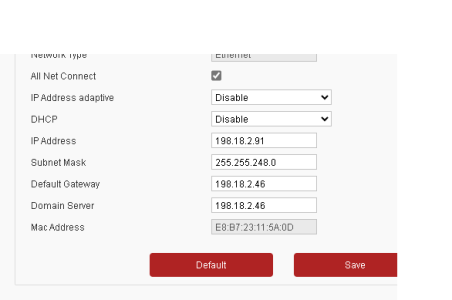
Hi Nigel, my messages are based on the fact that you have disabled DHCP on the camera. DHCP = dynamic host configuration protocol. It is a service that assigns the tcpip settings automatically. There is a dhcp service in your home router which assigns tcipip settings on your home network. The axiom also has a dhcp service built in, so things you connect to the raynet will be configured automatically. If you disable dhcp on a device, you will need to put all the tcpip setting is manually and they need to be correct for the network the device is attached to. I think Father Ted's suggestion is great. You can use angry IP scanner (or I would use Zenmap) to scan the network to see if you can find the camera. Good luck, let us know if it works.Kendal, some post dhcp enabled, some disabled with those ip addresses should I have dhcp enabled or disabled.

This is what I found as well.When in the video screen click on the hamburger menu on the screen (3 vertical bars top right) - you can choose the camera in there.
I have an analogue camera and also the IP camera and this is how I switch the view - this is the only thing I can think of that may be confused, even though you only have 1 camera
Interesting I must admit having dhcp enabled would make it much easier to configure. My next challenge is to get back into the camera from my computer when dhcp disabled and different ip and subnet significantly different to my home network until. Yes I know I have to change my laptop network configuration ip and subnet address, that is easier said than done. I will no doubt have a go when I’ve got used to where I’ve got now.This is what I found as well.
I went back to DHCP enabled which seems to work ok as then it is much easier to configure the camera elsewhere.
I also set the video quality on the primary stream to general and limited the data rate to 2048 so as not to swamp the network with multiple cameras.
Dipper, the only way to do that is to tick dhcp disabled make the IP changes and then tick dhcp enabled and save and not then try and scan it on a home network. Tied up tomorrow but will try this Saturday. Ive made your recommended changes to primary stream as well. I have used the IP and Subnet etc addresses that Father Ted used as they are working now. (I had a spare camera had home and this is the one I have changed.) if this works will leave this one the boat and bring the other one home and puzzle out how to access it via a web browser.This is what I found as well.
I went back to DHCP enabled which seems to work ok as then it is much easier to configure the camera elsewhere.
I also set the video quality on the primary stream to general and limited the data rate to 2048 so as not to swamp the network with multiple cameras.
That is great news.Ok, great now have full screen video and can share chart and video. What is weird i didn't really change anything. I did take a second camera down there configured with dhcp enabled and it showed up on the network but not the screen. So, final settings are as Father Ted with dhcp disabled.
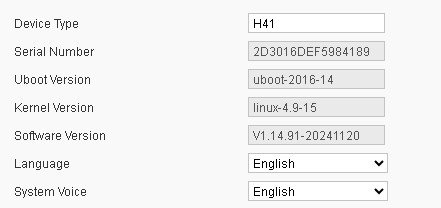
When you get chance be good to know the camera firmware. It's listed on the Axiom network page and also in the web ui.Thanks everyone for your help and guidance and encouragement when I nearly gave up.
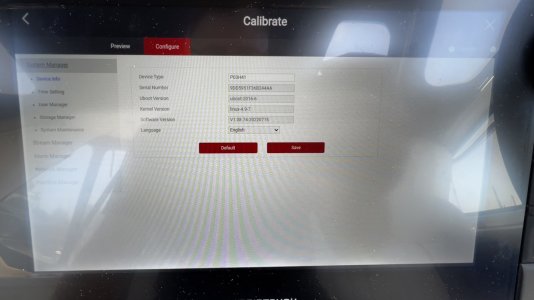
When you get chance be good to know the camera firmware. It's listed on the Axiom network page and also in the web ui.
If it is later than 1.08, then would be good to know.
View attachment 192967