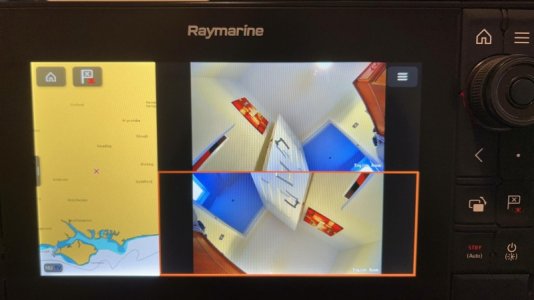
External camera interfaced with Raymarine Axiom Pro chart plotter.

Hi - I am not Tech savvy so please bear with me - would this camera be able to hook up to the Raymarine set up as described earlier ?
 

Attachments

  • DSC_0295.JPG
    DSC_0295.JPG
    1.8 MB · Views: 10
Father Ted it is: V1.14.91-20241120 so obviously quite a bit later than yours. Thanks for all your guidance.
Mine is also the same firmware.
I also bought a couple of the Gadinan bullet cameras from China using the official Gadinan store on the Ali Express site with the same spec except the lens (4MP POE 3.6mm) which also has the exact same firmware. At these prices it is well worth getting a spare!
 
So on the link to the Gadinan Camera - I am thinking of getting the 12 volt 8mp NO POE - there is focus options underneath which would be the best one to go for ?
and could I hook up 2 of these camera to the raymarine plotter ( 1 for the engine room and 1 for outside)
Jon
 
So on the link to the Gadinan Camera - I am thinking of getting the 12 volt 8mp NO POE - there is focus options underneath which would be the best one to go for ?
and could I hook up 2 of these camera to the raymarine plotter ( 1 for the engine room and 1 for outside)
Jon
Hi

For the engine room I went for the 2.8mm.
Go for the 12v version.
If you have the Axiom Pro it has 2 Raynet ports so you can add 1 camera on each port, alternately you can add a hub into 1 Raynet port and connect via that.
Picture below is my Axiom at home connected to 2 cameras and of course you can select just 1 camera view at a time

Take a look at my GitHub page for all the instructions and please provide project update so I can update the section in the Github page to help others.
GitHub - nigelfiler/Axiom-ipcamera: How to add generic IP Camera to Raymarine Axiom plotter

img_0614-3.jpg

PS - if you need someone to crimp a network cable, happy to do so if you cover the postage......
 
Hi

For the engine room I went for the 2.8mm.
Go for the 12v version.
If you have the Axiom Pro it has 2 Raynet ports so you can add 1 camera on each port, alternately you can add a hub into 1 Raynet port and connect via that.
Picture below is my Axiom at home connected to 2 cameras and of course you can select just 1 camera view at a time

Take a look at my GitHub page for all the instructions and please provide project update so I can update the section in the Github page to help others.
GitHub - nigelfiler/Axiom-ipcamera: How to add generic IP Camera to Raymarine Axiom plotter

View attachment 193078

PS - if you need someone to crimp a network cable, happy to do so if you cover the postage......
@FatherTed Many thanks for this and yes will update as and when I plan to do it
 
For ease of wiring do look at using a POE hub which runs off 12V. Then it is only one very expensive Raymarine Raynet cable to buy.
In fact, for the price of one Raymarine cable you might just cover the cost of 2 cameras and the hub!
Father Ted can suggest what he used. I went for a Teletonika POE automotive hub here. which was a bit more than others I have seen.
 
Sorry back again. As most will know I finally got everything working and very pleased with the video pictuer quality on the Axiom. However, i Noticed a week ago very bad interference on the VHF particularly bad on Ch 16 & 67. Turning the power off on the camera made no noticeable difference but powering down the Axiom and therefore the ethernet connection tothe camera and the interference went away. I suspect it is interference to the aerial lead but dont know. Today after much difficulty I pulled the old ethernet cable and 12 volt power and replaced them with a double screened ethernet cable and a screened 12volt power cable. Guess what! Problem is still there. What a nuisance. Anyone experienced this or have any solutions. (BTW the only path from the cockpit coachroof to the back of the Axiom is close to the VHF Aerial run.)
 
Sorry back again. As most will know I finally got everything working and very pleased with the video pictuer quality on the Axiom. However, i Noticed a week ago very bad interference on the VHF particularly bad on Ch 16 & 67. Turning the power off on the camera made no noticeable difference but powering down the Axiom and therefore the ethernet connection tothe camera and the interference went away. I suspect it is interference to the aerial lead but dont know. Today after much difficulty I pulled the old ethernet cable and 12 volt power and replaced them with a double screened ethernet cable and a screened 12volt power cable. Guess what! Problem is still there. What a nuisance. Anyone experienced this or have any solutions. (BTW the only path from the cockpit coachroof to the back of the Axiom is close to the VHF Aerial run.)
It sounds like although you have screened cable, the ground connection for rhe screening is not connected? Not sure how the axiom connects ground to the cable.
 
It sounds like although you have screened cable, the ground connection for rhe screening is not connected? Not sure how the axiom connects ground to the cable.
I’m sure that is one of the problems. I’ve got 12 pages of ChatGPT suggestions but in summary they suggest grounding and ferrite isolators. Problem is I only one way to run the cable which is alongside the aerial cable.
 
Clip on ferrite suppressor are cheap and may help. Amazon have them. The clip on but I suggest a cable tie also.
I would also test the SWR on your VHF, this might give an indication of a bad connection somewhere.
My network cable runs next to my VHF, it's the only way it can go, but I am not aware of any interference - do you get it when transmitting or when listening to CH16?
 
Clip on ferrite suppressor are cheap and may help. Amazon have them. The clip on but I suggest a cable tie also.
I would also test the SWR on your VHF, this might give an indication of a bad connection somewhere.
My network cable runs next to my VHF, it's the only way it can go, but I am not aware of any interference - do you get it when transmitting or when listening to CH16?
I’ve just ordered some ferret beads off Amazon and I suspect I need to earth the camera .Just need to work out how to earth the camera other than trying to pull another wire from cockpit roof back to engine bay.
 
I’ve just ordered some ferret beads off Amazon and I suspect I need to earth the camera .Just need to work out how to earth the camera other than trying to pull another wire from cockpit roof back to engine bay.
Not sure that an additional earth to the camera will help as the issue persists with the camera off? That can be proven by simply unplugging the ethernet cable from the camera.
 
Not sure that an additional earth to the camera will help as the issue persists with the camera off? That can be proven by simply unplugging the ethernet cable from the camera.
Unplugging the power makes no difference with the ethernet still pluged into the camera and Axiom. If you unplug the ethernet from the axiom the interference goes away. I am going to try ferrite beads each end of the ethernet cable and a RJ45 surge protection device that can be earthed to ground the ethernet cable.
 
So haven’t been able to cure the vhf interference from the camera. Tried a separate battery and an Ethernet cable strung across the cabin away from any vhf aerial run. Added ferrite beads on the Ethernet and power cables. Also added an Ethernet power surge protector with an earthing tag. All re-earthed and no real difference . So I’m coming to the conclusion it must be the camera. I have a Gardinan PoE camera so might set that up and see what happens.
 
So haven’t been able to cure the vhf interference from the camera. Tried a separate battery and an Ethernet cable strung across the cabin away from any vhf aerial run. Added ferrite beads on the Ethernet and power cables. Also added an Ethernet power surge protector with an earthing tag. All re-earthed and no real difference . So I’m coming to the conclusion it must be the camera. I have a Gardinan PoE camera so might set that up and see what happens.
So, did you unplug the ethernet cable from the camera so that it was only the axiom which was connected?
 
Top