Em-Track B100 AIS won't transmit but will receive...

JMax

New Member
Joined
17 Jun 2025
Messages
11
Visit site
Hi all,
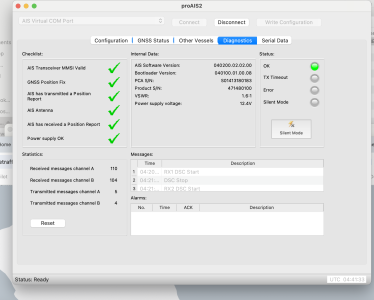
Wondering if anyone might have an idea as to why my Em-Trak B100 AIS won't transmit (even though PROAIS says it is).

I have done the following things to troubleshoot the problem but still can’t get it to work:

  • Had B100 bench tested at Anchor Marine which they said was fine.
  • Replaced VHF antenna (Shakespeare) and ran cable directly to the B100 (bypassing the splitter to see if that was the issue - made no difference)
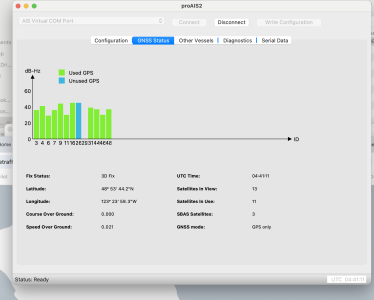
  • Confirmed valid GPS Fix
  • There are no LED error colours on the AIS or the Splitter
  • AIS not in Silent Mode
  • Checked MMSI # with transport Canada and within the B100
  • Ran PROAIS software which shows everything is green check marks (see screen shots) and it is transmitting
  • Updated software on the Raymarine 218 chartplotter and reconfigured it (I can see AIS targets fine)
  • I don’t show up on other vessels AIS or on MarineTraffic or VesselFinder.
What am I missing....?

Thanks in advance.
 

Attachments

  • Screenshot 2025-06-14 at 9.41.33 PM.png
    Screenshot 2025-06-14 at 9.41.33 PM.png
    487.9 KB · Views: 21
  • Screenshot 2025-06-14 at 9.41.11 PM.png
    Screenshot 2025-06-14 at 9.41.11 PM.png
    403.4 KB · Views: 26
Not appearing on MT or VF isn't unusual depending on your location. Also if you're not moving you'll only broadcast at 3 minute intervals after an initial 6 minute period. A VSWR of 1.6:1 isn't great so would point at the antenna or wiring. You can check the serial data to confirm what messages it thinks has been sent.
 
If your VHF is working well, I would borrow its antenna and cable and test it that way for a while.
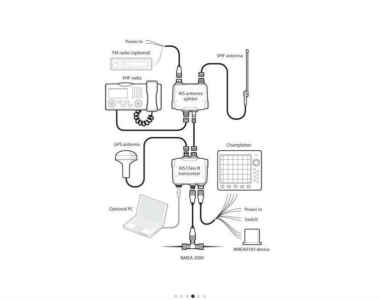
The VHF seems to be working fine. The attached is the set up I am running. Am I correct that the VHF Antenna is providing both VHF and AIS transmission? Thanks
 

Attachments

  • Screenshot 2025-06-02 at 11.25.56 AM.png
    Screenshot 2025-06-02 at 11.25.56 AM.png
    552.3 KB · Views: 29
Not appearing on MT or VF isn't unusual depending on your location. Also if you're not moving you'll only broadcast at 3 minute intervals after an initial 6 minute period. A VSWR of 1.6:1 isn't great so would point at the antenna or wiring. You can check the serial data to confirm what messages it thinks has been sent.
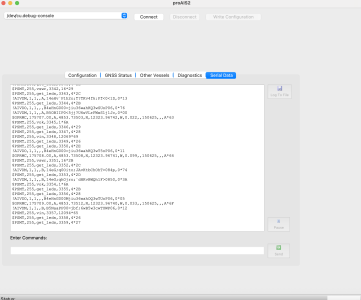
Thanks for the note. I ran to my home port on Sunday 2hrs and didn't show up on other vessels close by MT or VF. The attached is a snippet of serial data. A bit beyond my pay grade, but does this shed light on your serial data comment?
 

Attachments

  • Screenshot 2025-06-17 at 7.37.41 AM.png
    Screenshot 2025-06-17 at 7.37.41 AM.png
    391.5 KB · Views: 28
Just an off the wall suggestion - are the wires connected that put the unit into silent mode? That way it would work on the bench somewhere but when connected on the boat it would not transmit.
It seemed to be that there were two ways to put the unit into Silent Mode:
1. On my Raymarine 218 Chartplotter (which I toggled on and off) which made no difference on the transmit front. Also toggled off the "Show AIS Targets" on the plotter (which did what it was supposed to do) and then turned it back on.
2. Via the PROAIS Software - togged that on and off (didn't make any difference).

Do you think there would there be other wires that would specifically put the unit into silent mode?
 
Do you think there would there be other wires that would specifically put the unit into silent mode?
Yes, on my Em-Trak there are two wires that can be connected to a switch to enable and disable AIS transmit. Details are in the manual.

I assumed this was what you were discounting when you stated in your original post that it's not in silent mode.
 
Yes, on my Em-Trak there are two wires that can be connected to a switch to enable and disable AIS transmit. Details are in the manual.

I assumed this was what you were discounting when you stated in your original post that it's not in silent mode.
Ah I see. I'll have a look in the manual - thanks.
 
Thanks for the note. I ran to my home port on Sunday 2hrs and didn't show up on other vessels close by MT or VF. The attached is a snippet of serial data. A bit beyond my pay grade, but does this shed light on your serial data comment?
AIVDO is a transmission of your own position so it has sent data. Have you tried ProAIS2? You should be able to see forward power - it's likely your AIS transmission power amplifier has lost performance.
 
AIVDO is a transmission of your own position so it has sent data. Have you tried ProAIS2? You should be able to see forward power - it's likely your AIS transmission power amplifier has lost performance.
I think you are right; based on all the troubleshooting I've done. The only logical explanation at this point is a internal hardware failure. I am going to do the following on ProAIS2 (suggested by Em-Trak) to identify if this is the case...

On the Configuration tab, tick the RMC box
Go to the Serial Data tab
Select Log To File
Save the log to a location
Select the Diagnostics tab
Leave the unit transmitting for a duration of 30 minutes.
Stop logging and then send us the log file via email.
 
The only logical explanation at this point is a internal hardware failure.
Look closly at the vhf antenna connection on the ais box. I've had Tx fail indicator light show occasionally and it's turned out to be the coax connector.
Unscrewing it and pushing it in and out several times to burnish the plug - socket contact fixes it (for me).
 
Look closly at the vhf antenna connection on the ais box. I've had Tx fail indicator light show occasionally and it's turned out to be the coax connector.
Unscrewing it and pushing it in and out several times to burnish the plug - socket contact fixes it (for me).
Will do, thanks for the idea.
 
I think you are right; based on all the troubleshooting I've done. The only logical explanation at this point is a internal hardware failure. I am going to do the following on ProAIS2 (suggested by Em-Trak) to identify if this is the case...

On the Configuration tab, tick the RMC box
Go to the Serial Data tab
Select Log To File
Save the log to a location
Select the Diagnostics tab
Leave the unit transmitting for a duration of 30 minutes.
Stop logging and then send us the log file via email.
Quick update here - the unit is going back to Em-Trak (they have been really good about it) for repair. We are 99% sure it's a hardware (RF amplifier) issue.
Thanks all for your thoughts.
 
Bizarre !!!

I've just returned from the Jester Baltimore, discovering on leaving Pwllheli, my emtrack 924 was transmitting, however not receiving. My wife could follow me on marine traffic, all ther Jesters say they could follow me , not a peep of any ais information on my hard wired plotter or wi fi connected tablet. Also the emtrak ais app shows all boxes checked apart from signal received. Still under warranty so I need to confirm its not antenna related first . Gonna try a dedicated ais antenna, any recommendations.

Sorry for thread hijack ,
 
Top