Drone for taking aerial photos of anchorages?

Is it possible to set up one of these geo-fenced no-fly areas around one's home, or boat or anywhere else where one does not wished to be spied on?

I imagine that was tongue-in-cheek. But unless the lists of areas are authorised and cryptographically secured they would not provide what is needed for sensitive locations...
 
.

Is it possible to set up one of these geo-fenced no-fly areas around one's home, or boat or anywhere else where one does not wished to be spied on?

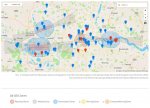
Maybe, if you're a royal or a PM ..... here's London as encoded by DJI ....

Red zones indicate restricted areas, which require a Custom Unlock.

Grey zones indicate areas with altitude restrictions and are usually found near airport runways.

Blue zones indicate areas where flying is risky but up to the discretion of the pilot, and may be flown after completing a Self Unlock.

Yellow zones indicate areas where flying is potentially dangerous but does not require any unlocking (these are those Warning Zones and Enhanced Warning Zones areas). When taking off in these areas, a warning will be shown to pilots along with a request for the pilot to take responsibility for flying in the area by checking a box.

NoFly.JPG

Unlocking can be done by following these steps ...

How to Unlock Geofencing on Your DJI Drone

To be honest, you can't get very good footage to spy on people with a consumer drone ..... you'd need to be so close they could take out the drone with one of these .... ???

 
Maybe, if you're a royal or a PM ..... here's London as encoded by DJI ....

Red zones indicate restricted areas, which require a Custom Unlock.

Grey zones indicate areas with altitude restrictions and are usually found near airport runways.

Blue zones indicate areas where flying is risky but up to the discretion of the pilot, and may be flown after completing a Self Unlock.

Yellow zones indicate areas where flying is potentially dangerous but does not require any unlocking (these are those Warning Zones and Enhanced Warning Zones areas). When taking off in these areas, a warning will be shown to pilots along with a request for the pilot to take responsibility for flying in the area by checking a box.

View attachment 89390

Unlocking can be done by following these steps ...

How to Unlock Geofencing on Your DJI Drone

To be honest, you can't get very good footage to spy on people with a consumer drone ..... you'd need to be so close they could take out the drone with one of these .... ???


PS: The drone won't fly if the database in the app is not at the latest version. Obviously a determined hacker could get round the restrictions, disabling GPS is the obvious route so the drone and the phone don't know where they are - easier than trying to hack the database. The drone will still fly without GPS (it flies indoors).
 
Maybe, if you're a royal or a PM ..... here's London as encoded by DJI ....

Red zones indicate restricted areas, which require a Custom Unlock.

Grey zones indicate areas with altitude restrictions and are usually found near airport runways.

Blue zones indicate areas where flying is risky but up to the discretion of the pilot, and may be flown after completing a Self Unlock.

Yellow zones indicate areas where flying is potentially dangerous but does not require any unlocking (these are those Warning Zones and Enhanced Warning Zones areas). When taking off in these areas, a warning will be shown to pilots along with a request for the pilot to take responsibility for flying in the area by checking a box.

View attachment 89390

Unlocking can be done by following these steps ...

How to Unlock Geofencing on Your DJI Drone

To be honest, you can't get very good footage to spy on people with a consumer drone ..... you'd need to be so close they could take out the drone with one of these .... ???


Ah well, it looks as if we'll just have to keep our clothes on ;)
 
One thing that seems to get forgotten - it's not that hard to build your own drone, and all geofencing etc. goes out the window. See, for example, T4 Quadcopter Drone by Brendan22

Don't get me wrong - I think that drones shouldn't be used where they might violate people's privacy or cause nuisance or danger to others. But technical means of enforcing limits simply won't work, as those bent on evading such limits can easily DIY. Even manufactured drones, such as those by DJI, are not immune to being reprogrammed. The only clever bit in a drone is the flight control software, and that's readily available.
 
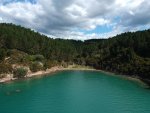
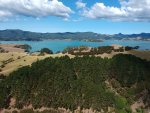
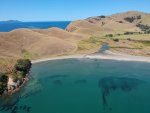
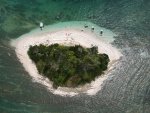
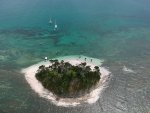
We have a DJI Spark, the cheapest DJI drone available when my son bought it a couple of years ago. Quite pleased with the results (a few examples below). I haven't been brave enough to launch or recover under way, even at anchor can be tricky if the boat swings. We have managed some underway filming by putting someone ashore to opearte the drone
 

Attachments

  • DJI_0043.JPG
    DJI_0043.JPG
    408.3 KB · Views: 18
  • DJI_0045.JPG
    DJI_0045.JPG
    458 KB · Views: 18
  • DJI_0047.JPG
    DJI_0047.JPG
    453.9 KB · Views: 17
  • DJI_0060.JPG
    DJI_0060.JPG
    439.4 KB · Views: 17
  • DJI_0062.JPG
    DJI_0062.JPG
    331.7 KB · Views: 18
  • DJI_0190.JPG
    DJI_0190.JPG
    544.8 KB · Views: 18
  • DJI_0198.JPG
    DJI_0198.JPG
    471.6 KB · Views: 19
  • DJI_0204.JPG
    DJI_0204.JPG
    400.7 KB · Views: 19
PS: The drone won't fly if the database in the app is not at the latest version. Obviously a determined hacker could get round the restrictions, disabling GPS is the obvious route so the drone and the phone don't know where they are - easier than trying to hack the database. The drone will still fly without GPS (it flies indoors).

It is NOT necessary to have latest FW or Database in a DJI or similar drone .... where do you get that info from ?

The Drone will never know anything about this unless you power up with Internet available for it to compare installed FW and Latest online. But you can ignore and fly - or just as you should anyway - disable Internet to the system ..

Many people do not update their drones because of 'bugs' in the software ... once they have a FW that works well for them - they leave it alone ... the old "Don't fix what aint broke"

Disabling GPS has no connection whatsoever with what version FW / Fencing you have installed. In fact disabling GPS is one of the worst things you can do to a Drone such as a DJI etc. You then lose stability ... Get you Home ... etc.
 
Thought you'd like to see a video and stills I quickly shot this evening ..... DJI Phantom 3 Professional.

I haven't post processed - just left as is apart from cutting out some that just repeats ...


And just to show again that evening sun over the river ... in my mind stunning ...

1AP6pZi.jpg
 
One thing to add is beware that DJI has a new phone app DJI Fly which is required to fly their Mavic Mini and Mavic Air 2 drones. This app needs a 64bit Android OS which rules out many old phones and tablets. Not sure about Apple devices so check their compatibility list and the DJI forums to avoid buying a drone and then needing a phone upgrade. .... or just download DJI Fly from the app store and install it to see if it works. I didn't know this and got lucky as it worked on my phone, but neither of my older tablets.

Thanks for this warning. DJI says their Fly app works with Android 6 or higher. BUT in fact it doesn’t work with many phones, even running much more recent versions of Android. It transpires that you need to check their list of supported phones, which is quite short.

So it won’t run on my 2 year old Samsung J5 - an otherwise excellent phone which runs virtually everything else I need. Hence that rules out getting a Mavic Mini, as would need to spend the same again to replace the phone.

Turns out quite a lot of unhappy customers bought the Mavic Mini when it came out, then subsequently discovered they could not fly it. And all DJI did was point them to their list of supported phones - which many said was not even published when they bought. Doesn’t reflect well on DJI.
 
One thing to add is beware that DJI has a new phone app DJI Fly which is required to fly their Mavic Mini and Mavic Air 2 drones. This app needs a 64bit Android OS which rules out many old phones and tablets. Not sure about Apple devices so check their compatibility list and the DJI forums to avoid buying a drone and then needing a phone upgrade. .... or just download DJI Fly from the app store and install it to see if it works. I didn't know this and got lucky as it worked on my phone, but neither of my older tablets.

Apple devices have good support, all the way back to iPhone 5S which was released in 2013. Supports anything iOS 10 and above (current s 13.4)
 
Thanks for this warning. DJI says their Fly app works with Android 6 or higher. BUT in fact it doesn’t work with many phones, even running much more recent versions of Android. It transpires that you need to check their list of supported phones, which is quite short.

So it won’t run on my 2 year old Samsung J5 - an otherwise excellent phone which runs virtually everything else I need. Hence that rules out getting a Mavic Mini, as would need to spend the same again to replace the phone.

Turns out quite a lot of unhappy customers bought the Mavic Mini when it came out, then subsequently discovered they could not fly it. And all DJI did was point them to their list of supported phones - which many said was not even published when they bought. Doesn’t reflect well on DJI.

I prefer a dedicated tablet anyway ... and Banggood sell very good high spec tablets that knock spots of Samsung and the branded stuff ...
For my P3Pro ... I use a Nexus 7 vers 2(3) ....... as a dedicated tablet ... if I was to replace the P3 with a later machine - Banggood would be my port of call.

DJI approved list is crap ... they have not tested as many as they should ... basically why should they ? They are a pro IOS company anyway ... whenever queries go in to them about connections - they will usually answer in terms of IOS ... even when Android is stated by questioner.
 
It is NOT necessary to have latest FW or Database in a DJI or similar drone .... where do you get that info from ?

The Drone will never know anything about this unless you power up with Internet available for it to compare installed FW and Latest online. But you can ignore and fly - or just as you should anyway - disable Internet to the system ..

Many people do not update their drones because of 'bugs' in the software ... once they have a FW that works well for them - they leave it alone ... the old "Don't fix what aint broke"

Disabling GPS has no connection whatsoever with what version FW / Fencing you have installed. In fact disabling GPS is one of the worst things you can do to a Drone such as a DJI etc. You then lose stability ... Get you Home ... etc.

The DJI Fly App that I have for my Mini has done this to me on 2 occasions. It runs on my phone and offers video editing and viewing inside the app, so you end up using DJI Fly without the controller or the drone attached or switched on - but it still queues updates. It is not practical to turn off the internet every time you want to launch the app - later when you attach the controller, power everything up you immediately get told the drone/database/batteries etc. need an update - and I have found no way of cancelling a Fly Database update to allow me to fly - perhaps I've missed something??

PS: If you are flying line-of-sight then disabling GPS is of little consequence - DJI Minis can also be flown indoors really easily due to their size - where there is no GPS. On the DJI Fly App there are 2 GPS positions logged, that of the controller and that of the drone. The App compares with the database geofencing and will either warn or prevent flight dependent on which category of fly-zone you are in. There are numerous posts on various forums where people use GPS spoofing apps to fool the phone into thinking it is somewhere else. This can also be used to increase the range of the WiFi on a US variant Mavic Mini flying in Europe - make it think it is in the US and the WiFi transmission power will be increased - once the drone is in the air, the WiFi modes don't change.

I guess your Pahanton 3 is a very different beast - I've never used one, but the Mini is too small to fly too far away as it is practically impossible to see or hear once it gets about 500m out - different uses for different drones - a FPV CineWhoop needs no GPS for example - the mini is somewhere in the middle.

GPS: Optional unit to beam back coordinates to goggles/radio. Also allows "direction to home" arrow to display on OSD. Not really necessary on a cinewhoop that has limited payload and is usually flown slow and not faraway.

Getting Into Cinematic FPV Drone Flying — becki and chris


My FPV kit should arrive this week. ?
 
Last edited:
Baggy ... as far as I know it doesn't really matter what DJI model you have - if you do not switch of internet - they all plague you with updates.

Switched off Internet - then neither the drone or tablet knows about updates and will calmly go about its business flying ... Geofence will work as per the version installed.

The Geofence actually works on the drone and just relays back to tablet its position with regard to the Geofence .. it does not have to compare drone to tablet.

Refusal to fly may be because you have allowed it to 'see updates' ?

GPS is of course an 'outside' facility .... but regardless of Line of Sight or not - it provides input to assist with stable hover and flight. It helps Flight Controller to counter wind etc.
Indoors is a different ball game - even my P3 flies indoors .... then you don't have same external influences on stable hover etc.

I admit that the Mini is not in my 'hangar' and DJI Fly is not needed for my gear ... DJI GO and Litchi are mine ...

All other drones I have are various WiFi and so on that have left over from doing reviews for various brands ...
 
Baggy ... as far as I know it doesn't really matter what DJI model you have - if you do not switch of internet - they all plague you with updates.

Switched off Internet - then neither the drone or tablet knows about updates and will calmly go about its business flying ... Geofence will work as per the version installed.

The Geofence actually works on the drone and just relays back to tablet its position with regard to the Geofence .. it does not have to compare drone to tablet.

Refusal to fly may be because you have allowed it to 'see updates' ?

GPS is of course an 'outside' facility .... but regardless of Line of Sight or not - it provides input to assist with stable hover and flight. It helps Flight Controller to counter wind etc.
Indoors is a different ball game - even my P3 flies indoors .... then you don't have same external influences on stable hover etc.

I admit that the Mini is not in my 'hangar' and DJI Fly is not needed for my gear ... DJI GO and Litchi are mine ...

All other drones I have are various WiFi and so on that have left over from doing reviews for various brands ...

The point I am trying to make is that the DJI Fly App often runs on a non-dedicated device, a phone, and on Android it requires a 64 Bit OS which tends to be fairly recent phones - so a lot of consumer drone users have their every-day phone as an extension to their remote control for the Mavic Mini and Mavic Air 2 - both these drones require DJI Fly, not DJI Go.

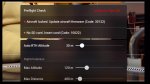
DJI Fly, on Android can be updated with all other Android Apps overnight from the App Store. I don't know about DJI Go, but DJI can force an update on a Mavic Mini. It looks like this ....

NoFly.JPG

DJI Response to this is ....

Hello and good day. I am sorry for the trouble and thank you for reaching out. To offer you a better and safer flight experience with your new DJI Mavic Mini, we optimized the flight functions and flight safety plans in the new firmware, and so it is set as a forced update. You can use the aircraft normally after the update is finished. You can go to the DJI official website for details of firmware release records ( Mavic Mini - Specs, FAQs, Videos, Tutorials, Manuals - DJI ). Again sorry for any inconvenience caused and thank you for your understanding.

https://forum.dji.com/forum.php?mod=viewthread&tid=202277

Now I agree, if you have a dedicated phone or tablet that you can disconnect from the internet permanently, then yes, you can fly without updates (assuming the Geo Zone Map has no expiry date), and without an up-to-date GEO Zone Map as the device doesn't know.

However, as soon as you want to fly in an area which requires self-unlocking (self authorisation for 24 hours over DJI servers ( https://www.dji.com/de/flysafe/self-unlock ) - and there are a number of these zones near me - then you end up needing your device to go online as the authorisation is done via the App. Then you get hit with the updates.

In this day and age it is a real faff to prevent one app among hundreds on the phone having access to the Internet.

The App logs everything the drone does, every fault, every warning and every input from the controller during flight - this info is used by DJI to enable them to offer the Care Refresh insurance - otherwise you could sell the drone on Ebay and claim to have lost it in the sea.

My opinion is that DJI have made it increasingly unattractive to use their consumer drones without an internet connection and this trend towards increasingly connected devices will only increase.

The GPS position on the phone (required by the Go Fly App) is used in conjunction with the drone GPS position to determine distance from controller and animate the drone position indicator in the App. Both phone and drone position are logged and can be viewed in the flight logs. The flight logs are stored on the phone so they can be retrieved even with a lost drone. The Home point can also be updated if you move while flying, and this comes from the phone GPS.

I don't know if the drone has a copy of the database internally and executes the geofencing algorithms itself (unlikely), or if the position it relays to the app is geo-fenced in the app and used to prevent the drone moving any further into a geo-fenced area. That's a question for DJI, but it is how I would do it as it avoids map data transfer to the drone.

Finally, here is the pain-in-the arse process to fly in "Blue" zones with a Mavic Drone ....

https://mavicpilots.com/threads/tips-how-to-fly-your-mavic-mini-in-a-blue-authorization-zone.79308/
 
Hi Baggy ... thanks for that ... think I will stick with my P3 Pro !!!

As regards Geofencing - that is in the drones FW itself ... there is no reason for phone / tablet to have it ... all that does is report the video and telemetry that comes back from the drone - plus flight control commands of course. Its same as the geographic limitation CE etc. The hack is to replace one line of code in the Drones FW to stop CE limitation acting from the GPS position ... it should not affect GPS other actions ......... my old P3S - I hacked to give max RF ... in fact I got my P3S to 5km range .. further than my P3Pro ...
The comparison of GPS of drone and tablet / phone ... actually is not there for distance / position indication .... distance is calculated on the drone by its recording home position and then referencing GPS positions as you fly to that. It relays that info back in the telemetry. But if you were to use Follow Me or to reset Home Position by moving and then telling drone to take your new position - then yes phone / tablet position is needed.
You can check this easily by just moving away from take off position and see that position indicator map does not change and drone distance is still related to original take off home position.
Its also why people are wary of flying on boats !! If all goes wrong and it auto RTH .... then its going for a swim !!

I know from my involvement with Latvian CAA / Larpas ... that DJI .. Yuneec etc. are under pressure to code their machines to prevent intrusion into No Fly zones. Its an ever increasing matter .... not DJI's fault. Its the fault of idiots who cannot seem to understand where they can and cannot fly.

Your comment about unlock - yes I forgot about that ... that's common to all DJI models to unlock areas ... its not only Mini. So any DJI if you go to unlock and its not on latest update will trigger warnings ... BUT most DJI models - you can ignore the update and continue. Your Mini sounds like they've handcuffed you !!
 
Last edited:
It is starting to appear that the Mavic Mini will not be suitable for my purpose. Not only would it require an expensive new phone to allow the DJI Fly App to load, but also it appears to need internet connectivity - which is often non existent in the places I want to film.
Back to square one.
 
It is starting to appear that the Mavic Mini will not be suitable for my purpose. Not only would it require an expensive new phone to allow the DJI Fly App to load, but also it appears to need internet connectivity - which is often non existent in the places I want to film.
Back to square one.

If you don't mind going above the 250gr mark ..... why not go for a normal 2nd hand Mavic ? or a Phantom ...

There's also the Spark in the small size.

The internet connectivity is not required normally.
 
Top