Chartplotter at the binnacle

Chartplotter screens tend to be kind of small, and they usually are low resolution.

The processors are slow, and the display settings are not very customizable.

They are great for making navigation information available in the cockpit, in all weather and lighting conditions. They are bombproof and are the best thing to have in the cockpit when tings get hairy.

Passage planning is really a different kind of task, and it is just not practical or even possible to have all the paper charts one might want for cruising far afield.

Laptops are great for passage planning; high resolution display, with the possibility of connecting to an even bigger display mounted at the nav station. There are many great PC nav programs, some of which are free, that are easier to use than chartplotters and typically have many more features. It's far easier to make and edit route on a laptop than on a chartplotter. you can quickly zoom in an out with no lag - I like to use a wireless mouse when conditions permit - the mouse doesn't work well when actually sailing though.
 
I'll give an anecdote to add something to consider with regards to how important the compass can be.

I was sailing from Riga back to the UK a few years ago, in the autumn when the weather is often boisterous. It's a couple of days and nights from there to Holtenau at the entrance to the Kiel Canal. My compass light wasn't working (turned out the circuit breaker had failed, but I didn't know it at the time).

It was a heavily overcast and therefore pitch black night, with a strong North wind and lumpy sea. It was raining and I had my cockpit enclosure up, so sails not visible unless you step out of the cockpit. It was about 03:00 and the rest of the crew was sleeping. Suddenly my entire N2K network went down, including the autopilot.

I grabbed the wheel -- fortunately I was behind the helm -- but how to steer? The night was as dark as a black cat in a coal bin. I could not let go of the helm to get a flashlight to peer out to look at the sails, even. I did my best by feel, but I couldn't tell what was straight, and what was turning. There followed an involuntary gybe, which thank God didn't break anything. I realized I would likely gybe back, so tried to get the formerly lazy end of the mainsheet car control line onto its winch, not quite making it, which resulted in a broken finger. Finally I managed -- by feel -- to get the boat hove to so I could wake the crew and try to sort something out.

This mess, which could easily have turned into a disaster, would not have occurred if I had been able to see the compass.

Compass, windex, telltales -- modern electronics do not replace any of the basic stuff.

What concerns my network -- another lesson learned. At the time I had an ultrasonic N2K wind transducer at the top of the mast, which had required me to pull N2K cable up to the top of the mast, which required the use of a field connector at the top. I had tied this down well (I thought) and had enclosed it all in a "telecomm wrap", but in the rough seas, the connector somehow started banging against the inside of the mast, and shorted out. An N2K network will not tolerate a dead short at one of the devices -- it brings the whole network down. Needless to say I no longer have N2K cabling up my mast.

Thank you and glad all ended up OK - sorry about the finger.

I have two occasions where caught in tail end of storms in Baltic ... like the North Sea - the seas get rough quickly and can be frightening. Both occasions for us were at night and I understand fully your concerns ...
The second - was when my battery bank had died and we were short on fuel ... I'm not a religious person but I was close to prayers !!
 
This is not what I experience. There is a near universal adoption of mobile phones and access to information via the internet. Similarly all the boats I see, all have some form of plotter. In fact, I think the opposite of what you propose has always been at play and folks of any age, move with the times. There are always vociferous outliers.
Mobile phones at the beginning were simply an evolution of what was already there, just made mobile, so they were quickly adopted by all phone users due to the similarity between a push-button landline and the early mobile phones. The transition from mobile phone to smart phone was more fraught, and as an auto manufacturer, when bluetooth hands-free profiles weren't nuance free, we had to support standard phones for far longer than the market in general because our customer base was older. Then smartphones arrived, and it gave people the choice to just use it as a smart phone, perhaps use the camera, but it was effectively a pocket communication swiss-army knife where people have a certain amount of freedom to use or not use all the features available. Doro is a good example of smartphones designed for seniors. Smartphones for elderly, best smartphones for seniors, easy to use smartphones, simple smartphones

Adoption by the older generations was slower than the younger generations, and their usage patterns are different ....

https://www.tandfonline.com/doi/full/10.1080/10447318.2024.2319916#abstract
2.3. Individual motivational barriers of older people
Other factors such as inexperience, lack of motivation or fear also have an influence on using technical aids and mHealth (Wildenbos et al., Citation2019; Wilson et al., Citation2021).

A qualitative study (Nymberg et al., Citation2019) suggests that older people (over 65 years of age) have less experience in dealing with mHealth, feel more insecure when using technology and are distrustful of new technologies (Nymberg et al., Citation2019). Pywell et al. (Citation2020) provide results supporting this and also make clear that doubt in one’s own abilities and lack of trust in digital interventions can represent barriers.

Fear of failure and frustration among older people also represent obstacles when interacting with mobile technologies and applications (Searcy et al., Citation2019). Experiences of failure due to incorrect clicking or overly complex applications increase the feeling of helplessness (Iancu & Iancu, Citation2020). In addition, a lack of technical support from family members (lack of patience and understanding) (Wilson et al., Citation2021; Zibrik et al., Citation2015) and a lack of technical support from the provider/operator make it more difficult to use the technology and mobile software applications (Cajita et al., Citation2018; Wilson et al., Citation2021).

Furthermore, the inner motivation or one’s own inner drive to try out new things plays a role in the use of digital technologies (Wildenbos et al., Citation2018). For example, older people are more likely to turn away from digital applications if they are not convinced of their personal benefits in everyday life (Tyler et al., Citation2020).

In summary, barriers can arise in the ageing process that make it necessary to develop technical aids or mobile applications in an age-appropriate way so that hurdles during use are minimised and senior citizens can exploit the full potential of the technologies.

This general decline in the ability to "keep up" was explained to me by someone at work and is best described as "human factors engineering" which dealt with UI design, understanding mental models and device paradigms, and how UIs suggest to the user the way in which they should be used. Basically, the longer you are alive, the more mental models you accumulate - the more device paradigms you can reference to try and understand something new (this is not always an advantage). Clocks, music players, and phones are great examples as they have been around for decades and their original form and device paradigms bear little resemblance to their current form.

You can live happily in the modern world with just the knowledge required for current devices, but older people struggle with new tech because they have a mental model already and it gets in the way of learning new device paradigms for familiar tasks, especially when there is a paradigm shift.

Going the other way, the lack of a relevant mental model in teenagers compared to older people is superbly illustrated in this video ...


So it's not simply old vs young, it's often a paradigm shift that is the route cause of problems adjusting to changes.

The paradigm shift which confuses these teenagers (apart form having no idea how the dial works) happened when someone thought it would be a good idea to be able to edit or check a phone number before placing the call - digital tech put an end to listening for the dial tone, required for line disconnect systems. Hence on a modern phone, the number is normally entered and then the green receiver button is pressed (which suggests the original receiver pick-up to the user), whereas previously the receiver was lifted first to get the dial tone, and then the number was entered. This is the kind of paradigm shift that confuses users who are used to a different way of doing things.

The teenagers therefore assume, because they have an "editable number" paradigm that they should pick up the phone receiver after dialling the number - which will not work on a line disconnect system.

Going the other way, from an old phone to the new editable version, it was made possible to dial the number after pressing the green receiver button as tone dial allowed it, so people coming from the old system wouldn't face the same problems these teenagers have going back in time.

Getting back to plotters, they are all subtly different in the way they operate, some being easier to use than others, and all offering novel "extras" to make tasks simpler, like autoroute which scares the willies out of some users ..... Navionics on a tablet probably the most straightforward as they tend not to be so deeply integrated with the rest of the boat systems. Chart plotters make a lot of learned knowledge and procedural steps redundant, and hide a lot of the complexity from the user, making older people wary, as they find the dumbed down task of navigating on a plotter too easy, and inherently don't trust new methods or tech.

The numbers are dwindling, but there are still a large percentage of boat owners out there who grew up with paper charts and prefer them for many reasons. Modern production boats are fitted with plotters pretty much as standard, and the chart tables have all but disappeared. Older boats are often fitted with plotters because at some point an owner decided the boat needed one, not necessarily that they needed one - the next owner may not be of the same opinion, but is still unlikely to remove one. Most of the paper chart aficionados end up using a mixture of both.
 
Last edited:
and the chart tables have all but disappeared.
No they haven’t. Go to a boatshow, every production boat has a chart table of some sort. The good ones are now just desks as they’re more useful for working than navigation, but they’re present on every boat I’ve looked at.
 
Thank you and glad all ended up OK - sorry about the finger.

I have two occasions where caught in tail end of storms in Baltic ... like the North Sea - the seas get rough quickly and can be frightening. Both occasions for us were at night and I understand fully your concerns ...
The second - was when my battery bank had died and we were short on fuel ... I'm not a religious person but I was close to prayers !!
That sounds pretty terrifying.

In my experience, the Baltic is even worse than the North Sea, in the manner and speed with which the sea gets up when it starts blowing. The HEIGHT of the waves seems to correspond to one Bft force less than what you'd have in the Atlantic, but they are higher frequency and steeper -- for some reason I don't understand. Those short, steep seas can be brutal -- frightening indeed. I've had more green water over my deck in the Baltic than anywhere else.

People think the Baltic is a kind of lake, but in my view it is not to be messed about with. The weather changes much faster than it does in the Atlantic -- thermal effects from land, I think. I've seen all kinds of stuff in the Baltic I've never seen anywhere else -- black walls of wind, which can take you from 8 knots of wind to 45 in three seconds, all kinds of stuff. Sailing offshore in the Baltic requires care and preparation, I think. And a fast hand on the furlers.

Ultimate conditions are far worse in the North Sea, of course, that shallow funnel magnifying storms, especially those coming out of the NW. I've been fully knocked down in the North Sea by a huge breaking sea. But the crucial difference is that this doesn't happen without warning (which means, right, that incident was a result of my own poor passage planning).
 
No they haven’t. Go to a boatshow, every production boat has a chart table of some sort. The good ones are now just desks as they’re more useful for working than navigation, but they’re present on every boat I’ve looked at.

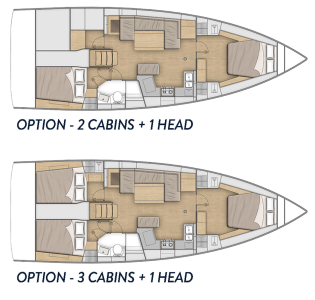
I looked at oodles of boats last year when I bought mine, was not impressed by what seems to be trying to pass as a chart table these days. IMO there's no excuse for not having a decent exclusive-use chart table (workspace) on a 40ft plus boat :cool: ... here is the crop of current Benjenbavs etc. ....
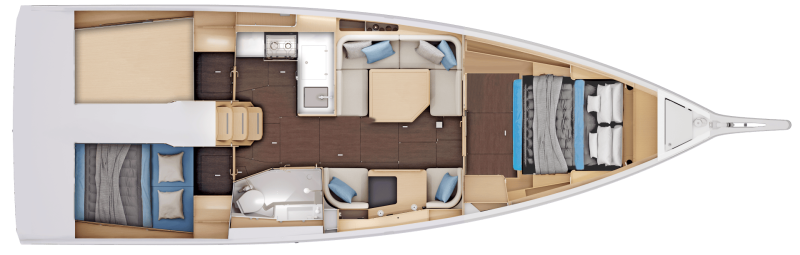
Sun Odyssey 415 .... leather covered coffee table between 2 armchairs .... probably the best of the production boats.

1766946848394.png

Oceanis 415 ... shelf with dual use of the saloon seating ...

1766947165228.png

Bavaria C42 ... shelf on the end of the port setee

1766947285764.png

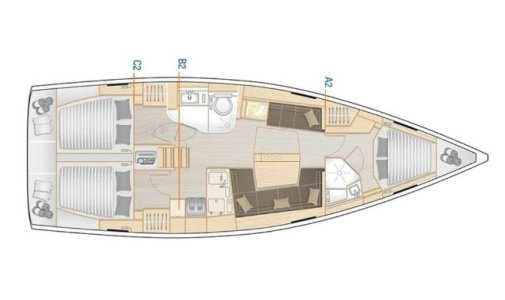
Hanse 418 .... shelf on the end of the port setee.

Screenshot 2025-12-28 194327.jpg

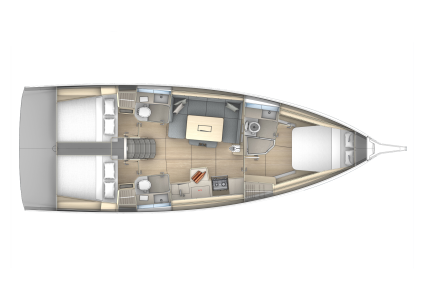
Dufour 41 .... no chart table, just the saloon table

1766947924811.png
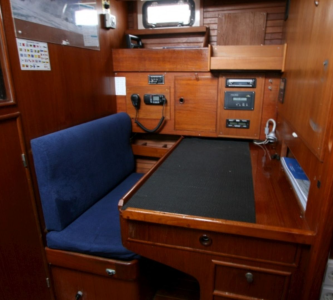
Hallberg-Rassy 400 ... at last, a proper chart table with it's own seat that doesn't make dual use of the seating/eating area.

1766948222131.png

... this is a chart table.

1766948337705.png

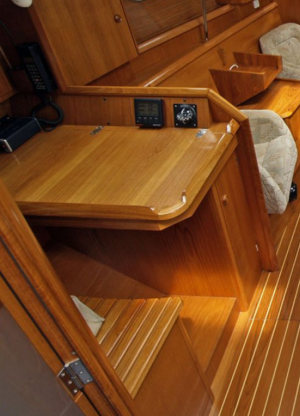
... and this is an (antique) chart table on a 44ft boat ...

1766948965314.png

.. and this is a chart table on a 36 ft boat .... so no excuse for something over 40ft

1766949502637.png

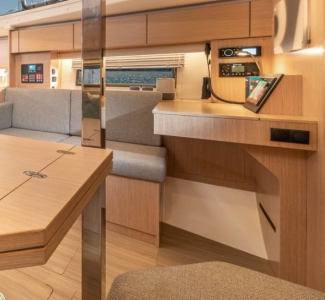
... this is not a chart table, it's a hybrid desk/shelf where depending on what is going on below deck, it is rendered either inaccessible, or you have to ask another crew member to wake up or move to use it. Access is blocked when the table is folded out.

1766948635374.png

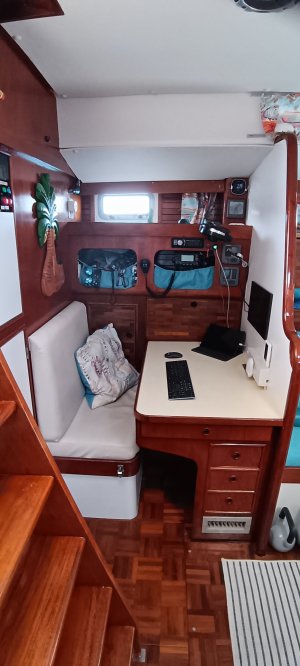
.... and this is what I bought. My own private space as skipper which is only ever occupied by me. :ROFLMAO: :ROFLMAO:🤣😍

1766949726309.png
 
and this is what I bought. My own private space as skipper which is only ever occupied by me. :ROFLMAO: :ROFLMAO:🤣😍

1766949726309.png
Where are the charts, dividers etc?
 
I looked at oodles of boats last year when I bought mine, was not impressed by what seems to be trying to pass as a chart table these days. IMO there's no excuse for not having a decent exclusive-use chart table (workspace) on a 40ft plus boat :cool: ... here is the crop of current Benjenbavs etc. ....
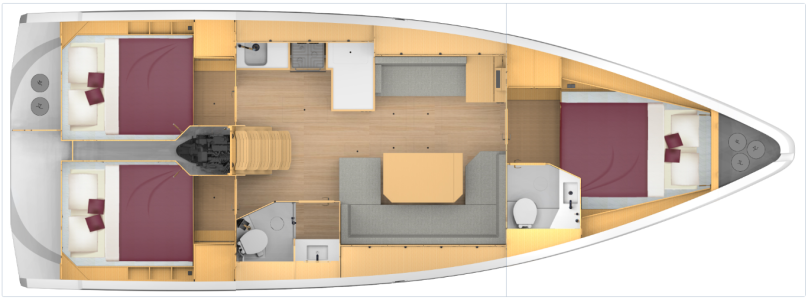
Sun Odyssey 415 .... leather covered coffee table between 2 armchairs .... probably the best of the production boats.

View attachment 204113

Oceanis 415 ... shelf with dual use of the saloon seating ...

View attachment 204114

Bavaria C42 ... shelf on the end of the port setee

View attachment 204115

Hanse 418 .... shelf on the end of the port setee.

View attachment 204116

Dufour 41 .... no chart table, just the saloon table

View attachment 204117
Hallberg-Rassy 400 ... at last, a proper chart table with it's own seat that doesn't make dual use of the seating/eating area.

View attachment 204118

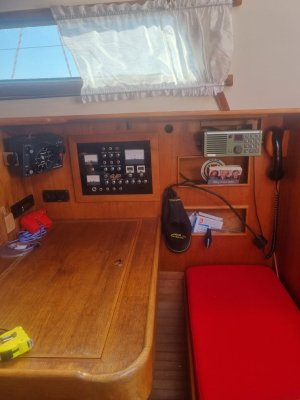
... this is a chart table.

View attachment 204119

... and this is an (antique) chart table on a 44ft boat ...

View attachment 204121

.. and this is a chart table on a 36 ft boat .... so no excuse for something over 40ft

View attachment 204122

... this is not a chart table, it's a hybrid desk/shelf where depending on what is going on below deck, it is rendered either inaccessible, or you have to ask another crew member to wake up or move to use it. Access is blocked when the table is folded out.

View attachment 204120

.... and this is what I bought. My own private space as skipper which is only ever occupied by me. :ROFLMAO: :ROFLMAO:🤣😍

IMG_20251228_154736.jpg
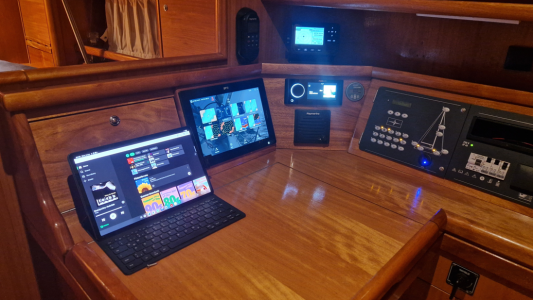
Here is the not so antique version with nav Station PC, 2 graphic displays, wind display, vhf, etc.
Chart locker beneath.IMG_20251228_154736.jpg
 
Top