Newbroom
Well-Known Member
+2 tothat



Can I just say a few things, there is nothing wrong with what you are doing but for some it would not work as well.
All the above things that you have mentioned in your first paragraph are failures in the equipment.
If your new to boating or have never seen equipment fail you would not know it was wrong, an auto pilot not set up will do the wiggle as it can get a conflict of info, ie, heading bearing miss aliened and gps input for heading different.
I
Especially when it is SO easy to use the electronic plotter with a Go To Cursor.
Goto works by drawing a strait line from where you are to the point you want to go to . fine if you have checked that line for shallow water, land , hazards .
Actually, your point about entering waypoints (IMO) creates a huge navigation risk.
How many people have entered a Lat/Long into a plotter and got it wrong?
That's My point, by doing the paper then into chart plotter, you are checking your own navigation , its easy to get it wrong. but you can work out why and correct it .Practise make you better. why I think this is important .
1. if you hear a Lat and Long given over the VHF for say a Mayday, a hazard, exclusion zone and you then plot the position on your chart , but get it in the wrong position on the chart, you could get yourself into trouble.
2 WP are give as Lat and Long in the almanac for a point of a harbour as an arrival point. If you want to put this on a chart to plan a passage to that point you need to get it right.
If you must pre-plan passages (say at home) it is much safer to (again) do it electronically on a Laptop PC and uploading the passage to the plotter.
Yes its a great way but the nature of electronic charts is a zoom view. so detail is lost as you zoom out. so for total safety, if you planning it that way you must go over the whole route on fullish zoom to check for hazards . if planned on a chart of right scale its all there to see.
All your stuff about placing a waypoint on a danger and enabling a waypoint arrival alarm is far too complicated.
Just look at a plotter's screen and steer away from the dangers.
its very simple, if say there is only one rock in the area you want to play just use your go to button.
AIS
The key factors that affect the overall frequency of the transmitted AIS information are the type of the AIS transponder (Class A or B) and the moving status of the subject vessel, as shown in the following table.
Transponder Type
Vessel's Moving Status (Transponder ON)
AIS Transmission Rate
Class A
Anchored / Moored
Every 3 Minutes
Class A
Sailing 0-14 knots
Every 10 Seconds
Class A
Sailing 14-23 knots
Every 6 Seconds
Class A
Sailing 0-14 knots and changing course
Every 3.33 Seconds
Class A
Sailing 14-23 knots and changing course
Every 2 Seconds
Class A
Sailing faster than 23 knots
Every 2 Seconds
Class A
Sailing faster than 23 knots and changing course
Every 2 Seconds
Class B
Stopped or sailing up to 2 knots
Every 3 Minutes
Class B
Sailing faster than 2 knots
Every 30 Seconds
this is the scary bit.
To ensure fast handling, accurate depiction and effective management of the incoming information, MarineTraffic uses proprietary downsampling techniques that take all of the above-mentioned factors into account. As a rule of thumb, in-range vessels will be updated on a 60-second basis (1 position report per MMSI per minute).
from here
https://help.marinetraffic.com/hc/e...-of-the-vessels-get-updated-on-MarineTraffic-
Now, I strongly disagree with your comments on MARPA vs AIS.
Maybe it is because AIS is the "new kid on the block" but IMHO, AIS is far superior to MARPA.
The range is better and your comment about not updating often only applies to Class B.
Class A (shipping) transmits within 3 minutes - you should never be that close.
So, compare MARPA to AIS
We are also now seeing more and more fixed AIS transmissions - remember, the AIS target doesn't need to actually be at the location that it is showing.
This means that coastguard authorities can place an AIS target without leaving the comfort of their offices.
Lights are now springing up everywhere with an AIS "beacons"
Yes they have one on Calshot spite and it had the wrong picture on so I emailed them and told them and sent them a correct picture.
I know that angular measurement using radar is very inaccurate but I thought that ALL radar is very accurate when using it to calculate distance.
So (if you must), you can fix your position using radar by taking distance bearings instead of angular bearings.
But, this is my point WHY?????
if you are going though a narrow estuary that has a channel more to one side than the other and a dog leg , you can set up the VRM so you have a better chance of keeping yourself where you need to be
All this stuff positions you far more accurately than you can on most paper charts - AND INSTANTLY
You are just making everything far too complicated.
Its fun, a GPS is to me a confirmation of where I think I am on the chart. and you only need to plan on paper a passage once and then put it into the GPS, you can then run it , change bits if not happy with bits of it. job done,


OK Powerskipper you seem to have started something akin to a WAFI anchor thread.
The next big question is.............
North up, head up or course up? (north up being correct of course and everyone else being - well - wrong because there can be only one way of doing things)
The main point is without a background of the theory of navigation Goto auto routing and suchlike can be dangerous to the uninitiated.
Dave

I think that arguement is getting thinner and thinner these days.
With the likes of GPS car nav and Google Maps, people are becoming more aware of the dangers that you are worried about.
but if your set was on that day 20m out your could get into trouble, the Radar would help stop the from happening.Yes - I still disagree with virtually all this.
I did say that in both cases (paper and electronic) you need to use common sense.
Planning using a PC is WAY easier and safer that paper because you DO have the ability to zoom.
Not because zooming causes problems.
I also have several different chart sources on my PC software - all at different zoom levels.
If you were plotting on a paper chart, you would usually only have one or two charts available ans switching charts whilst you are planning is a real PIA.
Here is an example of the latest beta test version of OpenCPN PC free PC nav software showing two different charts at the same time on the same screen.
Before anyone comments - these are old charts on a test version of the software so they chart data isn't up to date.
I've posted it to show how much easier it is to plan using a PC than with rolls/stacks of paper charts.
Your point on the AIS seems to make my point as well - you shouldn't be using AIS as close to shipping as to be less than 30 seconds away.
agreed but if it was a close quarter you need to be aware of delays and use best navigation tool, your eyes.
]When I use AIS, I plot my course around shipping several miles away - often well over 5 miles away.
This is where AIS is FAR better than MARPA - CPAs can be calculated and small adjustments to your own boat speed or course can make sure that you never get so close to trigger any of the circumstances that you seem yo be citing.
long distance works , but see above.
[/I]Here is an example of AIS CPA plotted electronically - it is VERY clear what is happening here:-
The 2 little dots show where the two vessels will be and the red line between them is the CPA.
In this case, we have to be careful as we are passing in front of the "stand on vessel".
So the electronics has to be good enough to make the decision to pass in front or behind.
Even though these decisions are often made miles away, I would not be happy using MARPA in these circumstances.
Like a lot of people on here, I come from dinghy sailing where (in racing) we learn a spatial awareness enabling us to manoeuvre our dinghies within inches of each other.
It has always seemed to me that people without this spatial awareness have problems relating distances when we navigate our bigger motor boats.
Likewise, why on earth would you use radar to navigate in a narrow channel - maybe for collision avoidance but surely you haven't got time to plot your course under those circumstances. Virtually any GPS plotter working properly would give you all you need.

A chart plotter is a point to point line drawer that then lays a chart under it. the Chart and information you see is only as good as the info inputted on the chip.
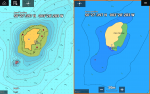
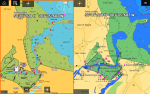

I couldn't have thought of a more appropriate example of the logical fallacy known as "mistaking the map for the territory".I will always say you need to understand paper navigation to be safe using a chart plotter.

2 different chart chips. of same place.
View attachment 76088
View attachment 76087
Yes paper charts need to be updated and if they have not done a reprint there will be chart corrections available. but they can be found easily. You have to take a chart chip to a store or do it online update for corrections, so you do not know what is not correct.
This is how I see it, it may differ and am happy to disagree, each to there own.

Thats an easy question to answer.
I consider my radar as my electronic eyes and my plotter as my electronic charts.
So it would be head up for radar and north up for charts.
I think that is the way most people use it.
I also don'r use radar overlay over the chart but I do know people who do.
Any targets that I create using MARPA automatically appear on my PC displays and, of course all the AIS transmissions are also on the PC screens by default.
I think that arguement is getting thinner and thinner these days.
With the likes of GPS car nav and Google Maps, people are becoming more aware of the dangers that you are worried about.
+1, with the only exception of chart overlay.I do exactly as you do - north up for charts and head up for radar.

