AIS

Note : SWR meters and VHF Radio Diagnostic Menu are useless if you use a splitter on the antenna ... the splitter will not allow SWR meter to function ... and the radio diagnostics will report error antenna ...
This is interesting as I've been trying to work out recently whether my Quark-Elec splitter was in fact trashing my transmission strength, and the SWR meter does show a transmission strength of 4W through the splitter when transmitting 25W from my VHF...

Question: Would the SWR meter function correctly if connected after the VHF splitter - i.e. to measure the output from the splitter, rather than the transmission going into it?
 
Interesting question ... and I don't know to be honest.

I know talking to Alan at Aves Marine - he uses a different machine ... not sure what it is - but he did warn me of this problem with SWR meters... I even bought a special meter designed solely for VHF radio diagnostics etc ... same problem.
 
Interesting question ... and I don't know to be honest.

I know talking to Alan at Aves Marine - he uses a different machine ... not sure what it is - but he did warn me of this problem with SWR meters... I even bought a special meter designed solely for VHF radio diagnostics etc ... same problem.
I’ll try it and report back!
 
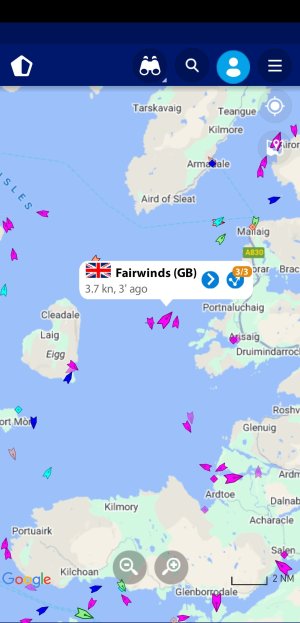
Our new Matsutec 528a AIS transponder with an aerial mounted on the windgen mast 3ft higher then the pushpit is receiving targets over 6nm away but we do not show up on Marine Traffic.

Aerial is Glomex AIS stubby.

Is the transmit function broken, or is there some other possible fix?

— W
 
Our new Matsutec 528a AIS transponder with an aerial mounted on the windgen mast 3ft higher then the pushpit is receiving targets over 6nm away but we do not show up on Marine Traffic.

Aerial is Glomex AIS stubby.

Is the transmit function broken, or is there some other possible fix?

— W
MarinTraffic can be very slow to show AIS transmissions, and as the stations available free of charge are operated mostly by enthusiasts, their availability is sometimes spotty. Have you checked whether there is a receiving station within line of sight? MarineTraffic has options to display receiving sites. You could also try an alternative such as VesselFinder - I have found this sometimes to be more responsive than MarineTraffic. Finally, how about getting A.N.Other to check with a real AIS receiver? That's the only reliable test.

The FREE version of MarineTRaffic only allows you to see data less than 24 hours old, too.
 
Last edited:
Actually Mariner Traffic can shows all sorts free or registered ... the problem is more that the delay in showing or only showing old plots ...

Yes the plots are dependent on receiving stations, your registration etc ... the type of registration you have with MT can open up other avenues such as sat tracked AIS etc.

With regard to "Webcraft" .... the power of your TX 'd signal is then affected by height and degradation in cables etc. If you are using a B unit - then you are at low 2W before losses ... if later B+ then some early were still 2W but soon upped to 5W .. but again all subject to losses.
The plot is only shown if the signal received is repeated enough in succession ... therefore if you have a low antenna and are in swell / waves that reduce frequently your antenna height - then MT will fail to show you.

I used to use a Rubby Dubby base loaded stubby with my portable setup for Ship to Ship operations .... it was barely usable .. the stubby was a joke. It was a reputable brand as well ...
Testing with a standard whip - the difference was astounding. Note I was operating on a ships bridge - far higher than most yacht masts !

We use Marine Traffic in our work - we need to follow the ships closely as market rates on cargo change by the hour !
 
We have experience of a similar stubby user with it mounted on the rail. In the calm conditions we kept him in view on the AIS for up to 5 miles distance. When things got rough his signal just dropped out virtually all the time.
I managed to fit a spare base loaded metz whip onto his backstay as high up as I could reach.

We doubled his drop out range and rough conditions contact range was tolerable and much safer for all.

I hate those sellers of " tuned ais" stubby antennas.
 
Actually Mariner Traffic can shows all sorts free or registered ... the problem is more that the delay in showing or only showing old plots ...

Yes the plots are dependent on receiving stations, your registration etc ... the type of registration you have with MT can open up other avenues such as sat tracked AIS etc.

With regard to "Webcraft" .... the power of your TX 'd signal is then affected by height and degradation in cables etc. If you are using a B unit - then you are at low 2W before losses ... if later B+ then some early were still 2W but soon upped to 5W .. but again all subject to losses.
The plot is only shown if the signal received is repeated enough in succession ... therefore if you have a low antenna and are in swell / waves that reduce frequently your antenna height - then MT will fail to show you.

I used to use a Rubby Dubby base loaded stubby with my portable setup for Ship to Ship operations .... it was barely usable .. the stubby was a joke. It was a reputable brand as well ...
Testing with a standard whip - the difference was astounding. Note I was operating on a ships bridge - far higher than most yacht masts !

We use Marine Traffic in our work - we need to follow the ships closely as market rates on cargo change by the hour !
Yes, it's very useful - I mainly use it to follow a friend's ship! The free version (which is what most of us use as the subscriptions are expensive; we don't have @Refueler 's motive for paying!) is quite limited, though - no satellite cover in most cases, and so ships disappear once about 20-30 miles offshore, and only 1 day of historical data.
 
Tip I pay for a 'Starter Plan' which only seems to be available via the iPhone app... (I can't find it on their website) - it is considerably cheaper but gives you things like past tracks etc.

It seems that by subscribing via the phone app, I also get access to those things when I log into my account on the website.
 
Tip I pay for a 'Starter Plan' which only seems to be available via the iPhone app... (I can't find it on their website) - it is considerably cheaper but gives you things like past tracks etc.

It seems that by subscribing via the phone app, I also get access to those things when I log into my account on the website.
I note that the free version has steadily got more restricted; it used to allow access to much greater amounts of historical data. But it's not sufficiently useful for me to pay anything to use it.
 
Take it from me ... the levels of access based on 'plans' are not that cheap and TBH - rarely do we use the extra info ..

The one that interests us more - is the ship details info part ... which unless you pay dearly for is so limited unless you have deep pockets !! ....

My offices use other trackers as well - but usually we end up back on Marine Traffic ..

One word of warning to all free users : Be very careful when relying on a plot of a vessel ... check carefully the last recieved date / time ...

Just checked without logging in and today my boat Anisette is not showing ... but quite often even if AIS hasn't been on for a few days - it shows up !!
 
You show up in Portsmouth, not up north, using Marine Traffic. There must be two fair winds sailing vessels. It is the same using VesselFInder, which shows two FairWInds but only one shows up, the Portsmouth one.

You will see that the screenshot I posted is a long way from Portsmouth. You are right though, we are not searchable on their database yet, but our position was updated on the map two minutes ago.

- W
 
Top