Add an iPad as digital gauge panel

Boater On Thames

Well-Known Member
Joined
5 Oct 2018
Messages
534
Visit site
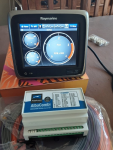
I bought an Albacombi convertor. The plan was to use it to convert all analogue signals to NMEA 2000 network. Then I found it can show all info and gauge panel on any browser on any computer device through a normal RJ45 network. So I added a WiFi router to connect it to an old iPad. It works. So, this means I don't have to buy an NMEA 2000 display as I only want to have an option to show digital data on a digital device to double-check.

Also, I have an old Raymarine C70 onboard, the manual said it can receive NMEA 2000 signal and has an engine monitoring and digital data function. Maybe I will buy an NMEA 2000 starter kit to have a try too. If this also working, that will make me one more digital gauge backup option.

Any advice is welcome. Thanks.
 
Last edited:
I bought an Albacombi convertor. The plan was to use it to convert all analogue signals to NMEA 2000 network. Then I found it can show all info and gauge panel on any browser on any computer device through a normal RJ45 network. So I added a WiFi router to connect it to an old iPad. It works. So, this means I don't have to buy an NMEA 2000 display as I only want to have an option to show digital data on a digital device to double-check.

Also, I have an old Raymarine C70 onboard, the manual said it can receive NMEA 2000 signal and has an engine monitoring and digital data function. Maybe I will buy an NMEA 2000 starter kit to have a try too. If this also working, that will make me one more digital gauge backup option.

Any advice is welcome. Thanks.

Snap........

I've got two 5.7" displays , the plan being one for each engine to display RPM, oil pressure and coolant temperature then sub pages for fuel, water, waste quantities, engine room temp, genset parameters etc.

That's my Winter project sorted then!


1630742826999.png
 
Not quite the same thing but I run a PC on board which gives me lots of winter projects.
The last project turned out to be something to do during lock down.
My boat PC is fed to all the nav screens on the boat - 2 on the flybridge and 2 at the main helm.
So, over the years, I've written lots of software that runs on the PC and displays whilst we are under way or at anchor.
Things like "anchor cameras" feed into the PC thus making them available on all the displays.

But, most importantly, OpenCPN runs on the PC as well thus providing a completely separate back up nav system.
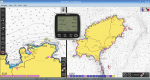
This is a screen shot of my latest addition - a third revamp of my "talking logger" but this time with some fancy graphics.
This pic shows OpenCPN running with my "talking logger" overlaid in the middle of the screen.
I've called the app "Mikemarine" because my name isn't Ray.

Mikemarine.png

The talking logger is designed to "cut in" and announce a "log event" every 30 mins over the boat's audio speakers.
During the "log event", it "speaks" the time, latitude, longitude, course and speed over the ground.
The idea is that the person "on watch" records everything that the logger announces.
You could simply print the log out on a printer but actually writing the log information down introduces a discipline into our longer passages.

Just an example of what can be done over a "winter project".
 
I have been on Jenny Wren and heard these announcements, I am just trying to work out a way to hack his software, to announce:

"ABANDON SHIP, ABANDON SHIP, MAN THE LIFERAFTS, IMMEDIATELY"

You will then find me somewhere in the West Indies with my new P67 named CAIN-II with my perfect vinyl decking and a broad smile on my face, must find out how to disconnect his tracker.....:geek:
 
I have been on Jenny Wren and heard these announcements, I am just trying to work out a way to hack his software, to announce:

"ABANDON SHIP, ABANDON SHIP, MAN THE LIFERAFTS, IMMEDIATELY"

You will then find me somewhere in the West Indies with my new P67 named CAIN-II with my perfect vinyl decking and a broad smile on my face, must find out how to disconnect his tracker.....:geek:
Actually, we have had a lot of "offline" fun with the logger. On one passage with friends from this forum, SWMBO had a "no swearing policy" on the boat, charging a pound for each time someone swore. As soon as someone swore, she said "thats a pound you owe me". So we adapted the logger to also say "thats a pound you owe me". It was also a great to wind SWMBO up by getting the logger to swear!!

For people that haven't heard it, this is Version 1 of the logger - running

And the is Version 2 - a much more sexy voice.

Version 3 is yet to be installed and exists as a result of changing everything to Linux.
Nothing left of Microsoft now - no more Windows!! Yea!!
 
Good stuff. You guys are genius!

I like it. Definitely will get an onboard PC and try.
First place to start is OpenCPN
See here - OpenCPN Official Site
It is all free and runs on all operating systems.
Just download it and try.
PM me if you need any help with charts for it.
Just add a GPS Dongle to a Laptop and you have a complete marine plotter.
A GPS dongle like one of these for example:-
USB GPS Receiver VK-172 Ublox7 Fast 10Hz GPS/Glonass RasPi Win10/8/7/XP/CE Linux | eBay

If you aren't familiar with FOSS (Free Open Source Software) this might be a good introduction.
There is some REALLY good FOSS about - Linux for example - used in more applications than MAC or Windows.
I bet that this forum is running under Open Source software (Apache under Linux - very probably)
 
Or, you could have a look at the Raspberry Pi.
I'm a great fan of the Raspberry Pi - I use it in lots of places.
For those who don'y know the Raspberry Pi is a very cheap "credit card sized" computer costing about £35.
Stick it in a box, give it a power supply and a GPS dongle and you have a complete system that you can build into your boat.
Here is an Open Source project that uses the Raspberry Pi as a full on board system.
OpenPlotter | OpenMarine
That project uses OpenCPN as its plotter but it also contains other useful free software - Kplex for example can multiplex your ship's NMEA data to multiple devices and transmit GPS/AIS over WiFi.

Although I love the Raspberry Pi, I don't use it for navigation - I prefer to use a more conventional PC with a bit more power.
But, I do use Kplex to distribute NMEA data around the boat.
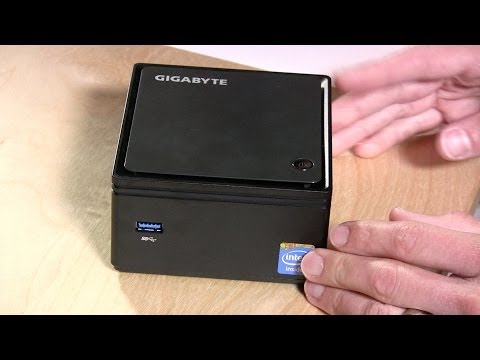
My ship's PC is one of the NUC type Barebones PCs - there are lots of variants:-
I use the Gigabyte Brix range of PCs - like this one:-

0.jpg


The trick with selecting these devices is to look closely at the interfaces on the side of the devices.
I use 2 video outputs - one for a desktop monitor that I usually use on the dinette table and one is wired through the boat to the navigation displays.
USB ports are generally used to connect to the ships systems through dedicated NMEA to USB interfaces.

But have a look at the Raspberry Pi - it is a great little device that you can do lots with.
For example this is a link to a Raspberry Pi on the roof of our reception in Sant Carles Marina Spain.
Live data from our AIS Station (Raspberry Pi)
Details for AIS Station Sant Carles Marina, Spain - VesselFinder
That Raspberry Pi is continually scanning and receiving AIS signals and then streaming the data to Vesselfinder, MarineTraffic and AIS Hub.

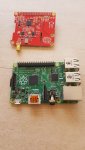
This is what it actually looks like
4.resized.jpg

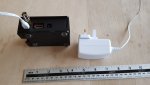
And inside - this is the Raspberry Pi (the green card) - with an AIS receiver card (the red card)
In the Raspberry Pi market, the AIS (red) card is called a "hat" because it simply clips onto the Raspberry Pi.
In this case, the red card is called a dAISy hat!!

6.resized.jpg

That little AIS station has now been running (feeding AIS data onto the internet) for just over 2 years now.
 
Cool! Thanks a lot! I like it. I have a little experience with Linux and have used Raspberry Pi before in another business project. But obviously, I am at the beginner level. Glad to have you here to help!

My daily personal laptop runs on Ubuntu Linux, I only use Windows occasionally when necessary. So I think I am also a fan of open-source software. I will definitely try the set-up you suggested. I am excited!
 
Last edited:
Cool! Thanks a lot! I like it. I have a little experience with Linux and have used Raspberry Pi before in another business project. But obviously, I am at the beginner level. Glad to have you here to help!

My daily personal laptop runs on Ubuntu Linux, I only use Windows occasionally when necessary. So I think I am also a fan of open-source software. I will definitely try the set-up you suggested. I am excited!
Great - an Ubuntu user - you are already using this fantastic technology.
I have taken the last 5 years to wean myself off Windows.
I started by using Linux Mint which is a derivative of Ubuntu and probably the best match to a Windows environment.
But over the last year, I have moved to Manjaro which is a derivative of Arch Linux.
It was a bit difficult to get my head around not having the Synaptic installer but Manjaro's Pamac Installer is way better than anything that Debian/Ubuntu/Mint are offering.
If a package doesn't exist in Manjaro's repository, it builds it - all interactively - all you do is click a button and the software is installed all automatically.
In fact this is exactly how OpenCPN gets installed under Manjaro.
The only disadvantage about Manjaro is that it is "Bleeding Edge" technology and to get the best from it you will find yourself upgrading a lot (you don't have to though)
Another great thing about Manjaro is there is an ARM distribution built specifically for the Raspberry Pi - just download and install it on the RPi.
This brings me to XFCE - all Manjaro distros are available with XFCE desktop environment.
Imagine Windows 95 - XFCE is a modern version of the well loved Windows 95 to Windows 7 environments that we all loved before Microsoft started fiddling with them.
Having XFCE on my desktop AND the Raspberri Pi makes for a seemless crossover.

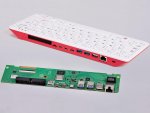
BTW - have you seen the Raspberry Pi 400?
It is a Raspberry Pi 4 inside a keyboard for 67 quid.
raspberrypi400pcb.resized.jpg

Now - what does that remind you of???
A Sinclair Spectrum or a Commodore 64 - for those of who can remember them.
The only difference is that the Pi 400 is way more powerful and COULD be used as a desktop computer - microSD cards used instead of hard disks etc
 
... and when you're done with that, and with the Albacombi dumping loads of stuff to N2K, do the next step and get signalk installed with the appropriate HAT on another standalone rpi (preferably 3B+ and not 4!) and enjoy decent telematics applications of all the N2K data through signalk -> influxDB and grafana for viewing them remotely (or locally) :cool:
just need another couple of decent lockdowns and you'll be done!

V.
 
... and when you're done with that, and with the Albacombi dumping loads of stuff to N2K, do the next step and get signalk installed with the appropriate HAT on another standalone rpi (preferably 3B+ and not 4!) and enjoy decent telematics applications of all the N2K data through signalk -> influxDB and grafana for viewing them remotely (or locally) :cool:
just need another couple of decent lockdowns and you'll be done!

V.
I've never really understood the benefit of SignalK
Can you think of any?
Maybe it will all be clear in the future.
 
I usually don’t understand much when you show your amazing technical skills on a computer. But that’s a funny line???
Well, in this world of funny names for different technology, I just thought I would add my own twist to my own project.
Names like Raspberry Pi itself but there are lots of Linux technologies with names like:-
man
cat (iv'e not seen dog though!!)
gimp
grub
curl
grep
gnome
catfish
etc
Then there is "finger" and "touch", of course
But there are loads more.
Lots have become household names - like Apple and Android - even Google and Yahoo would have been a name to laugh at in the past.

EDIT
Oh yes - I also use "wine"
 
Well, in this world of funny names for different technology, I just thought I would add my own twist to my own project.
Names like Raspberry Pi itself but there are lots of Linux technologies with names like:-
man
cat (iv'e not seen dog though!!)
gimp
grub
curl
grep
gnome
catfish
etc
Then there is "finger" and "touch", of course
But there are loads more.
Lots have become household names - like Apple and Android - even Google and Yahoo would have been a name to laugh at in the past.

EDIT
Oh yes - I also use "wine"
dont' forget:
top
tail
and ofcourse the ferrari of editors: vi :cool:
then there's latex as well but hope noone using it anymore (did my PhD draft on that in the early 90s)
 
I've never really understood the benefit of SignalK
Can you think of any?
Maybe it will all be clear in the future.
well, not per se, it's a means to reach decent visualisation tools.
So get your data on signalk (either directly or through N2K - latter is easier)
then signalk dumps all that data in a timebased db like influxdb (quite unlike sql/mysql etc)
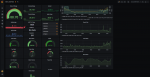
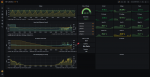
then grafana (nice v. configurable toolkit) picks data from influx and presents them in screens fully customised and at varying granularities (you just select them on the spot).

it's proved invaluable to my fully custom dash/N2K/whatnot programming as I have an easy way to log all events and inspect them at leisure (even 2months later from home)
Also you can have warning emails (assuming boat online 24/7) and actions using node red. Not gone into that as yet, but will during next lockdown :rolleyes:
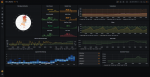
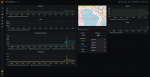
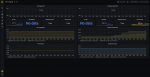
Below are the screens I've setup todate (last one is still heavily wip as the data collection from the main engines is not complete yet - far from it actually but not a high priority)

0_OverView - Grafana - Google Chrome 5_9_2021 2_14_06 μμ.png

0_OverView - Grafana - Google Chrome 5_9_2021 2_14_22 μμ.png

0_OverView - Grafana - Google Chrome 5_9_2021 2_14_45 μμ.png

0_OverView - Grafana - Google Chrome 5_9_2021 2_15_55 μμ.png

0_OverView - Grafana - Google Chrome 5_9_2021 2_16_56 μμ.png
 
well, not per se, it's a means to reach decent visualisation tools.
So get your data on signalk (either directly or through N2K - latter is easier)
then signalk dumps all that data in a timebased db like influxdb (quite unlike sql/mysql etc)
then grafana (nice v. configurable toolkit) picks data from influx and presents them in screens fully customised and at varying granularities (you just select them on the spot).

it's proved invaluable to my fully custom dash/N2K/whatnot programming as I have an easy way to log all events and inspect them at leisure (even 2months later from home)
Also you can have warning emails (assuming boat online 24/7) and actions using node red. Not gone into that as yet, but will during next lockdown :rolleyes:
Below are the screens I've setup todate (last one is still heavily wip as the data collection from the main engines is not complete yet - far from it actually but not a high priority)

View attachment 121924

View attachment 121925

View attachment 121926

View attachment 121927

View attachment 121928
Still not convinced.
Why do you need SignalK to do that?
Cant you just read the data when you need it?
And I'm not sure that I need that kind of detail.
I'm more interested in useful information that I can use at sea - AIS and GPS etc - displayed on simple to read screens.

One place I thought that SignalK might be useful was in inter vessel data.
Maybe interrogate other boats's systems - find where your mates are etc.
 
Top