3D Printers

Not that I am a convert (I dont like all those 'Bamboo fanatics') BUT! A1 mini is cheaper and A1 not that much more expensive. I have printed a lot on my Enders but I wonder if its worth buying new one due to excellent work that Bamboo did. Or if its new design - they should not keep 'Ender 3' in the name ;)
@Bigplumbs maybe after Christmas we could do some comparison in the speed of printing? Speed, not quality, as I managed to have some very good quality prints of my Ender - they were just slooooow.
my new ender 3 V3 KE is way faster than my old ender 3’s. I am making some videos but I am not allowed to post them here as the mods just ban me if I do
 
Not that I am a convert (I dont like all those 'Bamboo fanatics') BUT! A1 mini is cheaper and A1 not that much more expensive. I have printed a lot on my Enders but I wonder if its worth buying new one due to excellent work that Bamboo did. Or if its new design - they should not keep 'Ender 3' in the name ;)
@Bigplumbs maybe after Christmas we could do some comparison in the speed of printing? Speed, not quality, as I managed to have some very good quality prints of my Ender - they were just slooooow.

Speed can be set by you ... I have Ender 3 Pro .. and the latest print set I have completed - the scale RC Concorde - has printed at approx 2x the usual speed I use ...
Its all a matter of matching settings ...

I have usually stayed with default speed of nozzle transit - mistakenly thinking that going faster would create poor prints. The Ender has coped very well with speeding up and I have found no difference in print quality.
 
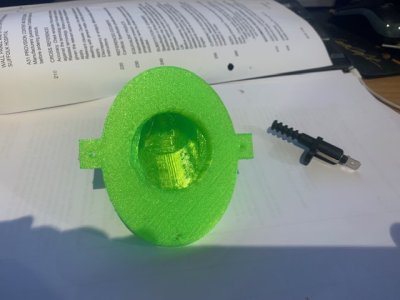
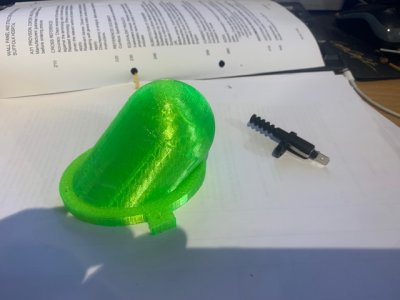
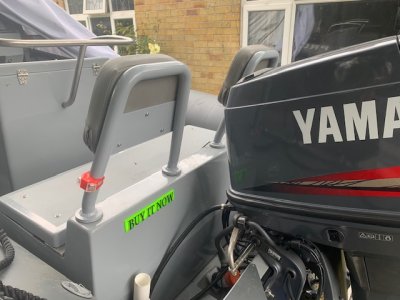
So I have just printed this to fix an issue I have with my Rib Power Tilt and Trim. It is printed from TPU so is flexible. See if you can guess what it is for

Thing 2.jpg

Thing.jpg
 
Looks like it is to keep water out from an opening or switch.
Did you design it yourself or download it?
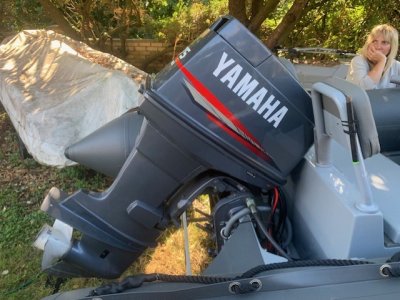
Quite Correct. I designed it myself on Tinker Cad. This is the situation.

On my new 3D Tender XPRO 535 Rib which I put together myself I decided to have a rear bench. This means that the outboard cannot go to full tilt as it will hit the bench. The idea is to fit the little switch in the housing I made and run the up wire from the trim solenoid to the switch in the housing. the top of the housing being TPU flexes. The whole thing will be fitted to the back of the fiberglass bench in such a location that the hood of the outboard will hit the top of the housing, Push the switch and cut the circuit.

I am not sure how waterproof TPU is so I will test that and most likely pack the inner bit of the housing with some sort of grease. I might also coat the outer with something to help the water proofing.

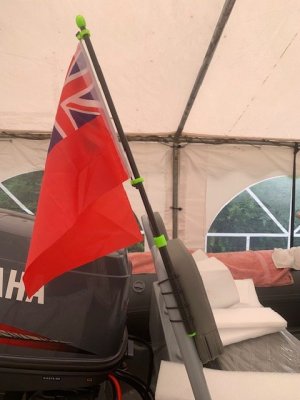
I have made several little things for the rib from this TPU and hence the colour.
 
Last edited:
Here are some of the other little things I printed from the rather bright TPU

Flag Pole f.jpg
 

Attachments

  • OUTBOARD SPACE.jpg
    OUTBOARD SPACE.jpg
    76.7 KB · Views: 8
I've been sent over here from another thread. I am using LibreCAD for 2D but wonder if there is a relatively easy way to import files from 2D to a 3D program where I can just add simple depth to the 2d? The 2D is fine for making trim for my new cabin windows (only around 5mm depth) but I am wondering about making trim for my old Lewmar portlights - they no longer offer these as spare parts. Any suggestions for software? I use Linux Mint.
 
I've been sent over here from another thread. I am using LibreCAD for 2D but wonder if there is a relatively easy way to import files from 2D to a 3D program where I can just add simple depth to the 2d? The 2D is fine for making trim for my new cabin windows (only around 5mm depth) but I am wondering about making trim for my old Lewmar portlights - they no longer offer these as spare parts. Any suggestions for software? I use Linux Mint.
The standard programme with my Voxel (called Flashprint) will do just that. I can give it a 2D shape and it will print it to any height I like - and even give a base on the blank bits. I used this to print a patch for my ancient Ogee guttering. Just traced the shape and bingo - a new stop end.

In fact I think it converts grayscale to height but I have only used it for black and white
 
I've been sent over here from another thread. I am using LibreCAD for 2D but wonder if there is a relatively easy way to import files from 2D to a 3D program where I can just add simple depth to the 2d? The 2D is fine for making trim for my new cabin windows (only around 5mm depth) but I am wondering about making trim for my old Lewmar portlights - they no longer offer these as spare parts. Any suggestions for software? I use Linux Mint.
Well done for being a Linux Mint user.
With Windows 10 excluding millions of old computers next year, I expect a lot more followers coming over to the Linux side.
Linux is free and more powerful, especially for older hardware.
No system registry etc to get in the way.

Most on here will know that I'm, a great user and supporter of Open Source software.
You will also see from the discussion in this thread that I have been using FreeCAD a lot recently.
I've not used LibreCAD but I seem to remember installing it to see what it did for me.

LibreCAD seems have all the features of FreeCAD's Draft workbench.
FreeCAD also has a very sophisticated 2D Sketcher Workbench separate from the Draft workbench.
That Sketcher workbench incorporates constraints which are really good once you get your head round them.
FreeCAD also has a dedicated workbench called Part Design.
This Part Design workbench does exactly what you are asking.
i.e. takes a 2D draining/sketch and allows you to "extrude" it into a 3D model.

That said, extruding a 2D sketch into 3D is just part of 3D modelling.
After you have created your 3D model by extruding a 2D design, there are often other 3D elements that you will need to construct.
So, software like FreeCAD then allows you to create more 2D sketches on any of the new faces that have been created after your extruded design.
Also, 3D designs can also be created from processes other than extruding.
For example FreeCAD calls some of these processes "Padding", "Revolving", "Lofting", "Piping" and "Helix" etc.
So you might be limiting yourself just trying to extruding a 2D sketch.

It sounds to me like you are used to Open Source software so, why not install a copy of FreeCAD and check it out.
There are probably ways to import your existing LibreCAD designs into the FreeCAD's Draft workbench but you would be missing the power of FreeCAD's Sketcher Workbench which can't be underestimated.

When downloading FreeCAD, make sure that you get the latest Version 1.0. That version was only released about 3 weeks ago so it may not be available in the Mint installer yet. If not download the 1.0 version AppImage from www.freecad.org - then make the Appimage file executable (you can do that with your Nemo file manager) and simply double click the Appimage file to run FreeCAD.
Any problems with Linux, just PM me.
Linux Rules.
 
I've been sent over here from another thread. I am using LibreCAD for 2D but wonder if there is a relatively easy way to import files from 2D to a 3D program where I can just add simple depth to the 2d? The 2D is fine for making trim for my new cabin windows (only around 5mm depth) but I am wondering about making trim for my old Lewmar portlights - they no longer offer these as spare parts. Any suggestions for software? I use Linux Mint.
Don’t know about conversion software 2D to 3D but since you are happy with your 2D models I would suggest that you will pick up FreeCAD easily
There are a few of us using this incl @Hurricane on this site with great effect and of course no subscription. Be careful with YouTube early instruction videos. The software is developing so rapidly that some of the early stuff has been drastically improved.
 
Briefly picked through this thread and some u-tube places to look at getting set up for budget 3d printing of small bits and pieces for the boats that are no longer available or expensive to replace/repair. Is there any resource in particular where I could go, that is "dedicated" to marine / boat stuff without trawling through thousands of toys and phone stands to find something I may need?
 
Well done for being a Linux Mint user.
With Windows 10 excluding millions of old computers next year, I expect a lot more followers coming over to the Linux side.
Linux is free and more powerful, especially for older hardware.
No system registry etc to get in the way.

Most on here will know that I'm, a great user and supporter of Open Source software.
You will also see from the discussion in this thread that I have been using FreeCAD a lot recently.
I've not used LibreCAD but I seem to remember installing it to see what it did for me.

LibreCAD seems have all the features of FreeCAD's Draft workbench.
FreeCAD also has a very sophisticated 2D Sketcher Workbench separate from the Draft workbench.
That Sketcher workbench incorporates constraints which are really good once you get your head round them.
FreeCAD also has a dedicated workbench called Part Design.
This Part Design workbench does exactly what you are asking.
i.e. takes a 2D draining/sketch and allows you to "extrude" it into a 3D model.

That said, extruding a 2D sketch into 3D is just part of 3D modelling.
After you have created your 3D model by extruding a 2D design, there are often other 3D elements that you will need to construct.
So, software like FreeCAD then allows you to create more 2D sketches on any of the new faces that have been created after your extruded design.
Also, 3D designs can also be created from processes other than extruding.
For example FreeCAD calls some of these processes "Padding", "Revolving", "Lofting", "Piping" and "Helix" etc.
So you might be limiting yourself just trying to extruding a 2D sketch.

It sounds to me like you are used to Open Source software so, why not install a copy of FreeCAD and check it out.
There are probably ways to import your existing LibreCAD designs into the FreeCAD's Draft workbench but you would be missing the power of FreeCAD's Sketcher Workbench which can't be underestimated.

When downloading FreeCAD, make sure that you get the latest Version 1.0. That version was only released about 3 weeks ago so it may not be available in the Mint installer yet. If not download the 1.0 version AppImage from www.freecad.org - then make the Appimage file executable (you can do that with your Nemo file manager) and simply double click the Appimage file to run FreeCAD.
Any problems with Linux, just PM me.
Linux Rules.
I will take a look at FreeCAD today. My needs are pretty simple and not very frequent.

Yes, Linux Mint has been my choice for some years - I never moved to Windows 10. I had kept an old version of Windows just for when ripping CD's - the ripper I used didn't get much info off the web. Then, my old PC failing (after 10 years) I had to reinstall on a new machine. I found fre:ac which does all I need. No windows anywhere. However, Linux does expect the user to be an OS person and I would not describe myself as that.

PS: installer does have Ver 1.0.0
 
Briefly picked through this thread and some u-tube places to look at getting set up for budget 3d printing of small bits and pieces for the boats that are no longer available or expensive to replace/repair. Is there any resource in particular where I could go, that is "dedicated" to marine / boat stuff without trawling through thousands of toys and phone stands to find something I may need?
If it is simple bits and bobs you want it is sometimes better to design them yourself on Tinker Cad
 
I will take a look at FreeCAD today. My needs are pretty simple and not very frequent.

Yes, Linux Mint has been my choice for some years - I never moved to Windows 10. I had kept an old version of Windows just for when ripping CD's - the ripper I used didn't get much info off the web. Then, my old PC failing (after 10 years) I had to reinstall on a new machine. I found fre:ac which does all I need. No windows anywhere. However, Linux does expect the user to be an OS person and I would not describe myself as that.

PS: installer does have Ver 1.0.0
Good news that the Mint repositories are keeping up to date.

I am a bit like you but for me, a few years earlier.
I didn't upgrade to Windows 8 from Windows 7 - I just didn't like the way that Microsoft were going.
I had lots of Windows computers in my life so it was going to be a big job changing.
But the decision was made whilst running Windows 7 as my main operating system.

My first step was a move to Linux Mint which turned out to be a success.
Linux Mint is definitely pitched at those people who want to move from Windows to Linux.
The Mint team have even written their own desktop environment called Cinnamon.
When I started, Cinnamon was in its early days so I switched to Mint using the XFCE desktop.
For those who don't know, the Desktop Environment (DE) is the graphical software (GUI) that you use to manage your system.
XFCE has been around a long time and mimics the old Windows 95/Windows 98/ Windows 2000 and Windows XP etc.
XFCE and Cinnamon don't try to have the new styles that Windows and others have moved to.
I'm a bit of a dinosaur so I guess thats why I like it.

A few years ago I wanted a bit more, so I moved away from Linux Mint but I stuck with XFCE for my Desktop Environment.
In fact, it was a big jump - I moved to Manjaro which is a sub distribution from Arch Linux.
Manjaro is a rolling release often referred to as "bleeding edge".
But crucially, Manjaro offer an XFCE option so I went with that.
However, I hate those dark theme systems so I spent some time building my own light theme from stuff that I had picked up over the years using Mint.
I now have a slick system that I am very pleased with.

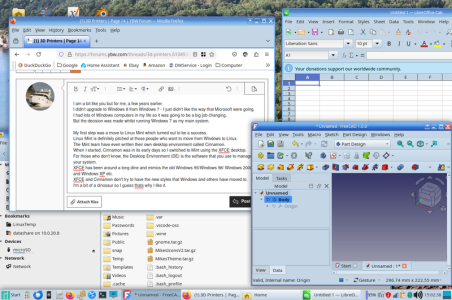
Here's a screenshot example (includes FreeCAD) of my light crisp Desktop Theme that I put together over the years
Screenshot_2024-12-24_15-02-40.resized.png

As a consequence, like you, all my systems are Linux based - not a single Windoze machine in my house or on the boat.
I'm typing this reply using a Microsoft Surface Pro running Linux.
I'm very proud that it is actually a Surface Pro 3 and runs many times faster than it ever did under Windows.

On the boat, I use a mini PC (running Linux of course)
At home, I have my main high performance Desktop PC, a General Server, a Media Centre, an Internet Servers
And loads of Raspberry Pi systems on the boat and at home which, of course also run Linux.

I would like to encourage everyone running Windows 10 to consider moving to a Linux based system - especially in 2025 when Microsoft withdraw their free support for Windows 10.
 
Top