3D Printers

All of the above by @Hurricane but on a tighter budget I went for the Bambu P1S with AMS (P1S Combo)
There are a few differences from the more expensive models like larger screen (All driven from the computer I never look at my smaller screen) but functionally the same as far as my lack of experience can ascertain.
As a complete novice it really needed limited skill to get it working. FreeCAD was a bit harder to get the hang of the jargon but I made some simple clips within a couple of hours. (#130)
Best of luck
I'm really enjoying FreeCAD - just like all the other Open Source Software that I use.
My FreeCAD designs are getting more and more complex.
Great value - its free so my only investment has been my time.

Just like switching to Linux 7 years ago, I don't regret it.
BTW I wonder how many people will be ditching their Windows 10 hardware later this year when it becomes un-supported by Microsoft.
Yes, it will work after that date but no security upgrades unless you pay for them (if they actually offer upgrades - that is).
The solution is to scrap Windoze and install Linux on those very computers and end up with something way quicker.
Loads of details out there on how and why you should do that.
 
This thread has intrigued me to consider dipping my toe into 3D printing.
As an absolute beginner it seems from the thread that the choice is ender 3V 3KE (£239) or bambu lab A13D (£289)
Prices are just from googling the names without any effort to get best price but neither seems very expensive. So in an ideal world (and repeating I am an absolute novice) which one would you guys go for if you were starting all over?
Both will be OK. If I would have need for low/mid budget extra 3d printer, I would pick A1. I am very happy with the Bamboo slicer and its plug'n'play capabilities. I don't know how it works with Creality now.

I'm really enjoying FreeCAD.
When I will finally create my 3d printing related youtube channel (current estimation is never), I am going to show designs in FreeCAD as its easier to obtain and works on Linux.
But on daily basis I am fan of Fusion360 - its also free (technically there is limit of 10 designs but its not a problem), its bit messy to sign up for free account.
 
I think SolidEdge (for makers) is well worth a look - its free for most "everyday" use. It has really nice to use Sketch/Sketch Out capabilities and it isnt as fiddly as FreeCAD. You dont get what i call ...massive parametric overloads here..

Check it out here:

 
I think SolidEdge (for makers) is well worth a look - its free for most "everyday" use. It has really nice to use Sketch/Sketch Out capabilities and it isnt as fiddly as FreeCAD. You dont get what i call ...massive parametric overloads here..

Check it out here:

Interesting - I watched that video which seems to give the "feel" of SolidEdge.
Looks easy to use - "Parametric Overload" - lovely term.
However, it is Windows only - and I am avoiding Windows like the plague - just look at Microsoft's policy on Windows 10 this year.
As a "home user" I'm always put off by packages like this that have a free base package and expensive upgrade options.
I feel that I may get "suckered in" to wanting the upgrade.
I have the same issue with Fusion.
I want a feature rich package and not have to pay for it.
I really want the best of both worlds "cake and eat it" - so to speak.
FreeCAD gets me most of the way there - in fact the more I use it, the more I can do with it - without upgrading.

Thanks for posting.
 
However, it is Windows only - and I am avoiding Windows like the plague - just look at Microsoft's policy on Windows 10 this year.
Not on the full topic, but since windows has native support for Linux, I started using it back (need Linux software for work) - I have been on Linux since 2005, then MacOS from say 2015. Since 2021 I am back on Windows. It is quite nice system and the hardware is cheaper - I am using Thinkpads, and very often you can buy 1-2 months old machines for half price of equivalent Mac with 3 years of Lenovo warranty on it!
 
Not on the full topic, but since windows has native support for Linux, I started using it back (need Linux software for work) - I have been on Linux since 2005, then MacOS from say 2015. Since 2021 I am back on Windows. It is quite nice system and the hardware is cheaper - I am using Thinkpads, and very often you can buy 1-2 months old machines for half price of equivalent Mac with 3 years of Lenovo warranty on it!
Have you tried installing a native Linux distribution on old hardware?
I think you will find it a significant improvement on speed.
Windows is a registry based system so after time, the registry gets bloated and slows the system down.
Linux is a flat system - no registry.

I have restored many computers that the owners wanted to throw in the bin.
Linux has made them fast and efficient.
For simple office based tasks, you can restore an old machine to a very useful state (IMO better than when it was new) at no cost.
 
Have you tried installing a native Linux distribution on old hardware?

For simple office based tasks, you can restore an old machine to a very useful state (IMO better than when it was new) at no cost.
Quite a few :) I agree that Microsoft is doing a big mistake not supporting Windows 10 anymore (or not letting Windows 11 on a old computers). The issue with Linux is that for many people, Windows is essential as lot of software has no Linux equivalent, like most of games. On the other side, the computers are not getting significantly faster anymore (from home usage point of view), and around 2015 I stoped helping people by installing Linux and was recommending tablets.
The bloated registry is less of a problem nowadays, as lot of software is available via the browser. This could be great case for Linux - and is to some extend with ChromeOS, but (sadly!) Linux is not close to become popular. I have to say, your friends are being lucky because I agree that 'upcycling' computer with linux is amazing way to give it longer life. But with ebay prices for very good machines, which are perfectly fine to run windows, its not a popular approach....
 
Quite a few :) I agree that Microsoft is doing a big mistake not supporting Windows 10 anymore (or not letting Windows 11 on a old computers). The issue with Linux is that for many people, Windows is essential as lot of software has no Linux equivalent, like most of games. On the other side, the computers are not getting significantly faster anymore (from home usage point of view), and around 2015 I stoped helping people by installing Linux and was recommending tablets.
The bloated registry is less of a problem nowadays, as lot of software is available via the browser. This could be great case for Linux - and is to some extend with ChromeOS, but (sadly!) Linux is not close to become popular. I have to say, your friends are being lucky because I agree that 'upcycling' computer with linux is amazing way to give it longer life. But with ebay prices for very good machines, which are perfectly fine to run windows, its not a popular approach....
Yep - I agree with everything you say except that more and more applications are now available multi platform - especially games. Steam and Proton are just a few of the reasons that more games are now available on the Linux platform. Helped of course by the new Steam Deck hand held gaming machine.

I have a couple of "oddballs" where I use Wine to run a Windows application but those applications are becoming increasingly out dated with multi platform alternatives. Yes it is a shame that the desktop "take up" has been slow on Linux but you can't say that about Linux in general where it is by far the widest used OS. Android and Chrome OS being good examples - I'm sure that not many people realise that Android IS Linux.

Anyway, thanks for your comments.
 
Yep - I agree with everything you say except that more and more applications are now available multi platform - especially games. Steam and Proton are just a few of the reasons that more games are now available on the Linux platform. Helped of course by the new Steam Deck hand held gaming machine.
Yes, but its still not a gamer OS ie. if someone would like to play different titles, would get Windows.
Android and Chrome OS being good examples - I'm sure that not many people realise that Android IS Linux.
And our 3d printers, smart homes, dog trackers, pretty much any device that is 'smart', not to mention all chartplotters etc. @Hurricane I know you know, but it might be interesting for the readers :) And I am using Windows only because I am quite lazy and don't agree on close hardware Apple policy, but everyone remembers the biiiiig distruptions related to Windows update ;)
 
I am currently working on turning old glider cockpit into joystick. Recently finished printing all bits necessary to connect the stick and airbrake:
The idea is to use original controls as much as possible. With new Bamboo its soooo much easier to print precise prints than with Ender 3 v2 (ender was still OK for a job just much more preparation and debugging).
 
I want to install an antenna casing on the top surface of a yacht spreader, the casing is approx 30cm diameter, but the spreader is not a flat surface.

I posted on the antenna manufacturer forum, and it was suggested to produce a 3D mount.

But, I have zero experience with 3D.

Having read from post #1, I can see the 3D printing would be a handy skill to have, and I'm prepared to invest some time and money.

But where to start?

My thoughts are to download a scanning app, scan the spreader (nast is down at the moment), and use the scan to produce a 3D image that I can either print or get printed - I need to complete fairly quickly so could be I go to a print shop for my 1st project. Not sute I have the time to produce both the file and the print.

Any advice on how best to proceed gratefully received.

TIA
 
Loads of info on this thread. I Bought a Bambu PS1 with AMS in September and have been learning FreeCAD, with the addition of TinkerCad for simple mods on other people's models. I've made a few things for the boat... am currently printing a new radar display suncover. I've not used a 3D scanner, and have just used digital calipers and the usual measuring stuff. It's useful to print off quick prototypes so you can finesse the model. Take note of the different types of filament material depending on how robust / flexible / heat resistant / UV resistant it needs to be. I have stuck with Bambu filament and it's been good. Loads of tutorials on YouTube for FreeCad and the other bits of software. The Bambu Studio software is surprisingly good when you get under the skin of it.
 
I want to install an antenna casing on the top surface of a yacht spreader, the casing is approx 30cm diameter, but the spreader is not a flat surface.

I posted on the antenna manufacturer forum, and it was suggested to produce a 3D mount.

But, I have zero experience with 3D.

Having read from post #1, I can see the 3D printing would be a handy skill to have, and I'm prepared to invest some time and money.

But where to start?

My thoughts are to download a scanning app, scan the spreader (nast is down at the moment), and use the scan to produce a 3D image that I can either print or get printed - I need to complete fairly quickly so could be I go to a print shop for my 1st project. Not sute I have the time to produce both the file and the print.

Any advice on how best to proceed gratefully received.

TIA
Welcome to the world of 3D printing.
The advice you got for making your antenna bracket using a 3D printer, is good.
But it would have been better to start with something simpler than a complex model like this. If I understand the problem correctly, the bracket will require an internal curved surface where it mates with the spreader. I assume that by "casing " you mean a bracket to take an antenna forming a base. Whilst designing the bracket you will need to measure the profile of the spreader at the position where you want it fixed. I assume that the spreader is tapered like most spreaders. Best to make your measurements as accurate as you can. Certainly to an accuracy of 1mm but I often work to 0.1mm accuracy.
I use free software everywhere so in this case I recommend FreeCAD.
As said above the Bambu printers will easily make this kind of project. I suggest that you should use ASA or ABS plastic. They will both do the job but ASA has slightly better UV protection. ABS is a bit cheaper but the material cost of either will only be a few pence.
I suggest that, long term, you look to buying a printer because you will quickly find lots of jobs that can be printed for a boat. I recommend the Bambu range. I have the more expensive X1C but the P1 is, essentially the same.
The AMS (filament feeder) is well worth the extra cost because it automatically sets up all the printing parameters - temperature etc.
Are you based in the UK?
If so, I am happy to help

Maybe PM me and I could help with the design. Perhaps by sending FreeCAD electronic designs between us over email. That way I could help get you started with this first more complex design.
If you are outside the UK you could go to a print house but it could end up costing a lot. Wasted cost that would be better spent towards the cost of your own machine.

So, please PM me if ypu would like any help.
 
Ive been doing a lot of sewing recently and the 3D printer has been really useful.
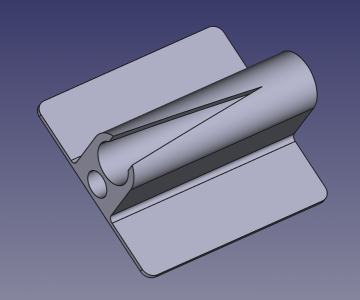
An example - this cleat.
Knocked up quickly in FreeCAD
Screenshot_2025-02-07_10-18-00.resized.png

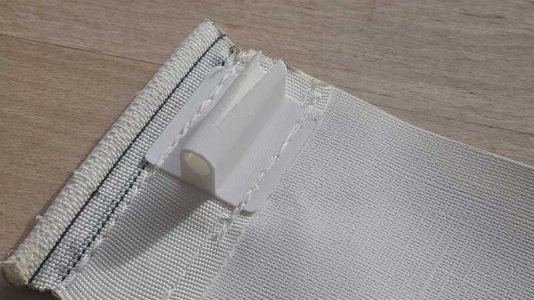
And this is the 3D printed cleat - sewn onto a test piece of luff tape.

cleat.resized.jpg

The Sailrite sewing machine "punches through" all the layers without any fuss.

BTW
I recently upgraded my Sailrite to the new "stepper motor" (Sailrite call it the "WorkerB Power Pack Motor System") but the old motor would have coped with this cleat as well.
I'm using the new WorkerB Power Pack Motor System with my old "Monster Flywheel" so the sewing speed is reduced significantly.
I might end up using the plastic flywheel that came with the "WorkerB Power Pack Motor System" kit.
But the slower speed does force me into more accurate sewing.

See here for more on the new Sailrite WorkerB power system

 
Just printed with a new (to me) TPU filament.
This one is from Bambu Labs and is their TPU for AMS - meaning that the filament itself is rigid enough to be fed from the AMS (multi filament feeder).
It is rated at a Shore Hardness of 68D which I was thinking would be too rigid.
For me, the whole point of using TPU is to use it in projects where I need a nice bendy model at the end.
In the past, I used a 3rd party TPU rated at a Shore Hardness of 95A.
In fact, in the final print, I can't tell the difference - except that the Bambu filament produces a much better print.
I suspect the better quality might be due to the automatic default settings of the Bambu material in a Bambu printer.
When I printed with the 3rd party filament, I just used a "Generic Profile".
I suppose I could have played with the settings (temperatures and speeds etc) but I don't really know where to start.

So, for me, this is just another reason for sticking to Bambu filaments - especially if they work in the AMS.

BTW, for other stuff, I am really liking ABS - uses more heat and takes a little longer to print but I think the end result is better.
ABS is roughly the same price as PLA but there are more options/colours with PLA.
 
Welcome to the world of 3D printing.
The advice you got for making your antenna bracket using a 3D printer, is good.
But it would have been better to start with something simpler than a complex model like this. If I understand the problem correctly, the bracket will require an internal curved surface where it mates with the spreader. I assume that by "casing " you mean a bracket to take an antenna forming a base. Whilst designing the bracket you will need to measure the profile of the spreader at the position where you want it fixed. I assume that the spreader is tapered like most spreaders. Best to make your measurements as accurate as you can. Certainly to an accuracy of 1mm but I often work to 0.1mm accuracy.
I use free software everywhere so in this case I recommend FreeCAD.
As said above the Bambu printers will easily make this kind of project. I suggest that you should use ASA or ABS plastic. They will both do the job but ASA has slightly better UV protection. ABS is a bit cheaper but the material cost of either will only be a few pence.
I suggest that, long term, you look to buying a printer because you will quickly find lots of jobs that can be printed for a boat. I recommend the Bambu range. I have the more expensive X1C but the P1 is, essentially the same.
The AMS (filament feeder) is well worth the extra cost because it automatically sets up all the printing parameters - temperature etc.
Are you based in the UK?
If so, I am happy to help

Maybe PM me and I could help with the design. Perhaps by sending FreeCAD electronic designs between us over email. That way I could help get you started with this first more complex design.
If you are outside the UK you could go to a print house but it could end up costing a lot. Wasted cost that would be better spent towards the cost of your own machine.

So, please PM me if ypu would like any help.
Apologies for the late reply. Hopefully, the offer is still available. I will PM you.
 
Good Morning
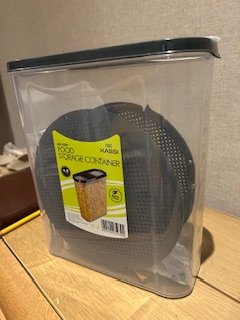
My excellent Amazon cereal box source (Kassi 4.5 litre) for filament storage has dried up.

IMG_8640.jpeg

I bought the Argos equivalent yesterday but although I can use it it’s very tapered and the spool kind of wedges down the bottom. Not good!
Any recommendations please
Also my filament count is now 8 so maybe one or two big boxes is the way to go
Recommendations again please
 
Last edited:
Good Morning
My excellent Amazon cereal box source (Kassi 4.5 litre) for filament storage has dried up.

View attachment 194138

I bought the Argos equivalent yesterday but although I can use it it’s very tapered and the spool kind of wedges down the bottom. Not good!
Any recommendations please
Also my filament count is now 8 so maybe one or two big boxes is the way to go
Recommendations again please
I use these, perfect fit for the spools and they stack really well Amazon.co.uk
 
I have a large clear plastic box - used for clothes storage etc with locking tabbed top.

All filaments I buy come in sealed bags with Silica Gel packets inside.

I stack the open ended box's into the storage box ... and filaments that are 'opened' - I place in bin liners with the silica gel packets ... put into box with colour / type written on top ... close storage box.

Its been successful for years now ...
 
Top