stu9000
Well-Known Member
I don't suppose the raymarine autopilot will have dedicated + 1 and +10 wires will it?


Lots of us on here using these too :
https://www.ebay.co.uk/itm/2X-Wirel...593092&hash=item5b45027ee1:g:eh8AAOSwsGdaqNta
Example listing, others are available.
I don't suppose the raymarine autopilot will have dedicated + 1 and +10 wires will it?
Those were my thoughts also.... but I doubt things would be that simple...

Does the raymarine autopilot have a simple wired remote control. My Simrad does and its simple to wire the radio remote receiver into the wired remote connections.
Which Simrad is that? Mine needs NMEA info through the remote connection.
Spyro did it in his Raymarine http://www.ybw.com/forums/showthrea...Tiller-Pilot&p=6629555&highlight=#post6629555Nice. Some of that kit looks more robust than mine. We will see how long it lasts. Fitting a hard wired momentary rocker switch as backup.
I'm interested in the remote auto pilot thing. The raymarine android app is junk. Frustrating as it's rletivrly low tech and all I want is to remotely do the plus and mi us thing. I can't see an easy mod to the current setup though.
Excellent....Spyro did it in his Raymarine http://www.ybw.com/forums/showthrea...Tiller-Pilot&p=6629555&highlight=#post6629555
And I did it to my Simrad http://www.ybw.com/forums/showthrea...s-remote-to-Simrad-tillerpilot&highlight=tp32
As I understand it the Simrad wheelpilots use the same pcbs as the tillerpilots, so the electrical work will be identical although finding somewhere to mount the wireless receiver will be a different challenge.
but unfortunately the forum software has removed the pictures. I'm not going to waste time putting them on here again, but if anyone's interested I'll put the whole 'how to' somewhere else and provide a link.
Excellent....
Mine is a wheel pilot with the controll on the dash and all wired to some sort of computer box where the rudder sensor compass power all converge... But looking at the various posts it may be that it is just a matter of tapping into the buttons. With the remote fitted in behind the dash...
That brings the next question ...can the remotes be paired to two different boards... This would allow one board to be connected to the windlass directly with a second board fitted behind the autopilot...
I'll have a little play and tell you for sure. One thing though - I think I'd prefer to have separate systems and avoid the consequences of fat finger action.[/QUOTE said:Thanks...
I am more worried about having the incorrect remote... I'll be sticking to just one ..unlikely my autopilot would be powered up at the same time as the windlass
I can see your logic, but in my mind I'd envisaged using two wireless units, from different suppliers so as to have unique remotes.Thanks...
I am more worried about having the incorrect remote... I'll be sticking to just one ..unlikely my autopilot would be powered up at the same time as the windlass
Yep. And I'll still be going to the bow to tie off the chain. I'll be even less likely to leave it on the Windlass now its wireless.
The main benefit is when I'm on my own, positioning the boat perfectly and letting the anchor go at the press of a button. Looking forward to that.
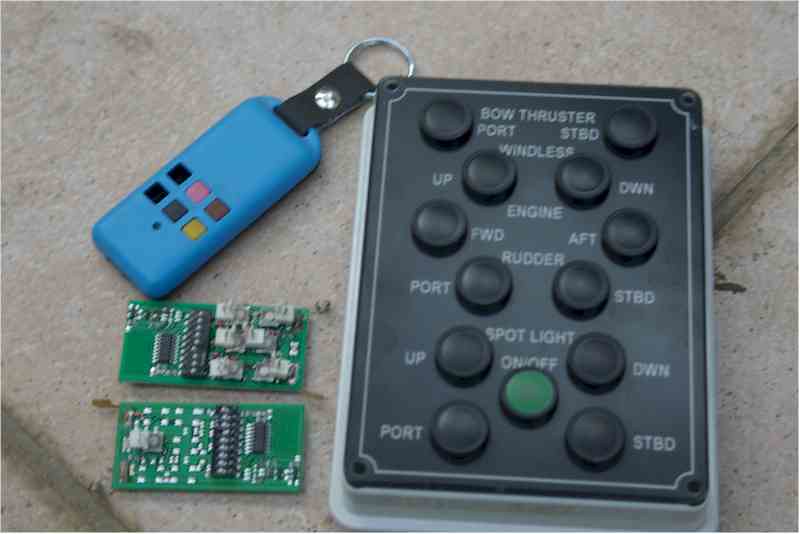
I've just tried it - one key (transmitter) and two 4 channel receivers. 'Pairing' the key is just a matter of applying power and then momentarily pressing a small button on the receiver's pcb, then pressing any button on the key. An led then flashes to confirm and away you go.
The first time I tried it I paired a spare receiver to the key I use with the AP, and that worked as above. I then plugged in the AP to power and operated it from the key. At that point the spare receiver stopped working. That makes no sense, so I disconnected the AP power and the spare receiver still didn't work. Re-paired the key to the spare and tried the AP again. This time there was no problem, both were working in unison. I suspect a momentary disconnection of the spare due to a very much lashed up setup...
For what it's worth, the buttons on the key work the same relays on both boards - quite important in your case Pandos!

According to the Chinglish instructions for the one I bought (https://www.ebay.co.uk/itm/12V-4CH-...83.l10137.c10&nordt=true&rt=nc&orig_cvip=true) the implication is that more than one 'receiver' can be controlled.
But if you give me a couple of days I'll have a little play and tell you for sure. One thing though - I think I'd prefer to have separate systems and avoid the consequences of fat finger action.
Hmmm that is interesting a 4 button remote controlling 2 receivers, buttons A and B for bow thruster, C and D for stern thruster.

Os you want a remote control for your boat