

lustyd
Well-Known Member
Hi all, I thought it might be useful to expand on something I said on another thread yesterday given the "work from boat" environment many of us now live in. This solution was suggested to me on another group but I could see very little mention of it on this forum despite it being a really great one, hence posting it here. This is a 4G Internet solution based on Teltonika industrial networking kit. It's cheap, it works very well, and it's dead easy to install. Components are:
Teltonica RUT240 ~£120 - This is your Internet router and houses the SIM card
QuWireless QuSpot for RUT240 ~ £80 - this is a weatherproof housing for the router which also includes antennas for wifi and 4G (the router has these but they are replaced by this housing)
Teltonika TSW100 ~£70 - This is just an Ethernet switch, but runs on 12/24V and provides power over Ethernet to the router.
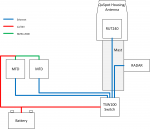
The TSW100 will act as a switch for your RADAR and MFDs, connecting all of them together over Ethernet - you might need to make up your own cable to connect to standard RJ45. This switch runs on 7-58VDC and so will be happy on most boat systems of 12V or 24V despite the variable voltage. A cable is available to wire it directly in to the boat supply. The switch also provides power over Ethernet (PoE) to the router, meaning you only need one cable to run up the mast, an Ethernet cable which you can easily make yourself with off the shelf components, or just buy a long one. This cable can replace the Glomex TV cable and the router can mount where the Glomex used to be. I'm assuming most people don't use their Glomex antenna these days, and will switch to streaming services once the WiFi is in.
The RUT240 can run directly on boat power with the same voltages as the switch - I have mine temporarily installed in the cigar lighter socket on board. Alternatively it will happily use PoE, which is recommended for mast top installations. This (tiny!) unit will live inside of the weatherproof QuSpot on the top of the mast, with a gromet sealing the single Ethernet cable on the entry point. Antennas inside the QuSpot will connect to the router to replace the ones which came with the router. Before mounting you'll also need to install a 4G SIM, I used a completely unlimited £20/month one from Three but any will work. It's fast enough for streaming two things at once so plenty of data is recommended. The interface is accessed via browser either through Wifi or Ethernet, with both working equally well. It's possible to use this unit to rebroadcast shore wifi too, and the higher end versions have two SIM slots so you can more easily roam or have a higher availability solution.
Once installed, your various devices including MFDs can use the WiFi freely. My B&G plotter syncs over this wifi and gets weather data automatically to overlay on the chart. Because the switch can be connected to your MFDs they can also use the wired network if they support that.
One last thing to note - many of the "boat wifi" solutions which will no doubt be referenced on this thread have this exact router inside them. Teltonika supply these to industry who add on a housing like the QuSpot, £500 profit margin, and a "for boats" sticker then sell it to you This whole setup is under £300 for reliable WiFi which works many miles off shore (I've been told 20 is reasonable). Hopefully helpful to someone out there!
Teltonica RUT240 ~£120 - This is your Internet router and houses the SIM card
QuWireless QuSpot for RUT240 ~ £80 - this is a weatherproof housing for the router which also includes antennas for wifi and 4G (the router has these but they are replaced by this housing)
Teltonika TSW100 ~£70 - This is just an Ethernet switch, but runs on 12/24V and provides power over Ethernet to the router.
The TSW100 will act as a switch for your RADAR and MFDs, connecting all of them together over Ethernet - you might need to make up your own cable to connect to standard RJ45. This switch runs on 7-58VDC and so will be happy on most boat systems of 12V or 24V despite the variable voltage. A cable is available to wire it directly in to the boat supply. The switch also provides power over Ethernet (PoE) to the router, meaning you only need one cable to run up the mast, an Ethernet cable which you can easily make yourself with off the shelf components, or just buy a long one. This cable can replace the Glomex TV cable and the router can mount where the Glomex used to be. I'm assuming most people don't use their Glomex antenna these days, and will switch to streaming services once the WiFi is in.
The RUT240 can run directly on boat power with the same voltages as the switch - I have mine temporarily installed in the cigar lighter socket on board. Alternatively it will happily use PoE, which is recommended for mast top installations. This (tiny!) unit will live inside of the weatherproof QuSpot on the top of the mast, with a gromet sealing the single Ethernet cable on the entry point. Antennas inside the QuSpot will connect to the router to replace the ones which came with the router. Before mounting you'll also need to install a 4G SIM, I used a completely unlimited £20/month one from Three but any will work. It's fast enough for streaming two things at once so plenty of data is recommended. The interface is accessed via browser either through Wifi or Ethernet, with both working equally well. It's possible to use this unit to rebroadcast shore wifi too, and the higher end versions have two SIM slots so you can more easily roam or have a higher availability solution.
Once installed, your various devices including MFDs can use the WiFi freely. My B&G plotter syncs over this wifi and gets weather data automatically to overlay on the chart. Because the switch can be connected to your MFDs they can also use the wired network if they support that.
One last thing to note - many of the "boat wifi" solutions which will no doubt be referenced on this thread have this exact router inside them. Teltonika supply these to industry who add on a housing like the QuSpot, £500 profit margin, and a "for boats" sticker then sell it to you
This whole setup is under £300 for reliable WiFi which works many miles off shore (I've been told 20 is reasonable). Hopefully helpful to someone out there!


 I will write this up though and maybe post a video on the YouTube channel about it. As you can imagine this boat is the opposite of the last one, I now want everything finished and easy, quick and capable, comfortable and spacious so it'll be very different stuff to Live Magic, although I do get a buzz when I see the old boat out sailing with her new owner! But hopefully that explains the fixed installation wifi and comfortable table for working.
