Victron Connect App

Irish Rover

Well-Known Member
Joined
5 Feb 2017
Messages
8,213
Location
Türkiye
Visit site
I have 2 Victron solar controllers on my boat and I use the Victron Connect app to check they're working OK. Normally when I open the app I see my 2 controllers with a summary of what each is doing at that time. I can click on either for more detail or history. I've been away for a week or so and I went to the marina this morning to check the boat as there's strong winds and heavy rain forecast. The app is only displaying one of the controllers. I had a look in the engine compartment where they're both located and both seem to be working fine. I restarted my phone but still the same. Any ideas on what i should do very welcome.?
Also on the app I'm seeing 3 and sometimes 4 other devices which I assume to be on nearby boats. Is there any way to stop these displaying on my app?
 
Do the manual disconnect and then turn both off and then power back up and reconnect. You know it makes sense! Don5 know about seeing other devices you don’t want to see. There is a decent Victron online forum.
First off Tech Numpty warning :giggle:.
I didn't think the controllers have on/off switches. I thought they're always on as long as they're connected to the panels or the batteries. If you're suggesting disconnecting completely that's what I was hoping to avoid.
 
First off Tech Numpty warning :giggle:.
I didn't think the controllers have on/off switches. I thought they're always on as long as they're connected to the panels or the batteries. If you're suggesting disconnecting completely that's what I was hoping to avoid.
Well……how else are you going to troubleshoot the issue ? I thought you wanted suggestions and tbh off/on is the first thing to do. Why don’t you want to do this :rolleyes::rolleyes:
 
First off Tech Numpty warning :giggle:.
I didn't think the controllers have on/off switches. I thought they're always on as long as they're connected to the panels or the batteries. If you're suggesting disconnecting completely that's what I was hoping to avoid.

You could try pulling the fuse in the controller.
 
Well……how else are you going to troubleshoot the issue ? I thought you wanted suggestions and tbh off/on is the first thing to do. Why don’t you want to do this :rolleyes::rolleyes:
Yes I do want suggestions and I'm grateful for your replies. If there was an on/off switch I'd be happy to do it but AFAIK there isn't. The controllers are mounted in a tight space close to the batteries and it's not easy to work there. Disconnecting from the batteries is easy as I fitted breakers but disconnecting from the panels is awkward to say the least. Also I was under the impression that it could damage the panel if it's feeding current but not connected.
 
Yes I do want suggestions and I'm grateful for your replies. If there was an on/off switch I'd be happy to do it but AFAIK there isn't. The controllers are mounted in a tight space close to the batteries and it's not easy to work there. Disconnecting from the batteries is easy as I fitted breakers but disconnecting from the panels is awkward to say the least. Also I was under the impression that it could damage the panel if it's feeding current but not connected.

You can safely disconnect the panels, if you needed to. Some controllers don't recommend disconnecting the batteries with the panels still connected, but that doesn't apply to Victron MPPT controllers.

To reset a Victron MPPT controller you do not need to disconnect the panels, just the batteries.
 
You can safely disconnect the panels, if you needed to. Some controllers don't recommend disconnecting the batteries with the panels still connected, but that doesn't apply to Victron MPPT controllers.

To reset a Victron MPPT controller you do not need to disconnect the panels, just the batteries.
Thanks again. That's easy then as I fitted breakers.
 
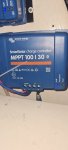
Above is the controller.
I disconnected from the battery but it just switched from bulk to absorption but was still powered. I did the same with the other one and I could still see it in the Victronconnect app so it seems disconnecting from the battery is not enough. I still can't see a fuse so I disconnected from the panel and tripped the breaker abd all the lights went out. I reconnected and I still can't see this controller in the app. I deleted and reinstalled the app and the same controller is still absent.
 
Have you checked that Bluetooth is enabled or have not accidentally reset the PIN to default?

I've renamed all my Victron kit to show the boat name, e.g. McBoatface Solar, to allow easy identification.
 
Have you checked that Bluetooth is enabled or have not accidentally reset the PIN to default?

I've renamed all my Victron kit to show the boat name, e.g. McBoatface Solar, to allow easy identification.
Do you mean Bluetooth enabled on the controller - how do I do that. I assumed it's always on.
I renamed both of mine as well to Top Controller and Bottom Controller.
I see one in the app but not the other. In fact this morning I'm only seeing my Top Controller.
 
cannot help (never happened to me!) but remember that IF you have access to the panels, cables from the panel box are v.short and have some fancy connectors (pushfit round things, dunno the name of them...) maybe drop the breaker and undo one of these connectors to open circuit the panels?
leave for 5mins and reconnect.

good luck
 
cannot help (never happened to me!) but remember that IF you have access to the panels, cables from the panel box are v.short and have some fancy connectors (pushfit round things, dunno the name of them...) maybe drop the breaker and undo one of these connectors to open circuit the panels?
leave for 5mins and reconnect.

good luck
I didn't do that but I disconnected the cables coming from the panels from the controller - all lights went out. I reconnected and still the controller is not showing in the app or on the BT list on my phone.
I did the same with the other controller and as soon as the lights went out it disappeared from the app and reappeared when I reconnected.
I does seem like the problem controller is fully functional but not transmitting a BT signal.
 
Do you mean Bluetooth enabled on the controller - how do I do that. I assumed it's always on.
I renamed both of mine as well to Top Controller and Bottom Controller.
I see one in the app but not the other. In fact this morning I'm only seeing my Top Controller.
I'll need to refer you to the manual.
 
I'm going to have another go at this tomorrow - @vas recommends leaving the controller disconnected for 5 minutes and someone on the victron site recommends 10 minutes. So if I do this is there any danger of damaging the panel?
 
Top