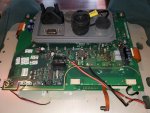
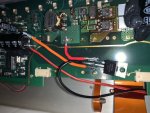
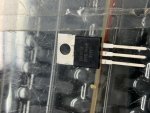
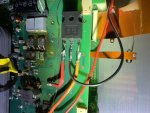
Replacing backlight with LEDs in Raymarine E-Series E120 display

Good write-up - similar to another one posted on this forum a number of years ago but yours is dimmable which improves things.

I did this on one E120 and it's really not worth the effort with the end result not matching the original. You have to be VERY careful not to damage the LCD screen and any fingerprints or dust trapped inside the diffuser and screen show up so you have to take it apart again. When another failed I actually bought a replacement for £500 and sold my broken one for parts for near enough the same money.
 
I could not find a good description of this process, so I have written one to help anyone else who wants to fix their display.

See http://blog.mailasail.com/anastasia/489

Hello,

The LED replacement is done . It works but the LEDs always stay on and cannot be turned off after pressing E 120 OFF button. The voltage (12 V) for the LEDs is taken from the terminals of the HV capacitor. Because there is 12V there the LEDs are illuminated.
Is there any other location to take 12V where the voltage goes away when the unit is turned off?

Naturally the LED illumination goes off when the main switch is turned off.
The unit is connected to the network with another E120 and radar etc.
Thanks,
Cemil
 
Having read the " instructions" the Op used a mosfet to do the dimming - have you done this? The line he picked up from the transformer will goto 0 when turned off I assume which will stop the mosfet allowing power to pass
 
Having read the " instructions" the Op used a mosfet to do the dimming - have you done this? The line he picked up from the transformer will goto 0 when turned off I assume which will stop the mosfet allowing power to pass

I do not think so, I think they placed the leds and connected power to led lens via the capacitor legs. I will ask them exactly what they have done.

Thanks for your reply.

Cemil
 
Most probably they have not utilized a Mosfet at all, or used an inadequate one. The mosfet should be one with a high amperage and with correct type (N).
 
Would you use the same MOSFET for a 24V application?

I tried using the 12V method but the LEDs would give a single half a second flicker on startup and I would have no backlight.

I have ordered the 24V LEDs and plan to do the set up exactly as the original write up.

I have already done a 12V version and I found it works perfectly. very impressed by the info shared here :encouragement:
 
I could not find a good description of this process, so I have written one to help anyone else who wants to fix their display.

See Anastasia - Replacing backlight with LEDs in Raymarine E-Series E120 display
Hello Phil, thanks for the post it has been extremely helpful. I managed to make it all the way to step 10 when I came a little confused because I never done anything remotely close to this type of thing. My issue is when you stated "The –ve from the LEDs goes to the drain (middle leg) of the MOSFET " I assumed that was the blue and white wire noted above in your picture so I ran my LED -wire to that point (see photo). What I cannot figure out is the next to actions you state right below that step:

The source (right hand leg) of the MOSFET goes to the –ve leg of the capacitor (0V). Where is this right hand leg, which hole are you referring to?
- The PWM signal goes to the gate (left hand leg) of the MOSFET. Is there a wire associated with this, if so from where to where?

Can you point out the locations of these two wires in the photo so I can complete the steps. Everything else was on point. I tested the lights they work wonderfully and I could not believe I actually done it myself. If anyone sees this post and wants to direct me in the right direction it will be much appreciated. Thanks
A picture of what I have done so far is attached. I attached the +wire from the LED to the +side of the capacitor and the -wire from the LED to what I believe is the middle leg of the MOSFET. Please correct me if i'm wrong.
 

Attachments

  • 20200322_092251.jpg
    20200322_092251.jpg
    298.1 KB · Views: 40
I could not find a good description of this process, so I have written one to help anyone else who wants to fix their display.

See Anastasia - Replacing backlight with LEDs in Raymarine E-Series E120 display
Phil, thanks for this excellent post. with your help I have just done as you suggested. It works a treat. The cost of replacing the old transformers would have been $90 Aud each, the cost of the LEDs was $12aud and the chip was $5Aud. I had the transformers replaced 3 years ago so I wasn’t happy to fork out again with expectation of doing it every 3 years. My special thanks for the photo of the LEDs in place. I copied that perfectly and ended up with a brighter better longer lasting E120. Cheers.
 
Guess who's backlight failed at the weekend! Huge thanks to the OP for the write up, the MOSFET is on it's way and I'm going to have a go.

One question I have from the write-up if anybody can answer it is "Identify the source of the PWM signal you are going to use and attach a lead. "
Is identifying the PWM signal as simple as copying the connection used in the photo? Or, do I need to do something more advanced?
 
Hi Murv, short answer is YES, the OP did an excellent job. I copied the way he used the LEDs which gave great brightness. Look carefully at his photos, they are accurate and show all you need. Take photos as you take it to bits. There is a clear plastic strip that goes in the base, took me a while to find its location. If you use waterproof LEDs you will need to melt the plastic waterproofing with the soldering iron at the connector points Preferably before you stick them down. If you get the 5 metres of LEDs you will have heaps left over if you make a mistake. I also didn’t reconnect one of the plugs correctly, so ensure when you put the PCBs back that connections are good. The glitch that the OP talks about, as you turn the brightness down the screen darkens but at half way springs back to bright, and then goes dark again. As the OP said, it’s no problem and easily lived with. You will need to find a place to mount the MOSFET, there is plenty of room to do that. Make sure you have enough wire from the LEDs to go through to the MOSFET. Good Luck, it’s time consuming but VERY worth while.
 
Hi Murv, short answer is YES, the OP did an excellent job. I copied the way he used the LEDs which gave great brightness. Look carefully at his photos, they are accurate and show all you need. Take photos as you take it to bits. There is a clear plastic strip that goes in the base, took me a while to find its location. If you use waterproof LEDs you will need to melt the plastic waterproofing with the soldering iron at the connector points Preferably before you stick them down. If you get the 5 metres of LEDs you will have heaps left over if you make a mistake. I also didn’t reconnect one of the plugs correctly, so ensure when you put the PCBs back that connections are good. The glitch that the OP talks about, as you turn the brightness down the screen darkens but at half way springs back to bright, and then goes dark again. As the OP said, it’s no problem and easily lived with. You will need to find a place to mount the MOSFET, there is plenty of room to do that. Make sure you have enough wire from the LEDs to go through to the MOSFET. Good Luck, it’s time consuming but VERY worth while.

That's fantastic, thanks very much!
 
Just to report back - job done and it works perfectly!
I'd like to just add some points from my perspective in case it helps anybody else who is as clueless at this sort of stuff as me.
So, if you're a competent electrickery type person, please stop reading now.

And, for us numpties, here are my observations:

1) This is not a quick, easy repair, I wrote off 3 evening's and one morning to finish it. Most of that time was spent struggling to wire up the LED's and those transformers are an absolute *outdrive* to get off.
2) If, like me, your soldering iron is a bit ropey and your solder referred to in the doomsday book, replace them. And, buy a solder sucker as well. And, get some small connectors that will fit the leg of the MOSFET as that is tricky to solder for some reason.
3) I wasted hours trying to link up the LED strips. Stop. You don't need to. Simply use one long strip and twist the corners round, a glue gun secures the raised corners and will save you hours of frustration and burns. The surface is reflective, as long as the LED's are lit, it will throw out enough light in the general direction of where you want it.
4) Those transformers. That took an entire evening with wooden strips driven under them to try and release them. I'm sure a solder sucker would help a lot. The front connection with just the two legs is easy enough, the four at the rear are an absolute sod. Stick with it though, keep wiggling, one came of intact, the other lost a pin (which is fine)
5) There is plenty of room for the MOSFET, but stick it down as close to the board as you can get it otherwise it fouls the heatsink on the case when you try and reassemble it.
6) Remove that earth screw before you try and remove the display. The ribbon cable is very fine and easily broken, it also leads into the large ribbon cable so not an easy fix. I broke mine and got around it by scraping some of the plastic off the end of the ribbon and clamping it under the earth screw. I don't even know if the ground is needed without the tubes but it's all avoided if you take the earth screw out first.
7) Remove the top circuit board before you take the ribbon cables off. It has to come off anyway to get the transformers off and it makes it much easier to get at those two ribbon cables on the bottom board.
8) That very first step, removing the bezel - that is not easy! It's held on by a raised edge on the main case so you need to try and push the bezel away from the display. It all becomes clearer, and easier as it comes away but I didn't understand the "twisting" motion mentioned in the write-up.
9) And most importantly, you don't need to understand how any of this stuff works to do the repair, just copy the pictures. I also bought the exact same MOSFET that was advised, and the right leg, left leg etc is referenced by looking at it from the front as it it were screwed down flush.

So, in summary, I found it frustrating and time consuming, I also learned some new swear words. But, it works and I'm very happy with the outcome. Even with my botched LED assembly the backlighting works beautifully and evenly.
 
Can anyone assist with the mosfet? Where and how do I fix it ? I’m thinking it should be attached (how) to the aluminium base ?

Everything works, I’m just nervous of this bit!
 
Can anyone assist with the mosfet? Where and how do I fix it ? I’m thinking it should be attached (how) to the aluminium base ?

Everything works, I’m just nervous of this bit!
Not that it may help, but I worked backwards firstly finding a spot to mount the mosfet then wiring up and lastly fixing that mosfet to the chosen spot. All in all I think that as long as it isn’t able to touch something that it shouldn’t and short out, Then everything is fine. Well done.
 
I have 2 displays with the backlight problem but get no luck with the dimmer circuit... LEDs works perfectly once power up from the capacitor direct but doesn’t work at all once connected via MOSFET... I tried 3 different MOSFETs using cross reference... Get around 6.87v PWM signal from the point mentioned by topic starter but nothing happens when connected gate leg there... Something tricky as it absolutely same on the both displays I tried to fix... Any advice? Thanks?
 

Attachments

  • 9821E2E4-AE01-4954-BFEC-9508A1DED20C.jpeg
    9821E2E4-AE01-4954-BFEC-9508A1DED20C.jpeg
    113.1 KB · Views: 28
  • 4E346E3E-D338-4B41-B99B-2CA1394F8D2A.jpeg
    4E346E3E-D338-4B41-B99B-2CA1394F8D2A.jpeg
    95.1 KB · Views: 25
  • 9DBFEC8D-FF34-4D4A-810C-2F1D0D9CB4A2.jpeg
    9DBFEC8D-FF34-4D4A-810C-2F1D0D9CB4A2.jpeg
    106.7 KB · Views: 27
@Const69

the PWM wire is fine.

try switching the other 2 round on the Mosfet.

I have also seen the PWM part of the E120 die in the past but 9/10 its wiring.

Also, if you have a flicker in your display every 5 seconds, try a 100ohm resister instead of the PWM wire.

usually sorts it
 
Tbh I was wary of the mosfet so left it out, I rarely if ever sail at night and I find it very satisfactory, the display is slightly brighter than the old one but it’s just not an issue. I’m delighted with the result and my thanks to everyone who has assisted by contributing
 
Top