
Raymarine Seatalk network hub thingy and E85001 interface

Angele

Well-Known Member
Joined
12 Dec 2008
Messages
3,427
Location
Hertfordshire
Visit site
Ok, so I basically haven't a clue about how electronic nav kit works, or how all the gadgets talk to each other. I'm just glad that they do, so I can get on sailing.

But, at last year's Southampton Boat Show, I bought stuff to get AIS fitted (a VesperMarine XB-8000 and SP160 active antenna splitter). It has, however, been sitting in a locker since then still in its boxes. However, since a bulk carrier tried to run me down mid-Channel a week ago, I've decided it would be a good idea to get it fitted.

My current system is a Raymarine network, based around a pair of E series plotters (not the current ones, but from the mid noughties). I have spoken to a couple of marine electronics engineers who told me that I needed to buy a special cable (Raymarine part number R08004 - an NMEA0183 interface cable) for the AIS to talk to the plotters and that these were discontinued and as rare as hen's teeth, but that they do come up on eBay in the US from time to time priced at around $100.

Now, I knew I had a couple of interface gadgets connected to the plotters, but I wasn't able to describe to the engineers what they were/did. I have now taken a photo of them...
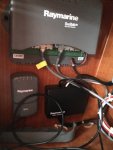
Raymarine network hubs.JPG

Ignore the thing in the bottom left. That is the device that talks to the handheld autopilot remote control. I'm hoping that one or both of the other two devices will be able to talk to the VesperMarine AIS unit such that I don't have to get one of those silly cables.

So, to those of you who understand this stuff, can the VesperMarine unit just be connected to either the black E85001 interface or the grey network hub thingy above it?

(I'm not interested in creating Heath Robinson connectors if the R08004 cable is really needed. If it is, I'll get one).

Many thanks in advance for your advice.
 
Last edited:
The black box is indeed an NMEA0183 to Seatalk1 converter. If you had something like a NMEA0183 GPS, you could use this to supply position information into the network. However, I'm reasonably certain that it only works at the original NMEA0183 speed, not higher speeds used for AIS, and that there are no suitable Seatalk1 messages for it to translate AIS data into. So that route won't work.

SeatalkHS is essentially Ethernet, and the grey box is basically a very expensive standard Ethernet switch. I'm less familiar with SealkHS, and don't know whether it can carry AIS data. However, even if does, you'd need a specialised device to convert the standard outputs from the Vesper into however Raymarine encapsulates AIS on its proprietary network. I'm not aware of such a device existing although there might be an obscure semihobbyist offering out there.

I think you're going to need to send NMEA0183 into the plotter's dedicated port. I made my own connector using individual crimp terminals embedded in a moulded block of hotmelt glue, further secured in place with adhesive heatshrink. But I can quite understand that you'd rather buy the proper cable.

Pete
 
The black box is indeed an NMEA0183 to Seatalk1 converter. If you had something like a NMEA0183 GPS, you could use this to supply position information into the network. However, I'm reasonably certain that it only works at the original NMEA0183 speed, not higher speeds used for AIS, and that there are no suitable Seatalk1 messages for it to translate AIS data into. So that route won't work.

SeatalkHS is essentially Ethernet, and the grey box is basically a very expensive standard Ethernet switch. I'm less familiar with SealkHS, and don't know whether it can carry AIS data. However, even if does, you'd need a specialised device to convert the standard outputs from the Vesper into however Raymarine encapsulates AIS on its proprietary network. I'm not aware of such a device existing although there might be an obscure semihobbyist offering out there.

I think you're going to need to send NMEA0183 into the plotter's dedicated port. I made my own connector using individual crimp terminals embedded in a moulded block of hotmelt glue, further secured in place with adhesive heatshrink. But I can quite understand that you'd rather buy the proper cable.

Pete

Pete

Thanks for that. As ever, your advice on such matters is really appreciated ...... even if I only understand about half of it. :o
 
What Pete said.
This may be useful:
https://raymarine.ning.com/forum/topics/ais-compatible-with-e-series-classic
I've always assumed that seatalkhs was some proprietary encapsulation of n2k with some service discovery, radar etc. thrown in but I'm not aware of any public or reverse-engineered info on it

I assume the useful bit you are referring to is the last comment from Raymarine themselves.

the AIS unit MUST be interfaced directly to the MFD's NMEA 0183 port

If Raymarine can't make an AIS that plugs into one of the grey or black boxes, then I'm pretty sure my Vesper unit won't be able to.

Thanks Laika
 
Last edited:
The black box is indeed an NMEA0183 to Seatalk1 converter. If you had something like a NMEA0183 GPS, you could use this to supply position information into the network. However, I'm reasonably certain that it only works at the original NMEA0183 speed, not higher speeds used for AIS, and that there are no suitable Seatalk1 messages for it to translate AIS data into. So that route won't work.

Thinking a bit more about this, I recall from way back when (2005 when I bought Angele) that I was told some extra bit of kit (that NMEA0183 to Seatalk converter?) was needed for the Raymarine MFDs to talk to something. Trouble is that I can't remember what that something was. It could have been the GPS, but I think that it was actually the ICS Nav 6 Navtex. I could be wrong though.
 
Thinking a bit more about this, I recall from way back when (2005 when I bought Angele) that I was told some extra bit of kit (that NMEA0183 to Seatalk converter?) was needed for the Raymarine MFDs to talk to something. Trouble is that I can't remember what that something was. It could have been the GPS, but I think that it was actually the ICS Nav 6 Navtex. I could be wrong though.

Could be either, or both :)

You have quite a few cables coming out of it, though it's possible that several of them are Seatalk just using it as a junction box. You'd need to pop the lid off to see which are connected where.

Quite possibly your VHF receives position data for DSC through here as well.

Pete
 
Could be either, or both :)

You have quite a few cables coming out of it, though it's possible that several of them are Seatalk just using it as a junction box. You'd need to pop the lid off to see which are connected where.

Quite possibly your VHF receives position data for DSC through here as well.

Pete

Hmm! This is getting a bit too techie for me....

The VHf does indeed get its position data. From where, I have no idea. :o

Looking at the Raymarine E series manual, the only socket on the back of the MFD that doesn't currently have a cable going into it is the one labelled "Seatalk2".
 
Hmm! This is getting a bit too techie for me....

The VHf does indeed get its position data. From where, I have no idea. :o

Looking at the Raymarine E series manual, the only socket on the back of the MFD that doesn't currently have a cable going into it is the one labelled "Seatalk2".

If you have a cable going into the socket labelled NMEA (5 pins if I recall although only 4 are used) then you already have the expensive cable. I have exactly the same Vespermarine kit and I also had the cable and plug in the back of my C80. However, only the output wires were used (the other two were just not connected) and these went to the Raymarine DSC VHF radio. I was able to use the existing cable to provide an input for the XB8000, however I needed to change it to high speed NMEA which meant that it could no longer output the low speed NMEA needed by the radio, so I had to buy a multiplexer to down-scale the high speed to low speed for the VHF.

However, if you have a laptop PC or a tablet or phone then you can use the wifi output from the XB8000 and just use the excellent AIS data without having to bother with any connections into the chartplotter. I used my XB8000 like this for a season before getting around to all the chartplotter connections but the AIS display is not very good and much less informative that using the free Vespermarine software on your phone or using OpenCPN on the laptop so, at the moment, I have actually turned off the AIS display on the C80 to remove the clutter and leave the chartplotter for what it's best at.

I would suggest that you install the XB8000 and the SP160 as that's a simple job. Then start using the AIS on a phone/tablet/PC and ensure your safety. You might find, like me, that this works really well. You can still work out whether to go ahead with the chartplotter link but you will be under no pressure and, in the meantime, will enjoy all the benefits of the excellent Vespermarine kit.

Richard
 
Last edited:
Looking at the Raymarine E series manual, the only socket on the back of the MFD that doesn't currently have a cable going into it is the one labelled "Seatalk2".

It sounds like you already have an NMEA interface cable then! All you need to do is find out where it goes and what it feeds. You'll need to configure the E series displays to accept AIS data at 38400 baud. This means that it will also output NMEA at 38400 baud, which may not be any good for your radio. As you have 2 displays, the NMEA output on the second display can be set to 4800 baud to output position data to your radio.

However, it sounds as if you'd be well advised to get a marine electronics guy along for a couple of hours to set up the wiring for you.
 
If you have a cable going into the socket labelled NMEA (5 pins if I recall although only 4 are used) then you already have the expensive cable. I have exactly the same Vespermarine kit and I also had the cable and plug in the back of my C80. However, only the output wires were used (the other two were just not connected) and these went to the Raymarine DSC VHF radio. I was able to use the existing cable to provide an input for the XB8000, however I needed to change it to high speed NMEA which meant that it could no longer output the low speed NMEA needed by the radio, so I had to buy a multiplexer to down-scale the high speed to low speed for the VHF.

However, if you have a laptop PC or a tablet or phone then you can use the wifi output from the XB8000 and just use the excellent AIS data without having to bother with any connections into the chartplotter. I used my XB8000 like this for a season before getting around to all the chartplotter connections but the AIS display is not very good and much less informative that using the free Vespermarine software on your phone or using OpenCPN on the laptop so, at the moment, I have actually turned off the AIS display on the C80 to remove the clutter and leave the chartplotter for what it's best at.

I would suggest that you install the XB8000 and the SP160 as that's a simple job. Then start using the AIS on a phone/tablet/PC and ensure your safety. You might find, like me, that this works really well. You can still work out whether to go ahead with the chartplotter link but you will be under no pressure and, in the meantime, will enjoy all the benefits of the excellent Vespermarine kit.

Richard

I think that sounds like good news, and was the bit of good news I was hoping to hear (unless a multiplexer is twice the price of the expensive cable. :eek:)

Ideally I would like to display the AIS info on my MFDs, but if I can't I could use an iPad instead. However, doesn't the AIS require its own dedicated GPS input? My understanding was that I would have to feed the existing GPS into the VesperMarine unit, but that the latter could then output the GPS info into the rest of the network (thereby avoiding the need for two GPS units).

I'm beginning to learn stuff (but I can tell it is going to be a long process). I am down on the boat tomorrow. So, if necessary, I can work out what cables connect to what gadgets.
 
However, it sounds as if you'd be well advised to get a marine electronics guy along for a couple of hours to set up the wiring for you.

That is a definite YES. There is no way I am doing any of this myself.

Prv, Laika, RichardS, pvb. You guys are the best. :encouragement:
 
I think that sounds like good news, and was the bit of good news I was hoping to hear (unless a multiplexer is twice the price of the expensive cable. :eek:)

Ideally I would like to display the AIS info on my MFDs, but if I can't I could use an iPad instead. However, doesn't the AIS require its own dedicated GPS input? My understanding was that I would have to feed the existing GPS into the VesperMarine unit, but that the latter could then output the GPS info into the rest of the network (thereby avoiding the need for two GPS units).

The XB8000 comes with it's own GPS mushroom which you have to use. You can't use the NMEA input but have to plug in the connector on the end of the mushroom into the small BNC socket on the XB8000. However, on my GRP boat, once the mushroom is plugged in I can just leave it lying on it's side or stood up in the locker where the XB8000 is installed. You don't need to worry about siting it as it always sees the satellites as it's very sensitive. Once you plugged the mushroom in, connect the power to the black and red wires, and connected the SP160 into the VHF cable (just a matter of plugging the plugs in) and you're good to go.

A 30 minute job and you have AIS on your iPad. There are plenty of free apps you can use to display the data but the vespermarine app is not only very easy to use but always allows you to do all the configuration and firmware updates on the XB8000 without faffing around with USB cables. You also get a free anchor watch app and some other stuff.

It sound as if you won't need the multiplexer if you have two displays but I wouldn't worry about that now .... just get the XB8000 connected up and start using it. Leaving it in the box is a tragedy as what you have there is probably the best AIS kit there is. :)

sorry .. just realised that I didn't understand the detail of your question. Yes, you can use the GPS data from the XB8000 in other devices .... it can be used by your iPad or your laptop if they don't have a GPS chip and you can use it in your chartplotter for all navigation which is what I do. However, unless you have a modern wifi enabled plotter, you will need the NMEA cabling to get the GPS signal from the XB8000 to the chartplotter. This data is at 38,400 so if your system is the same as mine, you can't use that into the VHF without the muxer.

Because you have two plotters, you might well be able to leave one plotter connected to your current GPS so that can output GPS data at 4,800 to the radio whilst the second chartplotter receives the GPS data over NMEA from the XB8000. However, I'm not sure whether that actually gets you anywhere as you might as well leave the current chartplotters connected to the current GPS but just output one at 4,800 to the VHF. The XB8000 then just needs to send the AIS data into the plotter which is not set to 4,800. You can tell the XB8000 not to send the GPS data as that will probably confuse matters. What actually works will, I think, depend on how the chartplotters are connected. If they're connected by Seatalk then it should all be straightforward.

Richard
 
Last edited:
I assume the useful bit you are referring to is the last comment from Raymarine themselves.

The takeaways from that were:
- you'll need to update the MFDs to the "latest" firmware before they'll display AIS
- you need to use the NMEA-0183 port (as prv said, no representation of AIS in seatalk 1 and that "seatalk 2" port won't help you)
- If you input AIS data into one MFD they will be shared over seatalkHS (ie your ethernet cable) between the two MFDs.

Where is Angele? We presume not hertfordshire :-)
 
just get the XB8000 connected up and start using it. Leaving it in the box is a tragedy ....

I think my crew said something like that just after we got out of the way of the bulk carrier that was trying to run us down. Or maybe the words were rather stronger. I don't exactly recall now. :o
 
The takeaways from that were:
- you'll need to update the MFDs to the "latest" firmware before they'll display AIS
- you need to use the NMEA-0183 port (as prv said, no representation of AIS in seatalk 1 and that "seatalk 2" port won't help you)
- If you input AIS data into one MFD they will be shared over seatalkHS (ie your ethernet cable) between the two MFDs.

Where is Angele? We presume not hertfordshire :-)

I'm hoping the version of firmware already installed is sufficient. It was last updated about 5 years ago. Every time I have updated the firmware, the performance of the device has slowed (like putting a new version of windows on an old lappie). In the top left of the display, where it has icons showing what gadgets it is attached to, radar is displayed, but AIS (and fishfinder) is greyed out. I'm inferring from this that the firmware knows how to interpret AIS data as soon as it gets its input.

As for bullets 2 and 3, I'll pass them on to the guy I get to fit it all.

Angele is on the Hamble.
 
Not sure about what you have on the NMEA going into the plotter, but check if the Vesper unit has a built-in multiplexer. If it does, then you can take the existing NMEA feed to the plotter via the Vesper unit which will then multiplex everything together to then go to the plotter NMEA port. Just make sure as others have suggested that you set the plotter NMEA to 38400 baud.
If the Vesper transponder is anything like the Camino units, they can be programmed for the various port speeds, vessel identifier, ships MMSI and, whether to forward the Vesper GPS data out to the plotter with all the other data.
I you are unsure, this should not be too big a challenge for a competent electronics engineer.

BTW... we almost got run down by a rogue french fishing boat in the mid channel separation area who was not transmitting AIS, was not keeping a watch (we were transmitting AIS data) and despite being the stand-on sailing vessel we had to make a rapid course change. Probably a bit of illegal fishing and not wanting to be identified!
 
Not sure about what you have on the NMEA going into the plotter, but check if the Vesper unit has a built-in multiplexer. If it does, then you can take the existing NMEA feed to the plotter via the Vesper unit which will then multiplex everything together to then go to the plotter NMEA port. Just make sure as others have suggested that you set the plotter NMEA to 38400 baud.

The XB8000 doesn't have a built-in muxer unfortunately. I doubt whether the OP has any NMEA input into the plotter, possibly just an NMEA output at 4,800. Unfortunately, once the port is switched to 38,400 to accept the AIS input, it will stop outputting at 4,800 as it cannot do dual rate. :(

Richard
 
Top