Navionics

What i would like to know with auto routing is - You enter all your boat specs, speed, draught etc... Would auto routing over a 18 hr journey along the coast allow for the tide with you and against giving a very accurate time of arrival ?
 
You realise you are talking to Mobo owners here. Time is a function of throttle and not tidal currents. 18hr straight? We have a few trawler types around but they're wise enough not to mention these things.
 
I use the navionics boating HD app on a Sony waterproof tablet, does not need Internet, but must have gps. Navigated all over holland and North Sea with it, also have full suite of raymarine at both helms but still used the tab.
 
A free premium nav app is sub optimal ? Do you prefer paying then ? I suggest you try embark and see its far clearer than cmap and navionics plotter offerings, and since you appear to not like free then subscribe and you wont need an internet connection ;)
Never said you did, I asked if you prefer paying as you stated a free premium app with autorouting and other great features is sub optimal because it needed internet.. For many that would be ok as they dont wander far offshore..
A forum member posted lots of screen shots of navionics and c-map as comparisons...I think Embark as an app on a mobile device is far better in terms of display, clarity and lack of clutter.
Well I've just had a look at this, tbh I can't see the cost of C Map premium as it's hidden within in-app purchases so I haven't bought it.

The fact is that despite what @BruceK suggests about the state of my bank account, I don't really care so much if it costs £3 or £30 or £300, what I care enormously about is that it works. The notion that I might choose an on-passage navigation tool that might fail at any moment when internet service disappeared is utter lunacy. So I stand by my view that for offline planning (at your office desk, in the pub, marina, etc) internet dependency may well be fine but as the primary navigation device for use on the sea then dependency on internet access is dangerous.

The question of whether C Map or Navionics or OpenCPN or whatever is superior, is irrelevent to that debate.
 
:oops: £300 for a tablet app? Hell no. Anything over 40 quid is a lost cause. Even paying 35 quid for map updates got me sucking through my teeth. They havent surveyed my patch in 16 years, what effing updates? It still works without updating. They had to pull on that subscription pretty hard tbh.

 
No of course not, the Navionics renewal subs for my chartplotter is about £120. Navionics tablet is about £40 I think. C Map Premium? well, who knows, I just spent another 15 minutes trying to get the cost of it from somewhere. The closest I have found is this which isn't very enlightening:

1596579266156.png
 
Talking of the internet and mobile devices.
A couple of weeks ago, we did a delivery exchange from Sant Carles to Mallorca and back.
Neither of the boats were fitted with AIS so a certain gentleman who reads these forums suggested we should use a mobile app.
One of us had an iPhone so he bought the Boatbeacon App and we told friends on shore how to track us.
I was amazed just how good Boatbeacon was at tracking us.
Obviously didn't work whilst we were out of 4G coverage but it was working up to 20 miles or so from land.
Really comforting to know that people were watching out for us.

One of our wives even phoned us to say that we were doing 27 knots.

And all for about 12 quid.
If you don't use it and you don't have AIS, it is really worth considering.
 
Hurricane is too, done some very impressive stuff with it. ? ? (y)
Yes, I am a great fan of OpenCPN
I have it on my two mobile devices (both Androids) but, it works much better on a PC.
My charts are interchangeable between all my devices.

When I started with OpenCPN, I was running it under Windows.
Now days, my boat's PC runs Linux.
OpenCPN is truly multi platform - the only devices that it won't run on is iPad and iPhone so no loss there !!!

On the boat, I feed my PC video to my Raymarine G Series Nav system.
So, I can switch between Navionics under Raymarine and OpenCPN on the Linux PC.
I have about 2500 charts - quite a lot of which I have made myself.
You can take any image and geo-reference it so I scan or acquire a chart then georeference it and use it alongside the rest of my Nav system.
OpenCPN also has commercial charts that you can buy (at sensible prices).
Most of my charts are raster charts (bitmaps) but OpenCPN zooms and "quilts" the charts together.
I also have the CMAP whole world vector charts running under OpenCPN

The easy way to get started with OpenCPN is to simply install it on a Laptop - for free.
Then plug in one of these which you can pick up on eBay for as little as 6 quid.

images


You then have a complete plotter that you can use as a backup.
And it is a proper plotter with proper navigation (rolling roads etc).
And it will even operate the autopilot if you connect it up.

OpenCPN is being continually developed and updated.
IMO, the AIS interface is second to none and in the latest release they have added even more to the AIS engine.
If you haven't seen or used it, it is well worth the free download.

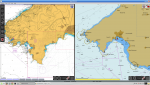
Here's a quick screenshot of the latest OpenCPN - I've set it up with two windows.
The window on the left is displaying some scanned (raster) British Admiralty charts and shows how the quilting of different resolutions works.
The window on the right is of the same place (Palma, Mallorca) but using CMAP vector charts.
Each window is operated independently of each other.

This image is a screen dump of OpenCPN running on my home PC so doesn't show GPS or AIS etc.

Screenshot_2020-08-04_23-57-34.png
 
My tuppence worth.
A plotter can connect to your auto helm to run on ‘track’ for your route. An iPad can’t
On the fly bridge the iPad can mimic the plotter screen with an app if plotter has Wi-fi
On the fly get a waterproof case (I have lifeedge)
Get a mount (lifedge)
Get a sun screen.
Get an iPad with the SIM card facility, this is needed for its own GPS
If you have a current subscription for both they will sync and transfer all routes and waypoints
 
Mine is permanently plugged in when navigating as seen in the pic.

100%
Easy just to tuck it somewhere in shadow to view, handy to use in conjunction with main plotter esp if your eyesight is rubbish .
Set the Ipad for long range while the plotter is set for detail.

We have
GPS Ipad with Navionics for headings from bouy to bouy or offshore.
Laptop with Seaclear for loads of detail in drying creeks
.......and if all else fails
The Raymarine plotter.

Seaclear can accurately determine journey times by entering a speed in each individual waypoint leg, handy for taking advantage of several tides .
On trip from Medway to upper Thames you could have two tides, 4 speed limits and 120 waypoints. Seaclear can handle this.
Navionics announces TO MANY WAYPOINTS halfway through its calculations.
With the Ipad/Navionics you are stuck with one speed from start to finish, a curious anomaly on such a techy bit of kit.
 
Last edited:
Impressive!
A big step forward for opencpn was being able to view mbtiles from the likes of sasplanet, especially cruising when charts can be hard to come by and accuracy unknown.
Available (though copyright must be a bit suspect..) below cmap, navionics, google satellite, bing, yandex, here.com.
Fantastically useful :cool:

4OciyDI.jpg


Our Navionics sub has expired and for the minimal use (especially this year) it wasn't worth renewing. Question is, if you purchase the cheaper subscription on mobile device, can you plan your routes (inc auto route) on there and still share them with an Axiom to follow routes and utilise autopilot etc.
 
Our Navionics sub has expired and for the minimal use (especially this year) it wasn't worth renewing. Question is, if you purchase the cheaper subscription on mobile device, can you plan your routes (inc auto route) on there and still share them with an Axiom to follow routes and utilise autopilot etc.
No. The Axiom also needs an active sub.
 
Top