Navionics chart shows weird yellow patches instead of water depth colours

Middie H.

Member
Joined
16 May 2024
Messages
24
Location
Münster, Germany
Visit site
Hello guys

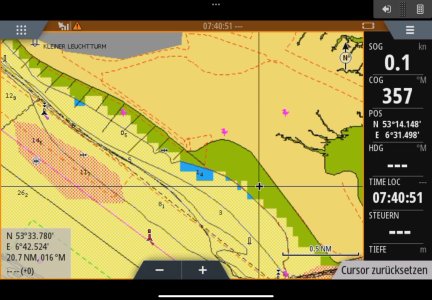
We are using Navionics sea chart with Zeus II chart plotter. We have renewed our licence a month ago and tested it at home, it worked nicely. Now, heading to Borkum (DE) via Delfzijl (NL), the chart shows weird yellow patches instead of blue colours which indicate water depth.

Have someone had also this problem?

Thanks
Middie
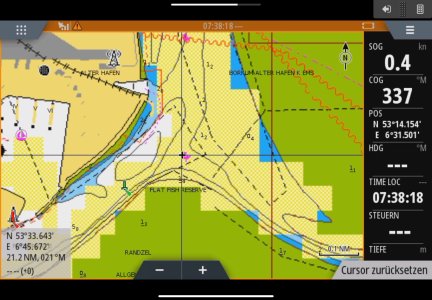
IMG_2909.jpeg
IMG_2908.jpeg
 
Had problems last year with Navionics charts after a chart update from Navionics, they did not display right, grey triangles like they were missing data, this was on a Garmin Echomap 95SV, eventually Garmin sent me a new SD card with the chart on it, still is a bit hit and miss sometimes.
After the last update from Garmin for the plotter, it now gets the depth via N2k from the Simrad plotter on the upper helm where as before it would not show depth at all.
 
Had problems last year with Navionics charts after a chart update from Navionics, they did not display right, grey triangles like they were missing data, this was on a Garmin Echomap 95SV, eventually Garmin sent me a new SD card with the chart on it, still is a bit hit and miss sometimes.
After the last update from Garmin for the plotter, it now gets the depth via N2k from the Simrad plotter on the upper helm where as before it would not show depth at all.

Surely the Depth overlay box has nothing to do with charts ... its a separate data box.
 
Hello guys

We are using Navionics sea chart with Zeus II chart plotter. We have renewed our licence a month ago and tested it at home, it worked nicely. Now, heading to Borkum (DE) via Delfzijl (NL), the chart shows weird yellow patches instead of blue colours which indicate water depth.

Have someone had also this problem?

Thanks
Middie
View attachment 193215
View attachment 193216
Hello guys

We are using Navionics sea chart with Zeus II chart plotter. We have renewed our licence a month ago and tested it at home, it worked nicely. Now, heading

Hello guys

We are using Navionics sea chart with Zeus II chart plotter. We have renewed our licence a month ago and tested it at home, it worked nicely. Now, heading to Borkum (DE) via Delfzijl (NL), the chart shows weird yellow patches instead of blue colours which indicate water depth.

Have someone had also this problem?

Thanks
Middie
View attachment 193215
View attachment 193216
Check the chart settings-depth contours ,and especially seabed option.
 
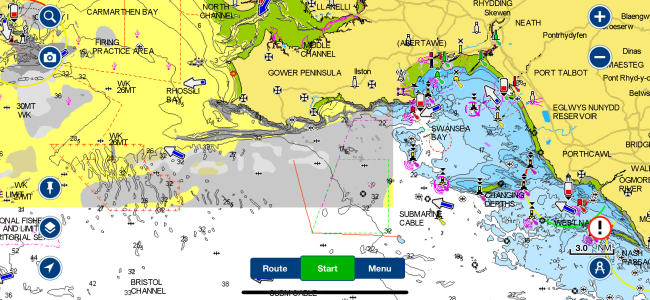
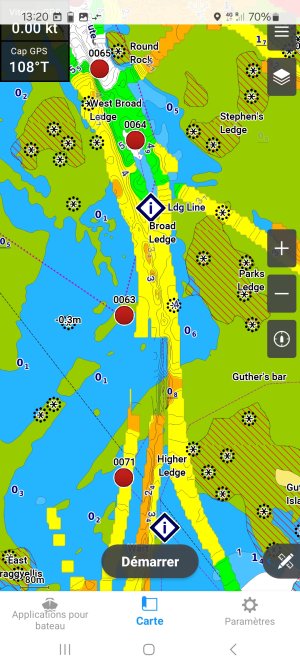
I don’t see how it can be anything to do with settings. Here is an example - Swansea Bay is in the normal blue colours but to the west it’s all yellow and grey, this is a single screenshot:IMG_0037.png
 
Thank you guys, we found what we did wrongly. As @gigm said, it was a seabed option.

The way to this setting: 3 bar menu on the top right corner > more potions > chart options > coloured seabed a…
The option was ticked. We deactivated it and the yellow patches disappeared :)

I really want to know wha this display option is built in.
In which case is this option useful?

Threema_2025-05-11_11-57-36.jpeg
 
Apologies, I’m talking about Navionics on iPhone/iPad which isn’t the original topic of the thread. Glad to see the OP has a solution.
Mike i think your duel colour scheme is down to the fact that areas in grey haven't downloaded detailed information, this is done generally by zooming in on a particular area when you have decent WiFi. The area then populates and bingo! ..all information is now visible
 
Mike i think your duel colour scheme is down to the fact that areas in grey haven't downloaded detailed information, this is done generally by zooming in on a particular area when you have decent WiFi. The area then populates and bingo! ..all information is now visible
I have done that, it makes no difference (I’ve just downloaded 1.3Gb of Navionics updates on my phone and 450Mb on my iPad so no issues with WiFi). It only happens on the phone and only in certain areas so maybe it’s just a bug.
 
@HERMES_M
I really want to know wha this display option is built in.
In which case is this option useful?
Old paper charts used to be covered in annotations like fS.M.Sh indicating what the sea bed consisted of. I was taught that it enabled you to plan your anchoring, and also perhaps give you a clue as to where you were (if you had a lead line with sticky stuff on the bottom).
For anchoring in strange places, I find I miss them being so prevalent, though my leadline has never had anything waxy in the hole at the bottom, so I've not managed to benefit from the alleged increased fix confidence.

Navionics appear to be trying to share the seabed info they're receiving from their sources, using their own user interface style. In some areas, you can see many different colours, but I've noticed that any given colour does not consistently get used for a particular seabed type: you have to click in the area and interrogate it.

p.s. fS.M.Sh means fine sand, mud and shells.
 
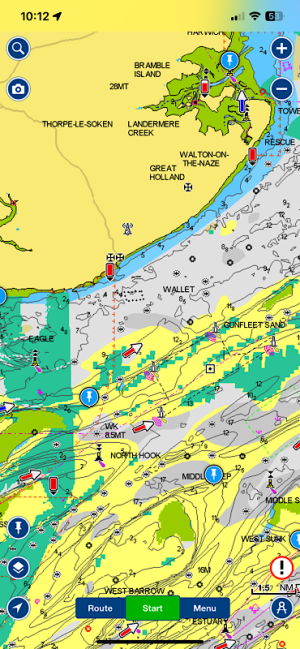
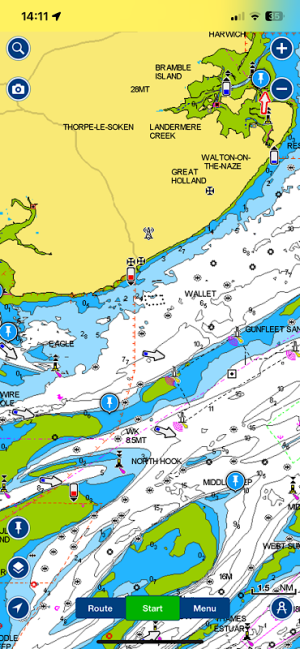
My issues with weird yellow, grey and blocky green on some, but not all, chart areas were solved by deleting and reinstalling the app. Downloading charts made the problem worse (prior to uninstall/reinstall of app).

Before:
IMG_2025-06-05-101323.png

After:
IMG_2025-06-05-141245.png

Charts downloaded in both cases.
 
Top