Navionics app question please....

Sea-Fever

Well-Known Member
Joined
27 Jun 2017
Messages
691
Location
Port Solent
Visit site
Am I being dense?

All the real-time tidal height business is great....

But I just want to see the charted depth beneath (or above) chart datum...

How do I do that?
 
When I say real-time I mean predicted tidal height at any given point, now and in the future.....not ACTUAL tidal height as this would clearly be affected by atmospheric pressure etc
 
As I understand it, the depths on the Navionics chart are the datum depths: they don't change according to the state of the tide. So, you go to the nearest tidal prediction point tap on it and it will give you the tide height at that moment, you then add that height to the chart depth and you've go the depth of water available.
 
Last edited:
Real-time tidal height? Are you sure? Could you provide a picture or web link please?

Can't do photo right now but the point I'm trying to make is this...

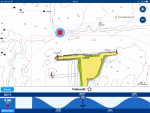
The app displays soundings here and there...just like a paper chart. It also features those little tidal height icons....you know, red for falling, blue for rising. If you click on one of those little tidal height icons you see the tidal curve and, by swiping left and right, one can see what the depth will be now and at any point in the future.

If, whilst you are doing this, you look at the values of the soundings on the chart they change.

My point - I just want to see the charted depth below or above LAT. That way I can know the minimum depth of water I would expect to see WHATEVER state of the tide.
 
Ho humm, you live and learn! Never noticed that feature before and you're right. However, the chart datum depth reappears as soon as you close the tide chart at the bottom of the screen...

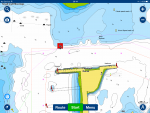
If you look at the depth by the centre of the screen shot it's 6.5m in the shot without the tide graph (ie chart datum) but it's 11.5m in the screenshot with the tide graph.

.IMG_0518.PNG
 

Attachments

  • IMG_0517.PNG
    IMG_0517.PNG
    319.3 KB · Views: 57
Last edited:
Ho humm, you live and learn! Never noticed that feature before and you're right. However, the chart datum depth reappear as soon as you close the tide chart at the bottom of the screen....View attachment 67173

Ah OK...so click off it and its a static value. Fine. I had assumed it was a dynamic thing on the chart - I'm new to the app. And yachting!! Thanks
 
On my version the display of real time tides only when you have the tidal curve visible at the bottom of the screen and changes as the time line moves or is moved. Get rid of the tidal display and the chart display reverts to normal.
 
I have the impression the charts in the app now show far fewer depth data than they used to. A quick comparison with the same area in the web-app chart for the same area seems to confirm this. I can't compare with the Navionics chart in my plotter now, but I'm fairly certain it shows more depth data as well.
 
Ho humm, you live and learn! Never noticed that feature before and you're right. However, the chart datum depth reappears as soon as you close the tide chart at the bottom of the screen...

If you look at the depth by the centre of the screen shot it's 6.5m in the shot without the tide graph (ie chart datum) but it's 11.5m in the screenshot with the tide graph.

And all the depth contours change as well. That's looks really strange the first time you see it.

I've never used the tide height feature as I'm in the Med. :)

Richard
 
I have the impression the charts in the app now show far fewer depth data than they used to. A quick comparison with the same area in the web-app chart for the same area seems to confirm this. I can't compare with the Navionics chart in my plotter now, but I'm fairly certain it shows more depth data as well.

You might have your app switched to ‘SonarCharts’, the crowd-sourced more recent (but controversial) data which does show depths in much more detail. Bottom left of screen, blue wavy-lined symbol, switch off and you get the data that Navionics publish.
 
Can't do photo right now but the point I'm trying to make is this...

The app displays soundings here and there...just like a paper chart. It also features those little tidal height icons....you know, red for falling, blue for rising. If you click on one of those little tidal height icons you see the tidal curve and, by swiping left and right, one can see what the depth will be now and at any point in the future.

If, whilst you are doing this, you look at the values of the soundings on the chart they change.

My point - I just want to see the charted depth below or above LAT. That way I can know the minimum depth of water I would expect to see WHATEVER state of the tide.

Help please! I have the opposite issue. When Navionics Europe HD was newly installed it would change the depths in the chart when and animating the tidal icon. Moreover, it would also animate tidal and stream icons nearby. This is what I want. However, it does not any longer, the chart depths remain static and only the clicked on icon animates.

How can I restore this, please? I have gone through every setting in the app, tried restore defaults etc!
 
Can anyone help with this?
I lost the ‘tide going up and down’ option a few years ago, assuming it had been removed as I didn’t upgrade to a subscription. I have just paid £35 to subscribe and it has not returned.
Does anyone else have the ability to ‘make the tide go up and down’ on the chart using the sideways movement at the bottom of the chart once you have clicked on the red/blue vertical tide scale?
Sorry to put it all in such layman’s terms but it‘s not easy to articulate!
 
I have a question on the weather and tides feature.
It works when the gps is on but shows my home location details which is the local river whilst I'm at home.
I can't seem to find how to change the location to a say, marina on south west coast (Brixham) to check conditions there.
Is there a way to have the side bar with all the details of weather, tide etc for that location whist I'm home..
 
Top