Navionics and a new phone

If this is the old version of the app (non subscription), then you're probably screwed. if you have the new version (subscription) then download the app, log in, just works. So based on what you say, likelihood is that you've got the retired version on your old phone.

Current version App icon looks like this; if you have this on your old phone it should work.

1730673253808.png
 
Pretty sure you just login and it downloads them for you. I forgo my tablet the other week so I installed it on the wifes phone so I'd still have two devices available and it automatically pulled the maps.
 
I've bought myself a new phone, and would like to transfer all my downloaded Navionics maps to it. Is it possible to do this and have Navionics accepr them? My first attempt had the app refusing to work.
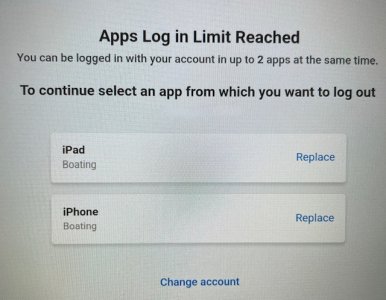
Your Navionics is linked to an email address. If you put the new version on the same account/email address as the one you wish to link to then it happens automatically. However Garmin are not as generous regarding the number of devices that can share an email address as Navionics were,
 
Can't you just "copy" one phone to the other ?

No you cannot as the App has the maps embedded in the app - not separate folder etc.

If you have a current subscription - as another says - just install app on new phone and it should as long as you have not reached max number of installs - install the maps you subbed for automatically.
If you have let the sub run out - then you are lucked out ... you could do a new trial as long as you can enter different details ...
 
Right, just borrowed an Android device and tested this. The account login is the same. It allows two devices to be logged in at the same time, so that can be 2x iOS, 2x Android or one of each.

Yes correct. Which was same with old version as well ... and was always linked to email address used - not the phone ...

What I think some may have got confused with ... is that Google and IOS stores list the phone / tablet you downloaded to and have not removed from the listing. It then defaults to the max number of units app can run simultaneously on.
I recently wanted to download onto another phone ... I deleted one of the listed and all then proceeded fine.
 
As i understand it I don't think the op has a subscription....
He previously managed with the "free" version but as this version is no longer available to download, I have "copied " apps from Samsung to Samsung and they have worked, but as Refuler says it may not be possible with this app.
 
Yes correct. Which was same with old version as well ... and was always linked to email address used - not the phone ...

What I think some may have got confused with ... is that Google and IOS stores list the phone / tablet you downloaded to and have not removed from the listing. It then defaults to the max number of units app can run simultaneously on.
I recently wanted to download onto another phone ... I deleted one of the listed and all then proceeded fine.

As i understand it I don't think the op has a subscription....
He previously managed with the "free" version but as this version is no longer available to download, I have "copied " apps from Samsung to Samsung and they have worked, but as Refuler says it may not be possible with this app.

The old version is no longer available to download. If you update an installed copy of the old version it will be replaced by the subscription version. So it’s getting quite difficult to create a working copy of the old version on a new device, may be possible somehow but no idea how to do it.
 
As i understand it I don't think the op has a subscription....
He previously managed with the "free" version but as this version is no longer available to download, I have "copied " apps from Samsung to Samsung and they have worked, but as Refuler says it may not be possible with this app.

The 'Free' version was only because you would download app .. then choose charts to have full use of for a trial period. Once that period ran out - if you didn't subscribe - you still had the charts - but no extra aspects / functions. This was never possible to transfer to another phone.
 
The old version is no longer available to download. If you update an installed copy of the old version it will be replaced by the subscription version. So it’s getting quite difficult to create a working copy of the old version on a new device, may be possible somehow but no idea how to do it.

Yes ... so ? The App itself is not subscription .. the charts are. But as far as I can find out - the charts still remain on your phone useable in basic form if you do not subscribe.
Old or New version ... same deal.

As regards being able to download old versions .... there are a number of online sites dedicated to archiving and providing old retired versions of Android and IOS apps .... whether this Navionics Boating app is listed - I have no idea. But in reality - it would not make any difference anyway.
 
Yes correct. Which was same with old version as well ... and was always linked to email address used - not the phone ...

What I think some may have got confused with ... is that Google and IOS stores list the phone / tablet you downloaded to and have not removed from the listing. It then defaults to the max number of units app can run simultaneously on.
I recently wanted to download onto another phone ... I deleted one of the listed and all then proceeded fine.
I think you are right, I'm sure Google link your phone ID with your iISP and control a lot of apps availability, especially those that are zoned, it renders VPN's pretty much a waste of time now.
 
Top