Maptech

Thanks for that, but although not clear from my post, I had actually done that by default, so that is clearly not the reason for not picking up the BSB4 charts. Must be something to do with the encryption files, but not sure what to look for or where to move them if found. I'm evidently in former position of Moody Nick, but unfortunately, have not had a spontaneous fix!

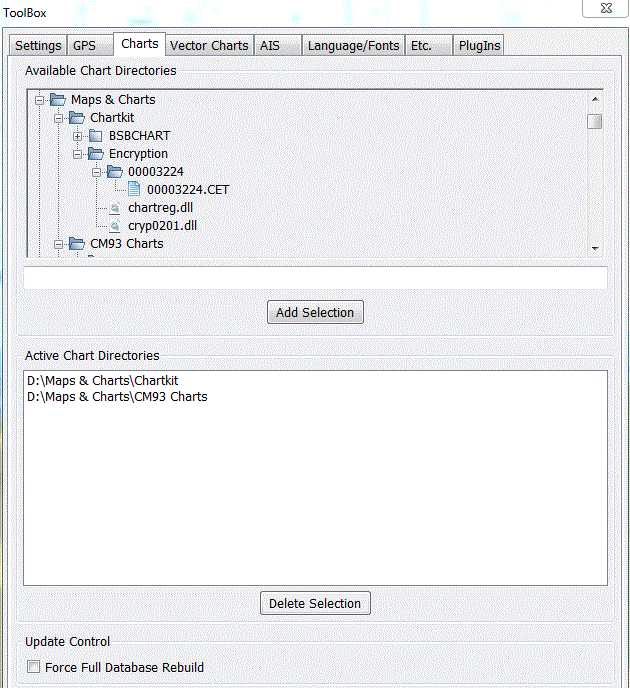
If it's of any help the structure on my (working) openCPN system is...
Capture.GIF


Good luck
 
Anyone got any suggestions on georeferencing scanned charts?

I have calibrated (georeferenced) scanned maps & charts using MemoryMap.
It used to be possible to download the program from their website. Although intended as a demo it was the full program, they seemed to make their money from selling maps & charts as opposed to the program. Don't know if the same still applies but worth a look.
 
Thanks for that, but although not clear from my post, I had actually done that by default, so that is clearly not the reason for not picking up the BSB4 charts. Must be something to do with the encryption files, but not sure what to look for or where to move them if found. I'm evidently in former position of Moody Nick, but unfortunately, have not had a spontaneous fix!
Hi Rob

My file structure for charts is similar to alahol2's. If yours doesn't look like that then maybe that's the problem.

Are the charts working OK on Maptech on the machine you are using for OpenCPN? As I'm sure you are aware, the Maptech charts have to be registered on the machine they are running on.

One other thought, have you done a Database Rebuild on OpenCPN? If not, just tick the box at the bottom of the Charts tab "Force Full Database Rebuild".
 
I have calibrated (georeferenced) scanned maps & charts using MemoryMap.
It used to be possible to download the program from their website. Although intended as a demo it was the full program, they seemed to make their money from selling maps & charts as opposed to the program. Don't know if the same still applies but worth a look.

I should have said that the calibration using MemoryMap only works within MemoryMap. I don't know of any other nav system that can use MM charts/maps. I currently use MM on a hand held.
 
My file directory looks very similar and I certainly have almost identical directories and files in the encryption sub-folder. Only real difference is my software is on the C hard drive.Equally the OpenCPn is on the same laptop as the functioning Chart Navigator software, which can access BSB 4 files. Still stumped!
 
Still stumped!

I'm running out of ideas! All I can suggest is that you revisit each item below and double check it.

1. You are using OpenCPN 2.5.0

2. The .dll file (bsb4_win32_pi15_v10_pi.dll) is visible in the folder /Program Files/OpenCPN/plugins.

3. The folder with the BSB4 charts and the encryption data is pointed to in OpenCPN/Settings/Charts.

4. You have done a database rebuild.

5. You have restarted OpenCPN after checking/completing all the above.

If it still doesn't work, I give in!

Good luck.

Roger
 
You have to click on the coloured bars at the bottom of the OpenCPN screen in order to view the charts.

Good point.

It's also worth noting that you should 'Move' the boat to somewhere that is covered by your Maptech charts (England South Coast maybe). The default when no GPS is connected (zero lat and long) is somewhere south of Ghana where you probably won't have any chart coverage!

As a further check you could turn on chart outlines (spanner/settings/tick box) to see all the chart outlines that are now loaded.
 
OpenCPn with Maptech charts

Has anybody actually succeeded in getting OpenCpn to read Maptech charts?

I have the latest stable version of OpenCPn v 2.50, the BSB4 plugin, and Maptech charts for the Central Channel (dated 2001).

Open Cpn works fine with CM93 vector charts but when I delete these and re-build the database, pointing to the MAPS directory containing Maptech CHARTHR and MAnnnnnn subfolders I get nothing.

The screen just show an all black chart.
 
OpenCPN with Maptech charts

.....and yes, I have the boat centred in the right chart area.

If I zoom right out I get a blue outline of the UK and the black background.
 
Yes

Has anybody actually succeeded in getting OpenCpn to read Maptech charts?

I have the latest stable version of OpenCPn v 2.50, the BSB4 plugin, and Maptech charts for the Central Channel (dated 2001).

Open Cpn works fine with CM93 vector charts but when I delete these and re-build the database, pointing to the MAPS directory containing Maptech CHARTHR and MAnnnnnn subfolders I get nothing.

The screen just show an all black chart.

Yes
I tried it just a couple of days ago out of interest. OpenCPN 2.5 and an old portfolio of Greece charts in BSB format Old unencrypted type.
My BSB4 chart DVD is on the boat so havent checked that but BSB v2? worked straight away (subject to moving the ship into a charted location)
 
Has anybody actually succeeded in getting OpenCpn to read Maptech charts?

I have the latest stable version of OpenCPn v 2.50, the BSB4 plugin, and Maptech charts for the Central Channel (dated 2001).

Yes, my setup is shown in post #22. I am running on Win 7. My Maptech charts are an old version (BACD2 English Channel).
I received the following from Maptech support if it's of any use...
"That BACD2 is in the BSB4 format, which means there are mostly .CAP files (along with their corresponding .BSB files.

BSB3 (non-encrypted format) consists of .BSB and .KAP files
BSB4 (encrypted) format) consist of .BSB and .CAP files

There are registration certificates placed on the computer
(C:\Chartkit\Encryption),

and in the Registry
on a 64 bit OS = ( Computer\HKEY_LOCAL_MACHINE\SOFTWARE\Wow6432Node\Maptech\ChartKit\3.00\Encryption )"
 
Has anybody actually succeeded in getting OpenCpn to read Maptech charts?

Yes - several of us on this thread -see from Page 2.

Why did you delete the link to your CM93 charts? Certainly alahol2 and Playtime (me) still have the CM93 charts in the database. This may not be the problem with your system, but if everything else looks right it might be worth re-instating them and trying again.
 
Ta for all the advice.

I am getting Maptech charts visible- but just the non BSB4 ones- ie what I assume are Kap files and not the Cap files in the same location. The system itself is therefore clearly worrking and indeed I have subsequently got hold of the 2010/11 CM93 vector maps and after a lot of faffing (mainly sorting out how to unlock rar files and then realising they were still zipped even after that!!) I can now see these on Open CPN evidently OK ( tho the charts have no place names etc on them whatever level of zoom or detail - can that be correct?)

It must be something to do either with the permissions , but as it allows me to open BSB non BSB4 charts, not sure how, or more likely somehow the BSB4 plug in is not operating (tho definitely activated via toolbox/plugins). Still stuck. A little knowledge is a dangerous thing! But at least by scientific method (actually trial & error) I have usable vector charts and some limited BSB raster alternatives.

Rob

Penny just dropped about Alahol2's post above on BSB file types- Kap non encrypted, so it could still be an authorisation issue then.
 
Last edited:
I can now see these on Open CPN evidently OK ( tho the charts have no place names etc on them whatever level of zoom or detail - can that be correct?)
- - - - - - - -
Penny just dropped about Alahol2's post above on BSB file types- Kap non encrypted, so it could still be an authorisation issue then.

Re OpenCPN placenames, try clicking the large "A" button next to the spanner.

Re authorisation issues with Maptech, are you sure the Maptech encrypted charts are working on the laptop on which you are running OpenCPN? Are you also sure that you are pointing to the full Chartkit folder containing the encrypted charts and the encryption data?

If yes to both then I have run out of ideas!
 
The plot thickens……..

I now have OpenCpn running fine with CM93 vector charts and a small sample of .BSB and .KAP raster files that I found in a CHARTKIT/BSBCHART directory (probably an old Maptech demo sample from 2003 I think).

I also have Capn Voyager and Maptech Chart Navigator running fine with a comprehensive set of Maptech charts (dated 1/3/2001) but I can’t get them to run in OpenCpn.

These chart files have extensions .A01, A02, A03, A04 .A05, B01 to B05, C01 to C05, ditto Dnn, Enn, Fnn. They are found in a directory structure:
CHARTKIT
BSBCHART
CHARTHDR
MA202150
MA202151
MA202152
etc.

Any ideas for getting this chart set to work in OpenCpn?
 
The plot thickens……..

These chart files have extensions .A01, A02, A03, A04 .A05, B01 to B05, C01 to C05, ditto Dnn, Enn, Fnn. They are found in a directory structure:
CHARTKIT
BSBCHART
CHARTHDR
MA202150
MA202151
MA202152
etc.

Any ideas for getting this chart set to work in OpenCpn?

If your chart files really have extensions of .A01 etc then I can't see how OpenCPN will read them, it will be looking for .bsb & .CAP extensions.

My directory structure is...
Chartkit..... main directory
....BSBChart...... subdirectory containing multiple .bsb & .CAP files
....Encryption.... subdirectory containing...
........a couple of .dll's +
........00003224.... sub-subdirectory containing...
............00003224.CET

If that makes sense
 
progress of sorts

Not with BSB4- still can't read these, but have resolved the place names issue with the CM93 vector charts, by downloading the latest beta version of OpenCPN. Latest new problemo is to link up to the GPS. I have a USB bluetooth dongle picking up a GPS puck signl onto com8, but the GPS function in open CPN tools doesn't seem to have any idea it exists- options e source re noe, Garmin,Network GPSD and AIS port shared- no coms ports. Any suggestions?
 
Top