Laptop power consumption

are you running it from the boat's batteries, taken up to 240 ac, and than back down to laptop volts by the laptop's mains power cord?
 
Also depends on how you use your laptop. Are you running the cd/dvd drive frequently? Are you using the laptops power saving functions e.g. switching the screen off whilst not looking at it (for instance, no need to for the screen to be on below deck when you are on deck)....etc
 
if you haven't yet chosen and bought the laptop a look at the power adaptor will give a ballpark figure for comparison purposes. if you do have it, use the ammeter on a multimeter. it should be capable of taking the two or three amps at the dc voltage.
 
I know this question has been asked before, but what is the most efficient way to power your laptop - Direct from the 12v batteries (through a car type adapter - I know maplins do a good one) or 240v through an inverter?

I know there can be problems if you're running from 12V and have the engine running, but that wouldn't apply in my case.
 
Read the spec of the laptop.

If you read the stuff written on your AC charger it'll tell you its AC input and DC output.

I have an ammeter in the circuit and found that shoving it through an inverter to use a 240 volt AC charger ate about twice as much power as using a Maplin DC car charger plugged into the boat 12 volt. (You can buy a charger which can be set to pretty much any voltage and has almost every computer plug you could imagine.)

Do set your computer's behaviour to a thrifty regime - turn off the CD, dim screen, spin down hard drives. Remember that, in its default setting, it thinks it's plugged into limitless mains supply and will be as greedy as it likes.
 
I know this question has been asked before, but what is the most efficient way to power your laptop - Direct from the 12v batteries (through a car type adapter - I know maplins do a good one) or 240v through an inverter?

I know there can be problems if you're running from 12V and have the engine running, but that wouldn't apply in my case.
As vic pointed out the 12v converter is usally more economical (mine is about 20% less)
There is no problems running the engine while using these, in fact the opposite they are designed for cars and the 13.8V they have available with the engine running.
They can sometimes fail with the lower voltage seen in boats. Also be carfull the cig lighter socket and wiring can take the durrent with the laptop running and charging it is often over 6a
 
My laptop and GPS connected to it are both powered off the boat's 12 volt. It is always fine with the engine running. However, starting the engine creates so much electrical noise that it buggers up communication between the laptop and the GPS - not always, but more often than not.

If I remember (almost never) I switch them both on to their own internal batteries when I start the engine. When I forget I have to reestablish the communication from my nav software (Offshore Navigator).
 
I'm not sure it's possible with every laptop, but I take the battery out of my Dell (so there will be no charging current) and dim the screen. Results in a very considerable reduction of amperes!
Chris

Good tip, I know the WiFi dongles are very hungry as well. When I move on to the boat I'll get one of these, probably the one mentioned by a few people...
 
Laptop Consumption

The question, as posed is impossible to answer as there are too many variables. However having been a liveaboard with a laptops - not used for navigation - over the last 10 years, here are some of my experiences.

1. All my laptops dual boot - into Linux or Microsoft - on Linux I get 12.8hrs out of the current Dell 8600 with main and docking batteries. On Win XP I get 6.2hrs. Win XP is slightly thirstier than 2000 but better than DOS-based Win98.

2. Using a Huawei dongle on Vodafone data, almost exactly halves the capacity, using WLAN reduces it by about 20%.

3. The computer, at anchor, gets about 135' use in 24 hours. Recharge from fully discharged takes 5.8 hours, with the computer not in use. If the computer is in use, the 150w inverter has difficulty in driving the charger, the 150watt DC solid state has no difficulty and pulls 6.2amps on startup, dropping gradually to about 4 amps and then tapering off.

4. In my power consumption plan I allow 44ah for the computer, somewhat generous and well above the next user, the fridge, at 40ah.

5. Finally, the older the laptop, the less power it uses....
 
I did some experiments with my old Dell laptop. I hooked up my laptop with mains charger to the 12-240v inverter connected to a 12v supply with an ammeter so I could see the consumption during use.

The initial turn-on phase did draw about 5A but (within a couple of minutes) as soon as the battey was charged (i.e the internal battery sense detected it was charged), it dropped right down to just over 1A. The chargers have to cope with the maximum usage so I don't think it is right or logical to assume that is what they will use all of the time.

Removing the battery once charged (which is good as it prolongs the life of the battery) further reduced the draw although I can't remember what it dropped to (it was afew years ago...).

Since then I have run the replacement for that laptop ( I dropped it) for about 6 years with no problems.

Cheers
 
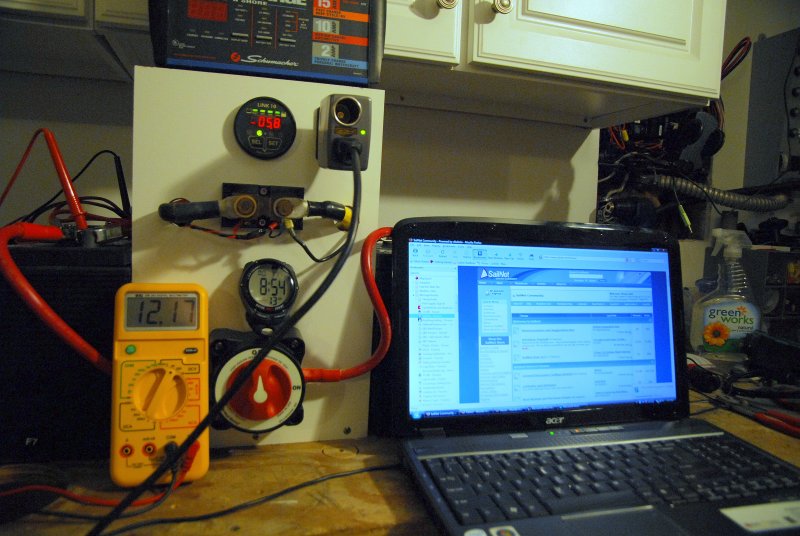
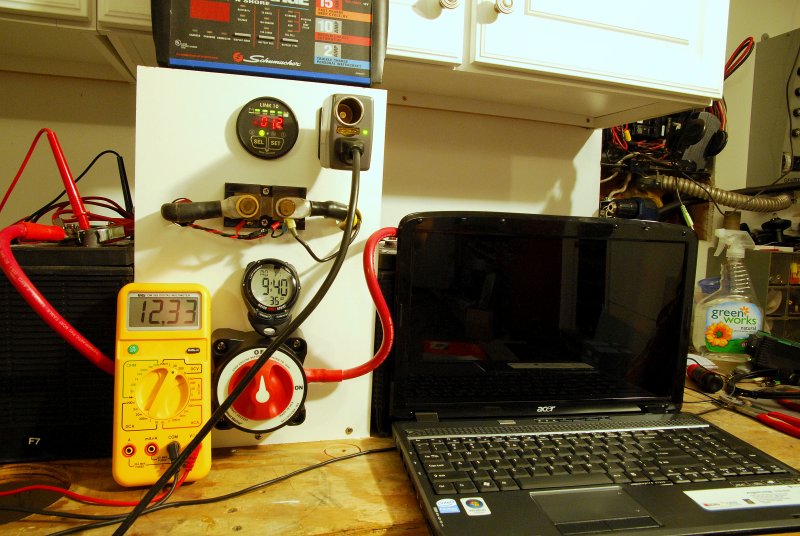
I ran a few comparisons between my Macbook Pro 15" and my Acer 17" laptops.

1- Both running off a 150 watt inverter.

2- Amps measured by a Link 10 just as some would have on-board.

3- Battery voltage when computers were connected was running was between 12.15 & 12.25 volts.

4- Macbook Pro at 34-35% of charge

5- Acer at 57% of charge

6- Both computers running nothing but Mozilla Firefox.

Running:

Macbook Pro - It varied widely in its amp consumption. Computer was ranging from a low of about 5.2 amps to a high of about 6.8 amps when running only Mozilla Firefox.

This pic captures it at about 6.5 amps:
121011941.jpg


Acer - Amp draw was considerably steady compared to the Mac and stayed between 5.7 & 5.8 amps when running Mozilla Firefox.

This pic captures it at 5.8 amps:

121011952.jpg


Turned Off:


Macbook Pro - When completely turned off at a 35% state of charge she drew 2.1-2.2 amps. This was not asleep but completely off.

This pic captures it at 2.2 amps:
121011947.jpg


Acer - When completely turned off, at a 57% state of charge, she drew 1.2 amps? This was not asleep but completely off. I have no explanation for the wide discrepancy between the Mac & Acer when both were turned off other than state of charge & possibly battery size?

This pic captures it at 1.2 amps:
121012299.jpg


One thing is for sure that computers vary widely in their consumption and running them on direct DC is more efficient. My Net book on AC, through the same inverter, burns about 3.8 amps and only 3 amps on DC..

P.S. Sorry for the bad pics. I had my aperture set wrong and did not notice it wile doing this....


Edited:
I went out to the car and grabbed my Netbook because I knew it was completely dead. At 1% state of charge on DC, not AC ttrough the inverter, it still drew 2.2 amps when turned off.

This pic shows it turned off and at about 1% state of charge on DC @ 2.2 amps:

121012326.jpg


I would say that even turned off you can expect some considerable amp draw until the batts in the computers begin accepting less current..
 
Just a quick tip.. Charge your lap top battery up to 50% only and then remove it. Use the mains or 12V as your direct power source.

This info from GOOGLE. Apparantly it prolongs the life of the battery. If you leave the battery in it will slowly drain. Each time the battery is connected to the mains it will accept a charge. The average number of charges per battery is approx 300.

Peter
 
How can i work out the power consumption of a laptop for use on board

I use a Toshiba Satellite Pro onboard and have checked the current consumption using a Nasa BM-1. I don't have the figures with me but was surprised that it seemed to use less current when powered using my invertor and the standard power supply. This was when compared to using a dc-dc unit from Maplins plugged directly into the laptop. I will recheck next week and post the figures.
Allan
 
Interesting, I put on about 80k miles per year (129000 km) in the car and on the road as a consultant and my laptop is plugged into 12V power about at least 40 hours per week and when at home it is in my docking station.

It is totally discharged to 0% at least 6 times per week when out of the car and in the hospitals I work in. Currently sitting at 54% on batt only while typing this. This battery, in my Lenovo tablet, is now going on 2.5 years with no loss in performance. I still get about 2.5- 3 hours out of it just as I did when it was new? I wonder how much longer it would last if I did not leave it plugged in. I have yet to replace the battery in my MacBook Pro and it is now about 4 years old and only suffered about a 15% reduction in capacity..

On the other hand the battery in my Acer has already been replaced and that computer is only two years old and rarely if ever plugged in or depleted to 0%. I think the internal charging regulation circuitry probably plays a decent role in the whole scheme of longevity as all these batteries are LiIon?


I use a Toshiba Satellite Pro onboard and have checked the current consumption using a Nasa BM-1. I don't have the figures with me but was surprised that it seemed to use less current when powered using my invertor and the standard power supply. This was when compared to using a dc-dc unit from Maplins plugged directly into the laptop. I will recheck next week and post the figures.
Allan

That would be very surprising. I have run numerous comparisons on multiple laptops (I currently own five) and I have yet to see a DC-DC, even a step up unit to say 18V or more like the iGo units, consume more current than an inverter going from AC to DC and back to DC.

The inefficiencies on inverter vs. direct DC have averaged between 20% & 35% depending upon the inverter used. In order to make this a fair comparison the computer needs to be at the same battery SOC running the same programs etc. I have set up the experiments so that I can make the switch from inverted AC to direct DC in about 2 seconds. By doing this the computer is very close to still doing the same thing it was on DC or on AC. Computers vary widely in consumption and the only way I know of to accurately track it with an "average" would be to use a computer output battery monitor, using your computer how you would normally use it, then with computer output battery monitor, graph the consumption use and then average it.

You could also plug just the computer in and nothing else, zero the monitor, and average the Ah consumption over a multiple hour period of use.
 
Last edited:
Top