Impressed by Navionics Autorouting.

  • Thread starter Thread starter XDC
  • Start date Start date

XDC

Well-Known Member
Joined
17 Mar 2018
Messages
1,021
Visit site
I have just tried Automatic routing on Navionics for the first time and am very impressed.

Finding the start location and the destination took probably thirty seconds and the routing took less than a minute.

The essential bridge and depth warnings are there and both routes are the ones I would take if motoring.

Sailing we can’t always be so choosy. :nonchalance:

 
I agree - the relatively few times I've tried it, it has always come up with an acceptable solution. You would be very unwise to simply click the button and set the autopilot, but it certainly produces a good starting point for your eventual course.
 
+2

I tried it for the first time last month and was surprised at how effective it was. Operating on an older iPad.
 
+2

I tried it for the first time last month and was surprised at how effective it was. Operating on an older iPad.

I have bought an iPad 2 16Gb for £25, immaculate except for a white pixel, put it in an £8.95 Tough Case that is surprisingly rugged and waterproof/weather proof, stuck some weather apps on the front page and it now runs the app and is exclusively for the boat.
 
Yes. I’ve just renewed my subscription having had the UK&Holland one since June 2012, cost me 0.69p at the time. I don’t begrudge the £34.99 I’ve just spent on up to date charts, a much nicer interface, and autoroute :encouragement:

Just to add, the latest Boating one also works on iPad AND phone. There were posts in the App Store complaining that it was necessary to buy a separate subscription for both devices and Navionics agreed saying the layout was different but that problem has been resolved.

£34.99, 2 iPads, 1 iPhone.

And just to add again for Luffe44 there is an option to “Connect a Device” which clearly shows a phone talking to a plotter. It says activate the WiFi on your device (I’m guessing the plotter), go to Mobile Device settings, Open WiFi, select the device network. Could it be that the latest update is for tablets, phones AND plotters?
 
Last edited:
I used it in the late summer when I was heading up the Eastern Swedish coast between a few hundred islands. It gave me a brilliant first-cut route which otherwise would have taken some tedious investigation. To be sure, I then zoomed in along the route to check all the details (good job too, as one passage between two islands led me under a 5m overhead cable), but you can then drag and drop a point along the route to move just that leg around an undesirable point on the chart.

I had rather turned my nose up at the idea of an iPad program telling me where to sail, but with thousands of possible courses, being given the shortest-distance apparently safe route was quite a pleasure. Well done Navionics.
 
Yes. I’ve just renewed my subscription having had the UK&Holland one since June 2012, cost me 0.69p at the time. I don’t begrudge the £34.99 I’ve just spent on up to date charts, a much nicer interface, and autoroute :encouragement:

Just to add, the latest Boating one also works on iPad AND phone. There were posts in the App Store complaining that it was necessary to buy a separate subscription for both devices and Navionics agreed saying the layout was different but that problem has been resolved.

£34.99, 2 iPads, 1 iPhone.

And just to add again for Luffe44 there is an option to “Connect a Device” which clearly shows a phone talking to a plotter. It says activate the WiFi on your device (I’m guessing the plotter), go to Mobile Device settings, Open WiFi, select the device network. Could it be that the latest update is for tablets, phones AND plotters?
With both subscriptions for plotter chart and boating app you can send route straight to plotter, not seemless but straight forward when your used to doing it.
 
Thanks - I'll try it again. It's never worked for me in the past, whether on laptop, phone or tablet, but I'll give it another go.

EDIT: Jings, it does work, and very well too, at least on the web version with a laptop. Just plotted from our mooring in Loch Leven, down Loch Linnhe, up the Sound of Mull, and through Loch Sunart to to Strontian. Perhaps slightly closer to the jaggy bits than I'd normally sail (yes, been there, done that...), but in safe water at all times. Impressed.
 
Last edited:
Thanks, I will renew subscription and have a go at sending the route from Ipad to plotter. The plotter has a preference for connecting to seaside restaurants, but i unsually get the grib files uploaded using the Ipad.
 
Unless it is linked to tidal height at the time of travel then it will only take a deep water route. When I tried it on the East coast (Bradwell to Burnham) it took a route of 36nm but in reality it is 18nm but not at LW. If you don't jump sandbanks on the East coast you waste a lot of time.
 
Unless it is linked to tidal height at the time of travel then it will only take a deep water route. When I tried it on the East coast (Bradwell to Burnham) it took a route of 36nm but in reality it is 18nm but not at LW. If you don't jump sandbanks on the East coast you waste a lot of time.

This is a good point and on the rout I used it took me around overfalls that were easily navigable. Most of us probably appreciate that we need to check our plotter routes at close zoom. However, sooner or later someone will have an autoroute incident.
 
Unless it is linked to tidal height at the time of travel then it will only take a deep water route. When I tried it on the East coast (Bradwell to Burnham) it took a route of 36nm but in reality it is 18nm but not at LW. If you don't jump sandbanks on the East coast you waste a lot of time.

Have you watched the video? Can you explain how the route took me over the drying entrance to Paimpol?
 
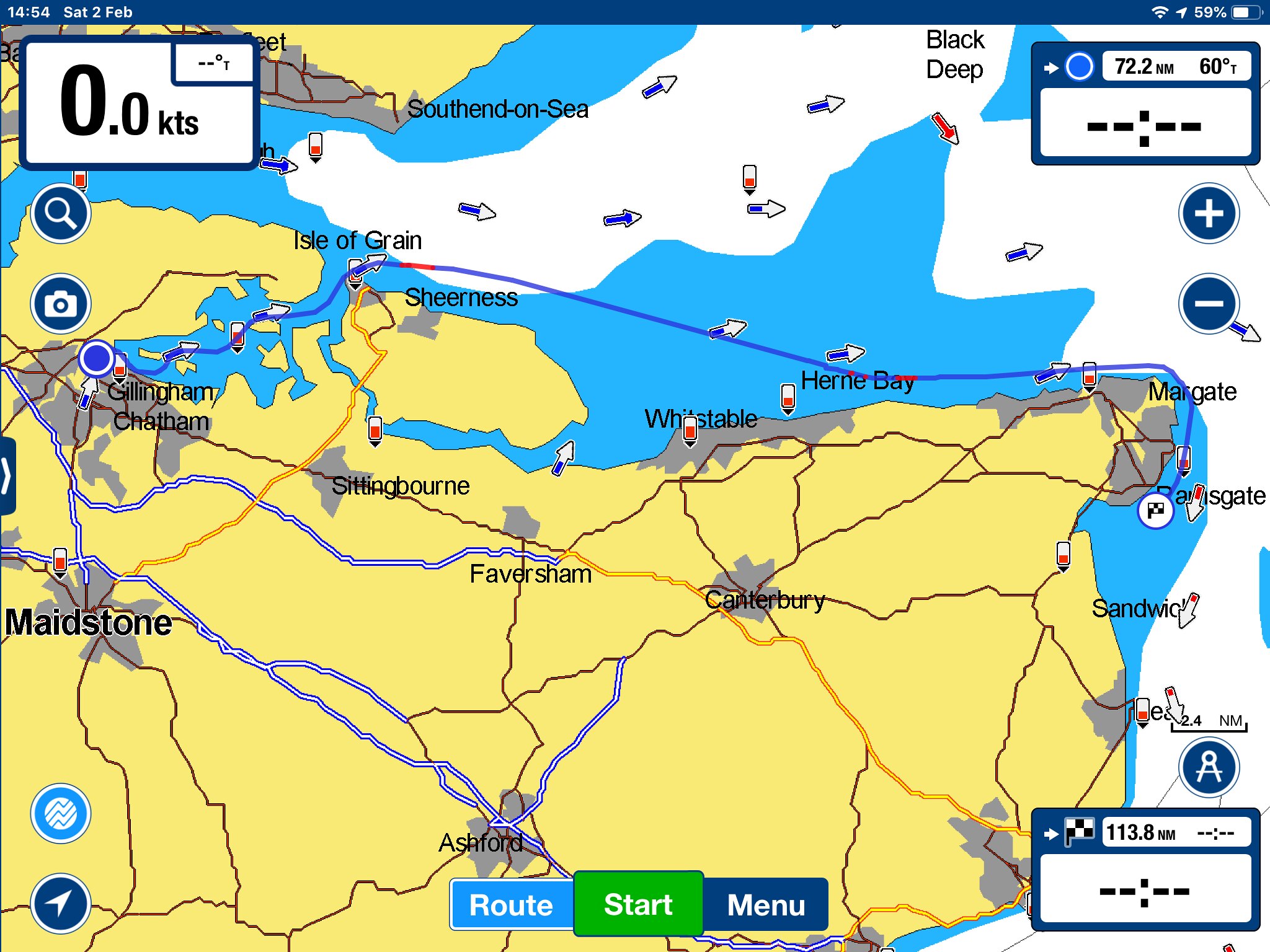
It seems to have its favourite routes and these can change. In the early part of 2018 it liked to take us via the Princess Channel when we were going from Chatham to Ramsgate, but later on in 2018, regardless of the tide, it took us on the overland route.
 
It seems to have its favourite routes and these can change. In the early part of 2018 it liked to take us via the Princess Channel when we were going from Chatham to Ramsgate, but later on in 2018, regardless of the tide, it took us on the overland route.

46907186422_e946fa8828_k.jpg
 

It’s a really good point about it only creating tide-independent routes. I guess I didn’t care when I used it extensively in the Baltic. But what is ‘overland’ about that pictured route round the N Kent coast? I’ve used it several times - Spile and the Reculver/ Copperas pair S of Margate Sand.
 
I used Navionics for a year but then let it lapse. I did like the routing but found the interoperability lacking with no easy way to export waypoints to use in any other device. I am not a massive fan of Garmin I'm afraid and I have no doubt that they will keep a tight lid on what the Navionics app will and will not work with.....

Unless someone knows better....I'm shooting from the hip really.
 
Top