Impressed by Navionics Autorouting.

  • Thread starter Thread starter XDC
  • Start date Start date
Yes. I’ve just renewed my subscription having had the UK&Holland one since June 2012, cost me 0.69p at the time. I don’t begrudge the £34.99 I’ve just spent on up to date charts, a much nicer interface, and autoroute :encouragement:

Just to add, the latest Boating one also works on iPad AND phone. There were posts in the App Store complaining that it was necessary to buy a separate subscription for both devices and Navionics agreed saying the layout was different but that problem has been resolved.

£34.99, 2 iPads, 1 iPhone.

And just to add again for Luffe44 there is an option to “Connect a Device” which clearly shows a phone talking to a plotter. It says activate the WiFi on your device (I’m guessing the plotter), go to Mobile Device settings, Open WiFi, select the device network. Could it be that the latest update is for tablets, phones AND plotters?

Having also had on iPad for a few years curious to know about how to also have on iPhone if it's included. If you renew subs does it now give this option or do you have to start from scratch ? As it's a new customer only thing. I should say I use as a home based app or perhaps when planning from a land based location mainly as the iPad also links to chartplotter on board and have a planning disk at home so gives AIS via that route which has always struck me as an issue for Navionics app program when actively on route however if by renewing it gives greater device capability might be worthwhile and for this active route
 
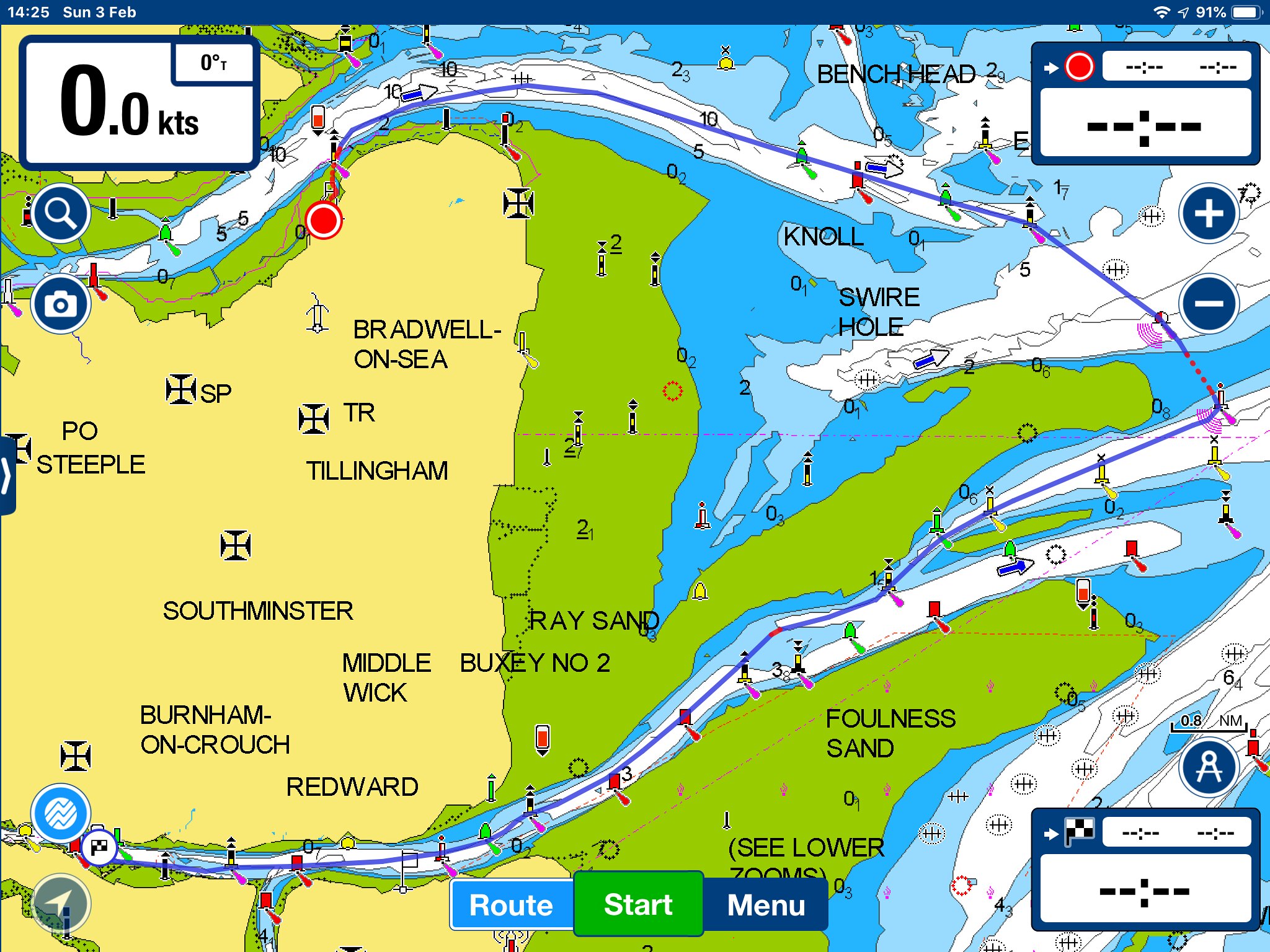
It’s a really good point about it only creating tide-independent routes. I guess I didn’t care when I used it extensively in the Baltic. But what is ‘overland’ about that pictured route round the N Kent coast? I’ve used it several times - Spile and the Reculver/ Copperas pair S of Margate Sand.

But why is a tide dependent route different to conventional paper chart navigation? The app can’t know the tide If for example you’re sitting at home planning a journey, and if you’re actually just about to set sail or on passage you adjust accordingly.

I’m a south coast and northern/western France sailor so don’t have the same challenges as sailing on our east coast (even though many French ports have drying approaches) but a quick example of what I’ve said is entering Poole Harbour from the west. There is a channel that takes you within spitting distance of the shore as you enter but as I can’t plan my eta I wait until I get closer and choose the appropriate tide adjusted route going round the fairway buoy.

With regard to the overland route that had been suggested I can only guess that Navionics are consistently adjusting their charts as problems are reported which make them more accurate than the paper ones you bought yesterday????

I don’t know but it’s a bit like the osmosis argument.

I’ve yet to hear of a boat sinking of osmosis, I’ve yet to hear of a boat sinking due to chart plotter error*, and even though I’m sure both have happened the incidence is insignificant. Unless you’re the owner :ambivalence:

* Coral atolls and round the world boats????
 
It looks as if the route proper stops in safe water. There is a dotted line to join that to your destination. That's not the same as avoiding sandbanks that you cross over - it doesn't do that.

Yes but you said it only takes a deep water route, which it clearly doesn’t.

The app will take you over drying heights and warns you. It is for you to review the suggested route and adjust for tide and draft accordingly.

Incidentally you can input your own boats draft in the app. I had mine set properly and you can see the red lines. As a test I set my draft to 10 metres and the red lines changed accordingly.

The suggested route for your Bradwell to Burnham example is 24.7 miles.

46056340485_ccab1418f9_k.jpg
 
Having also had on iPad for a few years curious to know about how to also have on iPhone if it's included. If you renew subs does it now give this option or do you have to start from scratch ? As it's a new customer only thing. I should say I use as a home based app or perhaps when planning from a land based location mainly as the iPad also links to chartplotter on board and have a planning disk at home so gives AIS via that route which has always struck me as an issue for Navionics app program when actively on route however if by renewing it gives greater device capability might be worthwhile and for this active route

Can’t answer the first part as it was already on both my phone and tablet but I’m sure Navionics will help you. They have an email address which although a little slow to answer is better than FAQ’s help@navionics.com
 
I've been routed overland on a couple of occassions ( a small minority). It ca also send you on passages which may not necessarily be your first choice at night in 3 knts of tide.

Screenshot_20190203-153434_Europe.jpg
 
I've been routed overland on a couple of occassions ( a small minority). It ca also send you on passages which may not necessarily be your first choice at night in 3 knts of tide.

View attachment 75693

Er, leave at a different time? It’s not the apps fault.

If you can’t leave at an earlier time then you’d be stuck in the tide regardless of the app suggestions.

Anyway, I’m not trying to sell this app to anyone, just sharing my thoughts.

I actually take the suggested route into Paimpol but when I first looked at my PAPER charts I was going to steer way-south from Guernsey and come in from the east towards the S.E. of Brehat.

Closer investigation made me feel safe enough to go between rocks where you could talk to people if they had been sitting on them (just Cormorants thank goodness) and the fact Navionics suggests this route too impresses me, particularly given the ease of just tapping two places on my screen.

Out.
 
Yes but you said it only takes a deep water route, which it clearly doesn’t.

The app will take you over drying heights and warns you. It is for you to review the suggested route and adjust for tide and draft accordingly.

Incidentally you can input your own boats draft in the app. I had mine set properly and you can see the red lines. As a test I set my draft to 10 metres and the red lines changed accordingly.

The suggested route for your Bradwell to Burnham example is 24.7 miles.

46056340485_ccab1418f9_k.jpg

But hardly anybody would go that way - the usual route is down and across the Raysand. It is however better than it was - the safe water route used previously was way longer. I'll try it again.
 
Er, leave at a different time? It’s not the apps fault.

If you can’t leave at an earlier time then you’d be stuck in the tide regardless of the app suggestions.

Anyway, I’m not trying to sell this app to anyone, just sharing my thoughts.

I actually take the suggested route into Paimpol but when I first looked at my PAPER charts I was going to steer way-south from Guernsey and come in from the east towards the S.E. of Brehat.

Closer investigation made me feel safe enough to go between rocks where you could talk to people if they had been sitting on them (just Cormorants thank goodness) and the fact Navionics suggests this route too impresses me, particularly given the ease of just tapping two places on my screen.

Out.

Er, nothing to do with time which, as I'm sure you know, Navionics does not account for in any way. Rather, my point was that a hazardous route, reducing distance by a minuscule amount, was suggested by the app in preference to a far safer, easier and probably quicker alternative.
 
Can’t answer the first part as it was already on both my phone and tablet but I’m sure Navionics will help you. They have an email address which although a little slow to answer is better than FAQ’s help@navionics.com
If you have both iPad and iPhone syncing via iCloud they should mirror apps on both, then they will also sync routes on either iPad or iPhone. Very easy and all done in background
 
Top