I really dislike Active Captain ....

Refueler

Well-Known Member
Joined
13 Sep 2008
Messages
24,593
Location
Far away from hooray henrys
Visit site
Went to check on my 38ft'r today ... feeling not bad this morning - most mornings the Ulcer gives me gyp ...

Checked that my new Solar panel will fit where the old one is ... yep ! Good ... will just need sorting the cable as the old has a single two core cable - but new has separate + / - cables.

Had to repair washboard and while waiting for glue to set - I decided to connect AC to update the Garmin 92sv .... its software - not charts. My charts SE Sweden and Baltic are out of date

PITA !! Get and insert the AC sd card ... then connect phone to unit ... it checks unit ... then starts transfer ... then validates .... then connection breaks - reconnects ... checks unit again ... transfer ... valdate ... sometimes stays connected .. checks for another update ... transfers ... validates ...
Cycle repeats and repeats and repeats ....
After 1 hour after it disconnected again .. I decided to call it a halt and continue next visit ...

I think the problem I am having - is that there are many sequential updates and AC is transferring each one - then next etc etc.
 
I share your pain re Active Captain. I’ve long since given up on it. I have a morbid fear of updating any bit of happily functional equipment so not using the app is no great loss to me.

I’ve always thought ‘Active Captain’ sounds like a dating app for gay men.
 
I use Active Captain all of the time, it mirrors the 2 MFDs on the flybridge with 2 Android tablets at the lower helm. It can also be used as a stand alone plotter, using charts downloaded from Garmin FOC, as i have a paid version on my account for the plotters. But, as OP says, the updates can be a real pain, sometimes they work first time, others not. It's possible to download the updates to an SD card and just stick that in the plotter, update everything on the N2K network in one go. FWIW Raymarine is no better. I think they both fail at the slightest data transfer glitch.
 
Downloading the updates to an SD card is convenient, you can use your home network rather than using potentially slower and more expensive phone data at the boat.

What really gets me is that the plotter (I have a GPSMap 723) can't join a WiFi network, it insists on creating its own for Active Captain. My boat has its own WiFi network with a 4G connection, the plotter could use that and it could do updates over the air without needing Active Captain or an SD card. With the boat's own network, the plotter's network and the AIS device's WiFi network, my boat has three active WiFi networks wherever it goes, and I have to switch my phone between them depending on which app i'm using. (To be fair, the AIS device, Digital Yacht AIT3000, has a newer model, AIT5000, that can join a WiFi network rather than creating its own).
 
David ... you are not alone in this ... my 92sv cannot download direct even though it has own WiFi etc. It also has to go through the phone.

I will be looking at SD card updating - to try and get rid of this time-consuming mess I go through each visit to the boat ...

Here's question for you guys ... Paul - I'm sure you know the answer .. The Active Captain SD card I created way back ... would it be better to erase it and use it 'clean' each time .. or as I have so far - left it with transferred files from before ...

I notice that in the plotter AC menu for the card - it asks if I want to 'merge files' .....

I don't think I will erase it just yet ... maybe complete the updates of all files - then re-format it. (UGH ! gonna take ages !!)
 
David ... you are not alone in this ... my 92sv cannot download direct even though it has own WiFi etc. It also has to go through the phone.

I will be looking at SD card updating - to try and get rid of this time-consuming mess I go through each visit to the boat ...

Here's question for you guys ... Paul - I'm sure you know the answer .. The Active Captain SD card I created way back ... would it be better to erase it and use it 'clean' each time .. or as I have so far - left it with transferred files from before ...

I notice that in the plotter AC menu for the card - it asks if I want to 'merge files' .....

I don't think I will erase it just yet ... maybe complete the updates of all files - then re-format it. (UGH ! gonna take ages !!)
I was just wondering the same thing. A couple of months ago I had to update the Garmin plotter on my boat and I bought a brand new SD card, downloaded the newer version and uploaded it onto the plotter. Since then Garmin has issued an update to the maps, which I downloaded to my phone. When trying to send the update to the plotter, it ask me to insert an Active Captain SD card, which I have already slotted in and has plenty of memory left from last time I used it, but somehow I believe it needs to be formatted, i.e, erase the old content before the new firmware can be uploaded.
 
For plotters with a single card slot i'd have a card just for the updates. If you have a Windows PC you can use Garmin Express or you can download from the Garmin website.

For chart updates the Active Captain card needs to stay in the plotter, which is fine for plotters with 2 slots or with built in charts, not so good for charts that are on an SD card in single slot plotters.
 
For plotters with a single card slot i'd have a card just for the updates. If you have a Windows PC you can use Garmin Express or you can download from the Garmin website.

For chart updates the Active Captain card needs to stay in the plotter, which is fine for plotters with 2 slots or with built in charts, not so good for charts that are on an SD card in single slot plotters.

It seems to me that Garmin has tried to create a 2 way system ... PC with Express to download to a card .... and another where you are 'mobile' without PC - Active Captain.
The only way I can see Chart Update is that Express / Active Captain creates a new chart card ? Cannot see how AC card in the slot instead of the actuial chart card can work ... its a mess !!

At least the Boating App seems to have it sorted ....
 
So far mine has been fine updating software and AFAIK also chart updates.

But can I just check I understand what it’s doing correctly?

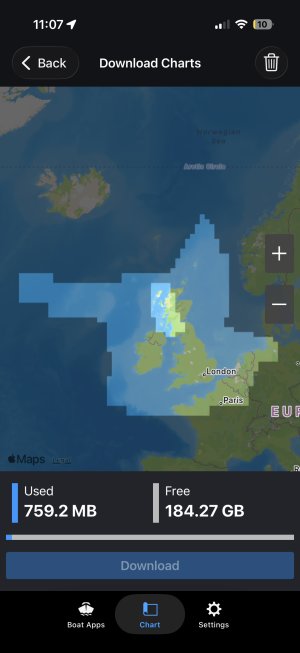
This screenshot shows my subscription, the whole of the UK (and a bit of Europe).

And the lighter box over the West of Scotland is what I’ve downloaded to my phone. Is that the only area that will update on the Garmin or does it update the whole of my subscription area each time?


IMG_0651.jpeg
 
Finally got all on the SD card ... 16GB of files downloaded to it via Express ....

I must admit that I do not update my plotter often ... unlike Boating App on my tablet - which I update every 2 or 3 days ...

As I understand it - once I place this card in the plotter and do the updates - I can basically format / clean my Active Captain card so it then only has needed updates transferred to it ...
 
Downloading the updates to an SD card is convenient, you can use your home network rather than using potentially slower and more expensive phone data at the boat.

What really gets me is that the plotter (I have a GPSMap 723) can't join a WiFi network, it insists on creating its own for Active Captain. My boat has its own WiFi network with a 4G connection, the plotter could use that and it could do updates over the air without needing Active Captain or an SD card. With the boat's own network, the plotter's network and the AIS device's WiFi network, my boat has three active WiFi networks wherever it goes, and I have to switch my phone between them depending on which app i'm using. (To be fair, the AIS device, Digital Yacht AIT3000, has a newer model, AIT5000, that can join a WiFi network rather than creating its own).
Fully agreee with this, we have 8400 series plotters, what's really frustrating there is that Garmin clearly, at some point, had the thought that they would allow the plotter to join existing wifi, as there's a selection in the settings somewhere (I dont' recall exactly where), in which the only option is "Host mode", but clearly intended to be selectable between client and host,..they just never developed it.....I hate having two separate wifi connections.
 
Top