Chart Plotter to run Navionics

Hi Dutch01517
Thanks but the phone is no problem. It sits on my Nav table down below and simply cofirms what is going on. Because Navionics allows you to share your routes etc, anything I pre-plan whilst I still have mobile data will end up on all devices. The problem is the tablet. The main issue is that the battery and charge regime cannot keep up with usage and will eventually go flat (usually just when you need it.) Also it is too dim in bright sunlight and too bright at night.
However Andrew Trayfoot's ingenious idea of using a car android tablet looks to be the answer I have been looking for.
 
Understand the issues with domestic tablets. I use a industrial rugged tablet which has a bigger and better screen in sunlight than a MFD and can dim at night. They are designed for military, oil field, emergency work. The battery life on mine is about 8 hours but I plan to fit a waterproof charging point over the winter. Not saying that it would be right choice for everyon, just that it works well for me.

The ruggedness of the car android idea would concern me, not designed for a marine environmen.
 
Last edited:
Hi Dutch01517
Thanks but the phone is no problem. It sits on my Nav table down below and simply cofirms what is going on. Because Navionics allows you to share your routes etc, anything I pre-plan whilst I still have mobile data will end up on all devices. The problem is the tablet. The main issue is that the battery and charge regime cannot keep up with usage and will eventually go flat (usually just when you need it.) Also it is too dim in bright sunlight and too bright at night.
However Andrew Trayfoot's ingenious idea of using a car android tablet looks to be the answer I have been looking for.

Lets be honest .... very few screens are any good in bright sunlight. I have RC gear with stated Sunlight viewable screens - but even those get hard to read ... and as for too bright at night ... is there not a Night / Day view option in the Navionics app ??

I have Mediatech tablets from Banggood that have more hours capability than many smart phones ... it all comes down to what you enable on the tablet .... if I need extra 'power' I use battery power bank and plug in - so I am still free to roam as needed without cable ... a simple setup of Velcro sorts out mounting the power bank - in fact even helps prop the tablet up to view ...
 
.....

The ruggedness of the car android idea would concern me, not designed for a marine environmen.

The car android idea, once fitted below, is rugged enough and has many advantages over a loose tablet in terms of ruggedness/survival... It does not need to be recharged, it cannot fall overboard, it cannot be left at home and is less likely to be stood on or hit with a winch handle when things go wrong.

It would be easy to fit a hinged plastic screen in front to protect it if further protection was deemed necessary.

Mine is positioned so that I can see it from the cockpit at a point where I can operate the autopilot or nudge the wheel..
 
Last edited:
The car android idea, once fitted below, is rugged enough and has many advantages over a loose tablet in terms of ruggedness/survival... It does not need to be recharged, it cannot fall overboard, it cannot be left at home and is less likely to be stood on or hit with a winch handle when things go wrong.

It would be easy to fit a hinged plastic screen in front to protect it if further protection was deemed necessary.

Mine is positioned so that I can see it from the cockpit at a point where I can operate the autopilot or nudge the wheel..

I thought the question being asked was what to replace the tablet at the primary helm position with. I assumed that was outside in the cockpit because strong sunlight was an issue. Hence the comment about concern about using a car android Sat Nav.
 
I thought the question being asked was what to replace the tablet at the primary helm position with. I assumed that was outside in the cockpit because strong sunlight was an issue. Hence the comment about concern about using a car android Sat Nav.


mmmmm ..... going back to OP's request .. it does seem to be that ....

Like many forum posts - if read quickly - quite often the exact intent is difficult to see.

If replacement of the Tablet is wished - then my original reply of a budget plotter would work. Even an old Lowrance or similar coupled to a WiFi2NMEA plexor would allow any other device to connect and display at the secondary position.

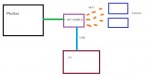
This is purely my setup and is given as example only >

Main plotter is Onwa KP39A, uses K-Charts or Navionics. Has B+ AIS transponder.
NMEA feed out to WiFi2NMEA plexor.
WiFi2NMEA plexor provides full data out (AIS and GPS) via USB + WiFi up to 4 devices can connect + Seatalk / NMEA in / out + relay of detected WiFi such as Marina / Home
I have Acer one Notebook computer running Seaclear with AIS / GPS data from the WiFi2NMEA USB. (Seaclear does not accept WiFi).
I have various Android Tablets with AIS data via the WiFi (GPS is from Tablets own GPS but can easily use the WiFi2NMEA GPS data if necessary).

The setup sounds 'involved' but its a doddle ... and allows anyone who sails on the boat to log onto the data stream with their phone or tablet ....
What plotter provides the foundation data is up to individual .... it could just as well be Garmin or another. For me - the Onwa provides excellent service without breaking the bank.
Having set this up ... I can now resite the Plotter anywhere on the boat and then use the wireless Tablets as my roving screen. This is quite an advantage to me as my boat is not large and mounting locations are at a premium.
 

Attachments

  • Multiplex setup SA.jpg
    Multiplex setup SA.jpg
    24.3 KB · Views: 2
Last edited:
I thought the question being asked was what to replace the tablet at the primary helm position with. I assumed that was outside in the cockpit because strong sunlight was an issue. Hence the comment about concern about using a car android Sat Nav.
You might be right it is a bit vague at first reading, but Andrew Trayfot's solution is used externally whilst mine is internal but viewable from the outside, so the car android idea has merit for the OP as he has confirmed.

I agree that a normal tablet is useless in sunny weather without some type of shading.
 
Android devices may take quite some fiddling/add-ons to be NMEA compatible, run an auto-pilot et al.

Depending on screen size modern chart plotters can be (sort of) fairly priced. For the different Navionics version features to work you need to check their device compatibility chart (now some new version definitions as Gamin have decided to make Navionics technology work on some Garmin devices).
 
Hi All
My early New Year's resolution is to complete all the threads I have started with the conclusion that I came to in the end. This is a kind of thank you to those who took the trouble to contribute with their advice.
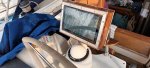
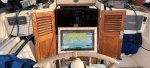
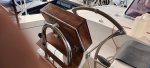
I have solved my chartplotter conundrum by building the cleverly designed plotter idea created by Andrew Trayfoot.
In total it cost me €146.00 for all the materials. As I liveaboard, my garage and workshop is a few 1000 miles away, so other than what I can store aboard (not much space in a 36' boat with 3 living aboard) So I had to buy the wood for the case. I use bamboo chopping boards for jobs like these and when stained and varnished looks quite like hardwood.
The screen is amazingly bright and is easily sunlight viewable. The aluminium edging I have used to fix a waterproof, (electrostatic) cover, placed over the touch screen.
For night mode I have downloaded an app that dims the screen down as much as you need.
I can remove the plotter, to store down below when not in use.
The next project is to connect the NMEA of my ICOM 500 AIS transponder to a small router so that I can see marine traffic on my map.
Just to re-iterate that I also have a Raymarine C80 chartplotter, which I use for the RADAR and as a backup system.
 

Attachments

  • 20221012_093618.jpg
    20221012_093618.jpg
    420.4 KB · Views: 27
  • 20221012_093637.jpg
    20221012_093637.jpg
    429.7 KB · Views: 27
  • 20221012_093546.jpg
    20221012_093546.jpg
    356.3 KB · Views: 26
The price difference is just marketing
Exactly !
There are many European products that (until recently) were a ⅓ of the price in the states compared to here. So why the higher prices here? Because they can. You keep paying the rip off prices and they will keep charging them.
A tablet is vastly superior to a plotter screen in terms of dpi,resolution, refresh rate, ram, rom, card capacity and smoothness . Many can take sim cards, browse the Internet, take photos and videos . Many samsung devices have the drivers already built in to work with nmea. You just need the software to control it.
The software is available on play for a few £
Waterproofing is easily solved and the screen brightness gets brighter with each new tablet. They dim down to zero which is not a great idea as then you can't see the screen to turn it back up.. Guess how I know ?:oops:
If your happy to pay a crazy amount for a 10" plotter with low res screen then your very likely to also pay the high price for chart software to go with it .
I do have two chart plotters on my boat, but navionics, c-map or many of the others just look so beautiful on a 4k tablet display.
I can't remember the last time I saw globe trotting YouTubers using a plotter - because they all use tablets.
I've noticed transducers appearing that are android. That makes it so easy to connect.
If your tablet battery runs down even when plugged in when using nav apps then it's possible its an oldish tablet with a unhealthy battery
.
 
This year I replaced my non functioning Raymarine C120 with a Beetronics 15.6" monitor and a Raspberry Pi4 running Navionics, JK BMS, Victron and Windy Apps on Android 11 ( Konstakang Lineage 18.1), . It gets NMEA data via my onboard router and a Digital Yacht WLN20. The MFD is below at the chart table, in the same place previously occupied by the C120, acting as a backup display to the iPad that I use ( in a rugged case) in the cockpit.

I was new to the world of Raspberry pi so it took me a little while and some help from YouTube (Thanks Leepsvideo) before I was able to get it running, but it's fine since mid November when we left Livorno and we're now in Naples heading (slowly) towards Sicily
 
I have gone down the android car radio replacement route using this unit to replace the ancient cd player as originally fitted to our boat.
eBay
Just working out how best to use the reversing camera and dvr facility for either security or engine compartment monitor.
Runs navionics and used in conjunction with a teletonika rut950 has eliminated the need for any TV on board.
Added two Vistaton 60w waterproof speakers for the cockpit which are superb quality and a 10th of the price of Fusion equivalent.

If you want navionics on a big screen anywhere else on the boat you could simply plug in an additional screen via one of the USB ports that supports additional screens for rear seat occupants.
 
Top