Can anyone on Earth update the SW of a Raymarine bit officially not supported anymore

Well, I guess it might be worth the cost, for someone who needs to replace a defective component.
But for someone like me, who already has exactly the same bloody thing, perfectly working, and just needs a SW upgrade, it would be a bit OTT to buy another... Besides, I don't think that Coastalrides would bother checking the version of the installed SW, which afaik requires a full connection, together with a control head! :ambivalence:
 
I am very concerned about this thread
Mapism expected something to work and now hurricane asks if you really need it!
LOL, yeah, almost akin to the planet spinning the other way round...! :D

Anyhow, in reply to Hurric, yeah, 'course I don't NEED the joystick - pretty much as I don't need a boat, sort of... :rolleyes:
BUT - and feel free to call me naive if you wish - I would rather go through some efforts to get the job done, than sell the thing and call it a day.

Btw, in the meantime (and I'm saying this mostly as a feedback to DiscoVolante) I got a reply from someone at Greenham Regis, who suggested that I must send the unit to Raymarine and gave me the email address of a lady who "should be able to assist".
I already emailed her, but it was a bit late so I couldn't reasonably expect a reply today. We'll see, I'll keep you posted.
I'm not holding my breath TBH, but hope is the last to die...
 
LOL, I saw this question coming.
I studied the steering equipment of my boat in detail, and it would indeed be possible to connect a simple 1-0-1 momentary toggle switch with a couple of relays to achieve essentially the same result.
Otoh, the OEM Raymarine joystick was a much nicer bit of kit in more ways than one, so when I found a new old stock one, I just grabbed it.
And now, I'd be pixxed if I couldn't fit it... :(

If the software route falls down, could you open up the joystick and replace the gubbins with switches so it operates as a 1-0-1 toggle?
 
Well, I guess it might be worth the cost, for someone who needs to replace a defective component.
But for someone like me, who already has exactly the same bloody thing, perfectly working, and just needs a SW upgrade, it would be a bit OTT to buy another... Besides, I don't think that Coastalrides would bother checking the version of the installed SW, which afaik requires a full connection, together with a control head! :ambivalence:

They're a business seller so you can return it if it doesn't have the software version you want.

You could also sell yours to offset the cost. Just another option of course.

Personally I'd put the joystick on eBay...
 
Just for the records, eventually...

...I got a reply from Raymarine support confirming me that they are willing to do the job.
I should ship them the thing, pay 55 quid plus tax and shipment, and hopefully I'll be good to go.

What is a bit funny is that I actually got two different replies, and in the second one they confirmed me that the update process is handled as per the S1 & S1G model service manual which jrudge posted in #24.
But in this reply, they also say that it's necessary to have a "proprietary tool" to do that, which happens to be a rather basic serial cable.

So, that leaves me with the doubt of either:
- try to get the program (SWDL4Windows.exe) and the files required, build a serial cable, find an old PC with a serial port, or
- fork out the (actually not unreasonable) amount requested, and call it a day.
I'll see after the completion of the delivery trip anyhow, no way I'm fiddling with the a/p now that I need it daily...
 
Re: Just for the records, eventually...

...I got a reply from Raymarine support confirming me that they are willing to do the job.
I should ship them the thing, pay 55 quid plus tax and shipment, and hopefully I'll be good to go.

What is a bit funny is that I actually got two different replies, and in the second one they confirmed me that the update process is handled as per the S1 & S1G model service manual which jrudge posted in #24.
But in this reply, they also say that it's necessary to have a "proprietary tool" to do that, which happens to be a rather basic serial cable.

So, that leaves me with the doubt of either:
- try to get the program (SWDL4Windows.exe) and the files required, build a serial cable, find an old PC with a serial port, or
- fork out the (actually not unreasonable) amount requested, and call it a day.
I'll see after the completion of the delivery trip anyhow, no way I'm fiddling with the a/p now that I need it daily...

I think I'd rather pay the money than run the risk of turning the thing into a 'brick'!
 
Re: Just for the records, eventually...

I think I'd rather pay the money than run the risk of turning the thing into a 'brick'!
I'm not so scared by that, 'cause I already flashed all sort of firwmares - mobile phones, PCs, smart TVs, car navigation systems, whatever.
No rocket science involved, just a matter of being careful and avoid panicking.
Besides, in the worst case, you'd be simply back to square one, needing to send the thing to Raymarime for flashing it as they would for the normal upgrade, I reckon.

More a matter of laziness than anything else, really.
But who knows...? Depending on whether I can find the program and the files or not (and also on the mood of the moment! :rolleyes:), maybe I'll give that a try.
I will post in due course about the results, anyway!
 
Re: Just for the records, eventually...

I'm not so scared by that, 'cause I already flashed all sort of firwmares - mobile phones, PCs, smart TVs, car navigation systems, whatever.
No rocket science involved, just a matter of being careful and avoid panicking.
Besides, in the worst case, you'd be simply back to square one, needing to send the thing to Raymarime for flashing it as they would for the normal upgrade, I reckon.

More a matter of laziness than anything else, really.
But who knows...? Depending on whether I can find the program and the files or not (and also on the mood of the moment! :rolleyes:), maybe I'll give that a try.
I will post in due course about the results, anyway!

go ahead and do it P.!
serial cable is dead simple 3 wires to get them wherever they have to go, no rocket science.
Don't even need an old PC with serial port, just get yourself a nice usb-serial connector and install the right FDFwhatever chipset driver and you're on your way.

cheers

V.
 
Re: Just for the records, eventually...

You would still need to find the update file - the last time I tried getting some old software from Raymarine it took 8 weeks.
 
Maybe I've been lucky then, because after asking yesterday to the guy who sent me the instructions if he could send me also the files, today I got them all:
- the "exe" program;
- a couple of "ini" files to be used for configuring the connection either through COM1 or COM2;
- a "bin" file which is the actual upgraded software, to be uploaded to the course computer.

Btw, the version is 4.19, i.e. well above the 3.0 which I required, and they confirmed me that it is the same software that runs not only my 400G, but also the later S2 and S3 course computers (whose upgrade program/instructions/files are exactly the same).

So, now laziness is not anymore a good enough excuse for not trying the update myself, I reckon! :D
I will just wait the end of the delivery trip, for very obvious reasons, and will report back in due course (no pun intended!).

In the meantime, if by chance anyone is interested in the same files, just drop me a pm with your mailbox.
 
Very positive customer service from Raymarine :encouragement:

Upgrading the autopilot is on my list , especially as I have recently installed an Axiom MFD. I need to do a bit of an audit to see what kit I have 'under the bonnet'.. all Auto Helm / Raymarine.
 
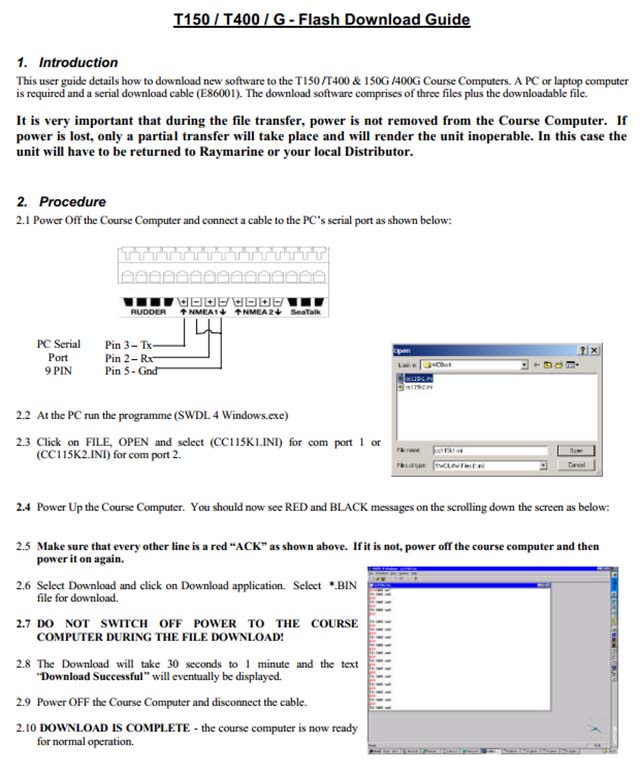
Many thanks DV, actually I don't think to need any further instructions, because a scheme was included in the instruction they sent me (see below).
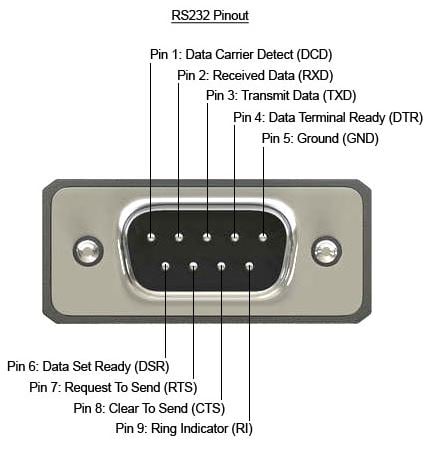
My only small doubt is about whether by pin 3, 2 and 5 of the old 9 pin serial port, Raymarine means the standard pin position - which afaik is as per second pic below. If by chance you are aware of any differences, many thanks in advance for your advise! :encouragement:

2H76BqFM_o.jpg


RS232-9-pin-pinout-explained.jpg
 
I was hoping to resurrect this thread after upgrading successfully the thing, to confirm everybody that it can be done.
But I am facing another first world drama instead… :rolleyes:

As explained above, the software is designed to work through an RS323 serial port, which no modern PC has anymore.
I half remembered that a very old laptop left in my garage at home had such port, but I was wrong - it doesn't.
Alternatively, I've got an USB to RS232 cable/converter, but a few previous experiences with it (with completely different devices) left me with the impression that it isn't always 100% reliable.

So, my concern is that if I connect the PC to the Raymarine box with the USB adapter, I could expect two possible scenarios:
1) the software doesn't "see" the connected hardware as it should - which pretty much means game over, unless I will find an old PC with a serial port.
2) the software sees the Raymarine box, hurrah!
BUT, in this case, do you think it would be safe to launch the upgrade, or am I looking for troubles, in case the adapter packs up during the data transfer?

TIA for any suggestion!
 
P,

I've been using these USB2Serial things for almost a decade now.
They either work with the hardware or not, I may be lucky but 90% of the times they do work.

First thing to do is get the FDwhatever device drivers for the thing and install it.
Make sure the PC (I guess running some ver of windows, 7 would be best for backwards compatibility) sees the thing and device manager is happy that it's working without any yellow signs.
Then connect the thing, if the Raymarine s/w sees the AP, just do it.

good luck!

V.

PS. not paying for another AP controller if it packs up mind! :D
 
Thanks V, interesting feedback.
By chance, are you also using the Prolific dongle with its PL2303 driver?
I'm asking because that's what I've got, and I struggled a bit to install it in my W10 notebook, but eventually I managed to make it work with some tricks.
And believe it or not, also the very old 'SWDL4Windows.exe' Raymarine program seems to run nicely, after a feeble attempt of Defender to block it.
So, theoretically I'm ready to connect the 3 wires to the AP controller and start the process!

Oh, and no worries, I won't ask you a refund if anything goes wrong! :D
Worst case is that I'll have to send the box to Raymarine UK, I suppose...
 
Top