Android Phone to Touch Screen

jandnrowe

Active Member
Joined
15 Nov 2023
Messages
50
Visit site
I've a modest cruiser on the Broads with no Nav gear so I use Nicholsons and my phone with various Apps but because of the small screen it's not ideal. Has anyone here connected their phone to some sort if touch screen just to get a bigger display?
 
Why not just get a cheap larger tablet ? save the phone for Phone use ??

I have a Headwolf 8" tablet from Banggood and it really works well .. its cheap .. its fast ... it has twin 4G sim if needed ... SD card .... WiFi 2.4 / 5.8 and full Android.

By time you fiddle about trying to get Mirror to Touch Screen - its easier and cheaper to go tablet ...
 
I wouldnt expect much from any cheap tablet in direct sunlight, but grand for down below and typical dull days up top.
 
If you go 'High street Brand Name' - then you will pay higher price for brighter screen and often slightly less performance ...

Paul I know highlighted some good tablets before as well ... its worth looking at the online sites .. Amazon - Ali-Express - Banggood ... as they have less well known tablets with far higher specs ... and lower priced.

To get full sunlight readable is going to be a push for any screen ... even most plotters don't do so well ... but a tablet - you can put in a folading case as I have ... 8" may not sound big - but it gives me decent screen image size - I watch F1 on it when not at home ! .. it slides easily into jacket pocket .. and has long battery life ... charges up quick on C cable ..

As to what I have on it ? Navionics Boating App with subscription charts ... for a paltry 45 euros a year .... full updates frequently - often available daily if I tap the update button. Auto routing .. tracking ... send to plotter ... etc etc. I have it on my Phone as well as a back-up.
My Onwa via NMEA to WiFi supplies AIS and other data to the tablet to display on the app ..

I'm a Professional user of charting (ships and all that) .. this Navionics Boating is the only system for Leisure users that I have seen come close to Pro form ... my Professional charting does not load on tablets ...

I have no commercial or other connection to Garmin / Navionics other than a satisfied user.
 
It is difficult to find a good sunlight viewable monitor at a sensible price that can be fitted into a boat.
When we commissioned our P67 17 years ago, I shelled out for a top of the range Raymarine Glass Bridge system.
I like to feed a standard PC into the system in parallel with the Raymarine kit.
Over the years, I have upgraded the PC several times without touching the basic Raymarine G Series kit.
Even switched from Windows to Linux over that time.
Started using MemoryMap software under Windoze and then moved to OpenCPN.
OpenCPN is multi platform - runs on all systems except Apple IOS.
As a backup or just for ad hoc charts, I use OpenCPN on my Android phone and tablet - using the same charts that I use on the boat.
On the boat, the PC's screen is fed to all the Raymarine Glass Bridge monitors, the TVs and a dedicated monitor that I use most of the time.
All driven off the ship's inverter etc.
Using the PC, I've integrated other features into the system - Anchor camera and chain counter etc.
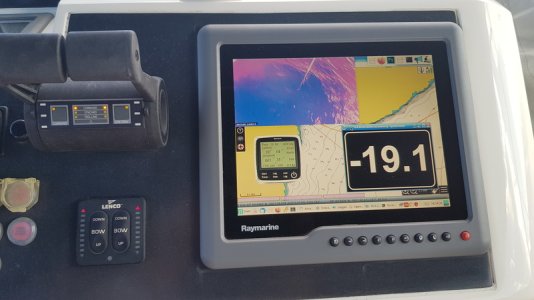
This is a photo of one of the flybridge monitors

20220916_151432.resized.jpg

The anchor camera showing the chain running out
The -19.1 is the amount of chain currently deployed
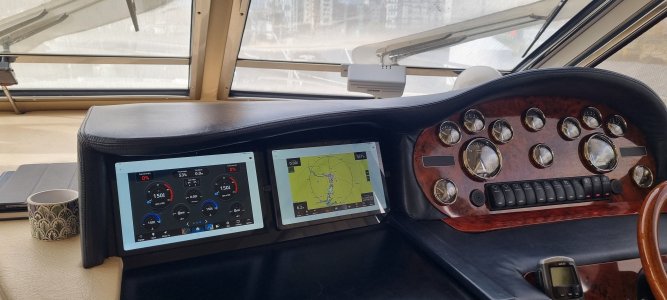
And the other display is an application that I wrote (I called it MikeMarine) which mimics the instruments and runs a verbal logging system.
Some people on here will know about my verbal logging systems!!
All of those are windows sitting on top of an OpenCPN plotter.

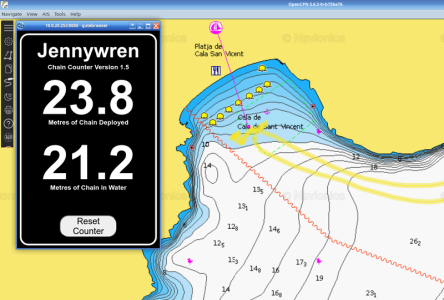
Since that photo, a friend suggested an enhancement to the chain counter software.
So, it now shows the amount of chain actually in the water and the amount of chain deployed.
ChainCounter2.resized.png

Most of the time, I use a standard desktop monitor on the dinette table along with a keyboard and mouse as my main computer.
I could use a laptop but this system integrates nicely with the big TV in the saloon for videos etc.
The problem with the standard desktop monitor is that it gets in the way during meal times.
So yesterday, I ordered a cheap portable monitor to see if that can be used instead.
This is what I ordered:-
https://www.amazon.co.uk/COOLHOOD-Portable-Monitor-Computer-External/dp/B0CZNWP1B8/ref=sr_1_4?crid=3OZ6Y8DN3KRY3&dib=eyJ2IjoiMSJ9.eRwv24-HLk-ENyV5yx36o_rjQt2bLXo5-N4IYW1YkWVyTxaTXwPEUY5zSnfzuRryBkmGhL8dMlhGmNxaVcd7rh0SgZGW8f4Y0NWmVJdyWPArF1rsTcKowGCWkIMNapDWh_dnJm8ulbUNNmFokWJC7MYoDwSFkHXQSz-9TSUgOUdGGRfX6tipXZaCUtUAujIGRqRdg1MkTFhBWqCJEa__AvUMUTtOWIBTRvOEFiaZlps.8aqK6PLWFB_C0RgUfUWvHwJZRoj8_iuVse2ME4Q5xv0&dib_tag=se&keywords=portable+monitor&qid=1733875309&sprefix=portable+monitor,aps,205&sr=8-4&th=1
Its only a cheapie so it will be interesting to see how well it works.
 
Never understood iPad's logic .... WiFi ... or ... GPS .... unless you open wallet wider and pay out hard earned cash !

Even cheapo Androids usually have all ... WiFi - GPS - Sim - SD Card ..
Android tablets don't have the Apple logo and are therefore inferior, even if they have a higher spec.
 
I have a Simrad Go9 on the upper helm on my boat, it came with the boat, it has a neat mirroring feature that allows the screen to be shown on an iPhone, iPad or Android tablet/phone over WiFi or Bluetooth, The WiFi on it is much more flexible than on the Garmin Echomap that I have, the Go9 can log into the router and from that you can directly update, download charts etc. from Simrad, C-Map, without having to do the WiFi IP dance that you have to do with Garmin/Navionics to get updates. However I find the Garmin much easier to use but I have had years more experience with Garmin and how their systems work.

I have my Echomap on the lower helm and though I could use Garmin's Active Captain to show maps etc. on my phone/tablet it does not show the live situation as is on the Echomap screen, where as the Go9 can mirror the screen to the phone/tablet or the phone/tablet can show the chart and allow you to make a route there and it will upload that to the Go9

iPhone/Android tablet user
While I use the features for the Go9, I find the Waterkaarten app on my Android Tablet contains much more info about the region where I am sailing and it is updated regularly sometimes many times a day as the info and situations change on the waterways.
 
It's been Apple's philosophy from the dawn of time to make you believe that cross-platform incompatibility was the same as exclusivity and make you happy to pay through the nose for "features" everyone else got for next to nothing. And once on their treadmill, you could never get off without huge sunk cost.
 
what is the screen brightness on these like for use in sunlight??
Its rated at 360 nits. 200-400 nits is great for indoor use. 500-700 is brighter for outdoors.
My last phone was up to 700 nits and not really viewable in direct sunlight.
Current phone is 2600 nits and is super bright in direct sunlight wearing sunglasses.
Best tablets seem to achieving 1000 nits but your going to be paying a premium for that.
For the power, screen size and image quality a tablet is a bargain , the only negative being display brightness in direct sunlight.
 
Top